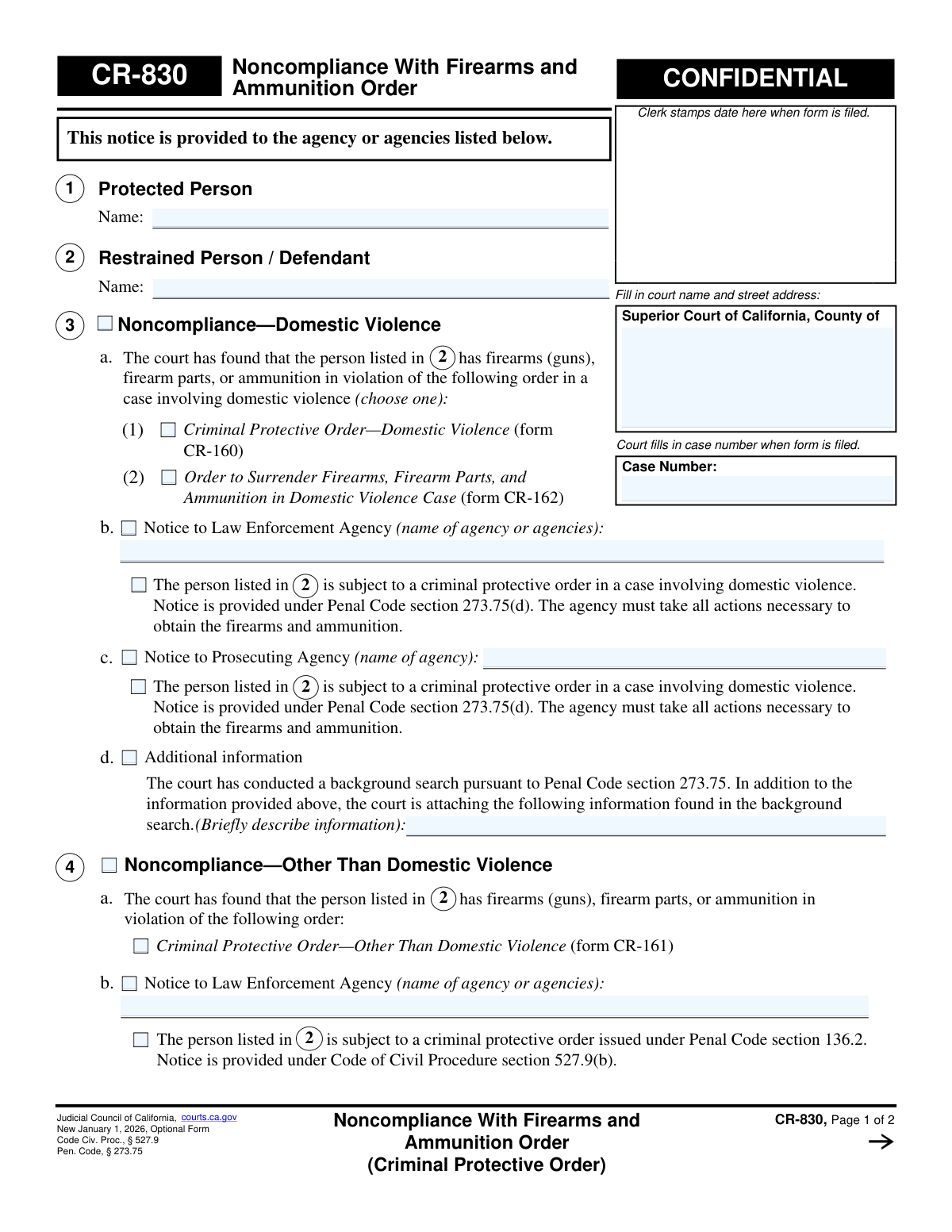
Yes! You can use AI to fill out Form CR-830, Noncompliance With Firearms and Ammunition Order (Criminal Protective Order)

Form CR-830, Noncompliance With Firearms and Ammunition Order, is a confidential document used by the Superior Court of California to formally notify law enforcement and prosecuting agencies that an individual has violated a criminal protective order by failing to surrender their firearms, firearm parts, or ammunition. This notice triggers the agencies to take necessary actions to obtain the prohibited items, ensuring compliance with court orders. Today, this form can be filled out quickly and accurately using AI-powered services like Instafill.ai, which can also convert non-fillable PDF versions into interactive fillable forms.
CR-830 is part of the California court forms category on Instafill.
Our AI automatically handles information lookup, data retrieval, formatting, and form filling.
It takes less than a minute to fill out CR-830 using our AI form filling.
Securely upload your data. Information is encrypted in transit and deleted immediately after the form is filled out.

Form specifications

Form name: Form CR-830, Noncompliance With Firearms and Ammunition Order (Criminal Protective Order)
Number of fields: 47
Number of pages: 1
Language: English
main-image

Instafill Demo: How to fill out PDF forms in seconds with AI

How to Fill Out CR-830 Online for Free in 2026

Are you looking to fill out a CR-830 form online quickly and accurately? Instafill.ai offers the #1 AI-powered PDF filling software of 2026, allowing you to complete your CR-830 form in just 37 seconds or less.
Follow these steps to fill out your CR-830 form online using Instafill.ai:
  1. 1 Navigate to Instafill.ai and upload the CR-830 form or select it from the template library.
  2. 2 Use the AI assistant to input the court name, street address, and case number into the designated fields at the top of the form.
  3. 3 Enter the full names of the protected person and the restrained person/defendant in sections 1 and 2, respectively.
  4. 4 In section 3 or 4, check the appropriate boxes to indicate the type of noncompliance and the specific order violated, and name the law enforcement and prosecuting agencies to be notified.
  5. 5 If the court conducted a background search, describe any additional relevant information in the space provided under section 3d.
  6. 6 After a judicial officer signs and dates the form, complete the Clerk's Certificate section by certifying how and when the notice was sent to the specified agencies.
  7. 7 Review all entered information for accuracy before printing the completed form for official filing and distribution.

Our AI-powered system ensures each field is filled out correctly, reducing errors and saving you time.

Why Choose Instafill.ai for Your Fillable CR-830 Form?

Speed

Complete your CR-830 in as little as 37 seconds.

Up-to-Date

Always use the latest 2026 CR-830 form version.

Cost-effective

No need to hire expensive lawyers.

Accuracy

Our AI performs 10 compliance checks to ensure your form is error-free.

Security

Your personal information is protected with bank-level encryption.

Frequently Asked Questions About Form CR-830

Form CR-830 is a confidential notice used by a California court to inform law enforcement and prosecuting agencies that a person has failed to comply with a court order to surrender their firearms and ammunition as part of a criminal protective order.

This form is completed and signed by a judicial officer (a judge) and then processed and sent by the court clerk. It is an official court document and not a form for the general public, protected persons, or defendants to fill out themselves.

The court issues this form after it has made a finding that the restrained person (defendant) has firearms, firearm parts, or ammunition in violation of a criminal protective order. This form serves as the official notification to enforcement agencies.

This form means the court has recognized the defendant's noncompliance with a firearms order and is officially instructing law enforcement to take action. It is a step taken by the court to enforce the protective order and enhance your safety.

Section 3 is used for cases involving domestic violence, referencing specific domestic violence protective orders (like form CR-160). Section 4 is used for non-domestic violence cases, referencing other types of criminal protective orders (like form CR-161).

Upon receiving this notice, the specified law enforcement and/or prosecuting agencies are required to take all necessary actions to obtain the firearms and ammunition from the non-compliant person.

These are the specific Criminal Protective Order forms that the defendant may have violated. CR-160 is for domestic violence cases, CR-161 is for other criminal cases, and CR-162 is a specific order to surrender firearms in a domestic violence case.

The form requires the names of the protected and restrained persons, the case number, the specific protective order being violated, and the names of the law enforcement and prosecuting agencies to be notified.

The Clerk's Certificate is a section where the court clerk formally certifies that they have sent a true copy of the completed form to the designated agencies. It serves as proof of notification, noting the date and method of delivery.

The 'CONFIDENTIAL' marking indicates that the form's distribution is restricted. It is intended for the court, the notified law enforcement and prosecuting agencies, and is part of the court record, not for general public access.

While this specific form is completed by the court, AI-powered services like Instafill.ai can be extremely helpful for filling out other related legal forms you might need to file. These tools use AI to accurately auto-fill form fields, saving you time and reducing errors.

For many court forms you need to complete yourself, you can use services like Instafill.ai to fill them out online. You simply upload the form, and the platform helps you complete the fields interactively before you print it for submission.

If you have a non-fillable or 'flat' PDF of a form you need to complete, you can use Instafill.ai to make it interactive. The service converts the document into a fillable format, allowing you to easily type your information directly into the fields.

Compliance CR-830
Validation Checks by Instafill.ai

1
Case Number Consistency Across Pages
This check verifies that the 'Case Number' entered on page 1 is identical to the 'Case Number' on page 2. This is critical for ensuring the integrity and proper association of all pages of the legal document. A mismatch could lead to filing errors or confusion about which case the document pertains to.
2
Protected Person Name Required
Validates that the name of the 'Protected Person' in Section 1 is not empty. This information is fundamental to the purpose of the form, as it identifies the individual who is under the protection of the court order. Without this name, the notice is incomplete and cannot be properly acted upon.
3
Restrained Person Name Required
Ensures the name of the 'Restrained Person / Defendant' in Section 2 is provided. This is a mandatory field, as it identifies the individual who is in noncompliance with the firearms order. Failure to provide this name makes the entire notice legally unenforceable and actionless.
4
Mutually Exclusive Noncompliance Sections
This validation confirms that information has been entered in EITHER Section 3 (Domestic Violence) OR Section 4 (Other Than Domestic Violence), but not both. These sections represent different legal grounds and are mutually exclusive. Selecting both would create ambiguity and could invalidate the notice.
5
Domestic Violence Order Type Selection
If Section 3 (Noncompliance—Domestic Violence) is used, this check ensures that exactly one checkbox is selected in item 3a. The user must specify whether the violation pertains to a CR-160 or CR-162 order. This specificity is required for law enforcement to understand the exact nature of the underlying protective order.
6
Agency Name Required for Notice
Verifies that if a notice is indicated for a law enforcement agency (3b or 4b) or a prosecuting agency (3c or 4c), the name of that specific agency is filled in the corresponding text field. An anonymous notice is useless. This information is essential for the clerk to know where to send the official notification.
7
Attached Pages Count Format
This check ensures that the value entered in Section 5 for 'Number of pages attached' is a valid, non-negative integer (e.g., 0, 1, 2). This prevents the entry of text or invalid numbers, ensuring clarity on the completeness of the submitted document package. An invalid entry could cause confusion about whether attachments are missing.
8
Valid Judicial Officer Signature Date
Validates that the date next to the Judicial Officer's signature is a valid, properly formatted date that is not in the future. This date establishes when the order was officially signed by the court. An invalid or future date would call the authenticity and timing of the judicial action into question.
9
Clerk's Certificate Agency Reference Consistency
This check ensures the agency reference selected in the Clerk's Certificate (e.g., 'item 3b' or 'item 4b') logically matches the section that was filled out on page 1. For example, if Section 3 was completed, the clerk must certify notice for an agency in 3b or 3c, not 4b or 4c. This prevents clerical errors in certifying the notice.
10
Clerk's Certificate Delivery Method Required
For each agency being notified in the Clerk's Certificate, this validation ensures that one method of delivery ('by fax, email, or other electronic means' or 'by personal delivery') is selected. This certification is incomplete without specifying how the notice was transmitted. This detail is crucial for creating a legal record of service.
11
Clerk's Certificate Contact Information Presence
If a delivery method is chosen in the Clerk's Certificate for either the law enforcement or prosecuting agency, this check confirms that the corresponding contact information (phone number, email, or address) is not empty. The contact details are necessary to validate where the notice was sent. Without this, the certification of service is unsubstantiated.
12
Clerk's Delivery Date Chronology
This validation ensures the 'Date of transmission or delivery' in the Clerk's Certificate is a valid date that occurs on or after the 'Judge's Signature Date'. The clerk cannot certify delivery of a document before it has been officially signed by the judge. This maintains the logical and legal timeline of events.

Common Mistakes in Completing CR-830

Incorrect or Missing Case Number

A frequent error is transposing digits in the case number or forgetting to enter it on the second page. Since the case number is the primary identifier for the legal action, an incorrect number can lead to the form being filed in the wrong case or rejected entirely. Always double-check the case number against source documents and ensure it is present on all pages; AI-powered tools like Instafill.ai can help by auto-populating recurring information across pages.

Confusing the Protected and Restrained Persons

Users may accidentally enter the restrained person's name in the field for the protected person (Item 1) and vice versa. This critical error reverses the roles of the parties, leading to extreme confusion, incorrect enforcement actions, and potential legal jeopardy. Carefully verify the identity and role of each person from the original protective order before entering their names into the correct fields.

Selecting the Wrong Noncompliance Basis

The form requires a clear distinction between noncompliance related to a "Domestic Violence" case (Item 3) and "Other Than Domestic Violence" (Item 4). Choosing the incorrect category misrepresents the legal grounds for the notice and can invalidate the entire form, as different legal codes apply. It is crucial to review the underlying criminal protective order to confirm the case type before making a selection.

Using Vague or Incomplete Agency Names

When specifying the law enforcement or prosecuting agency (Items 3b, 3c, 4b, 4c), users may write a generic name like "Police Department" instead of the required specific name like "Los Angeles Police Department." This ambiguity can result in the notice never reaching the correct entity, delaying or preventing enforcement. Always use the full, official name of the specific agency responsible for the jurisdiction.

Failing to Specify the Violated Order Form

In Section 3a, the user must specify which order was violated by checking the box for either form CR-160 or CR-162. Forgetting to check a box leaves the basis for the noncompliance finding unclear, which could lead to the notice being questioned or ignored by the receiving agency. To prevent this, always refer to the case file and check the appropriate box to clearly identify the specific court order that has been violated.

Mismatching Attached Pages Information

Users may describe additional information in Item 3d or attach other documents but then fail to state the number of attached pages in Item 5, or state an incorrect number. This discrepancy can lead to receiving agencies being unaware of missing information, compromising the completeness of the notice. Always count all attached pages carefully and enter the correct number in Item 5 to ensure all parts of the submission are accounted for.

Incorrectly Completing the Clerk's Certificate of Service

The Clerk's Certificate is highly detailed and prone to multiple errors, such as checking the wrong item reference (e.g., 3b vs. 4b), selecting the wrong delivery method, or omitting the date of transmission. Any error in this section can invalidate the proof of service, creating legal challenges about whether the agencies were properly notified. The clerk must meticulously review the form, check the correct boxes corresponding to the sections filled out, and accurately record the date and method of delivery for each agency.

Missing Judicial Officer's Signature or Date

A judicial officer must sign and date the form to validate the court's finding of noncompliance. A missing signature or date renders the form an unofficial draft that is legally unenforceable, meaning agencies will not act on it. This oversight can completely halt the enforcement process, requiring the form to be resubmitted to the judge and causing significant delays.

Incomplete Court Identification

Users often enter a partial court name, like "Superior Court," without specifying the county, or they omit the full street address. This ambiguity can cause the document to be misrouted or delayed in filing, as there are many Superior Courts in California. To avoid this, always provide the full official name of the court and its complete street address as found on official court documents.

Illegible Handwriting on Non-Fillable Versions

If the user only has access to a flat, non-fillable PDF, they may resort to handwriting the information, which is often illegible and can lead to data entry errors by court staff. This can cause rejections or critical mistakes in the record. To avoid this, it is best to use the official fillable version or a tool like Instafill.ai, which can convert non-fillable PDFs into interactive, fillable forms to ensure clarity and accuracy.
Saved over 80 hours a year

“I was never sure if my IRS forms like W-9 were filled correctly. Now, I can complete the forms accurately without any external help.”

Kevin Martin Green

Your data stays secure with advanced protection from Instafill and our subprocessors

Robust compliance program

Transparent business model

You’re not the product. You always know where your data is and what it is processed for.

ISO 27001, HIPAA, and GDPR

Our subprocesses adhere to multiple compliance standards, including but not limited to ISO 27001, HIPAA, and GDPR.

Security & privacy by design

We consider security and privacy from the initial design phase of any new service or functionality. It’s not an afterthought, it’s built-in, including support for two-factor authentication (2FA) to further protect your account.

Fill out CR-830 with Instafill.ai

Worried about filling PDFs wrong? Instafill securely fills form-cr-830-noncompliance-with-firearms-and-ammunition-order-criminal-protective-order forms, ensuring each field is accurate.