
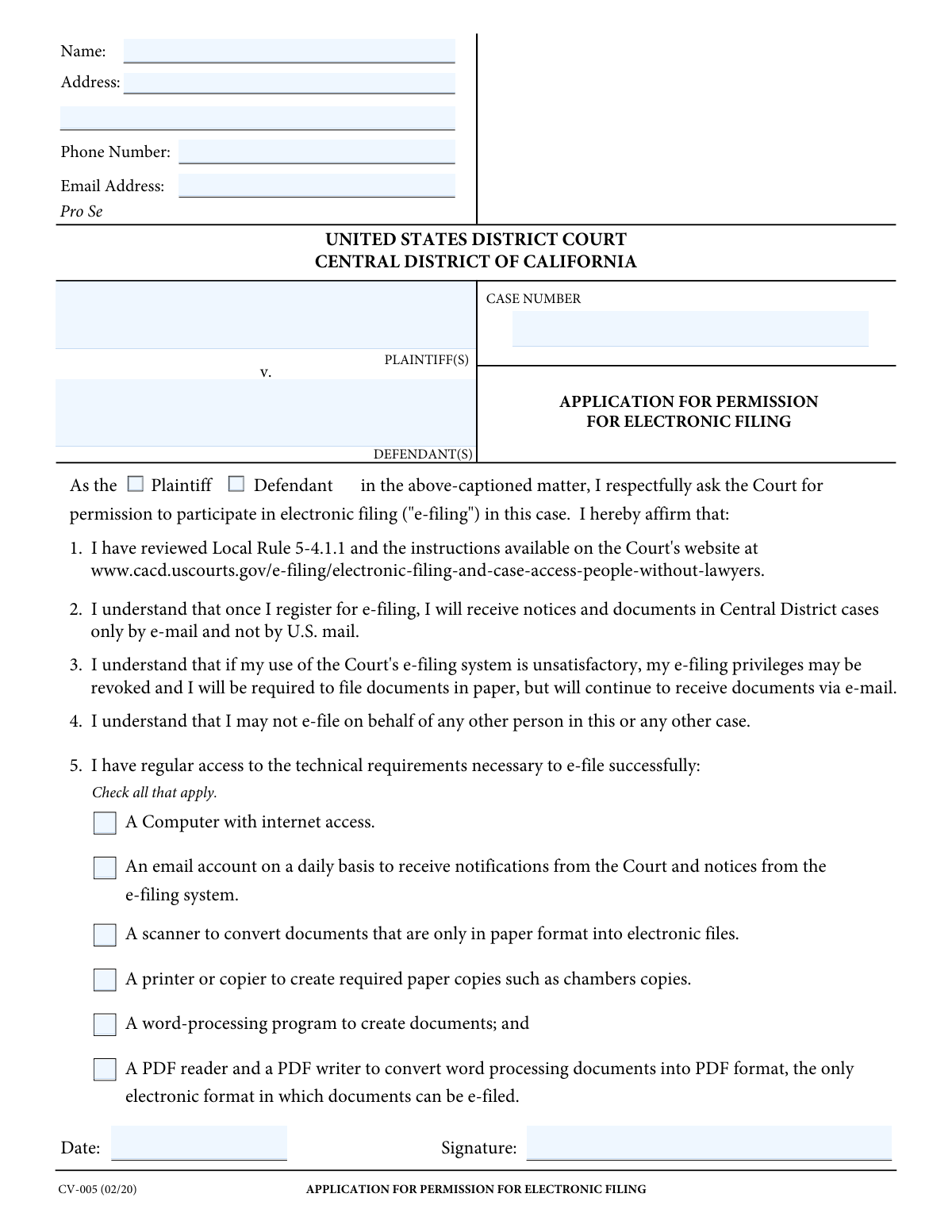
Yes! You can use AI to fill out Form CV-005, Application for Permission for Electronic Filing
Don't type 18 fields by hand. Tell our AI about yourself, or upload a document you already have, and it fills every field in seconds. You check it, then download, print or sign.
The AI does the filling. You just check it.
No typing into boxes, nothing to install.
What this form asks for
The AI fills all of it, from your answers or your documents.
The AI checks your answers before you download
11 checks built for this form, so a wrong date or a missing answer is caught before anyone else sees it.
This check verifies that the 'Email Address' field is not empty and that the provided value conforms to a standard email format (e.g., [email protected]). Since the applicant agrees to receive all official court notices and documents via email, a valid and active email address is the most critical piece of information on this form. If the email is missing or invalid, the application must be rejected as the court would have no way to communicate electronically with the applicant.
This validation ensures the 'Case Number' field is populated and matches the specific format required by the U.S. District Court. The case number is the unique identifier that links this application to the correct legal proceeding. An incorrect or missing case number would result in the application being rejected or misfiled, causing significant delays.
This check ensures that the applicant has selected exactly one role, either 'Plaintiff' or 'Defendant', but not both and not neither. It is essential for the court to know the applicant's standing in the case. An ambiguous selection (choosing both) or no selection makes it impossible to process the application, leading to its rejection.
This validation confirms that all six checkboxes under the 'Technical Access Requirements' section have been checked. By checking these boxes, the applicant affirms they have the necessary equipment and software to participate in e-filing. If any box is left unchecked, it indicates the applicant does not meet the minimum requirements, and the application for e-filing privileges will be denied.
This check cross-references the applicant's 'Full Name' with the names listed in either the 'Plaintiff(s)' or 'Defendant(s)' field, depending on the role selected. This is a logical check to confirm the person applying is actually a party to the case they have cited. A mismatch would suggest the applicant may not have standing to file in this case, which would lead to the application's rejection pending clarification.
This check verifies that both the 'Signature' and 'Date Signed' fields are completed. The typed signature and date serve as a legal affirmation that the applicant has reviewed the rules and understands the responsibilities of e-filing. An application without a signature or date is not legally binding and will be considered incomplete and rejected.
And 5 more checks
- Valid and Current Signature Date
- Complete Pro Se Contact Information
- Valid Phone Number Format
- Plaintiff and Defendant Fields Populated
- Valid State and ZIP Code Format
Let AI fill out your CV-005
No typing. Every field filled in seconds, checked, ready to sign.
How to Fill Out CV-005 Online for Free in 2026
What the AI walks you through.
- Navigate to Instafill.ai and upload or select the CV-005 Application for Permission for Electronic Filing.
- Provide the case information, including the case number and the full names of the plaintiff(s) and defendant(s).
- Enter your personal contact details, such as your full name, address, phone number, and email address.
- Indicate your role in the case by selecting either 'Plaintiff' or 'Defendant'.
- Confirm you have the necessary technical capabilities by checking all applicable boxes regarding computer access, email, scanner, printer, and software.
- Review all the information populated by the AI for accuracy, then provide your electronic signature and the current date.
- Download the completed, signed form, ready for submission to the court.
Common Mistakes in Completing CV-005
The ones the AI is built to catch.
Entering an Incorrect or Incomplete Case Number
Providing a Mistyped or Unreliable Email Address
Mismatching Plaintiff/Defendant Names with the Case Caption
Failing to Indicate Role as Plaintiff or Defendant
Using an Incorrect Electronic Signature Format
Not Checking All Required Technical Capability Boxes
Forgetting to Date the Application
Providing an Incomplete Mailing Address
Using an Informal Name Instead of a Full Legal Name
Filing on Behalf of Another Person
Frequently Asked Questions About CV-005
Is it really free for 7 days?
Can I fill other forms too?
How do I cancel?
How does the AI fill out CV-005?
What happens to my information?
How complex is CV-005 to fill out?
What is the purpose of Form CV-005?
Who needs to fill out this form?
What happens after I get permission to e-file?
What information do I need to provide on this application?
What are the technical requirements I must have to e-file?
Where do I find the Case Number for my case?
Can my permission to e-file be taken away?
Can I e-file documents for someone else if I get permission?
What do I do after filling out the form?
Can AI tools help me fill out Form CV-005?
How can I use Instafill.ai to fill this form online?
The PDF of this form I downloaded isn't fillable. What can I do?
Do I check the 'Plaintiff' or 'Defendant' box?
Get your CV-005 filled out by AI
$0 today. Cancel before Nov 1 and you pay nothing.
Other forms like this one
ERM forms: REQUEST FOR OWNERSHIP INFORMATION—ERM-14 FORM, Form I-90, Application to Replace Permanent Resident Card, Form I-485, Application to Register Permanent Residence, Form SS-8, Determination of Worker Status, Form CMS-1763, Request for Termination of Medicare Coverage, Form I-212, Application for Permission to Reapply, Form I-192, Application for Advance Permission to Enter as a Nonimmigrant, Form W-8IMY (Rev. October 2021), Certificate of Foreign Intermediary, Foreign Flow-Through Entity, or Certain U.S. Branches for United States Tax Withholding and Reporting, County of Louisa Department of Community Development – New Non-Residential Building Permit Package, Application Schedule 1: Designer Information (City of Toronto Building Permit Application), HR-Pol-Rec&Res-04 Employment Application Form (Recruitment of Permanent Employees), Fauquier County Department of Community Development – Building Trades Permit or Amendment to Existing Permit Application (Residential or Commercial), Belastingdienst VPB 075 – Verzoek fiscale eenheid Vennootschapsbelasting (Deel A – Gegevens moedermaatschappij), ROTC Cadet Academic Plan / Degree and Credit Hour Worksheet (Student Identification, Term-by-Term Courses, GPA Summary, and Completion Certification), Health Assessment – Ontario Health atHome (Fixing Long-Term Care Act, 2021) (Form 4768-69E), Health Assessment - Ontario Health atHome (Fixing Long-Term Care Act, 2021) — Form 4768-69E, Washington Single-Family Property Term Lease & Security Deposit Receipt (WA Single-Family Lease) | Revised 10/08/2025, Application for Mechanical Permit, Pennsylvania Department of State — Certificate of Termination (Domestic Limited Liability Company) (15 Pa.C.S. § 8872(f)) (DSCB:15-8872(f)), Document Checklist for a Study Permit (IMM 5483)
Let AI fill out your CV-005
Your trial starts once a card is added. You pay nothing before Nov 1.
Our AI already knows this form, all 18 fields of it. Skip the typing: tell it about yourself, or upload what you have, and it fills the whole form in seconds.
- AI fills every field on the form, checkboxes included
- No typing into boxes: answer a few questions, or upload a document you already have, an old copy of this form, a photo of a document
- The AI checks the answers; you review and change anything before you download
- Download the finished PDF, print it, or sign it online
- Encrypted, and never used to train AI
Cancel before Nov 1 and you pay nothing.
A card is needed to start the trial. Cancel in two clicks from your account.
Terms · Privacy