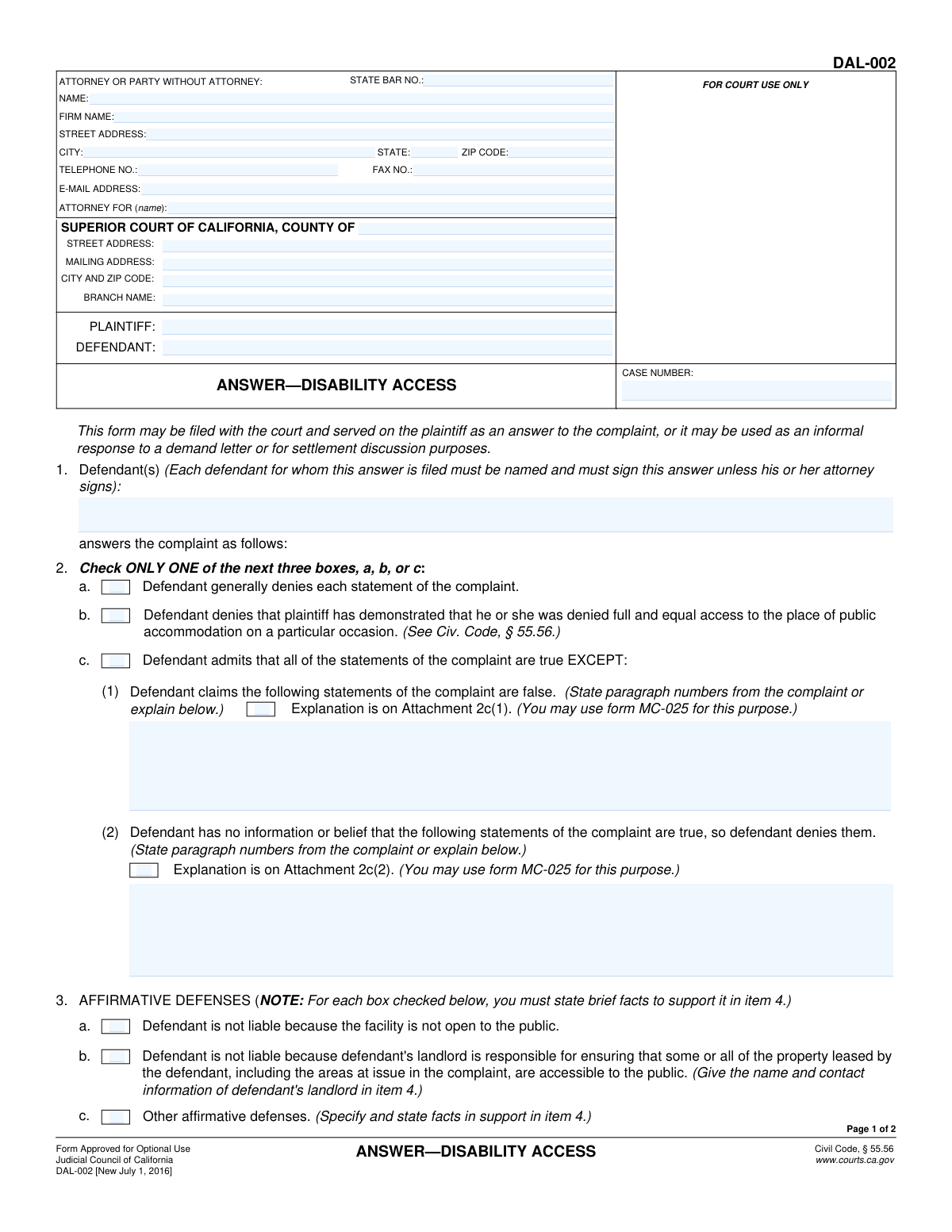
Yes! You can use AI to fill out Form DAL-002, Answer—Disability Access

Form DAL-002, Answer—Disability Access, is a legal document provided by the Judicial Council of California for a defendant to formally respond to a civil complaint concerning disability access violations. It allows the defendant to admit or deny the allegations in the complaint and to assert affirmative defenses. This form is crucial for initiating the legal defense process in such cases. Today, this form can be filled out quickly and accurately using AI-powered services like Instafill.ai, which can also convert non-fillable PDF versions into interactive fillable forms.
DAL-002 is part of the California court forms category on Instafill.
Our AI automatically handles information lookup, data retrieval, formatting, and form filling.
It takes less than a minute to fill out DAL-002 using our AI form filling.
Securely upload your data. Information is encrypted in transit and deleted immediately after the form is filled out.

Form specifications

Form name: Form DAL-002, Answer—Disability Access
Number of fields: 45
Number of pages: 1
Language: English
main-image

Instafill Demo: How to fill out PDF forms in seconds with AI

How to Fill Out DAL-002 Online for Free in 2026

Are you looking to fill out a DAL-002 form online quickly and accurately? Instafill.ai offers the #1 AI-powered PDF filling software of 2026, allowing you to complete your DAL-002 form in just 37 seconds or less.
Follow these steps to fill out your DAL-002 form online using Instafill.ai:
  1. 1 Navigate to Instafill.ai and upload or select Form DAL-002, Answer—Disability Access.
  2. 2 Use the AI assistant to automatically fill in case information such as court details, case number, and plaintiff/defendant names from the complaint.
  3. 3 Provide your personal or your attorney's contact information in the header section.
  4. 4 In Section 2, select your response to the complaint: a general denial, a specific denial regarding access, or an admission with exceptions.
  5. 5 In Section 3, check any applicable affirmative defenses, and provide brief supporting facts for each in Section 4.
  6. 6 Complete the remaining sections regarding early evaluation conferences or reduced damages if applicable, then review the entire form for accuracy.
  7. 7 Sign and date the verification section, then download the completed form to file with the court and serve on the plaintiff.

Our AI-powered system ensures each field is filled out correctly, reducing errors and saving you time.

Why Choose Instafill.ai for Your Fillable DAL-002 Form?

Speed

Complete your DAL-002 in as little as 37 seconds.

Up-to-Date

Always use the latest 2026 DAL-002 form version.

Cost-effective

No need to hire expensive lawyers.

Accuracy

Our AI performs 10 compliance checks to ensure your form is error-free.

Security

Your personal information is protected with bank-level encryption.

Frequently Asked Questions About Form DAL-002

This form is used by a defendant to respond to a disability access complaint filed in a California court. It can also be used as an informal response to a demand letter or for settlement discussions before a lawsuit is filed.

Any person or business named as a defendant in a disability access lawsuit or who has received a demand letter regarding disability access issues should fill out this form to provide their official response.

Section 2 determines your core response: 2a is a general denial of all claims, 2b specifically denies that the plaintiff was denied access, and 2c allows you to admit some claims while denying others.

An affirmative defense is a legal reason why you should not be held liable, even if the plaintiff's allegations are true. You must provide factual support for any affirmative defense you claim in Section 4.

Check box 3b for the affirmative defense regarding landlord responsibility. You must then provide the landlord's name and contact information in Section 4 as part of your supporting facts.

For each affirmative defense you check in Section 3, you must state the specific facts that support that defense in Section 4. Be brief but clear in your explanation.

This is a meeting to try and resolve the case early on. To request one, you must check box 5 and file a separate form, DAL-005 (Application for Stay of Proceedings and Early Evaluation Conference).

Eligibility for reduced damages is determined by specific criteria outlined in California Civil Code § 55.56(f). You should review this code section or consult with an attorney to see if your situation qualifies.

Each defendant named in item 1, or their attorney, must sign the main part of the form. Additionally, the defendant must personally sign the 'Verification' section, declaring the information is true under penalty of perjury.

The Verification is your sworn statement that you have read the answer and that its contents are true and correct to the best of your knowledge. Signing this section makes your statements legally binding.

The form indicates that you can use form MC-025 as an attachment if you need more space for explanations in sections 2c or 4. Be sure to note the number of pages attached in Section 7.

Yes, services like Instafill.ai use AI to auto-fill form fields accurately with your personal and case information, which can save time and help prevent errors.

You can use a service like Instafill.ai to fill out this form online. Simply upload the PDF to their platform, and you can type directly into the fields, save your progress, and download the completed document.

If you have a non-fillable or 'flat' PDF, you can use a tool like Instafill.ai to convert it into an interactive, fillable form. This allows you to easily type your information instead of printing and writing by hand.

Compliance DAL-002
Validation Checks by Instafill.ai

1
Exclusive Answer Selection in Item 2
This validation ensures that the user selects only one option among items 2a, 2b, and 2c. The form instructions explicitly state 'Check ONLY ONE of the next three boxes'. This prevents contradictory answers, ensuring the response is legally clear and unambiguous. If more than one box is checked, the form submission should be blocked with an error message prompting the user to select a single response.
2
Conditional Requirement for Item 2c Explanation
This check verifies that if option 2c ('Defendant admits that all of the statements of the complaint are true EXCEPT:') is selected, then at least one of the sub-options (2c(1) or 2c(2)) is completed. The user must either provide paragraph numbers/explanations in the text fields or check the corresponding 'Attachment' box. This is crucial because selecting 2c without specifying the exceptions makes the answer incomplete and legally insufficient.
3
Affirmative Defense Justification
This validation creates a logical link between Item 3 (Affirmative Defenses) and Item 4 (Facts Supporting Affirmative Defenses). If any checkbox in Item 3 is checked, this rule ensures that Item 4 contains corresponding explanatory text or that the 'Attachment 4' checkbox is marked. This is required by the form's instructions and is essential for the affirmative defenses to be legally valid, as they must be supported by factual claims.
4
Case Number Consistency Across Pages
This check ensures that the 'CASE NUMBER' field is identical on both page 1 and page 2. The case number is the primary identifier for a legal case within the court system. Any discrepancy could lead to the document being misfiled or rejected, causing significant delays and potential legal jeopardy for the defendant.
5
Defendant Identification in Item 1
This validation confirms that the text field in Item 1, which identifies the defendant(s), is not empty. This field is fundamental as it names the party or parties filing the answer. An answer filed without identifying the defendant is invalid and has no legal effect, so this field must be considered mandatory.
6
Signature and Representation Validation
This rule verifies that the form is properly signed. It checks that either an attorney has signed (and provided their name) or that each defendant named in Item 1 has provided a corresponding signature. An unsigned legal document is invalid. This check ensures the answer is properly executed and binding on the party it represents.
7
Verification Section Completion
This check ensures the 'VERIFICATION' section is fully completed by an individual defendant, including a date, printed name, and signature. The verification is a declaration under penalty of perjury that the contents of the answer are true. An incomplete or missing verification can weaken or invalidate the legal standing of the answer.
8
State Bar Number Format
This validation checks that the 'STATE BAR NO.' field, if filled, contains only numbers. This is required when an attorney is representing the party. A valid State Bar number is necessary for the court to identify and verify the attorney's credentials. An invalid format could lead to rejection of the filing or questions about the legitimacy of the representation.
9
Email Address Format Validation
This rule ensures that any entry in the 'E-MAIL ADDRESS' field conforms to a standard email format (e.g., '[email protected]'). While not always mandatory, providing a valid email is crucial for modern legal communication and service of documents. An invalid format would prevent the party or their attorney from receiving important electronic notifications from the court or opposing counsel.
10
Attachment Count Logic
This validation checks that if any 'Attachment' checkbox is selected (in items 2c(1), 2c(2), or 4), the 'Number of pages attached' field in Item 7 contains a number greater than zero. This ensures consistency and alerts court clerks that additional pages are part of the submission. Failure to correctly state the number of attachments could result in an incomplete filing if the attached pages are overlooked.
11
Party Name Consistency Across Pages
This check verifies that the 'PLAINTIFF' and 'DEFENDANT' names in the case caption are identical on page 1 and page 2. Consistent party names are essential for correct document indexing and case management. Inconsistencies can create confusion and potential administrative errors in the court record.
12
Verification Date Validity
This validation ensures the 'Date' in the Verification section is a valid, properly formatted date and is not set in the future. The date of verification is legally significant as it marks when the defendant swore to the truthfulness of the answer. An invalid or future date would call the validity of the declaration into question and could be grounds for the document to be rejected.
13
Landlord Information for Affirmative Defense 3b
This is a specific conditional check. If checkbox 3b ('defendant's landlord is responsible') is checked, this validation ensures that the text provided in Item 4 includes the landlord's name and contact information as explicitly required by the form. Without this specific information, the affirmative defense is unsupported and likely to be dismissed by the court.
14
Attorney for Defendant Link
This validation checks that the name provided in the 'ATTORNEY FOR (name):' field matches the defendant's name listed in the 'DEFENDANT:' caption field and/or in Item 1. This confirms exactly which party the attorney is representing. Mismatched information can create ambiguity regarding legal representation, potentially leading to procedural challenges.

Common Mistakes in Completing DAL-002

Selecting Multiple or Incorrect Answer Options in Item 2

The form explicitly instructs the user to 'Check ONLY ONE' of the boxes in item 2 (a, b, or c). Filers often mistakenly check multiple boxes or fail to check any, creating an ambiguous or invalid legal response. This can lead to the court disregarding the answer or requiring an amended filing, causing delays and potentially negative legal consequences. To avoid this, carefully read the instructions and select the single option that best represents your response to the complaint.

Using the Incorrect Verification Form

A critical error is using the standard verification when filing on behalf of a corporation, LLC, or partnership. The form clearly states, 'Use a different verification form if the verification is by an attorney or for a corporation or partnership.' An improper verification can render the entire answer defective and subject to a motion to strike by the plaintiff. To prevent this, business owners or representatives must obtain and use the correct Judicial Council form for corporate or entity verification.

Unsubstantiated Affirmative Defenses

Filers frequently check boxes for affirmative defenses in item 3 without providing the required factual support in item 4. The form requires that for each defense checked, a brief statement of supporting facts must be written in item 4, clearly labeled with the corresponding letter (e.g., 'a.', 'b.'). Failing to provide this factual basis makes the defense legally insufficient and likely to be dismissed by the court. Always ensure every checked defense in item 3 has a corresponding, labeled factual explanation in item 4.

Inaccurate or Inconsistent Case Information

The Case Number, Plaintiff name, and Defendant name must be transcribed perfectly from the complaint onto the top of both pages. Any typo, abbreviation, or inconsistency can lead to the court clerk rejecting the filing or docketing it incorrectly, causing significant delays. To avoid this, meticulously copy the information. AI-powered form filling tools like Instafill.ai can prevent this by auto-populating case information consistently across all required fields and pages.

Improperly Citing Complaint Paragraphs

When selecting option 2c, the filer must list the specific paragraph numbers from the complaint that they are denying. People often write a general statement instead of listing the exact numbers, or they cite the wrong paragraphs. This makes the denial legally ineffective, as it doesn't properly inform the court and plaintiff which specific allegations are being contested. To avoid this, have the complaint in front of you and carefully list each paragraph number you intend to deny.

Incomplete or Missing Signatures

The form requires a signature and a typed/printed name for each defendant (or their attorney) in the main signature block and the verification section. It is common for one of the required signatures to be missed, especially when multiple defendants are filing together. An unsigned answer is invalid for the non-signing party. Always double-check that every defendant listed in item 1 has signed in all required locations.

Omitting Landlord Details for Defense 3b

When asserting that the landlord is responsible for accessibility (defense 3b), the form requires the filer to provide the landlord's name and contact information in item 4. Filers often check the box for this defense but forget to include the landlord's details in the supporting facts section. This omission makes the defense incomplete and easily challenged. Before filing, ensure you have the landlord's information ready and have included it in item 4 if you are checking box 3b.

Forgetting to Include Necessary Attachments

The form allows for attachments (like form MC-025) if more space is needed for explanations in items 2c or 4. A common mistake is to write 'see attachment' in the form but then fail to physically include the attachment with the filing. Another error is attaching pages but forgetting to update the 'Number of pages attached' field in item 7. This can result in the court not considering the additional information, weakening your legal arguments.

Incorrectly Filling the 'Attorney or Party Without Attorney' Section

Individuals representing themselves ('pro per') are often confused by the top-left box. They may leave it blank or, worse, fill in the plaintiff's attorney's information. This creates confusion for the court clerk and opposing counsel about who filed the document and where to send future correspondence. If you are representing yourself, you must fill this section out with your own name, address, and contact information, and write your name or 'Defendant' on the 'ATTORNEY FOR (name):' line.

Handling a Non-Fillable PDF

Often, court forms are provided as flat, non-fillable PDFs, forcing users to print them and fill them out by hand. This leads to illegible handwriting, mistakes, and an unprofessional appearance that can prejudice the reader. Manually filling it out also increases the likelihood of all the other data entry errors. To avoid this, you can use a tool like Instafill.ai, which can convert any non-fillable PDF into an interactive, fillable form, ensuring a clean, professional, and accurate submission.
Saved over 80 hours a year

“I was never sure if my IRS forms like W-9 were filled correctly. Now, I can complete the forms accurately without any external help.”

Kevin Martin Green

Your data stays secure with advanced protection from Instafill and our subprocessors

Robust compliance program

Transparent business model

You’re not the product. You always know where your data is and what it is processed for.

ISO 27001, HIPAA, and GDPR

Our subprocesses adhere to multiple compliance standards, including but not limited to ISO 27001, HIPAA, and GDPR.

Security & privacy by design

We consider security and privacy from the initial design phase of any new service or functionality. It’s not an afterthought, it’s built-in, including support for two-factor authentication (2FA) to further protect your account.

Fill out DAL-002 with Instafill.ai

Worried about filling PDFs wrong? Instafill securely fills form-dal-002-answerdisability-access forms, ensuring each field is accurate.