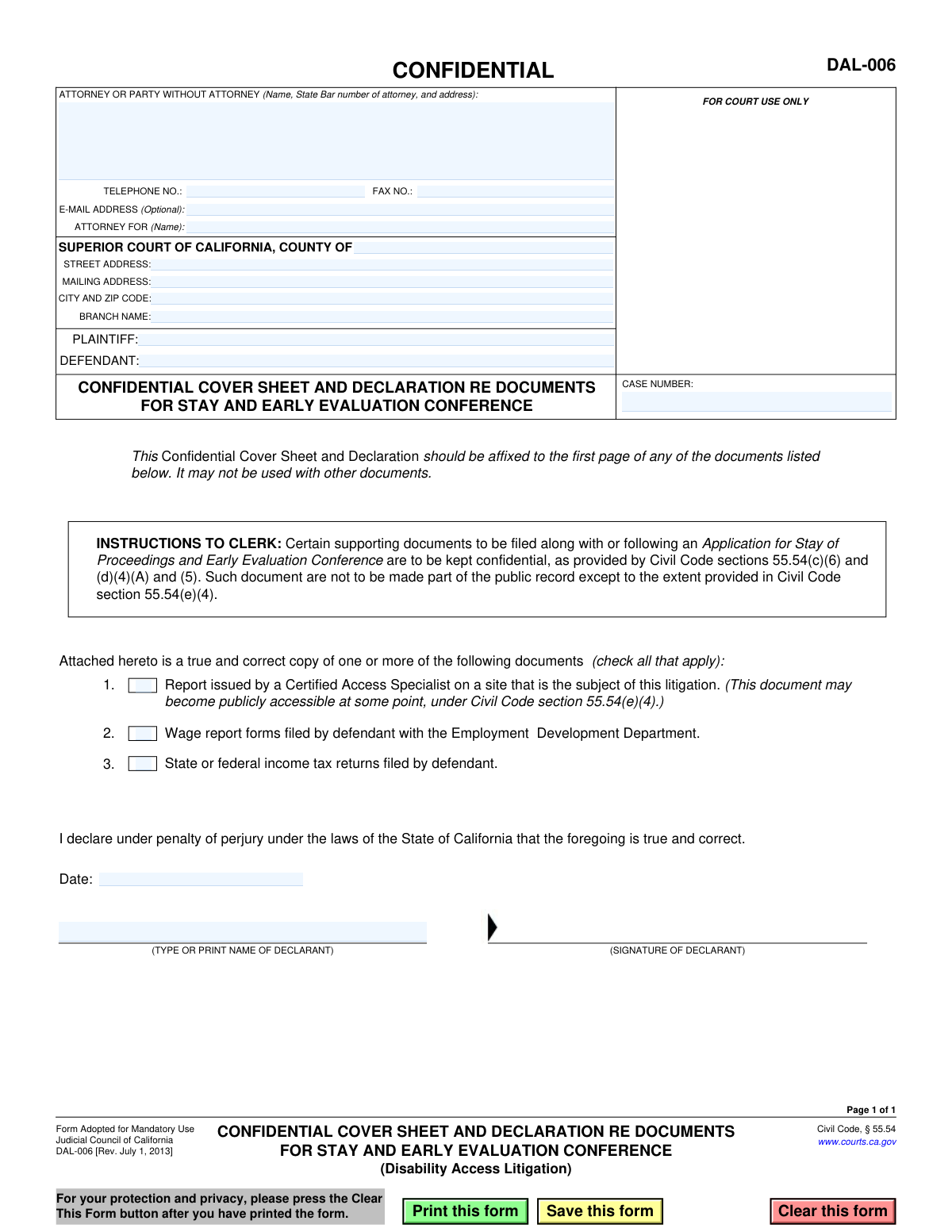
Yes! You can use AI to fill out Form DAL-006, Confidential Cover Sheet and Declaration re Documents for Stay and Early Evaluation Conference

This form, officially titled 'Confidential Cover Sheet and Declaration re Documents for Stay and Early Evaluation Conference,' is used in California Superior Courts for disability access litigation cases. Its purpose is to maintain the confidentiality of specific documents, such as Certified Access Specialist (CASp) reports or financial records, when they are filed with an Application for Stay of Proceedings and Early Evaluation Conference. Today, this form can be filled out quickly and accurately using AI-powered services like Instafill.ai, which can also convert non-fillable PDF versions into interactive fillable forms.
DAL-006 is part of the California court forms category on Instafill.
Our AI automatically handles information lookup, data retrieval, formatting, and form filling.
It takes less than a minute to fill out DAL-006 using our AI form filling.
Securely upload your data. Information is encrypted in transit and deleted immediately after the form is filled out.

Form specifications

Form name: Form DAL-006, Confidential Cover Sheet and Declaration re Documents for Stay and Early Evaluation Conference
Number of fields: 22
Number of pages: 1
Language: English
main-image

Instafill Demo: How to fill out PDF forms in seconds with AI

How to Fill Out DAL-006 Online for Free in 2026

Are you looking to fill out a DAL-006 form online quickly and accurately? Instafill.ai offers the #1 AI-powered PDF filling software of 2026, allowing you to complete your DAL-006 form in just 37 seconds or less.
Follow these steps to fill out your DAL-006 form online using Instafill.ai:
  1. 1 Navigate to Instafill.ai and upload or select the DAL-006 form.
  2. 2 Use the AI assistant to automatically populate court and case information, including the county, case number, and plaintiff/defendant names.
  3. 3 Enter the personal details of the attorney or party filing the form, such as name, address, and contact information.
  4. 4 Check the appropriate boxes to indicate which confidential documents are being attached (e.g., CASp report, wage reports, tax returns).
  5. 5 Electronically sign and date the declaration section, affirming that the attached documents are true and correct copies.
  6. 6 Review the entire form for accuracy, then download the completed DAL-006 to affix to your confidential documents before filing with the court.

Our AI-powered system ensures each field is filled out correctly, reducing errors and saving you time.

Why Choose Instafill.ai for Your Fillable DAL-006 Form?

Speed

Complete your DAL-006 in as little as 37 seconds.

Up-to-Date

Always use the latest 2026 DAL-006 form version.

Cost-effective

No need to hire expensive lawyers.

Accuracy

Our AI performs 10 compliance checks to ensure your form is error-free.

Security

Your personal information is protected with bank-level encryption.

Frequently Asked Questions About Form DAL-006

This form is a mandatory cover sheet used in California Disability Access Litigation to keep specific documents confidential when filed with the court. It instructs the court clerk not to make the attached documents part of the public record.

Any party or their attorney in a disability access lawsuit who is submitting a Certified Access Specialist (CASp) report, wage reports, or tax returns to the court needs to use this form. It is typically filed by the defendant when requesting a stay and early evaluation conference.

You can only attach the three types of documents listed on the form: a report from a Certified Access Specialist, wage reports filed with the Employment Development Department (EDD), or state/federal income tax returns.

No, this cover sheet is exclusively for the specific documents listed. Using it for other types of documents is not permitted and may not provide the intended confidentiality.

No, this form must be attached as the first page of the confidential documents you are submitting. It functions as a cover sheet and is not filed as a standalone document.

Tax returns and wage reports are kept confidential. However, the form notes that a Certified Access Specialist (CASp) report may become publicly accessible at a later stage in the litigation, as provided by law.

You need to provide the full case information, including the court name and address, case number, and plaintiff/defendant names. You must also include the contact information for the attorney or party filing the document.

By signing the declaration, you are stating under penalty of perjury that the attached documents are true and correct copies. This is a formal legal confirmation of the authenticity of your submissions.

You must file the cover sheet and the attached confidential documents with the court clerk. This is typically done at the same time as, or following, the filing of an Application for Stay of Proceedings and Early Evaluation Conference.

Yes, services like Instafill.ai use AI to accurately auto-fill form fields with your case and personal information. This can help you complete the form faster and with fewer errors.

You can use a service like Instafill.ai to complete this form online. Simply upload the PDF, and the platform's AI will identify the fields, allowing you to type your information directly and save the completed document.

If you have a non-fillable or 'flat' PDF, you can use a tool like Instafill.ai. It can convert the static document into an interactive, fillable form that you can easily complete on your computer.

Compliance DAL-006
Validation Checks by Instafill.ai

1
Ensures Case Number is Provided
This check verifies that the 'CASE NUMBER' field is not empty. The case number is a unique identifier for the litigation in the court system, and its absence would make it impossible to associate this document with the correct legal proceeding. A failure would result in the form being rejected by the court clerk as it cannot be filed.
2
Validates Filer's Name and Address are Complete
This validation ensures that the 'ATTORNEY OR PARTY WITHOUT ATTORNEY' field contains both a name and a full address. This information is legally required to identify the filing party and establish an official address for service and communication from the court and other parties. Incomplete information can lead to filing rejection or missed legal notices.
3
Verifies Attorney's State Bar Number is Included
This check confirms that if an attorney is the filer, their California State Bar number is included in the 'ATTORNEY OR PARTY WITHOUT ATTORNEY' field. The State Bar number is required to verify the attorney's credentials and authority to practice law and represent the client. A missing number would render the filing invalid on behalf of the client and would be rejected.
4
Validates Telephone Number Format
This check ensures that the value entered in the 'TELEPHONE NO.' field follows a standard US phone number format (e.g., XXX-XXX-XXXX or (XXX) XXX-XXXX). A valid phone number is crucial for the court or opposing counsel to make timely contact with the filer. An invalid format could prevent communication and cause delays in the case.
5
Validates E-Mail Address Format
This validation checks that if an email address is provided in the 'E-MAIL ADDRESS (Optional)' field, it conforms to the standard '[email protected]' format. Although optional, providing an invalid email address can lead to failed electronic communications and missed notifications. This check prevents data entry errors for this important contact method.
6
Ensures Plaintiff and Defendant Names are Present
This check verifies that both the 'PLAINTIFF' and 'DEFENDANT' fields are filled out. These fields identify the primary parties to the lawsuit, which is fundamental information for any court document. A form missing either party's name is incomplete and cannot be correctly associated with the case.
7
Confirms at Least One Document Type is Checked
This validation ensures that at least one checkbox is selected from the list of confidential documents being attached. The sole purpose of this form is to act as a cover sheet for these specific documents. If no document type is checked, the form has no purpose and its submission is a logical error, likely leading to rejection.
8
Verifies Court County is Specified
This check ensures the 'COUNTY OF' field is completed to identify the specific Superior Court jurisdiction. California has a Superior Court in each of its 58 counties, and specifying the correct one is essential for proper filing and routing of the document. Failure to specify the county will result in the document being rejected.
9
Ensures Declaration Date is Present
This validation confirms that the 'Date' field in the declaration section is not empty. A declaration made under penalty of perjury is legally invalid without a date. The date establishes when the declaration was made, which can be critical for legal purposes.
10
Validates Declaration Date is Not in the Future
This check verifies that the 'Date' provided in the declaration is not a future date. A legal declaration attests to facts as of the moment of signing, so it cannot be dated for a time that has not yet occurred. A future date would invalidate the declaration and cause the filing to be rejected.
11
Ensures Declarant's Name is Provided
This validation ensures that the 'TYPE OR PRINT NAME OF DECLARANT' field is filled out. This printed name clearly identifies the individual who is signing the document and making the declaration under penalty of perjury. An missing name makes the signature unidentifiable and the declaration legally insufficient.
12
Verifies Attorney Representation Consistency
This check confirms that the name listed in the 'ATTORNEY FOR (Name)' field matches either the Plaintiff or Defendant name entered on the form. This ensures there is no ambiguity about which party the filing attorney represents. A mismatch could indicate a significant error and lead to confusion or rejection of the document.

Common Mistakes in Completing DAL-006

Entering Personal Address in Court Information Fields

Users often mistakenly enter their own personal or office address in the fields designated for the court's location. These fields, including 'STREET ADDRESS', 'MAILING ADDRESS', and 'BRANCH NAME', are intended for the specific courthouse where the case is being heard. This error can cause the document to be misrouted or rejected, leading to significant delays. Always verify and enter the exact address and branch name of the correct Superior Court.

Entering an Inaccurate Case Number

The case number is the single most important identifier for a court filing. A common mistake is transcribing this number incorrectly, omitting prefixes or suffixes, or having a single digit wrong. An incorrect case number will cause the clerk to reject the filing or, worse, file the confidential documents in the wrong case. To avoid this, meticulously copy the case number from official court correspondence.

Misidentifying the Party in the 'ATTORNEY FOR' Field

Filers, particularly attorneys, sometimes mistakenly write their own name in the 'ATTORNEY FOR (Name):' field. This field is meant to identify the party they are representing (i.e., the Plaintiff or Defendant's name). This ambiguity can cause confusion for the court clerk and may require clarification. Ensure this field contains the name of the client, not the attorney.

Omitting the Signature or Date on the Declaration

The declaration at the bottom of the form is made under penalty of perjury and is legally invalid without a signature and date. Forgetting to sign or date the form is a frequent oversight that leads to automatic rejection by the court. This requires refiling, which can jeopardize deadlines. Always perform a final check to ensure the declarant has signed and dated the form.

Mismatching Checkboxes and Attached Documents

This form requires the filer to check a box for each type of confidential document being attached. A common error is checking a box for a document that isn't actually included, or attaching a document without checking the corresponding box. This discrepancy can lead the court to disregard an attachment or question the filing's completeness. Before filing, carefully compare the physical or digital attachments against the checked boxes to ensure they match perfectly.

Filing the Cover Sheet Without Any Attachments

This document's sole purpose is to serve as a confidential cover sheet for other documents. A surprising mistake is filing the DAL-006 form by itself, without any of the reports or returns it is meant to protect. This is a null filing that serves no purpose and wastes the court's time. Always ensure that the confidential documents are securely bundled with this cover sheet before submission.

Failing to Use the Mandatory Cover Sheet

The most critical error is filing sensitive documents like tax returns or wage reports directly with the court without this mandatory confidential cover sheet. Doing so places private financial information into the public record, permanently and irrevocably. This form is legally required to protect the confidentiality of the specified documents. Always affix this cover sheet to the front of any document listed on the form to prevent unintended public disclosure.

Using the Cover Sheet for Unauthorized Documents

The form explicitly states it is for only three types of documents (CASp report, EDD wage forms, and tax returns). Filers sometimes try to use it to make other documents confidential, such as correspondence or different financial statements. This is improper procedure and will be rejected, leaving the unauthorized documents unprotected. Only use this cover sheet for the specific documents listed.

Submitting Illegible Handwritten Information

When forms are printed and filled out by hand, illegible handwriting can make it impossible for court clerks to process the document. Unclear names, addresses, or case numbers can lead to rejection or data entry errors by court staff. To prevent this, use the form's fillable fields to type information before printing. If you only have a non-fillable version, AI tools like Instafill.ai can convert it into a fillable PDF to ensure all entries are clear and legible.

Using an Obsolete Version of the Form

Courts frequently update their forms, and using an outdated version is a common reason for rejection. This form is marked '[Rev. July 1, 2013],' and using a version prior to this or any subsequent revision could be problematic. This forces the filer to start over, wasting time and potentially missing deadlines. Always download the most current version of any form directly from the official court website before you begin filling it out.
Saved over 80 hours a year

“I was never sure if my IRS forms like W-9 were filled correctly. Now, I can complete the forms accurately without any external help.”

Kevin Martin Green

Your data stays secure with advanced protection from Instafill and our subprocessors

Robust compliance program

Transparent business model

You’re not the product. You always know where your data is and what it is processed for.

ISO 27001, HIPAA, and GDPR

Our subprocesses adhere to multiple compliance standards, including but not limited to ISO 27001, HIPAA, and GDPR.

Security & privacy by design

We consider security and privacy from the initial design phase of any new service or functionality. It’s not an afterthought, it’s built-in, including support for two-factor authentication (2FA) to further protect your account.

Fill out DAL-006 with Instafill.ai

Worried about filling PDFs wrong? Instafill securely fills form-dal-006-confidential-cover-sheet-and-declaration-re-documents-for-stay-and-early-evaluation-conference forms, ensuring each field is accurate.