
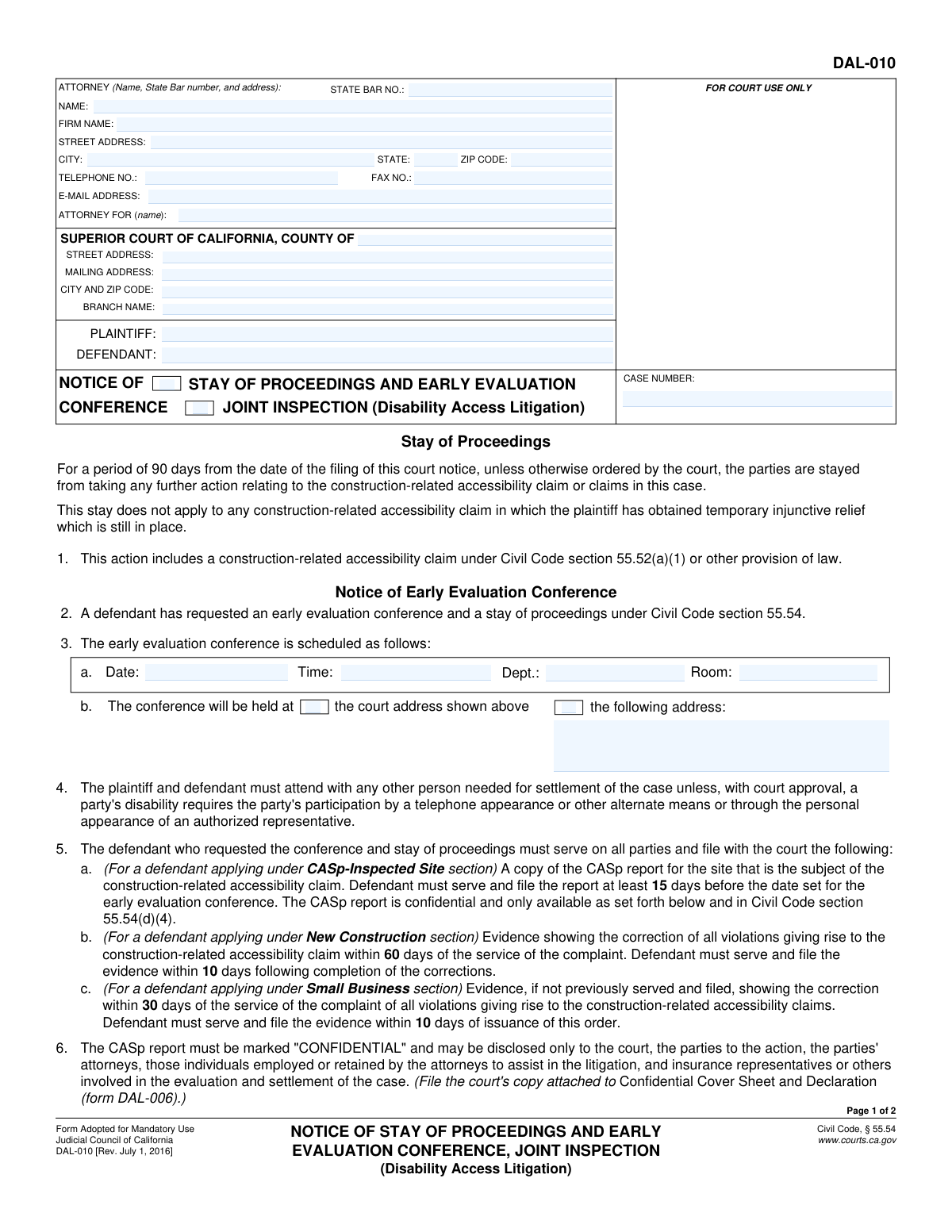
Yes! You can use AI to fill out Form DAL-010, Notice of Stay of Proceedings and Early Evaluation Conference, Joint Inspection (Disability Access Litigation)
Don't type 38 fields by hand. Tell our AI about yourself, or upload a document you already have, and it fills every field in seconds. You check it, then download, print or sign.
The AI does the filling. You just check it.
No typing into boxes, nothing to install.
What this form asks for
The AI fills all of it, from your answers or your documents.
The AI checks your answers before you download
14 checks built for this form, so a wrong date or a missing answer is caught before anyone else sees it.
This check ensures that the 'CASE NUMBER' field is identical on both page 1 and page 2 of the form. Case numbers are unique identifiers for a legal proceeding, and any discrepancy can lead to misfiling or confusion in court records. If the numbers do not match, the submission should be rejected to prevent administrative errors.
Validates that the 'STATE BAR NO.' field contains only numeric characters. A state bar number is a unique identifier for a licensed attorney, and it must be accurate for verification purposes. An invalid format could indicate a data entry error or an unlicensed individual, so the form should be flagged for correction.
If an attorney's name is provided in the 'ATTORNEY (Name)' field, this check verifies that the associated fields for State Bar number, full address, and the party they represent ('ATTORNEY FOR') are also completed. This ensures all necessary contact and representation information is present for proper legal correspondence. Incomplete submissions will be returned for completion.
This check verifies that the value entered into the 'E-MAIL ADDRESS' field conforms to a standard email format (e.g., '[email protected]'). Proper formatting is essential for ensuring that electronic communications and notices from the court are successfully delivered. An invalid email address would cause communication failures and should trigger a validation error.
This validation confirms that the 'PLAINTIFF' and 'DEFENDANT' names are identical on page 1 and page 2. Consistent party information is critical for maintaining the integrity of the case file. A mismatch could indicate a serious clerical error, and the document should be rejected until the discrepancy is resolved.
Ensures that both the 'PLAINTIFF' and 'DEFENDANT' fields are filled in. These fields are fundamental to identifying the parties involved in the litigation. A form submitted without this information is incomplete and cannot be processed, as it's impossible to know who the legal action pertains to.
And 8 more checks
- Conference Date Validity
- Conference Time Format
- Conditional Conference Address Requirement
- Mutually Exclusive Conference Location Selection
- Clerk's Issuance Date Presence
- Attorney Representation Match
- ZIP Code Format Validation
- Court Information Completeness
Let AI fill out your DAL-010
No typing. Every field filled in seconds, checked, ready to sign.
How to Fill Out DAL-010 Online for Free in 2026
What the AI walks you through.
- Navigate to Instafill.ai and upload the DAL-010 form or select it from their library of official documents.
- Allow the AI to scan and process the form, identifying all the necessary fields for case information, party details, and conference scheduling.
- Enter the case information, including the court name, county, case number, and the names of the plaintiff and defendant.
- Provide the attorney's details or the self-represented party's information, such as name, address, State Bar number, and contact information.
- Input the specific details for the Early Evaluation Conference, including the date, time, and location, and check the relevant boxes if a joint inspection has been requested.
- Review all the information auto-filled and entered by you for accuracy, ensuring all required sections are complete before finalizing the document.
- Securely download the completed DAL-010 form, ready for printing, signing, and filing with the court and serving on the opposing party.
Common Mistakes in Completing DAL-010
The ones the AI is built to catch.
Incorrect or Incomplete Case Number
Failing to File the Plaintiff's Pre-Conference Statement
Missing Defendant's Filing Deadlines for Reports or Evidence
Improper Handling of Confidential CASp Reports
Omitting the Attorney's State Bar Number
Failure to Serve the Notice and File Proof of Service
Confusing Plaintiff and Defendant Fields
Ignoring the Joint Inspection Requirement
Misunderstanding Who Completes Which Sections
Incomplete or Incorrect Court Information
Frequently Asked Questions About DAL-010
Is it really free for 7 days?
Can I fill other forms too?
How do I cancel?
How does the AI fill out DAL-010?
What happens to my information?
How complex is DAL-010 to fill out?
What is the purpose of Form DAL-010?
Who needs to comply with this notice?
What does a 'Stay of Proceedings' mean for my case?
Do I have to attend the Early Evaluation Conference?
As the defendant, what are my main responsibilities after this notice is issued?
As the plaintiff, what do I need to prepare for the conference?
What is a 'Joint Inspection' and is it required?
Is the CASp report I submit going to be public record?
What if my disability prevents me from attending the conference or inspection in person?
Who actually fills out and issues this form?
Can AI tools help me with the paperwork in my disability access case?
How can I use Instafill.ai to fill out my legal forms online?
What should I do if a related court form I downloaded is a non-fillable PDF?
Get your DAL-010 filled out by AI
$0 today. Cancel before Nov 1 and you pay nothing.
Other forms like this one
California court forms: Judicial Council of California Form SC-105, Request for Court Order and Answer (Small Claims), Judicial Council of California Form SC-120, Defendant’s Claim and ORDER to Go to Small Claims Court (Small Claims), Judicial Council of California Form SER-001, Request for Sheriff to Serve Court Papers, Judicial Council of California Form SER-001, Request for Sheriff to Serve Court Papers, Affidavit for Collection of Personal Property California Probate Code Section 13100, Form POS-040, Proof of Service—Civil, Declaration of Facts of Death (California Superior Court), declaration-of-marriage-for-court-proceeding-california-family-law, ADOPT-200, Adoption Request, ADOPT-200, Stepparent Adoption Request, ADOPT-210, Adoption Agreement, ADOPT-310, Contact After Adoption Agreement, Judicial Council of California Form ADOPT-200, Adoption Request, Form ADR-107, Mediation Attendance Sheet, Form ADR-110, Order Appointing Referee, Form ADR-109, Stipulation or Motion for Order Appointing Referee, Form ADR-102, Request for Trial De Novo After Judicial Arbitration, Form ADR-108, Referee's Report (Code Civ. Proc., §§ 638, 639), Form ADR-106, Petition to Confirm, Correct, or Vacate Contractual Arbitration Award, Form ADR-104, Rejection of Award and Request for Trial After Attorney-Client Fee Arbitration
Let AI fill out your DAL-010
Your trial starts once a card is added. You pay nothing before Nov 1.
Our AI already knows this form, all 38 fields of it. Skip the typing: tell it about yourself, or upload what you have, and it fills the whole form in seconds.
- AI fills every field on both pages, checkboxes included
- No typing into boxes: answer a few questions, or upload a document you already have, an old copy of this form, a photo of a document
- The AI checks the answers; you review and change anything before you download
- Download the finished PDF, print it, or sign it online
- Encrypted, and never used to train AI
Cancel before Nov 1 and you pay nothing.
A card is needed to start the trial. Cancel in two clicks from your account.
Terms · Privacy