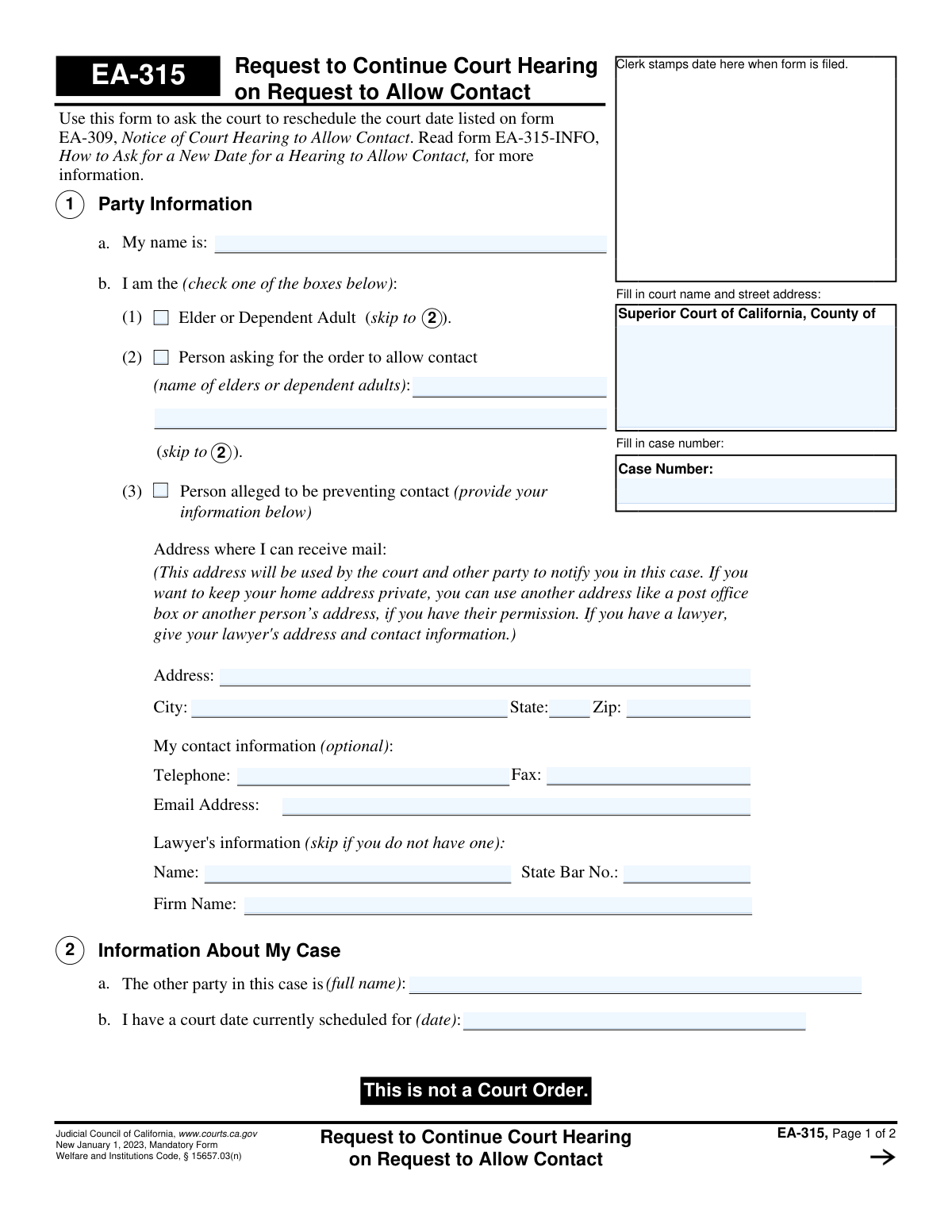
Yes! You can use AI to fill out Form EA-315, Request to Continue Court Hearing on Request to Allow Contact

Form EA-315, Request to Continue Court Hearing on Request to Allow Contact, is a mandatory legal document in California used by a party in a case to ask the court for a new date for a hearing. This specific hearing pertains to a 'Request to Allow Contact' with an elder or dependent adult, often related to elder abuse prevention cases. It is crucial for ensuring all parties have adequate time to prepare or fulfill legal requirements like serving documents. Today, this form can be filled out quickly and accurately using AI-powered services like Instafill.ai, which can also convert non-fillable PDF versions into interactive fillable forms.
EA-315 is part of the California court forms category on Instafill.
Our AI automatically handles information lookup, data retrieval, formatting, and form filling.
It takes less than a minute to fill out EA-315 using our AI form filling.
Securely upload your data. Information is encrypted in transit and deleted immediately after the form is filled out.

Form specifications

Form name: Form EA-315, Request to Continue Court Hearing on Request to Allow Contact
Number of fields: 33
Number of pages: 1
Language: English
main-image

Instafill Demo: How to fill out PDF forms in seconds with AI

How to Fill Out EA-315 Online for Free in 2026

Are you looking to fill out a EA-315 form online quickly and accurately? Instafill.ai offers the #1 AI-powered PDF filling software of 2026, allowing you to complete your EA-315 form in just 37 seconds or less.
Follow these steps to fill out your EA-315 form online using Instafill.ai:
  1. 1 Navigate to Instafill.ai and upload or select the EA-315 form.
  2. 2 Provide the Superior Court name, address, and the case number in the designated fields.
  3. 3 Identify your role in the case by checking the appropriate box: Elder or Dependent Adult, Person asking for the order, or Person alleged to be preventing contact.
  4. 4 Enter your personal contact information, or your lawyer's information if you are represented.
  5. 5 Input the currently scheduled court date that you are requesting to continue.
  6. 6 Select the reason for the continuance request, such as needing more time to serve papers or other specified reasons.
  7. 7 Review all entered information for accuracy, then date and e-sign the form before downloading it for filing with the court.

Our AI-powered system ensures each field is filled out correctly, reducing errors and saving you time.

Why Choose Instafill.ai for Your Fillable EA-315 Form?

Speed

Complete your EA-315 in as little as 37 seconds.

Up-to-Date

Always use the latest 2026 EA-315 form version.

Cost-effective

No need to hire expensive lawyers.

Accuracy

Our AI performs 10 compliance checks to ensure your form is error-free.

Security

Your personal information is protected with bank-level encryption.

Frequently Asked Questions About Form EA-315

Form EA-315, 'Request to Continue Court Hearing on Request to Allow Contact,' is used to ask a California court to reschedule a hearing date related to allowing contact with an elder or dependent adult.

This form can be filled out by the elder or dependent adult, the person asking for the contact order, or the person alleged to be preventing contact who needs to postpone the court date.

The case number is located on other court papers you have received for this case, such as the 'Notice of Court Hearing to Allow Contact' (Form EA-309).

You will need your case number, the currently scheduled court date, the name of the other party, and a valid reason for requesting the postponement.

The form allows you to provide an alternate mailing address, like a P.O. Box or another person's address (with their permission), to keep your home address private.

The form provides checkboxes for common reasons, such as needing more time to serve legal papers or if it's the first continuance request. You can also specify any 'Other reason' in the space provided.

After you complete and sign the form, you must file it with the court clerk at the courthouse handling your case. For detailed instructions, you should also read Form EA-315-INFO.

No, filing this form is only a request. A judge must approve your request, so you should not assume the date is changed until you receive confirmation from the court.

You must follow up with the court clerk to find out if the judge granted your request and, if so, what the new hearing date is. Continue to check your mail for any official notices from the court.

Yes, services like Instafill.ai use AI to help you accurately auto-fill form fields with your saved information, which saves time and reduces the chance of errors.

You can use a service like Instafill.ai to upload the form, fill it out on your computer or mobile device, and then download the completed document to print for filing.

If you have a flat, non-fillable PDF, you can upload it to Instafill.ai. The platform can convert it into an interactive, fillable form that you can easily complete online.

Compliance EA-315
Validation Checks by Instafill.ai

1
Case Number Presence and Format
This check ensures the 'Case Number' field is not empty and, if possible, conforms to the court's standard format. The case number is the primary identifier linking this request to an existing legal proceeding. A missing or malformed case number would cause the document to be rejected as it cannot be filed correctly.
2
Exclusive Party Role Selection
This validation verifies that the user has selected exactly one role from the checkboxes in Section 1b ('Elder or Dependent Adult', 'Person asking for the order', or 'Person alleged to be preventing contact'). Selecting zero or multiple roles creates ambiguity about the filer's standing in the case. The form submission will be blocked until a single, valid role is chosen to ensure clarity for the court.
3
Filer Name Completeness
This check ensures the 'My name is' field in Section 1a is not left blank. This field is essential for identifying the party making the request and is required for the document to have any legal standing. A form without the filer's name is fundamentally incomplete and cannot be processed by the court clerk.
4
Conditional Contact Information for Filer
This validation ensures that if the filer identifies as the 'Person alleged to be preventing contact' (Section 1b(3)), they must provide a mailing address. This address is legally required for service of court documents and notifications. Failure to provide this information when required will halt the submission process.
5
Current Hearing Date Validity
This validation confirms that the date entered for the 'currently scheduled' court hearing in Section 2b is a valid, future date. A request to continue a hearing that has already occurred is logically invalid and would be rejected by the court. The system should reject past dates and require a standard date format (e.g., MM/DD/YYYY).
6
Reason for Continuance Selection
This check verifies that at least one of the checkboxes in Section 3 ('Why Does the Court Date Need to Be Rescheduled?') has been selected. The court requires a stated reason to evaluate the merit of the continuance request. A form submitted without any selected reason is incomplete and will be rejected.
7
Conditional 'Other Reason' Explanation
This check ensures that if the user selects checkbox 3c, 'Other reason,' they must provide a textual explanation in the corresponding field. This is crucial for the judge to understand the specific justification for the continuance request. If the box is checked but the explanation is missing, the submission will be flagged as incomplete.
8
Declaration Date Presence and Validity
This validation ensures the 'Date' field in the declaration section is filled with a valid calendar date that is not in the future. This date confirms when the declaration was made under penalty of perjury and is a legal requirement for the document's validity. An invalid or future date would invalidate the declaration.
9
Printed Name on Declaration
This check verifies that the 'Type or print name' field in the declaration section is filled out. This printed name corresponds to the signature and formally identifies the declarant. A missing printed name makes the signature ambiguous and can lead to the form being rejected.
10
Exclusive Signature Capacity Selection
This validation ensures that exactly one of the signature capacity checkboxes ('Party Without Lawyer' or 'Lawyer') is selected in the declaration section. This clarifies who is signing the document and in what capacity. The form is considered incomplete if zero or both boxes are checked.
11
Logical Consistency for Lawyer Signature
This validation ensures that if the 'Lawyer' checkbox is selected in the signature block, the lawyer information fields (Name and State Bar No.) in Section 1 are populated. This confirms the identity and credentials of the legal representative filing on behalf of a party. If the lawyer info is missing when the lawyer box is checked, the submission is considered incomplete.
12
Case Number Consistency Across Pages
This check verifies that the case number entered on Page 1 matches the case number entered in the header of Page 2. This is a critical data integrity check to ensure all pages of the document belong to the same case file. A mismatch could lead to pages being misfiled and will prevent submission.
13
State Bar Number Format
This check ensures that the 'State Bar No.' field, if filled, contains only numeric digits, which is the standard format for California. This helps maintain data quality and allows for potential verification against the state bar database. Non-numeric entries should be flagged to prevent data entry errors.
14
Email Address Format Validation
This validation checks that any value entered into the optional 'Email Address' field follows the standard format of [email protected]. While optional, providing a valid email is important for receiving electronic notifications. An incorrectly formatted email is useless and could cause the filer to miss important updates, so the system should flag invalid formats.

Common Mistakes in Completing EA-315

Incorrect or Missing Case Number

Filers often forget to enter the case number or write it incorrectly, especially on the second page. The case number is the court's primary identifier for your file; without it, the document can be rejected or misfiled, causing critical delays. To avoid this, double-check the number against existing court documents and ensure it is present on every page as required. AI-powered tools like Instafill.ai can automatically populate the case number on all necessary pages, preventing this error.

Forgetting to Identify the Court

People frequently download the generic state form and leave the court name and street address fields blank. Each case belongs to a specific Superior Court, and without this information, the clerk's office cannot accept or file the document. Always fill in the full name and address of the county court where your case is being heard.

Incorrectly Identifying Your Role in the Case

In Section 1b, users must check a box to identify if they are the elder, the person asking for contact, or the person alleged to be preventing contact. Choosing the wrong role is a critical error that confuses the court about who is making the request and why, often leading to an immediate denial. Carefully read each option and select the one that accurately describes your position in the case.

Providing an Unsafe or Unreliable Contact Address

The form explicitly warns that the provided address will be used for official notifications. A common mistake is using a home address when privacy is a concern, or conversely, using an unreliable P.O. Box or third-party address where mail isn't checked frequently. Either mistake can be dangerous, leading to compromised safety or missed court notices and potential default judgments.

Entering the Wrong Hearing Date to be Rescheduled

In Section 2b, people sometimes mistakenly enter the date they *want* the hearing moved to, instead of the *current* scheduled date. The purpose of this form is to postpone an existing court date, so entering the wrong one makes the request invalid and will cause it to be rejected. Always refer to your 'Notice of Court Hearing' (Form EA-309) to get the correct date.

Failing to Provide a Valid Reason for Continuance

A court will not reschedule a hearing without a valid reason. Common mistakes in Section 3 include not checking any box, or checking 'Other reason' and then failing to provide a clear, concise, and compelling explanation. A vague or missing justification gives the judge no basis to grant your request, making a denial highly likely.

Missing Signature or Date on the Declaration

Forgetting to sign and date the form under penalty of perjury is a fatal error that instantly invalidates the document. This is one of the most frequent reasons for a court clerk to reject a filing, forcing the person to start the process over again, potentially missing the opportunity to reschedule. Always review the form one last time to ensure it is signed and dated.

Submitting an Illegible, Hand-Written Form

Many court forms are only available as flat, non-fillable PDFs, tempting users to print and fill them out by hand. Poor handwriting can lead to court clerks misreading names, dates, or the case number, causing data entry errors that can have serious consequences. To ensure clarity, use a tool like Instafill.ai that can convert the document into a fillable version, allowing you to type your information neatly.

Omitting the Other Party's Full Name

In Section 2a, it is crucial to list the full, correct legal name of the other party in the case. People sometimes use a nickname, a partial name, or leave it blank altogether. This creates ambiguity for the court and can cause procedural delays, as the court must be able to clearly identify all parties involved.

Failing to Check the Correct Signatory Box

At the bottom of the form, you must check a box indicating whether the person signing is the 'Party Without Lawyer' or the 'Lawyer'. Forgetting this small step can cause processing delays at the clerk's office. It is a simple but necessary detail to clarify who is making the legal declaration.
Saved over 80 hours a year

“I was never sure if my IRS forms like W-9 were filled correctly. Now, I can complete the forms accurately without any external help.”

Kevin Martin Green

Your data stays secure with advanced protection from Instafill and our subprocessors

Robust compliance program

Transparent business model

You’re not the product. You always know where your data is and what it is processed for.

ISO 27001, HIPAA, and GDPR

Our subprocesses adhere to multiple compliance standards, including but not limited to ISO 27001, HIPAA, and GDPR.

Security & privacy by design

We consider security and privacy from the initial design phase of any new service or functionality. It’s not an afterthought, it’s built-in, including support for two-factor authentication (2FA) to further protect your account.

Fill out EA-315 with Instafill.ai

Worried about filling PDFs wrong? Instafill securely fills form-ea-315-request-to-continue-court-hearing-on-request-to-allow-contact forms, ensuring each field is accurate.