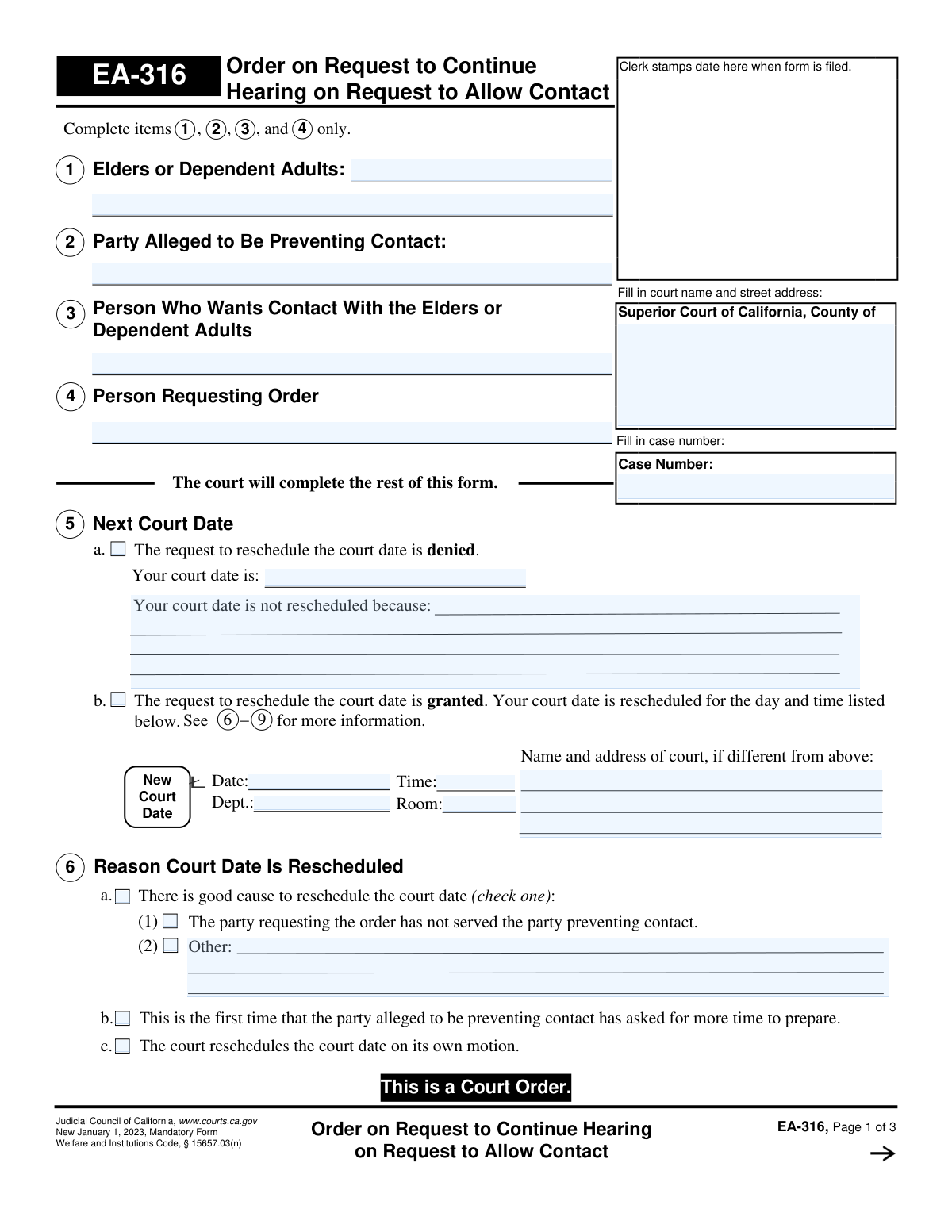
Yes! You can use AI to fill out Form EA-316, Order on Request to Continue Hearing on Request to Allow Contact
Form EA-316, Order on Request to Continue Hearing on Request to Allow Contact, is a mandatory Judicial Council of California form. It is a court order that documents a judge's decision on a request to postpone (continue) a hearing related to allowing contact with an elder or dependent adult. The form outlines whether the continuance is granted or denied, provides the new hearing date if applicable, and specifies instructions for serving the order to the relevant parties. Today, this form can be filled out quickly and accurately using AI-powered services like Instafill.ai, which can also convert non-fillable PDF versions into interactive fillable forms.
EA-316 is part of the
California court forms category on Instafill.
Our AI automatically handles information lookup, data retrieval, formatting, and form filling.
It takes less than a minute to fill out EA-316 using our AI form filling.
Securely upload your data. Information is encrypted in transit and deleted immediately after the form is filled out.
Form specifications
| Form name: | Form EA-316, Order on Request to Continue Hearing on Request to Allow Contact |
| Number of fields: | 56 |
| Number of pages: | 1 |
| Language: | English |
Instafill Demo: How to fill out PDF forms in seconds with AI
How to Fill Out EA-316 Online for Free in 2026
Are you looking to fill out a EA-316 form online quickly and accurately? Instafill.ai offers the #1 AI-powered PDF filling software of 2026, allowing you to complete your EA-316 form in just 37 seconds or less.
Follow these steps to fill out your EA-316 form online using Instafill.ai:
- 1 Navigate to Instafill.ai and upload your Form EA-316 or select it from the template library.
- 2 Use the AI assistant to accurately identify and input the names of the elders or dependent adults, the party alleged to be preventing contact, and the person requesting the order.
- 3 Enter the Superior Court information, including the county and street address, along with the specific case number in the header section.
- 4 Follow the court's direction to complete the order section, indicating whether the request to continue the hearing is granted (5b) or denied (5a) and filling in the new court date, time, and location if granted.
- 5 Specify the reason for the continuance in section 6, such as for service of process or other good cause as determined by the court.
- 6 Complete section 7 to detail the service requirements, noting who must serve the order to the other party and the method of service (personal or by mail).
- 7 Review all the information entered with the AI's assistance to ensure accuracy, then download or print the completed Form EA-316 for filing with the court clerk.
Our AI-powered system ensures each field is filled out correctly, reducing errors and saving you time.
Why Choose Instafill.ai for Your Fillable EA-316 Form?
Speed
Complete your EA-316 in as little as 37 seconds.
Up-to-Date
Always use the latest 2026 EA-316 form version.
Cost-effective
No need to hire expensive lawyers.
Accuracy
Our AI performs 10 compliance checks to ensure your form is error-free.
Security
Your personal information is protected with bank-level encryption.
Frequently Asked Questions About Form EA-316
Form EA-316 is a court order that communicates a judge's decision on a request to postpone (or 'continue') a hearing. The underlying case is about a request to allow contact with an elder or dependent adult.
You only need to complete the top portion of the first page, specifically items 1 through 4, which identify the parties in the case. The court will fill out the rest of the form to issue its official order.
Check section 5 of the form. If box 5a is checked, your court date was not rescheduled; if box 5b is checked, your request was granted and the new court date, time, and location will be listed there.
You must provide the court name, case number, and the names of all parties involved: the elder/dependent adult, the person alleged to be preventing contact, the person who wants contact, and the person requesting the order.
Serving the order means formally delivering a copy to the other party to legally notify them of the court's decision. Section 7 will specify who must be served, by what method (e.g., in person or by mail), and the deadline to do so.
No, section 8 of the form states that the sheriff or marshal will serve this order for free. You will need to bring a copy of all the required papers to the sheriff or marshal's office.
As noted in section 6, a hearing might be rescheduled if the requesting party hasn't served the other party, if it's the first continuance request from the other party, or for other 'good cause' determined by the judge.
You must request accommodations at least five days before your hearing. You can do this by contacting the clerk's office or by submitting Form MC-410, 'Disability Accommodation Request'.
Yes, services like Instafill.ai use AI to accurately auto-fill form fields with your information. This can help you save time and reduce the chance of errors when completing the required sections.
You can use a service like Instafill.ai to fill out this form online. Simply upload the form, and the platform will allow you to type your information directly into the fields before printing for submission.
If you have a non-fillable or 'flat' PDF, you can use a tool like Instafill.ai. It can convert the document into an interactive, fillable form that you can easily complete on your computer.
The 'Person Who Wants Contact' is the individual seeking to visit the elder. The 'Party Requesting Order' is the person who legally filed the court papers to ask for that contact, which could be the same person or their lawyer.
The order becomes legally binding, and all parties must follow its instructions. This means either attending the hearing on the original date or the new, rescheduled date, and completing any required service of the order.
Compliance EA-316
Validation Checks by Instafill.ai
1
Case Number Consistency Across Pages
This check ensures that the 'Case Number' entered on page 1 is identical to the case numbers on pages 2 and 3. Maintaining consistency is critical for document integrity, ensuring all pages are correctly associated with the same legal case. A mismatch could lead to filing errors and misidentification of the order.
2
Mutually Exclusive Order Decision in Item 5
Validates that only one of the two primary options in Item 5 is selected: either 5a (request denied) or 5b (request granted). The form cannot be processed if both or neither are checked, as this would create ambiguity about the court's decision. If validation fails, the form should be flagged for manual review to determine the court's actual order.
3
Conditional Requirement for New Hearing Details
If the checkbox for Item 5b ('The request to reschedule...is granted') is selected, this validation ensures that the new court date, time, and department/room fields are all populated. This information is essential for notifying the parties of the new hearing. Failure to provide these details makes the order to reschedule incomplete and ineffective.
4
Future Date for New Hearing
This check verifies that the 'New Court Date' entered in Item 5b is a date in the future, relative to the date the order is signed. A hearing cannot be scheduled for a past date. This prevents logical errors and ensures the order is legally and practically sound.
5
Conditional Requirement for Denial Reason
If the checkbox for Item 5a ('The request to reschedule...is denied') is selected, this validation confirms that the text field explaining the reason for the denial is filled. Providing a reason is often a procedural requirement and provides clarity to the involved parties. An empty reason field may render the denial order incomplete.
6
Conditional Requirement for Reschedule Reason
When Item 5b is checked (granting the continuance), this validation ensures that a reason is selected in Item 6. Furthermore, if sub-option 6a(2) ('Other') is checked, the corresponding text field must contain an explanation. This ensures the court's reasoning for the reschedule is properly documented as required.
7
Mutually Exclusive Service Responsibility in Item 7
Verifies that only one of the main sections in Item 7 (7a, 7b, or 7c) is selected. These sections define who is responsible for serving the order and are mutually exclusive. Selecting more than one would create conflicting instructions for service.
8
Conditional Requirement for Service Deadline
This check ensures that if a service option requiring a deadline is selected (e.g., 7a(2), 7a(3), 7b(2), 7b(3)), the corresponding date field is populated. The order is unenforceable without a clear deadline for service. This validation prevents incomplete service instructions from being issued.
9
Logical Service Deadline Date
Validates that any service deadline date entered in Item 7 is logically sound. The date must be after the Judicial Officer's signature date (Item 9) and before the new hearing date (Item 5b). This ensures that parties have a realistic timeframe to complete service before the next court appearance.
10
Conditional Requirement for 'Other Orders' Text
If the checkbox for Item 9 ('Other Orders') is selected, this validation ensures the adjacent text field is not empty. Checking the box indicates the Judicial Officer has made additional orders not covered elsewhere, and the text field is necessary to specify what those orders are. An empty field would make this part of the order void and meaningless.
11
Judicial Officer Signature Date Presence
Ensures that the 'Date' field in the Judicial Officer signature block (Item 9) is filled. The signature date is the effective date of the court order and is legally essential for its validity. An order without a date is not considered fully executed.
12
Clerk's Certification Date Logic
If the Clerk's Certificate section is completed, this check verifies that the certification date is on or after the Judicial Officer's signature date. The clerk certifies a copy of an order that has already been signed by the judge. A certification date prior to the signature date is a logical impossibility and indicates a data entry error.
13
Completeness of Party Information
This validation checks that the name fields in Items 1 (Elders or Dependent Adults), 2 (Party Alleged to Be Preventing Contact), 3 (Person Who Wants Contact), and 4 (Person Requesting Order) are all filled. This information is fundamental to the case and identifies all necessary parties involved in the order. Missing party information would make the order ambiguous and potentially unenforceable.
14
Court Information Presence
Verifies that the court name and street address field at the top of page 1 is completed. This information is essential for identifying the specific court that issued the order. Without it, the document lacks proper context and cannot be correctly filed or referenced.
Common Mistakes in Completing EA-316
This form is a court order, and large portions are to be completed only by the judge or court staff. A frequent error is for a party to fill out sections 5, 6, or 7, which detail the court's decision and instructions. Doing so can lead to the form's immediate rejection by the court clerk, as it appears the filer is attempting to pre-determine the outcome. To avoid this, strictly adhere to the instructions to only complete the caption (court name, case number) and the party identification boxes (items 1-4).
The form requires the precise identification of up to four different parties: the elder, the party preventing contact, the person wanting contact, and the person requesting the order. Users often confuse these roles, especially the 'Person Who Wants Contact' versus the 'Person Requesting Order' (which could be an attorney). This error creates legal ambiguity, can make the order unenforceable, and may require filing a corrected version, causing significant delays. Double-check that each person or entity is listed in the correct box with their full legal name as it appears in other case documents.
Filers often abbreviate the court's name or forget to include the specific county and street address in the caption. Submitting a form with 'Superior Court' instead of 'Superior Court of California, County of Los Angeles' and its full address can cause it to be rejected or misrouted. This simple oversight can delay filing past crucial deadlines. Always use the full, official name and address of the courthouse where the case is being heard.
The case number is the unique identifier for your entire legal matter, and this form requires it to be written on pages 1, 2, and 3. A very common mistake is to fill it out on the first page but forget the subsequent pages. If the pages are separated during clerical processing, the latter pages become unidentifiable and may be lost from the case file, rendering the order incomplete. Using a tool like Instafill.ai can help prevent this by automatically populating recurring fields like the case number across all pages of a document.
This document, EA-316, is an 'Order,' not a 'Request.' A critical mistake is filling this out and filing it with the court to ask for a hearing to be rescheduled. This form is the legal document a judge signs to grant or deny a continuance that was requested on a different form (e.g., EA-315). Filing this form as a request will accomplish nothing and will be rejected, wasting valuable time.
The legal names entered in items 1-4 must be spelled identically to how they appear on the initial petition and all other documents in the case file. Using a nickname, a middle initial, or a slightly different spelling than the official record can cause the clerk to reject the form or create a basis for a future legal challenge to the order's validity. Always cross-reference names with official case documents to ensure perfect consistency.
The form instructs the user to 'Complete items 1, 2, 3, 4, and 12 only,' but there is no item 12 on the form. This typo can cause significant confusion, leading people to either fill out incorrect sections or abandon the form. Instead of guessing, the correct procedure is to rely on the other instruction ('The court will complete the rest of this form') and only fill out the top caption and party identification boxes (1-4).
If the form is printed and filled out by hand, handwriting that is difficult to read can make the order impossible to process correctly. An illegible name, case number, or date can lead to rejection by the clerk, data entry errors, or failed service on a party. To prevent this, print clearly in block capitals or, ideally, use a computer to fill out the form. If the form is a non-fillable PDF, a service like Instafill.ai can convert it into a fillable version so you can type the information for maximum clarity.
Once the judge signs the order, it is not automatically effective. The party responsible must follow the service instructions the judge checks in section 7, which dictates who must be served, by what method (e.g., personal service, mail), and by what deadline. A common failure is to assume the court handles notification or to miss the service deadline. This can invalidate the new court date and may result in negative consequences if you fail to appear on the original date.
Out of uncertainty, a filer might be tempted to leave one of the party fields in items 1-4 blank. Each of these roles is essential for the court to understand the relationships and for the order to be legally binding. Submitting a form with missing party information will almost certainly result in its rejection, as the order would be ambiguous and unenforceable against an unnamed party.
Saved over 80 hours a year
“I was never sure if my IRS forms like W-9 were filled correctly. Now, I can complete the forms accurately without any external help.”
Kevin Martin Green
Your data stays secure with advanced protection from Instafill and our subprocessors
Robust compliance program
Transparent business model
You’re not the product. You always know where your data is and what it is processed for.
ISO 27001, HIPAA, and GDPR
Our subprocesses adhere to multiple compliance standards, including but not limited to ISO 27001, HIPAA, and GDPR.
Security & privacy by design
We consider security and privacy from the initial design phase of any new service or functionality. It’s not an afterthought, it’s built-in, including support for two-factor authentication (2FA) to further protect your account.
Fill out EA-316 with Instafill.ai
Worried about filling PDFs wrong? Instafill securely fills form-ea-316-order-on-request-to-continue-hearing-on-request-to-allow-contact forms, ensuring each field is accurate.