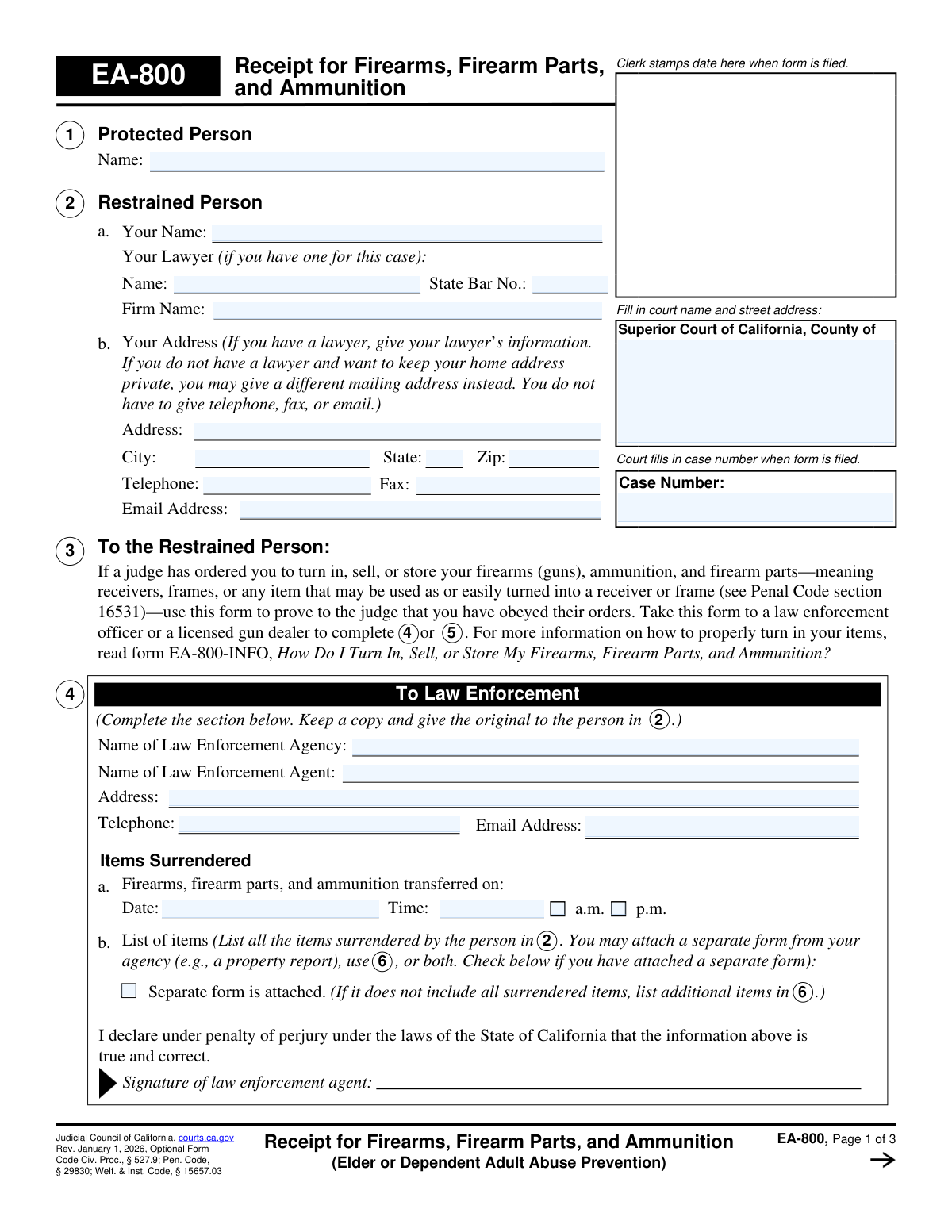
Yes! You can use AI to fill out Form EA-800, Receipt for Firearms, Firearm Parts, and Ammunition (Elder or Dependent Adult Abuse Prevention)
Form EA-800, Receipt for Firearms, Firearm Parts, and Ammunition, is a crucial legal document used in California courts. It serves as proof that a person under a restraining order for elder or dependent adult abuse has lawfully surrendered, sold, or stored their firearms and related items as mandated by the court. This form must be completed by law enforcement or a licensed gun dealer and filed with the court to demonstrate compliance. Today, this form can be filled out quickly and accurately using AI-powered services like Instafill.ai, which can also convert non-fillable PDF versions into interactive fillable forms.
EA-800 is part of the
California court forms category on Instafill.
Our AI automatically handles information lookup, data retrieval, formatting, and form filling.
It takes less than a minute to fill out EA-800 using our AI form filling.
Securely upload your data. Information is encrypted in transit and deleted immediately after the form is filled out.
Form specifications
| Form name: | Form EA-800, Receipt for Firearms, Firearm Parts, and Ammunition (Elder or Dependent Adult Abuse Prevention) |
| Number of fields: | 122 |
| Number of pages: | 1 |
| Language: | English |
Instafill Demo: How to fill out PDF forms in seconds with AI
How to Fill Out EA-800 Online for Free in 2026
Are you looking to fill out a EA-800 form online quickly and accurately? Instafill.ai offers the #1 AI-powered PDF filling software of 2026, allowing you to complete your EA-800 form in just 37 seconds or less.
Follow these steps to fill out your EA-800 form online using Instafill.ai:
- 1 Navigate to an AI-powered service like Instafill.ai and upload or select the EA-800 form.
- 2 Use the AI assistant to fill in the initial information, including court details, case number, and the names of the protected and restrained persons.
- 3 Take the partially completed form to a law enforcement agency or a licensed gun dealer for them to document the surrendered items.
- 4 The law enforcement agent or gun dealer will complete their section, listing all firearms, parts, and ammunition received, and provide their signature.
- 5 As the restrained person, complete the final section of the form, declaring if you own any other firearms, and then sign and date it.
- 6 Review the entire form for accuracy, then download the completed document to file with the court clerk and keep a copy for your records.
Our AI-powered system ensures each field is filled out correctly, reducing errors and saving you time.
Why Choose Instafill.ai for Your Fillable EA-800 Form?
Speed
Complete your EA-800 in as little as 37 seconds.
Up-to-Date
Always use the latest 2026 EA-800 form version.
Cost-effective
No need to hire expensive lawyers.
Accuracy
Our AI performs 10 compliance checks to ensure your form is error-free.
Security
Your personal information is protected with bank-level encryption.
Frequently Asked Questions About Form EA-800
Form EA-800 is a receipt used to prove to a California court that you have complied with a judge's order to turn in, sell, or store your firearms, firearm parts, and ammunition in a case related to elder or dependent adult abuse prevention.
This form must be used by the 'Restrained Person' in an elder or dependent adult abuse prevention case who has been ordered by a judge to surrender their firearms and related items.
You do not fill out these sections. Section 4 is completed by a law enforcement agent if you surrender your items to them, while Section 5 is completed by a licensed gun dealer if you sell or store your items with them.
Section 6 requires a detailed list of all surrendered items. For firearms and firearm parts, you must provide the make, model, and serial number; for ammunition, you must list the brand, type, and amount.
If you run out of space, list the additional items on a separate sheet of paper. Be sure to write 'EA-800, item 6' and your case number at the top of the page and attach it to the form.
After the form is complete, make two additional copies. You must file the original and the copies with the court clerk, and you should keep one copy for your personal records.
Failure to file a completed Form EA-800 receipt with the court is a direct violation of the court's order and can lead to serious legal consequences.
You must declare this in Section 7. You will need to specify if you have already filed proof for those items, are filing it now, or explain why you have not yet filed proof of their surrender.
You must take your firearms, parts, and ammunition to a local law enforcement agency or a California licensed gun dealer. They will complete the appropriate section of the form to serve as your receipt.
Yes, services like Instafill.ai use AI to accurately auto-fill your personal information on the form, which can save time and help prevent errors. However, the official sections must still be completed and signed by law enforcement or a licensed gun dealer.
You can upload the EA-800 PDF to the Instafill.ai website. The service will make the form fillable online, allowing you to type your information before printing it to be signed by the proper authorities.
If you have a non-fillable or 'flat' PDF, you can use a service like Instafill.ai. It can convert the document into an interactive, fillable form that you can easily complete on your computer.
The 'Protected Person' is the elder or dependent adult who is being protected by the court order. Their name must be entered in Section 1 of the form.
Compliance EA-800
Validation Checks by Instafill.ai
1
Case Number Presence and Consistency
This check verifies that the 'Case Number' field is filled out and is identical on all pages of the form (pages 1, 2, and 3). The case number is the primary identifier linking this receipt to the correct legal proceeding. If the number is missing or inconsistent across pages, the document could be misfiled or rejected by the court, delaying proof of compliance.
2
Exclusive Completion of Section 4 or 5
This validation ensures that information is entered into either Section 4 (To Law Enforcement) or Section 5 (To Licensed Gun Dealer), but not both. A single form should only document one transaction with one entity. Having both sections filled creates ambiguity and suggests a data entry error, which would require manual clarification and could invalidate the receipt.
3
Completeness of Active Receipt Section
If Section 4 is used, this check requires 'Name of Law Enforcement Agency', 'Name of Law Enforcement Agent', and 'Date' to be filled. If Section 5 is used, it requires 'Name of Licensed Gun Dealer', 'License number', and 'Date'. This is critical because a receipt is invalid without knowing who received the items and when the transaction occurred.
4
Verification of Item Surrender Details
This check ensures that if Section 4 or 5 is completed, there is a corresponding list of surrendered items. It verifies that either at least one item is detailed in the tables in Section 6, or the 'Separate form is attached' checkbox is checked in the relevant section. A receipt without a list of items received is meaningless and fails to provide the court with the necessary proof of compliance.
5
Firearm Item Row Integrity
For each row in the 'Firearms and firearm parts' table in Section 6, if any data such as 'Make' or 'Model' is entered, this validation requires that at least one disposition checkbox ('Sold', 'Stored', or 'To be destroyed') is also selected. This prevents incomplete entries and ensures the final status of each listed firearm is clearly documented. An incomplete row creates ambiguity about the item's disposition.
6
Ammunition Item Row Integrity
For each row in the 'Ammunition' table in Section 6, if a 'Brand' or 'Type' is specified, the 'Amount' field and at least one disposition checkbox ('Sold', 'Stored', or 'To be destroyed') must also be completed. This ensures that every listed ammunition entry is fully described and its disposition is recorded. Failure to do so would leave the record incomplete and unclear.
7
Single Disposition per Item
For each firearm or ammunition item listed in the tables in Section 6, this validation ensures that only one of the three disposition checkboxes ('Sold', 'Stored', 'To be destroyed') is selected. An item cannot be simultaneously sold and stored, for example. This rule prevents ambiguity and ensures a clear, singular status for each surrendered item.
8
California State Bar Number Format
This validates that the 'State Bar No.' field (`RespondentLawyerBar_no`) under Section 2, if filled, contains a valid numerical format. California Bar numbers are unique identifiers for attorneys. Ensuring a correct format helps verify the legitimacy of the legal counsel listed and prevents data entry errors that could hinder communication.
9
Conditional Requirement for Section 7 Explanation
This check enforces the rule in Section 7. If the 'Yes' checkbox is selected, indicating the restrained person has other firearms, then one of the subsequent options (7a, 7b, or 7c) must also be selected. This is crucial for the court to understand the status of all firearms owned by the individual, not just those on this specific receipt.
10
Required Explanation for Delayed Filing (Section 7c)
If the restrained person selects option 7c in Section 7, stating they have not yet filed proof for other firearms, this validation ensures the accompanying explanation text field (`ExcuseFill`) is not left blank. The court requires an explanation for the delay to assess the person's compliance with the order. An empty explanation field would render the answer incomplete.
11
Logical Signature Date
This check verifies that the signature date (`SigDate`) on page 3 is logical. It ensures the date is not in the future and is on or after the firearm surrender date listed in Section 4 or 5. A signature date preceding the surrender event is impossible and would invalidate the declaration, as one cannot attest to an event that has not yet occurred.
12
Mandatory Party Names
This validation ensures that the names of the 'Protected Person' (Section 1) and the 'Restrained Person' (Section 2) are not empty. These names are the primary identifiers for the parties involved in the court case. Without them, the form is fundamentally incomplete and cannot be correctly associated with the intended legal file.
13
Valid Date and Time Format
This validation checks that all date fields (e.g., `SoldDate_dt`, `SigDate`) are entered in a valid format like MM/DD/YYYY. It also ensures that time fields are entered correctly and that either 'a.m.' or 'p.m.' is selected. Correctly formatted dates and times are essential for creating an accurate and legally sound record of the transaction.
14
Restrained Person Signature Declaration
This check ensures that if the form is being finalized, the declaration on page 3 is completed. This includes providing a signature date and typing or printing the name of the restrained person. This declaration, made under penalty of perjury, is the restrained person's attestation to the form's accuracy and is a non-negotiable requirement for the form to be considered valid by the court.
Common Mistakes in Completing EA-800
Users often forget to enter the Case Number on every page or misspell the names of the Protected or Restrained Persons. This happens when rushing or copying information incorrectly from other court documents. An incorrect Case Number can lead to the form being misfiled or rejected, causing delays and potentially violating the court order. To avoid this, double-check that the Case Number and all names match the court order exactly on all three pages.
A frequent error is the restrained person filling out Section 4 (Law Enforcement) or Section 5 (Licensed Gun Dealer) themselves. These sections must be completed and signed by the respective official who takes possession of the items. Submitting a self-attested form will result in immediate rejection by the court, as it provides no valid proof of surrender. Always take the form to the appropriate authority and have them complete their designated section.
The restrained person may leave the law enforcement agency or gun dealer without ensuring Section 4 or 5 is fully completed. This includes the official's name, agency/dealer name, license number, date, time, and signature. An incomplete receipt is invalid and will be rejected by the court, meaning you have not proven compliance. Before leaving, carefully review the section to confirm every field is filled and it is signed.
In Section 6, people often provide incomplete descriptions, such as listing only the make of a firearm or writing 'N/A' for a serial number that exists. The court requires the Make, Model, and Serial Number for each firearm or part (like a receiver or frame) to ensure proper tracking. Omitting these details can lead to questions about whether all court-ordered items have been surrendered. Be meticulous and record every detail exactly as it appears on the item.
For every single firearm, part, and ammunition entry in Section 6, one of three boxes must be checked: 'Sold,' 'Stored,' or 'To be destroyed.' It is a common oversight to list the items but forget to check the corresponding box indicating its status. This leaves the court uncertain about the final disposition of the weapon, making the form incomplete and potentially requiring you to refile. Ensure you select one option for each line item.
After getting the official signature, the restrained person may think the form is finished and neglect to complete Section 7 on page 3. This section is a sworn statement about whether you possess any *other* firearms not listed on the form. Failure to answer this 'Yes/No' question and provide a required explanation if 'Yes' is selected will make the filing incomplete and likely lead to rejection.
Forgetting to sign and date the declaration at the bottom of page 3 is one of the most common and critical errors. An unsigned form is not a valid legal declaration and will be rejected by the court clerk, meaning you have failed to comply with the filing requirement. Always complete your signature and the date after you have reviewed the entire form for accuracy.
When listing more items than will fit in Section 6, users often fail to follow the specific instructions for attachments. They might forget to check the 'Separate form is attached' box in Section 4 or 5, or fail to label the extra page with 'EA-800, item 6' at the top. This can cause the attachment to be overlooked or dissociated from the main form, leading the court to believe not all items were declared. Follow the instructions precisely to ensure all surrendered items are properly documented.
Perhaps the most significant mistake is correctly completing the entire process but then failing to file the original, signed form with the court clerk. The purpose of the form is to serve as proof *to the court* that you have complied with its order. Simply having the receipt is not enough; it must be officially filed to avoid being found in violation of the court order. Remember to make copies for your records and file the original promptly.
In Section 2b, the form explicitly advises using a lawyer's address or an alternative safe mailing address to protect your privacy. A common mistake is to automatically enter your home address, which then becomes part of a public court file. This can have serious safety and privacy implications, especially in a case involving a restraining order. Always use a non-residential address for correspondence if you wish to keep your home location private. AI-powered tools like Instafill.ai can help manage and correctly populate designated safe addresses across multiple legal forms.
Saved over 80 hours a year
“I was never sure if my IRS forms like W-9 were filled correctly. Now, I can complete the forms accurately without any external help.”
Kevin Martin Green
Your data stays secure with advanced protection from Instafill and our subprocessors

Robust compliance program
Transparent business model
You’re not the product. You always know where your data is and what it is processed for.
ISO 27001, HIPAA, and GDPR
Our subprocesses adhere to multiple compliance standards, including but not limited to ISO 27001, HIPAA, and GDPR.
Security & privacy by design
We consider security and privacy from the initial design phase of any new service or functionality. It’s not an afterthought, it’s built-in, including support for two-factor authentication (2FA) to further protect your account.
Fill out EA-800 with Instafill.ai
Worried about filling PDFs wrong? Instafill securely fills form-ea-800-receipt-for-firearms-firearm-parts-and-ammunition-elder-or-dependent-adult-abuse-prevention forms, ensuring each field is accurate.