Yes! You can use AI to fill out Form EJT-018, Agreement of Parties (Mandatory Expedited Jury Trial Procedures)
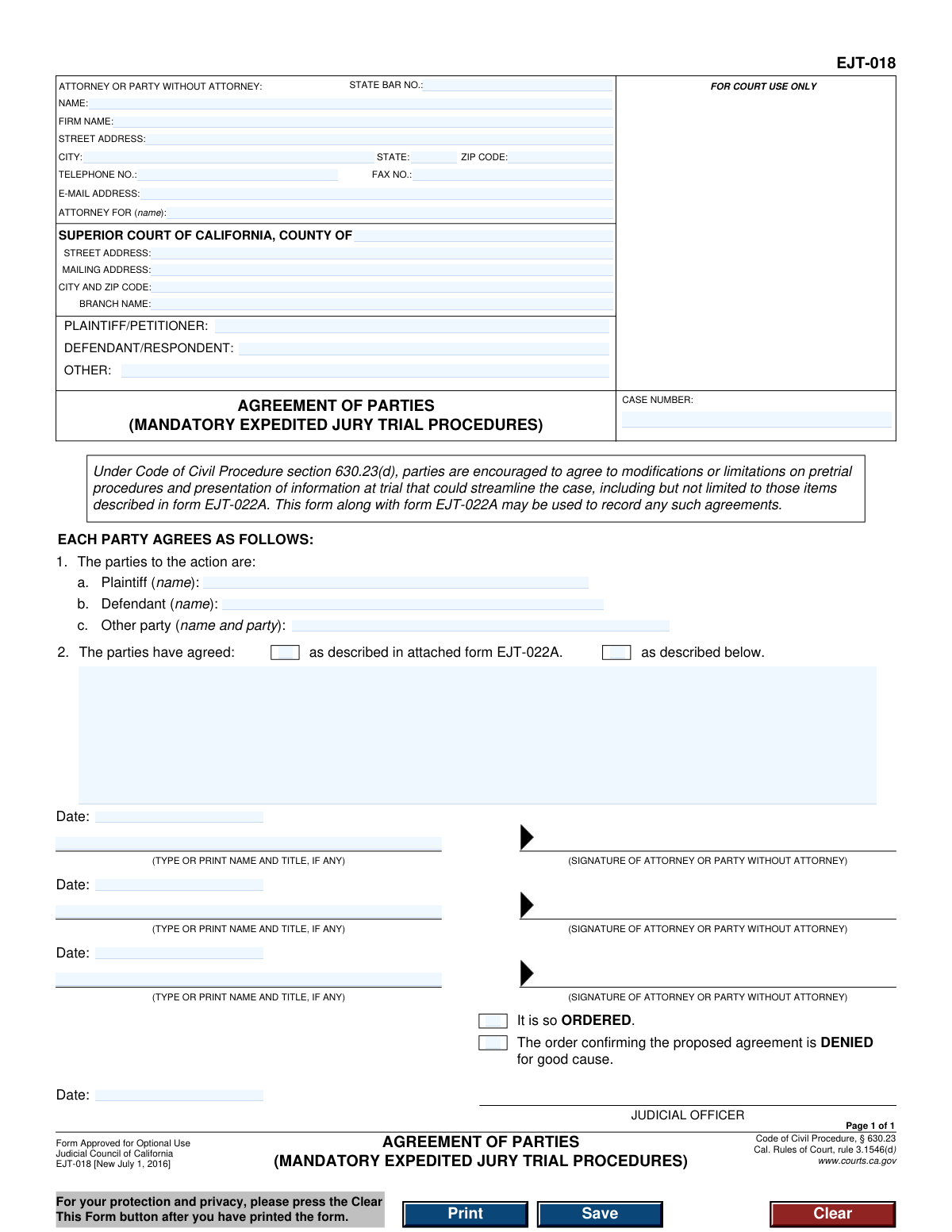
Form EJT-018, Agreement of Parties (Mandatory Expedited Jury Trial Procedures), is a legal document used in the Superior Court of California. It allows parties in a lawsuit to formally agree on specific modifications and limitations to streamline pretrial procedures and the presentation of information at trial, as encouraged by the Code of Civil Procedure. This agreement helps to expedite the legal process, making it more efficient and cost-effective for all involved. Today, this form can be filled out quickly and accurately using AI-powered services like Instafill.ai, which can also convert non-fillable PDF versions into interactive fillable forms.
EJT-018 is part of the
California court forms category on Instafill.
Our AI automatically handles information lookup, data retrieval, formatting, and form filling.
It takes less than a minute to fill out EJT-018 using our AI form filling.
Securely upload your data. Information is encrypted in transit and deleted immediately after the form is filled out.
Form specifications
| Form name: | Form EJT-018, Agreement of Parties (Mandatory Expedited Jury Trial Procedures) |
| Number of fields: | 38 |
| Number of pages: | 1 |
| Language: | English |
Instafill Demo: How to fill out PDF forms in seconds with AI
How to Fill Out EJT-018 Online for Free in 2026
Are you looking to fill out a EJT-018 form online quickly and accurately? Instafill.ai offers the #1 AI-powered PDF filling software of 2026, allowing you to complete your EJT-018 form in just 37 seconds or less.
Follow these steps to fill out your EJT-018 form online using Instafill.ai:
- 1 Navigate to Instafill.ai and upload or select Form EJT-018.
- 2 Use the AI assistant to automatically populate court and case information, such as the county, branch name, and case number.
- 3 Enter the details for the attorney or party representing themselves, including name, State Bar number, and contact information.
- 4 Identify all parties to the agreement by listing the names of the plaintiff, defendant, and any other parties.
- 5 Indicate the specific agreements made by the parties, either by checking the box to attach Form EJT-022A or by describing the agreements in the space provided.
- 6 Review all the information for accuracy, then have each party or their attorney sign and date the document in the designated signature blocks.
- 7 Download the completed form to print and file with the court for the judicial officer's review and order.
Our AI-powered system ensures each field is filled out correctly, reducing errors and saving you time.
Why Choose Instafill.ai for Your Fillable EJT-018 Form?
Speed
Complete your EJT-018 in as little as 37 seconds.
Up-to-Date
Always use the latest 2026 EJT-018 form version.
Cost-effective
No need to hire expensive lawyers.
Accuracy
Our AI performs 10 compliance checks to ensure your form is error-free.
Security
Your personal information is protected with bank-level encryption.
Frequently Asked Questions About Form EJT-018
Form EJT-018 is used to document a formal agreement between all parties in a lawsuit to modify procedures for an expedited jury trial. This helps streamline the case by setting specific, mutually agreed-upon rules for pretrial and trial presentations.
All parties involved in the case, or their attorneys, must sign this form to show they consent to the agreed-upon trial procedures. The form is then submitted to a judicial officer for review and approval.
The 'Mandatory' part refers to the overall expedited jury trial program your case is assigned to by law. This form allows parties to voluntarily agree to further modifications within that mandatory framework to customize and streamline their specific case.
Form EJT-022A is a checklist of potential modifications to trial procedures that parties can agree upon. You can either attach a completed EJT-022A to this form or describe your agreements directly in the space provided on Form EJT-018.
In Section 2, check the first box if you are attaching Form EJT-022A to detail your agreements. Check the second box if you are writing out the specific agreements directly in the space provided on Form EJT-018.
You will need the court's name and address, the case number, and the full names and contact information for all parties and their attorneys. You must also have the specific details of the procedural modifications you have all agreed upon.
After all parties or their attorneys have signed the agreement, it must be filed with the court. A judicial officer will then review the agreement and either sign the order to approve it or deny it.
If the judicial officer denies the agreement, the standard procedures for the mandatory expedited jury trial will apply without your proposed modifications. The form states that a denial would be for 'good cause'.
Yes, AI-powered services like Instafill.ai can help you accurately auto-fill form fields with your case and personal information. This saves time and helps reduce the chance of making errors.
Simply upload Form EJT-018 to the Instafill.ai platform. The AI will make the document fillable, and you can enter your information once to have it automatically and accurately placed in all the correct fields.
If you have a non-fillable or 'flat' PDF, you can use a service like Instafill.ai. It can convert the flat PDF into an interactive, fillable form that you can easily complete and print from your computer.
If there are more parties than the signature lines provided, you can attach an additional page with the required signatures. Be sure to clearly label the attachment with the case name, case number, and reference Form EJT-018.
Parties often agree to modifications to make the trial process faster, more efficient, and less expensive for everyone involved. Common agreements include limiting the number of witnesses, the length of testimony, or the types of evidence presented.
Compliance EJT-018
Validation Checks by Instafill.ai
1
Case Number Presence and Format
This check verifies that the 'CASE NUMBER' field is not empty and follows the expected format for the jurisdiction. The case number is the primary identifier for the legal action, and its absence or incorrect format will result in the document being rejected by the court clerk, delaying the filing process. The system should flag submissions with a missing or malformed case number.
2
State Bar Number Format
Validates that the 'STATE BAR NO.' field, if provided, contains only numeric digits. A valid state bar number is required to verify the attorney's credentials and standing with the State Bar of California. An invalid format could indicate a data entry error or an unlicensed individual, and the submission should be flagged for review.
3
Attorney/Party Contact Information Completeness
Ensures that if an attorney or party name is provided, their full street address (street, city, state, zip) and telephone number are also filled out. This contact information is legally required for official correspondence and service of documents. Incomplete information can lead to communication failures and potential legal complications, so the form should be considered incomplete if these fields are missing.
4
Email Address Format Validation
This check confirms that the value entered in the 'E-MAIL ADDRESS' field is in a valid format (e.g., '[email protected]'). As courts increasingly rely on electronic communication and filing, a valid email address is crucial for timely notifications. An invalid email format would prevent the party or attorney from receiving important case updates, so the system should reject invalid entries.
5
Court County Specification
Verifies that the 'COUNTY OF' field under 'SUPERIOR COURT OF CALIFORNIA' is filled in. This specifies the legal venue and jurisdiction for the case. Submitting a form without the correct county will lead to its rejection, as the court cannot process a filing for an unspecified jurisdiction.
6
Party Name Consistency Check
This validation compares the party names listed in the case caption (PLAINTIFF/PETITIONER and DEFENDANT/RESPONDENT) with the names listed in section 1 ('The parties to the action are'). The names must be consistent to ensure the agreement correctly identifies the involved parties. A mismatch could create ambiguity and render the agreement unenforceable, requiring correction and refiling.
7
Attorney Representation Link
Checks that the name provided in the 'ATTORNEY FOR (name):' field matches one of the parties listed in the case caption or in section 1. This explicitly links the filing attorney to their client within the context of this document. If the name does not match any party, the filing is ambiguous and may be rejected by the court.
8
Exclusive Agreement Choice
Ensures that in section 2, exactly one of the two checkboxes ('as described in attached form EJT-022A' or 'as described below') is selected. The parties must clearly indicate the basis of their agreement. Selecting both or neither creates ambiguity, making the agreement's terms unclear and likely invalid.
9
Conditional Agreement Description
This check is triggered if the 'as described below' checkbox in section 2 is selected. It verifies that the subsequent text field is not empty and contains a description of the agreement. An empty description field would mean the agreement has no defined terms, making it void and unacceptable for filing.
10
Minimum Party Signatures
Validates that at least two signature blocks are completed, typically one for the plaintiff's side and one for the defendant's. An agreement requires the consent of the opposing parties to be legally binding. A form submitted with only one party's signature does not represent a mutual agreement and will be rejected.
11
Signature Date Validity
This check ensures that each provided signature 'Date' is a valid calendar date and is not set in the future. The date of signature is critical for establishing when the agreement was made. An invalid or future date compromises the document's authenticity and legal standing, requiring correction before it can be processed.
12
Signature Block Completeness
For every signature date that is filled, this validation ensures the corresponding 'TYPE OR PRINT NAME AND TITLE' field is also completed. An anonymous signature is invalid, and the printed name is required to identify the signatory. Failure to provide the printed name alongside the date and signature makes that party's consent unverifiable.
13
Judicial Officer Section Integrity
Verifies that all fields within the 'JUDICIAL OFFICER' section (the 'ORDERED'/'DENIED' checkboxes and the judge's signature date) are left blank by the filer. This section is reserved strictly for court use. Any entries made by the filing party would be inappropriate and could cause the document to be rejected.
Common Mistakes in Completing EJT-018
Users often enter the case number with typos, transposed digits, or in an incorrect format. Since the case number is the primary identifier for a court file, any error can lead to the document being rejected by the clerk, misfiled, or significantly delayed in processing. To avoid this, meticulously double-check the case number against official court documents before submission. AI-powered tools like Instafill.ai can help by saving and accurately auto-filling case information across multiple forms.
The names of the Plaintiff, Defendant, and other parties must be listed consistently and exactly as they appear in the official case caption. People frequently use abbreviations, nicknames, or slightly different versions of names in the header, the 'ATTORNEY FOR' field, and the agreement body. These inconsistencies create ambiguity and can be grounds for the clerk to reject the filing. Always copy the names precisely from a court-endorsed document like the initial complaint.
In the 'ATTORNEY FOR (name):' field, attorneys sometimes write a generic term like 'Plaintiff' instead of the specific client's full name. In cases with multiple plaintiffs or defendants, this creates confusion about who the attorney is actually representing on this agreement. This can lead to legal challenges later on. The best practice is to always state the full, specific name of the individual or entity being represented.
Filers often make mistakes when entering the court's information, such as selecting the wrong county, using an incorrect street address, or omitting the specific branch name. A large county like Los Angeles has numerous court branches, and filing at the wrong one will cause rejection or transfer delays. Always verify the exact and full address and branch name for your specific case from the official court website or prior filings.
A critical and frequent error is checking the box for 'as described in attached form EJT-022A' but then failing to actually attach the form to the submission. This makes the agreement incomplete and unenforceable, as the core terms are missing. Before filing, create a checklist and physically confirm that all referenced attachments are included with the primary EJT-018 form.
In Section 2, parties must choose one option to define their agreement. Common mistakes include checking both boxes, checking the 'as described below' box but leaving the text field empty, or not checking any box at all. Any of these errors makes the agreement's terms unclear and will likely result in the court denying the order, forcing the parties to refile. Ensure one, and only one, option is clearly selected and fully completed.
An agreement is invalid without the signatures of all participating parties or their legal counsel. It is extremely common for a form to be submitted with one or more missing signatures or dates, especially when the document is being circulated among multiple people. This automatically invalidates the filing. The best way to prevent this is to have one person do a final review to ensure every signature and date line is filled before the document is submitted to the court.
While this is a fillable PDF, users sometimes print it blank and fill it out by hand. Illegible handwriting for names, addresses, or case numbers can lead to the court clerk misinterpreting the information or rejecting the form outright. To ensure accuracy and acceptance, always type directly into the fillable fields. If you only have a scanned, non-fillable version, AI tools like Instafill.ai can convert it into a fillable document to ensure clarity.
Parties representing themselves (pro se) often get confused by the attorney information block. They may incorrectly fill in the 'STATE BAR NO.' and 'FIRM NAME' fields or leave the entire contact section blank out of uncertainty. Pro se litigants should enter their own name and contact details and write 'N/A' or leave blank the fields that are specific to attorneys. This ensures the court has the correct contact information for the party.
The form includes a 'Clear This Form' button for privacy. Users, in a hurry, sometimes click this button after filling everything out but before they have saved or printed the final document. This action erases all entered data, forcing them to start over from scratch. Always follow a strict 'fill, save, print, then clear' workflow to avoid losing your work.
Saved over 80 hours a year
“I was never sure if my IRS forms like W-9 were filled correctly. Now, I can complete the forms accurately without any external help.”
Kevin Martin Green
Your data stays secure with advanced protection from Instafill and our subprocessors

Robust compliance program
Transparent business model
You’re not the product. You always know where your data is and what it is processed for.
ISO 27001, HIPAA, and GDPR
Our subprocesses adhere to multiple compliance standards, including but not limited to ISO 27001, HIPAA, and GDPR.
Security & privacy by design
We consider security and privacy from the initial design phase of any new service or functionality. It’s not an afterthought, it’s built-in, including support for two-factor authentication (2FA) to further protect your account.
Fill out EJT-018 with Instafill.ai
Worried about filling PDFs wrong? Instafill securely fills form-ejt-018-agreement-of-parties-mandatory-expedited-jury-trial-procedures forms, ensuring each field is accurate.