Yes! You can use AI to fill out Form FM-AV-100, Motion to Enforce and for Contempt
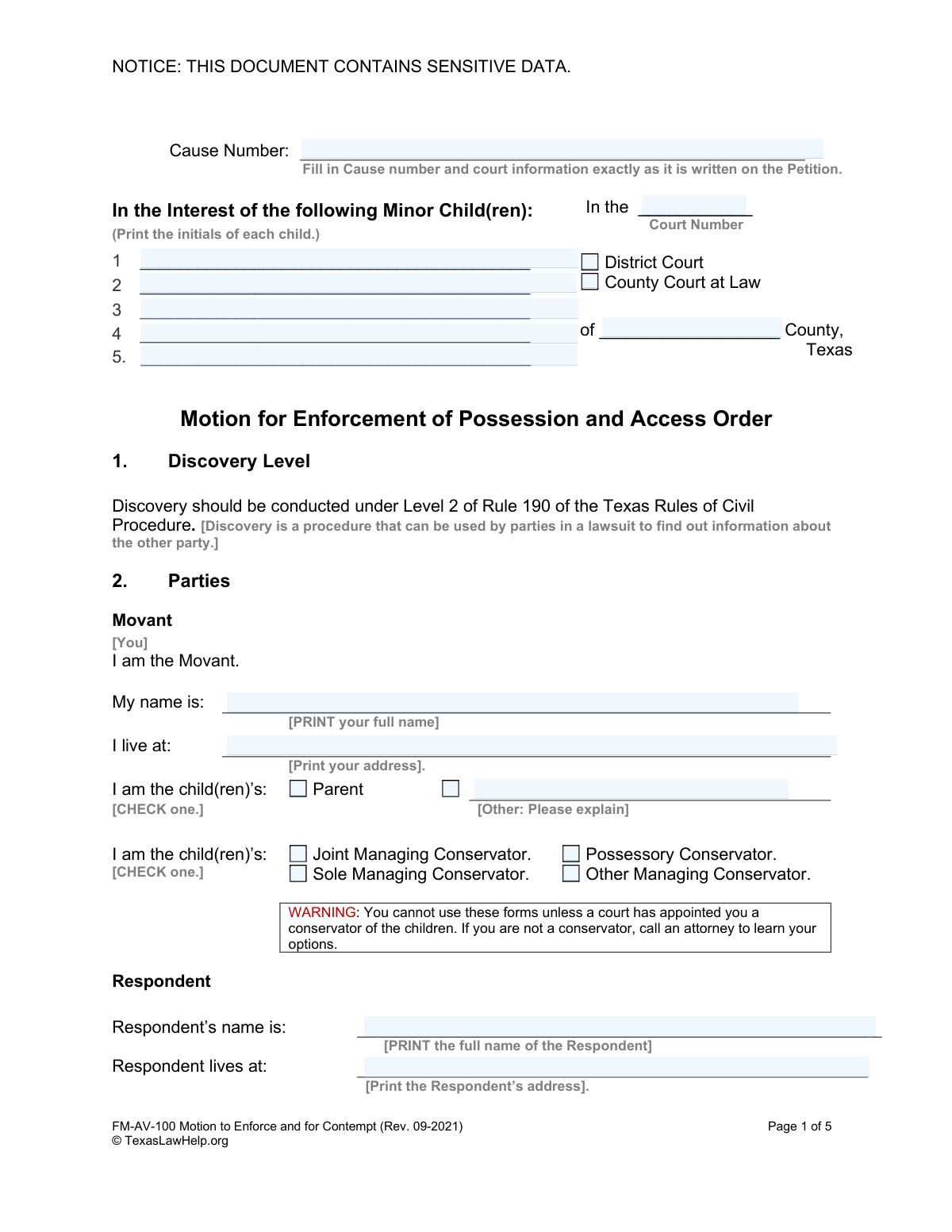
The Motion to Enforce and for Contempt, form FM-AV-100, is filed in a Texas court when one parent or conservator believes the other is violating a court-ordered possession and access (visitation) schedule. It formally requests the court to enforce the existing order and can ask for penalties, such as fines or jail time, for the non-compliant party. Today, this form can be filled out quickly and accurately using AI-powered services like Instafill.ai, which can also convert non-fillable PDF versions into interactive fillable forms.
FM-AV-100 is part of the
child custody forms category on Instafill.
Our AI automatically handles information lookup, data retrieval, formatting, and form filling.
It takes less than a minute to fill out FM-AV-100 using our AI form filling.
Securely upload your data. Information is encrypted in transit and deleted immediately after the form is filled out.
Form specifications
| Form name: | Form FM-AV-100, Motion to Enforce and for Contempt |
| Number of fields: | 62 |
| Number of pages: | 1 |
| Language: | English |
Instafill Demo: How to fill out PDF forms in seconds with AI
How to Fill Out FM-AV-100 Online for Free in 2026
Are you looking to fill out a FM-AV-100 form online quickly and accurately? Instafill.ai offers the #1 AI-powered PDF filling software of 2026, allowing you to complete your FM-AV-100 form in just 37 seconds or less.
Follow these steps to fill out your FM-AV-100 form online using Instafill.ai:
- 1 Navigate to Instafill.ai and upload or select the 'Motion to Enforce and for Contempt' (FM-AV-100) form.
- 2 Provide the court and case information, such as the cause number and county, exactly as it appears on the original order you are enforcing.
- 3 Enter your personal information as the 'Movant' and the other party's information as the 'Respondent', including names, addresses, and conservator status.
- 4 Detail the violations by checking the appropriate boxes for denial of possession or failure to provide contact information, and note the required exhibits (like the original order and a possession journal).
- 5 Indicate any attempts made to settle the dispute and select the specific legal remedies you are requesting from the court, such as make-up visits or a bond.
- 6 Review all the information populated by the AI for accuracy and completeness, then download the finalized document.
- 7 Print the completed motion and sign it in the presence of a notary public before filing it with the appropriate court clerk.
Our AI-powered system ensures each field is filled out correctly, reducing errors and saving you time.
Why Choose Instafill.ai for Your Fillable FM-AV-100 Form?
Speed
Complete your FM-AV-100 in as little as 37 seconds.
Up-to-Date
Always use the latest 2026 FM-AV-100 form version.
Cost-effective
No need to hire expensive lawyers.
Accuracy
Our AI performs 10 compliance checks to ensure your form is error-free.
Security
Your personal information is protected with bank-level encryption.
Frequently Asked Questions About Form FM-AV-100
This form is used to ask a Texas court to enforce an existing child possession and access (visitation) order when the other parent is not following it. It also allows you to request that the court hold the other parent in contempt for their violations.
You can only file this motion if a court has already appointed you as a conservator of the children (e.g., Joint Managing Conservator, Sole Managing Conservator, or Possessory Conservator). If you are not a court-appointed conservator, you cannot use this form and should consult an attorney.
You must attach a copy of the court order you are trying to enforce, labeling it as 'Exhibit A'. If you are filing due to denied visitation, you also need to attach a 'Possession and Access Journal' detailing the violations, labeled as 'Exhibit B'.
Holding someone in contempt means the court finds they have willfully disobeyed a court order. Potential punishments can include fines, jail time, or being placed on community supervision as a consequence of the violation.
Check the box for this section if the other parent has denied your court-ordered visitation. You must provide the name and date of the order being violated and attach a detailed log (Possession and Access Journal) of each time your possession was denied.
Discovery is the formal process of exchanging information between parties in a lawsuit. Level 2 is a standard set of rules under the Texas Rules of Civil Procedure that governs the timeline and limits for this information exchange.
Yes, the form requires you to describe what attempts you made to resolve the issue with the other parent before filing the motion. This could include sending a letter, trying mediation, or other communication attempts.
Make-up visits are additional possession periods granted by the court to compensate you for the time you lost due to the other parent's violations. You can request them by checking the box in Section 8, 'Make Up Visits'.
Yes, you must sign the 'Verification' section at the end of the form in the presence of a notary public. Do not sign it beforehand, as the notary must witness your signature for it to be valid.
The form includes a 'Clarification' section where you can ask the court to issue a new, clearer order. This helps prevent future disagreements by specifying the exact duties of each parent and making the order enforceable by contempt.
You must fill in the Cause Number, Court Number, and County at the top of the first page. This information must be copied exactly from your existing court order that you are trying to enforce.
Yes, services like Instafill.ai use AI to accurately auto-fill form fields, which can save you time and help reduce errors. This is especially useful for repetitive information like names, addresses, and case numbers.
You can upload the 'Motion to Enforce' PDF to the Instafill.ai platform. The AI will identify the fields, allowing you to type your information directly into an interactive version of the form and then save or print the completed document.
If you have a non-fillable or 'flat' PDF, you can use a service like Instafill.ai. It can convert the static PDF into an interactive, fillable form, allowing you to easily type your answers into the correct fields online.
Compliance FM-AV-100
Validation Checks by Instafill.ai
1
Cause Number Presence
This check ensures that the 'Cause Number' field is not empty. The Cause Number is a unique identifier for the case within the court system, and its absence would make it impossible to file the motion or associate it with the correct legal proceeding. If this field is left blank, the user should be prompted to enter the correct Cause Number as it appears on the original court order.
2
Exclusive Court Type Selection
Validates that the user has selected either 'District Court' or 'County Court at Law', but not both. Court filings must be directed to a single, specific court. This check prevents ambiguity and ensures the motion is routed correctly. If both or neither are selected, the form should display an error and require the user to choose exactly one option.
3
Child's Birthday Validity
This check verifies that the 'Child’s Birthday' field for each child is a valid date in the past, formatted as MM/DD/YYYY. It is impossible for a minor child in a custody case to have a birthday in the future. This validation prevents data entry errors and ensures the child's age is calculated correctly. An invalid or future date would trigger an error message.
4
Child Initials and Full Name Consistency
Compares the provided 'Initials' for each child against the 'Child’s Name' field to ensure they correspond. For example, if the name is 'Jane Marie Doe', the initials should be 'JMD'. This check helps maintain data integrity and confirms the user has entered information for the correct child in both places. A mismatch would prompt the user to review and correct the entries.
5
Movant Conservator Status Confirmation
Ensures that at least one of the conservator status checkboxes ('Joint Managing Conservator', 'Possessory Conservator', etc.) is selected for the Movant. The form explicitly warns that only appointed conservators can use it. This check enforces a critical legal requirement for standing, preventing individuals without legal conservatorship from filing this motion. If no status is selected, the submission should be blocked with an explanation.
6
Basis for Contempt Requirement
Verifies that the user has checked at least one of the primary reasons for the motion: 'Contempt Based on Denial of Possession' or 'Contempt Based on the Failure to Disclose Contact Information'. A motion for contempt must have a specific legal basis. This check ensures the filing is not empty or purposeless, and it guides the user to provide the necessary supporting details for their claim.
7
Conditional Prior Order Details
If the 'Contempt Based on Denial of Possession' box is checked, this validation ensures that the 'Name of the order' and 'Date the judge entered your court order' fields are both filled out. These details are essential for the court to identify the specific order that was allegedly violated. Failure to provide this information would make the motion unenforceable, so the form should not be submittable without them.
8
Prior Order Date Chronology
Validates that the 'Order Date' entered is a valid date that occurs in the past. A court order that is being enforced must have already been signed and entered by a judge. This check prevents logical errors, such as entering a future date or a typo. If the date is invalid or in the future, the user must correct it before proceeding.
9
Conditional 'Other' Relationship Explanation
This check is triggered if the Movant selects 'Other' for their relationship to the child. It ensures that the corresponding text field explaining the relationship is not empty. This is important for the court to understand the Movant's legal standing and connection to the child. An empty explanation field would result in an incomplete and potentially invalid filing.
10
Conditional 'Other' Settlement Attempt Description
If the user checks the 'Other' box in the 'Settlement Attempts' section, this validation confirms that the associated description text box contains an explanation. This provides the court with a complete picture of the efforts made to resolve the issue outside of court. An empty description would render the 'Other' selection meaningless and would prompt the user to provide details.
11
Minimum Child Information Requirement
Ensures that the information for at least one child (Initials, Name, Sex, and Birthday) is fully completed. The motion is filed 'In the Interest of the following Minor Child(ren),' making the child's information the central subject of the proceeding. A motion without any child information is invalid. This check prevents the submission of an empty or incomplete form.
12
Respondent Identification and Location
Verifies that the 'Respondent’s name' and 'Respondent lives at' fields are both completed. It is a fundamental requirement of legal proceedings to properly identify the opposing party (Respondent) and provide an address for notification and service. Without this information, the court cannot proceed with the case. The form should be blocked if this critical information is missing.
13
Movant Contact Information Format
This check validates that the Movant's phone number and email address are provided and adhere to standard formats (e.g., a 10-digit phone number and an email with an '@' symbol and domain). Accurate contact information is crucial for the court and other parties to communicate with the Movant. An invalid format could lead to missed communications and delays in the case.
14
Court Identification Completeness
This validation ensures that both the 'Court Number' and 'County' fields are filled out. Along with the court type, these two pieces of information are required to uniquely identify the specific court where the case is filed. Omitting either would lead to filing rejection, so the system must enforce their completion.
Common Mistakes in Completing FM-AV-100
Users often enter the Cause Number or Court information from memory, leading to typos or inaccuracies. The form explicitly requires this information to match the original Petition exactly. An incorrect Cause Number can lead to the motion being rejected by the clerk or filed in the wrong case, causing significant delays and requiring refiling.
The form contains multiple explicit warnings to not sign the verification section until in the physical presence of a notary. Many people sign the form at home out of habit and then take it to be notarized, which invalidates the document. A notary must witness the signature for the sworn statement to be legally valid, and failure to comply will result in the motion being deemed defective.
The motion is legally insufficient without the required attachments, specifically 'Exhibit A' (the court order being enforced) and 'Exhibit B' (the Possession and Access Journal). A common error is forgetting to attach these documents, attaching the wrong order, or failing to label them correctly as specified. This oversight makes it impossible for the court to evaluate the motion, leading to immediate dismissal or denial.
The form distinguishes between where the Respondent lives and where they can be legally served with court papers. Filers often assume these are the same or leave the service address blank, even if it's different (e.g., a work address). Improper service means the court has no jurisdiction over the Respondent, which will halt the case until service is properly completed, causing major delays.
The first page specifically requests only the initials of the minor children to protect their sensitive data, a common practice in family court filings. However, users often overlook this instruction and write out the children's full names. This mistake violates the court's data privacy rules and may result in the clerk rejecting the document and requiring the filer to submit a corrected version.
In Section 5, the filer must provide the exact name and signing date of the order they wish to enforce. People frequently provide a vague description (e.g., 'custody order') or guess the date. This ambiguity prevents the court from knowing which specific order has been violated, which is grounds for denying the motion for lack of specificity.
A critical mistake is filling out this form without being a court-appointed conservator of the children, despite a clear warning on page 1. This form is specifically for enforcing rights granted in a conservatorship order. Filing without this legal standing will lead to the motion being dismissed, and the filer will have wasted their time and any filing fees.
The form asks for children's initials on page 1 and their full names and details on page 3. Users may list a different number of children in each section or have other inconsistencies. Such discrepancies create confusion and undermine the credibility of the document, potentially leading to questions from the judge or a request to amend the filing.
When checking 'Other' under settlement attempts, filers often write a brief or non-specific statement. Courts prefer to see that a genuine, good-faith effort was made to resolve the issue before litigation. A vague description can be interpreted as a lack of serious effort, which may negatively influence the judge's perception of the case.
The form specifies a 'month/day/year' format for dates like the children's birthdays and the date of the court order. Users may enter dates in a different regional format (e.g., day/month/year) or use an inconsistent style, creating ambiguity. Correct and consistent formatting is crucial for official records and can be automatically handled by AI-powered form-filling tools like Instafill.ai, which also convert non-fillable PDFs into fillable versions.
Saved over 80 hours a year
“I was never sure if my IRS forms like W-9 were filled correctly. Now, I can complete the forms accurately without any external help.”
Kevin Martin Green
Your data stays secure with advanced protection from Instafill and our subprocessors

Robust compliance program
Transparent business model
You’re not the product. You always know where your data is and what it is processed for.
ISO 27001, HIPAA, and GDPR
Our subprocesses adhere to multiple compliance standards, including but not limited to ISO 27001, HIPAA, and GDPR.
Security & privacy by design
We consider security and privacy from the initial design phase of any new service or functionality. It’s not an afterthought, it’s built-in, including support for two-factor authentication (2FA) to further protect your account.
Fill out FM-AV-100 with Instafill.ai
Worried about filling PDFs wrong? Instafill securely fills form-fm-av-100-motion-to-enforce-and-for-contempt forms, ensuring each field is accurate.