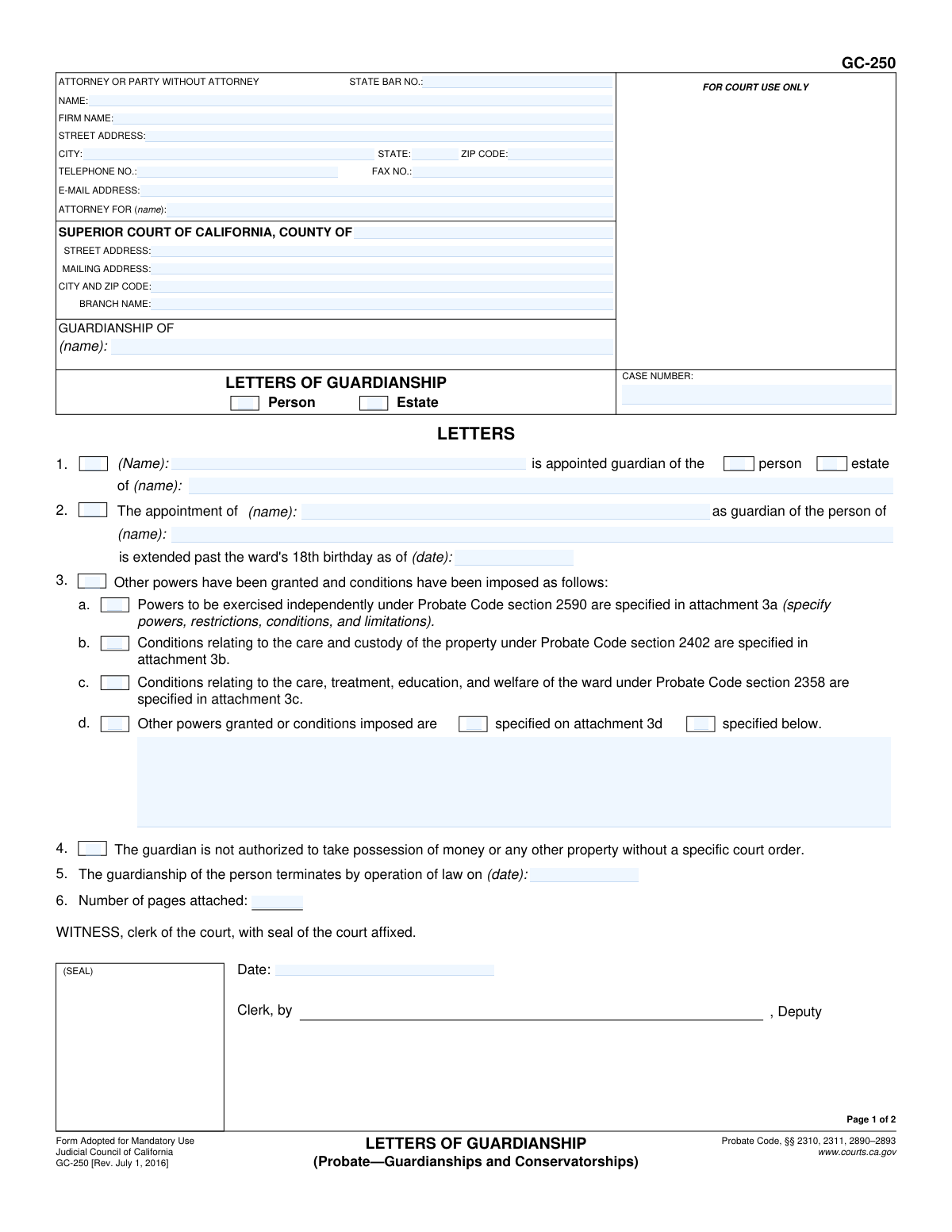
Yes! You can use AI to fill out Form GC-250, Letters of Guardianship

California Form GC-250, Letters of Guardianship, is a crucial legal document issued by the court that officially confirms the appointment of a guardian for a minor's person, estate, or both. It serves as the official proof of authority that the guardian presents to institutions like schools, healthcare providers, and banks, enabling them to legally perform their duties. Today, this form can be filled out quickly and accurately using AI-powered services like Instafill.ai, which can also convert non-fillable PDF versions into interactive fillable forms.
GC-250 is part of the California court forms category on Instafill.
Our AI automatically handles information lookup, data retrieval, formatting, and form filling.
It takes less than a minute to fill out GC-250 using our AI form filling.
Securely upload your data. Information is encrypted in transit and deleted immediately after the form is filled out.

Form specifications

Form name: Form GC-250, Letters of Guardianship
Number of fields: 51
Number of pages: 1
Language: English
main-image

Instafill Demo: How to fill out PDF forms in seconds with AI

How to Fill Out GC-250 Online for Free in 2026

Are you looking to fill out a GC-250 form online quickly and accurately? Instafill.ai offers the #1 AI-powered PDF filling software of 2026, allowing you to complete your GC-250 form in just 37 seconds or less.
Follow these steps to fill out your GC-250 form online using Instafill.ai:
  1. 1 Navigate to Instafill.ai and upload or select the Form GC-250, Letters of Guardianship.
  2. 2 Use the AI assistant to input the Superior Court information, including the county, branch, and case number.
  3. 3 Enter the personal details for the attorney or filing party, the appointed guardian, and the minor (ward).
  4. 4 Specify if the guardianship is for the 'person' or 'estate' and detail any special powers, conditions, or limitations as ordered by the court, noting any attachments.
  5. 5 The appointed guardian must complete the affirmation section by providing their signature, date, and location.
  6. 6 Review all entered information for accuracy, then download the completed form to be presented to the court clerk for the official witness signature, seal, and filing.

Our AI-powered system ensures each field is filled out correctly, reducing errors and saving you time.

Why Choose Instafill.ai for Your Fillable GC-250 Form?

Speed

Complete your GC-250 in as little as 37 seconds.

Up-to-Date

Always use the latest 2026 GC-250 form version.

Cost-effective

No need to hire expensive lawyers.

Accuracy

Our AI performs 10 compliance checks to ensure your form is error-free.

Security

Your personal information is protected with bank-level encryption.

Frequently Asked Questions About Form GC-250

This is an official court document that serves as legal proof that you have been appointed as a guardian for a minor. You will use it to demonstrate your authority to schools, doctors, banks, and other institutions.

The court clerk prepares and issues the Letters of Guardianship after a judge approves the guardianship. The appointed guardian must then sign the 'Affirmation' section on page 2 to make it valid.

A guardian of the 'person' is responsible for the minor's care, such as housing, health, and education. A guardian of the 'estate' manages the minor's finances and property. Section 1 of the form will specify which role you have been appointed to.

You must sign the Affirmation on page 2. Then, you can present certified copies of the Letters to any person or institution that requires proof of your legal authority to act on the minor's behalf.

The Affirmation is your sworn promise to the court that you will lawfully perform all the duties required of a guardian. You must sign and date this section for the Letters to be effective.

Attachments are additional pages that describe any special powers the court has granted you or specific conditions and restrictions placed on the guardianship. These might relate to managing property or making decisions for the minor.

When you use these Letters to access a minor's assets, the financial institution is legally required to notify the court by filing one of those forms. This is a protective measure to ensure the minor's assets are being handled correctly under court supervision.

Only if you are appointed guardian of the estate and have a specific court order authorizing it. The form clearly states that a guardian is not authorized to take possession of money or property without a specific order from the court.

The Letters are valid as long as the guardianship is in effect and have not been revoked by the court. The 'Certification' from the court clerk confirms that the Letters are currently in full force.

You can request a new certified copy from the clerk's office of the Superior Court that issued the original document. Be aware that there may be a fee for each certified copy you request.

Yes, while the court issues this final form, AI services like Instafill.ai can help you accurately auto-fill the initial petition and other related forms required to establish the guardianship, saving you time and reducing errors.

You can upload the necessary guardianship forms, such as the initial petition, to Instafill.ai. The service uses AI to help you fill in the required fields accurately and efficiently before you print the forms for filing.

Services like Instafill.ai can solve this problem. You can upload the flat, non-fillable PDF, and the platform will convert it into an interactive, fillable form that you can easily complete online.

Compliance GC-250
Validation Checks by Instafill.ai

1
Ensures Case Number Consistency Across Pages
Validates that the Case Number field is identical on page 1 and page 2 of the form. This is critical for document integrity, ensuring that all pages are correctly associated with the same legal case file. A mismatch could lead to filing errors, rejection by the court clerk, or incorrect record-keeping.
2
Requires Guardianship Type Selection
Verifies that at least one of the checkboxes, 'person' or 'estate', is selected in section 1. This selection is fundamental as it defines the legal scope of the guardian's authority over the ward's life or finances. Failure to specify the type of guardianship makes the letters legally ambiguous and invalid.
3
Validates Guardian Name Consistency
Confirms that the guardian's name entered in section 1 ('NameGdn1_ft') is identical to the appointee's printed name in the Affirmation section on page 2 ('AppointeeName_ft'). This cross-reference ensures the person taking the oath is the same person being appointed by the court. Discrepancies could indicate a serious clerical error or potential fraud.
4
Validates All Date Formats
Checks that all date fields on the form (e.g., 'Date_ft', 'DateSigApptee_ft', 'Ward18thBday2_ft') are entered in a valid and unambiguous format, such as MM/DD/YYYY. Proper date formatting is essential for legal documents to establish clear timelines and deadlines. An invalid format could render key dates, like the start or termination of guardianship, unenforceable.
5
Ensures Affirmation Section is Complete
Verifies that the guardian's affirmation on page 2 is fully completed, including the execution date ('DateSigApptee_ft'), place ('PlaceSigSigned_ft'), and the appointee's typed or printed name ('AppointeeName_ft'). This section represents the guardian's sworn oath to perform their duties, and its completeness is a legal prerequisite for the letters to be valid. An incomplete affirmation invalidates the guardian's official acceptance of their role.
6
Verifies Attachment Count Logic
Checks if the 'Number of pages attached' field ('NoPages5_ft') is greater than zero when any of the checkboxes in section 3 (referencing attachments 3a, 3b, 3c, or 3d) are marked. This ensures that if special powers or conditions are indicated, the corresponding attachment documents are accounted for. Missing this validation could result in the court overlooking critical attachments that define the scope of the guardianship.
7
Validates Attorney State Bar Number
If an attorney's name ('AttyName_ft') is provided, this check validates that the State Bar Number ('AttyBarNo_dc') is present and formatted correctly as a number. This is important for verifying the attorney's credentials and their standing with the California State Bar. An invalid or missing number could delay processing or indicate that the person listed is not authorized to practice.
8
Requires Court County Specification
Ensures that the 'COUNTY OF' field ('CrtCounty_ft') at the top of the form is filled out. This specifies the legal jurisdiction of the court issuing the letters, which is a mandatory piece of information for identifying the correct court. Omitting the county makes the document invalid and un-fileable.
9
Requires Guardian and Ward Names
Validates that the name of the appointed guardian ('NameGdn1_ft') and the name of the ward ('NameWard1_ft') are both filled in section 1. These are the primary parties to the legal action, and their identification is the most fundamental requirement of the form. The document is legally meaningless without this information.
10
Checks for Logical Date Sequence
Verifies that dates follow a logical chronological order, for example, the guardianship termination date in section 5 must be after the court's witness date ('Date_ft'). This check prevents logically impossible or contradictory timelines from being entered into a legal document. An illogical date sequence could create legal challenges and render the terms of the guardianship void.
11
Validates ZIP Code Format
This check ensures that all ZIP code fields ('AttyZip_ft', 'CityZip_ft') contain a valid 5-digit or 9-digit (ZIP+4) numeric format. Correct ZIP codes are essential for ensuring that legal notices and other correspondence sent via mail are delivered to the correct address. Incorrect formatting can lead to returned mail and significant delays in legal proceedings.
12
Validates Email Address Format
Checks that the value entered in the E-Mail Address field ('Email_ft'), if provided, conforms to the standard format for an email address (e.g., [email protected]). This is important for ensuring that electronic service and communication from the court or other parties are deliverable. An invalid email address would cause communication failures, potentially leading to missed deadlines or hearings.

Common Mistakes in Completing GC-250

Incorrectly Identifying the Ward in the Case Caption

Filers often mistakenly write the guardian's name in the 'GUARDIANSHIP OF' field at the top of the form. This field is exclusively for the full legal name of the minor child (the ward). This error can cause significant confusion, leading to incorrect court records and potential rejection of the filing, requiring correction and resubmission. To avoid this, always enter the minor's name exactly as it appears on other legal documents, such as their birth certificate.

Confusing 'Party Without Attorney' and Attorney Information

Self-represented individuals often get confused by the 'ATTORNEY OR PARTY WITHOUT ATTORNEY' section. They might leave it blank or only partially fill it out. If you do not have an attorney, you must enter your own full name, address, and phone number in this section. This mistake can leave the court with no way to contact you, causing you to miss important notices and deadlines. Ensure all your personal contact details are entered accurately here.

Reversing Guardian and Ward Names in Item 1

In section 1, which reads '(Name): is appointed guardian of the... of (name):', it is common to accidentally swap the guardian's name and the ward's name. This critical error legally misidentifies the parties involved and will invalidate the document. To prevent this, carefully read the sentence and place the guardian's name first and the minor's name second. AI-powered tools like Instafill.ai can help by using contextual awareness to populate these fields correctly based on initial inputs.

Improperly Selecting Guardianship Type (Person vs. Estate)

In section 1, filers must check whether the guardianship is for the 'person,' the 'estate,' or both. A 'guardianship of the person' involves care and custody, while a 'guardianship of the estate' involves managing the minor's finances. Checking the wrong box, or failing to check both when needed, can result in the guardian lacking the legal authority required for their duties. This mistake often requires a new court order to fix, causing delays and extra legal fees.

Mismatched or Missing Attachments

Section 3 allows for granting special powers or conditions by referencing attachments (3a, 3b, 3c, 3d). A frequent error is checking a box for an attachment but then forgetting to include the corresponding document with the filing. Another common mistake is failing to update the 'Number of pages attached' field in section 6. This discrepancy can lead the court clerk to deem the filing incomplete, halting the process until all documents are submitted correctly.

Filling Out Sections Reserved for the Court

Eager to be thorough, filers sometimes write in sections clearly marked 'FOR COURT USE ONLY,' such as the Case Number box (if not yet assigned) or the Clerk's Certification section on page 2. This can disrupt the court's internal processing and may require the form to be redone. Always leave fields designated for court or clerk use completely blank. If you are filling out a non-fillable PDF, tools like Instafill.ai can convert it into a smart, fillable version that helps guide you away from restricted fields.

Incorrectly Executing the Affirmation

The 'AFFIRMATION' on page 2 must be completed by the appointed guardian. Common mistakes include forgetting to sign, dating it before the judge has signed the appointment order, or failing to type or print their name legibly beneath the signature. An improperly executed affirmation can invalidate the Letters of Guardianship. The date should be the day you are signing it, and the signature must be original (not a copy).

Inconsistent Case Number and Party Names

The Case Number and the 'GUARDIANSHIP OF' name must be entered on both page 1 and page 2. People often forget to fill in the information on the second page or make a typo, creating an inconsistency. Any mismatch can lead to the pages being separated or the document being rejected. Using an autofill tool like Instafill.ai ensures that recurring information like case numbers and names are populated consistently and accurately across all pages of the document.

Omitting the Guardianship Termination Date

Section 5 requires the date on which the guardianship of the person terminates by law, which is typically the ward's 18th birthday. Filers often leave this blank or enter an incorrect date due to miscalculation. Leaving this information out creates ambiguity and can cause issues when presenting the Letters to institutions like schools or banks. To avoid this, carefully calculate the minor's 18th birthday and enter it in MM/DD/YYYY format.

Using an Outdated Version of the Form

Judicial Council forms are periodically updated, as indicated by the revision date in the footer (e.g., 'Rev. July 1, 2016'). Submitting an obsolete version of a mandatory form is a common reason for immediate rejection by the court clerk, forcing you to start over. Always ensure you are using the most current version by downloading it directly from the official California Courts website. This simple check can save you weeks of delay.
Saved over 80 hours a year

“I was never sure if my IRS forms like W-9 were filled correctly. Now, I can complete the forms accurately without any external help.”

Kevin Martin Green

Your data stays secure with advanced protection from Instafill and our subprocessors

Robust compliance program

Transparent business model

You’re not the product. You always know where your data is and what it is processed for.

ISO 27001, HIPAA, and GDPR

Our subprocesses adhere to multiple compliance standards, including but not limited to ISO 27001, HIPAA, and GDPR.

Security & privacy by design

We consider security and privacy from the initial design phase of any new service or functionality. It’s not an afterthought, it’s built-in, including support for two-factor authentication (2FA) to further protect your account.

Fill out GC-250 with Instafill.ai

Worried about filling PDFs wrong? Instafill securely fills form-gc-250-letters-of-guardianship forms, ensuring each field is accurate.