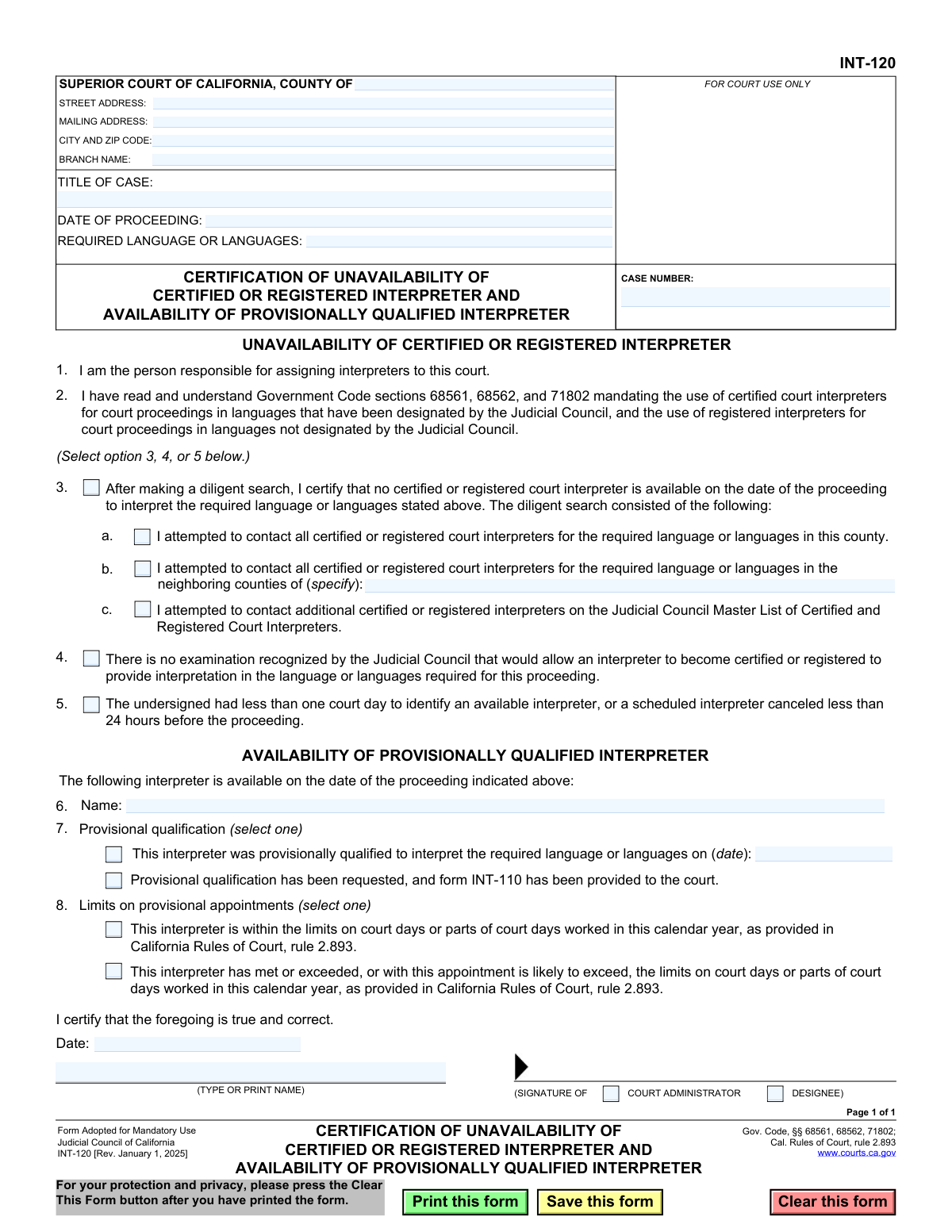
Yes! You can use AI to fill out Form INT-120, Certification of Unavailability of Certified or Registered Interpreter and Availability of Provisionally Qualified Interpreter

Form INT-120 is a mandatory California court form used by the person responsible for assigning interpreters to certify that a diligent search for a certified or registered interpreter was unsuccessful for a specific proceeding. It also documents the availability and details of a provisionally qualified interpreter who can serve instead, ensuring legal requirements for court interpretation are met. Today, this form can be filled out quickly and accurately using AI-powered services like Instafill.ai, which can also convert non-fillable PDF versions into interactive fillable forms.
INT-120 is part of the California court forms category on Instafill.
Our AI automatically handles information lookup, data retrieval, formatting, and form filling.
It takes less than a minute to fill out INT-120 using our AI form filling.
Securely upload your data. Information is encrypted in transit and deleted immediately after the form is filled out.

Form specifications

Form name: Form INT-120, Certification of Unavailability of Certified or Registered Interpreter and Availability of Provisionally Qualified Interpreter
Number of fields: 31
Number of pages: 1
Language: English
main-image

Instafill Demo: How to fill out PDF forms in seconds with AI

How to Fill Out INT-120 Online for Free in 2026

Are you looking to fill out a INT-120 form online quickly and accurately? Instafill.ai offers the #1 AI-powered PDF filling software of 2026, allowing you to complete your INT-120 form in just 37 seconds or less.
Follow these steps to fill out your INT-120 form online using Instafill.ai:
  1. 1 Navigate to Instafill.ai and upload or select the Form INT-120.
  2. 2 Enter the Superior Court information, including county, address, and branch name, along with the case title and number.
  3. 3 Specify the date of the proceeding and the required language or languages for interpretation.
  4. 4 Certify the unavailability of a certified or registered interpreter by selecting the appropriate reason, such as detailing the diligent search efforts.
  5. 5 Provide the name and provisional qualification details of the available interpreter.
  6. 6 Indicate whether the provisional interpreter is within the statutory limits for court days worked in the calendar year.
  7. 7 Review all entered information for accuracy, then date and sign the certification as the court administrator or designee before submitting.

Our AI-powered system ensures each field is filled out correctly, reducing errors and saving you time.

Why Choose Instafill.ai for Your Fillable INT-120 Form?

Speed

Complete your INT-120 in as little as 37 seconds.

Up-to-Date

Always use the latest 2026 INT-120 form version.

Cost-effective

No need to hire expensive lawyers.

Accuracy

Our AI performs 10 compliance checks to ensure your form is error-free.

Security

Your personal information is protected with bank-level encryption.

Frequently Asked Questions About Form INT-120

This form is used by a California Superior Court to officially document that a certified or registered interpreter is unavailable for a proceeding and that a provisionally qualified interpreter is being used instead.

The person responsible for assigning interpreters to the court, such as a court administrator or their designee, is the one who completes and signs this form. It is an internal court document and not for the parties in the case.

This form is used whenever the court must appoint a provisionally qualified interpreter because a diligent search failed to find an available certified or registered interpreter for the required language.

You will need the full case information (court, case title, case number), the date of the proceeding, the required language, and the name and qualification status of the provisionally qualified interpreter.

A diligent search, as described in Section 3, includes attempting to contact all certified or registered interpreters in the local county, neighboring counties, and on the Judicial Council Master List.

If the Judicial Council does not recognize an exam for the required language, you can indicate this in Section 4 of the form as the reason for using a provisionally qualified interpreter.

If you had less than one court day to find an interpreter or a scheduled one canceled less than 24 hours before the proceeding, you can note this in Section 5 to justify the use of a provisional interpreter.

Provisional qualification means the court has found the interpreter competent to interpret in a specific language for a particular case, even if they have not yet completed the state's full certification or registration process.

This refers to the maximum number of days a provisionally qualified interpreter can work in a calendar year, as defined by court rules, to encourage them to pursue full certification.

This form is filed with the Superior Court for the specific case it pertains to, becoming part of the official court record for that proceeding.

Yes, services like Instafill.ai use AI to auto-fill form fields with case details and other repetitive information, which helps save time and ensures accuracy.

You can upload the INT-120 PDF to Instafill.ai, and the platform will make it a fillable form. You can then type in your information, check the appropriate boxes, and download the completed document for filing.

If you have a non-fillable or 'flat' PDF, you can use a service like Instafill.ai. It can convert the document into an interactive, fillable form that you can complete on your computer.

Compliance INT-120
Validation Checks by Instafill.ai

1
Mandatory Case Number
Validates that the 'CASE NUMBER' field is not empty. The case number is a critical identifier that links this certification form to a specific legal proceeding. If the case number is missing, the document cannot be correctly filed or associated with its corresponding case file, causing significant administrative delays.
2
Date of Proceeding Validity
Ensures the 'DATE OF PROCEEDING' field contains a valid date in the correct format (e.g., MM/DD/YYYY). This date is the central point of the certification, specifying when the interpreter was needed. An invalid or missing date renders the form's purpose unclear and invalidates the certification.
3
Required Language Specification
Checks that the 'REQUIRED LANGUAGE OR LANGUAGES' field is filled out. The entire purpose of the form is to address the unavailability of an interpreter for a specific language. If this field is blank, the form is incomplete and cannot be processed, as it's unknown which language interpreter was sought.
4
Exclusive Unavailability Reason Selection
Verifies that the user has selected exactly one option from the choices in items 3, 4, or 5. The form instructs the user to select a single reason for unavailability. This validation prevents ambiguous or contradictory justifications for using a provisionally qualified interpreter.
5
Conditional Diligent Search Substantiation
If option 3 ('After making a diligent search...') is selected, this validation ensures that at least one of the sub-options (3a, 3b, or 3c) is also checked. This is required to substantiate the claim of a 'diligent search' by providing details on the actions taken. A failure means the certification for a diligent search is incomplete and lacks the required proof.
6
Conditional Neighboring County Specification
Checks that if checkbox 3b ('attempted to contact... in the neighboring counties') is selected, the corresponding text field specifying the counties is not empty. This provides necessary evidence for the search effort. An empty field would make the attestation in 3b unverifiable and incomplete.
7
Mandatory Provisional Interpreter Name
Validates that the interpreter's 'Name' field in item 6 is filled in. The form certifies the availability of a specific provisionally qualified interpreter. Without a name, the certification is invalid as it does not identify the individual who will be providing the interpretation services.
8
Exclusive Provisional Qualification Status Selection
Ensures that exactly one of the two options in item 7, regarding the interpreter's provisional qualification status, is selected. These options are mutually exclusive and define the basis of the interpreter's qualification. This check prevents contradictory or incomplete information about the interpreter's status.
9
Conditional Provisional Qualification Date
If the first option in item 7 ('This interpreter was provisionally qualified...') is chosen, this check verifies that the associated date field is filled with a valid date. This date is a critical piece of evidence for the interpreter's qualification status and must be provided to complete the certification.
10
Exclusive Appointment Limit Status Selection
Verifies that exactly one of the two mutually exclusive options in item 8, concerning the interpreter's work limits under court rules, is selected. This is a required declaration for compliance purposes. Failing to select an option leaves a critical compliance question unanswered.
11
Mandatory Signature Date
Ensures the 'Date' field in the final certification block is filled with a valid date. This date establishes when the certification was officially made by the court administrator or designee. An undated certification is legally insufficient and may be rejected.
12
Logical Signature Date
Compares the signature 'Date' with the 'DATE OF PROCEEDING'. The signature date should logically be on or before the proceeding date. Certifying unavailability for an event after it has already passed would be illogical and may indicate a data entry error that needs correction.
13
Mandatory Printed Name of Certifier
Validates that the 'TYPE OR PRINT NAME' field in the signature block is not empty. This field clearly identifies the court official who is making the certification. Without this information, the accountability and authority of the signer cannot be confirmed, potentially invalidating the document.
14
Mandatory Court County
Ensures the 'COUNTY OF' field at the top of the form is filled. This identifies the specific Superior Court jurisdiction for which the form is being filed. This is a top-level identifier without which the form cannot be correctly routed or filed within the court system.

Common Mistakes in Completing INT-120

Incorrect or Incomplete Case Number

Users often enter the case number with incorrect formatting, typos, or missing characters. This typically happens due to manual data entry errors or referencing an incorrect source document. An incorrect case number can lead to the form being rejected by the clerk, misfiled, or detached from the official case record, causing significant administrative delays and potentially impacting the proceeding's timeline.

Ambiguous Language Specification

In the 'REQUIRED LANGUAGE' field, filers may enter a general language family like 'Chinese' instead of the specific language required, such as 'Mandarin' or 'Cantonese'. This ambiguity occurs from a lack of specificity and can result in the court assigning an interpreter who cannot communicate with the party. To avoid this, always specify the exact language or dialect needed for the court proceeding to ensure effective communication.

Selecting Multiple Unavailability Reasons

The form requires the filer to select only one option from items 3, 4, or 5 to certify the reason for unavailability. A common mistake is checking multiple boxes, which invalidates the certification. This error usually stems from rushing or misunderstanding that only a single, primary reason should be provided. To prevent this, carefully review the options and select the one that most accurately reflects the situation.

Failing to Specify Neighboring Counties

When certifying a 'diligent search' under item 3, if box 3b is checked, the filer must list the specific neighboring counties that were contacted. Filers often check the box but forget to fill in the county names, rendering the certification incomplete. This omission can lead to the court questioning the diligence of the search and rejecting the form. Always provide the required details to validate your search efforts.

Incorrectly Claiming No Certification Exam Exists

Selecting option 4, which states no certification exam exists, for a language that is designated by the Judicial Council (e.g., Spanish, Korean, Russian) is a serious error. This mistake happens when the filer is unaware of the current list of certified languages. This misrepresentation can invalidate the interpreter's appointment and may have legal repercussions for the proceeding. Always verify the language's status on the Judicial Council's website before selecting this option.

Missing Provisional Qualification Date

In section 7, if the filer selects the option indicating the interpreter was previously qualified, they must also provide the specific date of qualification. Forgetting to enter this date is a frequent oversight that leaves the form incomplete. Without the date, the court cannot verify the interpreter's status, leading to rejection of the form. Ensure all required fields corresponding to a checkbox selection are filled.

Misstating Interpreter's Annual Work Limits

Section 8 requires the filer to certify whether the provisionally qualified interpreter is within their annual appointment limits as per court rules. Incorrectly stating this status, often due to poor record-keeping, is a significant compliance error. This can lead to the appointment being deemed invalid and may create grounds for an appeal. It is crucial to consult accurate, up-to-date records of the interpreter's workdays before completing this section.

Forgetting the Signature or Date

An unsigned or undated form is legally invalid. Filers, especially when dealing with paper or flat PDF copies, can easily overlook the signature or date fields at the bottom. This simple mistake will cause the form to be immediately rejected by the court, halting the process and requiring resubmission. Always double-check that the form is signed and dated by the authorized court administrator or designee.

Inconsistent Court Branch Information

Filers may enter a generic county street address but fail to specify the correct branch name for large, multi-location superior courts. This can cause the document to be sent to the wrong courthouse, leading to filing delays and confusion. To avoid this, always verify and include the specific branch name where the proceeding is being held. AI-powered tools like Instafill.ai can help by auto-populating correct and complete court addresses based on the county and case type.

Leaving Unavailability Section Blank

A critical error is submitting the form without selecting any of the options in items 3, 4, or 5. The entire purpose of this section is to provide a legal reason for the unavailability of a certified or registered interpreter. Submitting the form without this information makes it useless and guarantees its rejection. Ensure one, and only one, of these options is selected before signing.

Using a Non-Fillable PDF Manually

This form is often available as a non-fillable PDF, leading to manual entry that is prone to errors, illegible handwriting, and formatting issues. This can cause the court clerk to reject the form or misinterpret the information provided. To avoid these issues, tools like Instafill.ai can convert flat PDFs into interactive, fillable forms, ensuring all data is entered clearly and accurately, which helps prevent rejections and delays.
Saved over 80 hours a year

“I was never sure if my IRS forms like W-9 were filled correctly. Now, I can complete the forms accurately without any external help.”

Kevin Martin Green

Your data stays secure with advanced protection from Instafill and our subprocessors

Robust compliance program

Transparent business model

You’re not the product. You always know where your data is and what it is processed for.

ISO 27001, HIPAA, and GDPR

Our subprocesses adhere to multiple compliance standards, including but not limited to ISO 27001, HIPAA, and GDPR.

Security & privacy by design

We consider security and privacy from the initial design phase of any new service or functionality. It’s not an afterthought, it’s built-in, including support for two-factor authentication (2FA) to further protect your account.

Fill out INT-120 with Instafill.ai

Worried about filling PDFs wrong? Instafill securely fills form-int-120-certification-of-unavailability-of-certified-or-registered-interpreter-and-availability-of-provisionally forms, ensuring each field is accurate.