Yes! You can use AI to fill out Form JURY-003, Juror Questionnaire for Expedited Jury Trials

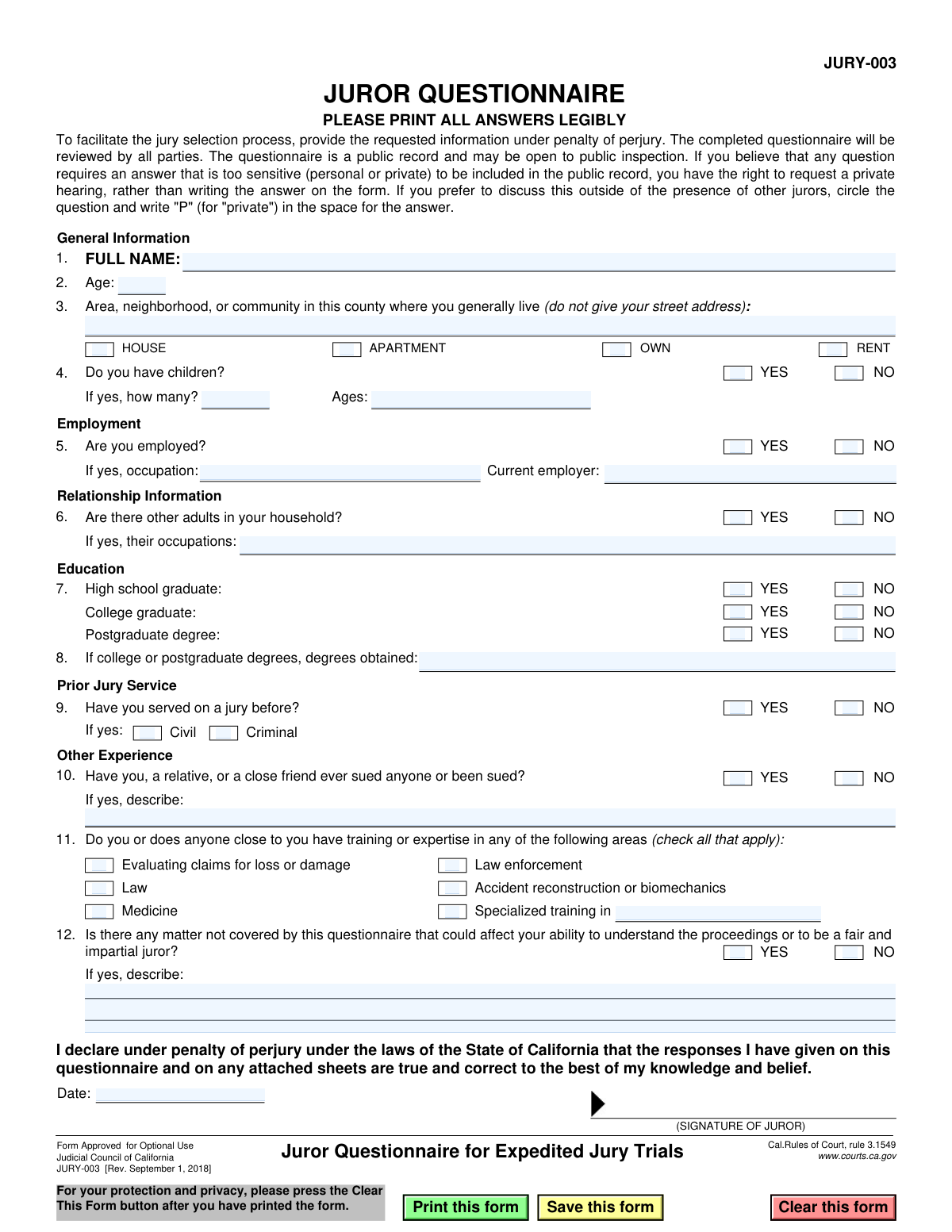
Form JURY-003, the Juror Questionnaire for Expedited Jury Trials, is a document approved by the Judicial Council of California for optional use in court proceedings. It is designed to collect essential background information from prospective jurors—including personal details, employment history, and prior legal experiences—to help attorneys and the court select a fair and impartial jury more efficiently. Today, this form can be filled out quickly and accurately using AI-powered services like Instafill.ai, which can also convert non-fillable PDF versions into interactive fillable forms.
JURY-003 is part of the California court forms category on Instafill.
Our AI automatically handles information lookup, data retrieval, formatting, and form filling.
It takes less than a minute to fill out JURY-003 using our AI form filling.
Securely upload your data. Information is encrypted in transit and deleted immediately after the form is filled out.

Form specifications

Form name: Form JURY-003, Juror Questionnaire for Expedited Jury Trials
Number of fields: 47
Number of pages: 1
Language: English
main-image

Instafill Demo: How to fill out PDF forms in seconds with AI

How to Fill Out JURY-003 Online for Free in 2026

Are you looking to fill out a JURY-003 form online quickly and accurately? Instafill.ai offers the #1 AI-powered PDF filling software of 2026, allowing you to complete your JURY-003 form in just 37 seconds or less.
Follow these steps to fill out your JURY-003 form online using Instafill.ai:
  1. 1 Navigate to Instafill.ai and upload or select the Form JURY-003, Juror Questionnaire for Expedited Jury Trials.
  2. 2 Use the AI assistant to automatically populate your general information, including your full name, age, and area of residence.
  3. 3 Answer the questions regarding your household, children, and employment status, following the guided prompts.
  4. 4 Provide details about your educational background and any prior jury service experience you may have.
  5. 5 Disclose any relevant training or experience in fields like law, medicine, or law enforcement for yourself or those close to you.
  6. 6 Carefully review all the information entered by the AI for accuracy, then date and sign the form electronically, declaring the responses are true under penalty of perjury.
  7. 7 Download the completed JURY-003 form to print for court or submit as directed.

Our AI-powered system ensures each field is filled out correctly, reducing errors and saving you time.

Why Choose Instafill.ai for Your Fillable JURY-003 Form?

Speed

Complete your JURY-003 in as little as 37 seconds.

Up-to-Date

Always use the latest 2026 JURY-003 form version.

Cost-effective

No need to hire expensive lawyers.

Accuracy

Our AI performs 10 compliance checks to ensure your form is error-free.

Security

Your personal information is protected with bank-level encryption.

Frequently Asked Questions About Form JURY-003

This form is used to gather information from potential jurors to help the court and attorneys select a fair and impartial jury for an expedited trial, which is a shorter and faster type of trial.

Individuals who have been summoned for jury duty and are being considered as potential jurors for an expedited jury trial in California must complete this questionnaire.

No, the form states that the completed questionnaire is a public record and may be open to public inspection. The attorneys and judge involved in the case will also review your answers.

You have the right to request a private hearing to discuss sensitive answers. To do this, circle the question number and write 'P' (for 'private') in the answer space on the form.

No, the form specifically asks you to list the area, neighborhood, or community where you live, but instructs you not to provide your street address.

This means you are making a legal declaration that all your answers are true and correct to the best of your knowledge. Providing false information intentionally can have serious legal consequences.

The completed questionnaire will be reviewed by the judge and the attorneys for all parties to facilitate the jury selection process. It becomes part of the public record for the case.

This question aims to identify any expertise that might influence your understanding of the case, such as in finance, engineering, or other technical fields not listed. If you have formal training or significant work experience in a specific area, you should describe it.

This is your opportunity to honestly disclose any personal experiences, beliefs, or biases that you think might prevent you from being completely fair and impartial to both sides in the case. Being truthful helps ensure a fair trial for everyone.

Submission instructions are typically provided with your jury summons. Generally, you will bring the completed and signed questionnaire with you to the courthouse on your assigned date.

Yes, services like Instafill.ai use AI to help you accurately auto-fill form fields with your personal information, which can save time and reduce errors. However, you must personally verify that all answers are truthful and accurate before signing.

You can use a service like Instafill.ai to upload the PDF and fill it out on your computer. The platform allows you to type your answers directly into the fields before printing the completed form for submission.

If you have a non-fillable or 'flat' PDF, you can upload it to a tool like Instafill.ai. It can convert the PDF into an interactive, fillable form online, allowing you to easily type your answers.

Compliance JURY-003
Validation Checks by Instafill.ai

1
Ensures Full Name is Provided
This check verifies that the 'FULL NAME' field is not empty. A complete name is essential for identifying the juror in court records and proceedings. If this field is left blank, the form submission should be rejected as incomplete, and the user prompted to provide their full name.
2
Validates Juror Age
This check ensures the 'Age' field contains a numeric value greater than or equal to 18, the minimum legal age for jury service in most jurisdictions. It prevents submissions from individuals who are not legally eligible to serve. An invalid or missing age will result in a validation error, requiring the user to enter a valid age.
3
Verifies Conditional Employment Details
This validation checks that if the juror answers 'YES' to 'Are you employed?', the 'occupation' and 'Current employer' fields must be filled out. This information is crucial for attorneys to identify potential biases related to a juror's profession. If the condition is met and the fields are empty, the submission is considered incomplete.
4
Checks for Conditional Child Information
If a juror answers 'YES' to 'Do you have children?', this check ensures that the 'how many?' and 'Ages' fields are completed. Conversely, if the answer is 'NO', these fields should be empty. This prevents incomplete data and ensures follow-up questions are answered when required.
5
Validates Child Count and Ages Consistency
This check performs a logical comparison between the number entered in 'how many?' children and the number of ages listed in the 'Ages' field. For example, if a juror indicates they have 3 children, the system should expect to find approximately three ages listed. This helps ensure the accuracy and internal consistency of the provided information.
6
Ensures Educational Progression Logic
This validation enforces a logical rule: if a juror indicates they have a 'Postgraduate degree', they must also have indicated 'YES' for 'College graduate'. It is impossible to obtain a postgraduate degree without first completing a college degree. This check prevents logically inconsistent or erroneous data entry.
7
Requires Degree Details if College Educated
If a juror checks 'YES' for 'College graduate' or 'Postgraduate degree', this validation ensures the 'degrees obtained' field is not left empty. This provides necessary context for the parties to understand the juror's educational background. A failure would prompt the user to specify their degree(s).
8
Verifies Conditional Prior Jury Service Type
This check ensures that if a juror answers 'YES' to 'Have you served on a jury before?', they must select at least one of the case types ('Criminal' or 'Civil'). This follow-up information is critical for understanding the juror's prior experience. If 'YES' is selected but no type is chosen, the form is incomplete.
9
Requires Description for Prior Lawsuits
If the juror answers 'YES' to the question about having sued or been sued, this validation requires that the corresponding 'describe' field is filled out. This ensures that relevant litigation history, which could indicate bias, is fully disclosed. An empty description field after a 'YES' answer would trigger an error.
10
Validates Date Format and Plausibility
This check verifies that the 'Date' field contains a valid date in a recognized format (e.g., MM/DD/YYYY). It also ensures the date is not in the future or unreasonably far in the past. This is important for establishing when the declaration under penalty of perjury was made.
11
Flags 'Private' Answer Requests
This check scans text fields for the specific character 'P', which the instructions state should be used to request a private hearing for sensitive answers. Instead of treating this as an error, the system should flag the response for manual review by court staff. This respects the juror's right to privacy while ensuring the form is processed correctly.
12
Ensures Community Field Privacy
This validation checks that the 'Area, neighborhood, or community' field does not contain a specific street address, as explicitly instructed on the form. It may scan for patterns like street numbers at the beginning of the string or keywords like 'St.', 'Ave.', or 'Blvd.'. This protects the juror's private information from being entered into a public record.
13
Requires Description for 'Other Matters'
If a juror answers 'YES' to the final question, 'Is there any matter not covered by this questionnaire that could affect your ability...to be a fair and impartial juror?', this check ensures the description field is completed. This is a critical catch-all question for identifying potential bias. An empty description would render the 'YES' answer useless and make the form incomplete.
14
Verifies Conditional Other Adult Occupations
This check ensures that if the juror answers 'YES' to 'Are there other adults in your household?', the 'their occupations' field is not empty. This information helps attorneys understand the juror's home environment and potential influences. If the field is empty after a 'YES' response, the submission is flagged as incomplete.

Common Mistakes in Completing JURY-003

Providing a Specific Street Address Instead of a General Area

Question 3 explicitly asks for the 'Area, neighborhood, or community' and states '(do not give your street address)'. Many people miss this instruction and provide their full home address out of habit. This creates a privacy risk as the questionnaire is a public record, and it fails to follow the court's specific instructions. To avoid this, carefully read every instruction and provide only the general neighborhood or city area where you live.

Incomplete Follow-up to 'Yes' Answers

Several questions (e.g., #4, #8, #11) require additional details if the answer is 'Yes'. A common mistake is to check 'Yes' but then leave the corresponding description field blank, such as failing to list children's ages or describe a prior lawsuit. This forces the court and attorneys to ask for clarification, slowing down the jury selection process. Always double-check that you have provided the required follow-up information for every 'Yes' response.

Vague Occupation or Employer Information

When asked for their occupation in Question 5, individuals often use vague terms like 'analyst', 'manager', or 'consultant' without context. This lack of specificity requires further questioning to understand potential biases or expertise. To prevent this, provide a more descriptive job title (e.g., 'Financial Analyst for a bank') and the specific name of your employer, not just a parent corporation.

Forgetting the Signature and Date

Forgetting to sign and date the questionnaire is one of the most critical and frequent errors. The signature is a declaration made 'under penalty of perjury,' and without it, the entire document is legally invalid. This oversight can lead to your questionnaire being rejected and may cause significant delays. Always perform a final review of the form, paying special attention to the signature and date fields before submission.

Missing Specifics on Educational Degrees

In Question 6, prospective jurors may check the box for 'College graduate' or 'Postgraduate degree' but neglect to fill in the field asking for the 'degrees obtained'. Simply indicating you have a degree is not enough; the court needs to know the field of study (e.g., 'B.S. in Engineering', 'M.A. in Psychology'). This information helps assess potential expertise or biases relevant to the case, so be sure to list the specific degrees you have earned.

Ignoring the 'Private Answer' Procedure

The form provides a specific instruction for sensitive answers: circle the question number and write 'P' to request a private hearing. Many people miss this and either write highly personal information on a public document or omit the information entirely, creating an incomplete record. Understanding and using this 'P' designation protects your privacy while still complying with the court's need for information. This ensures sensitive topics are discussed confidentially with the judge and attorneys.

Incomplete Prior Jury Service Information

When answering Question 7 about prior jury service, people often check 'Yes' but forget to specify whether the case was 'Criminal' or 'Civil'. This distinction is crucial for the attorneys to understand your previous experience with the legal system. Leaving this detail out results in an incomplete answer and requires follow-up questions. If you have served on a jury before, make sure to check one of the corresponding boxes.

Illegible Handwriting

The form explicitly requests that all answers be printed legibly, but rushed or poor handwriting can make responses unreadable. This can lead to misinterpretation of your answers or require court staff to seek you out for clarification, delaying the selection process. If the form is a non-fillable PDF, AI-powered tools like Instafill.ai can convert it into a fillable version, allowing you to type your answers for perfect legibility.

Insufficient Description of Legal Involvement

For Question 8, which asks if you or a close relation have ever sued or been sued, simply checking 'Yes' is not sufficient. The follow-up instruction 'If yes, describe' is often answered with vague phrases like 'car accident' or 'divorce'. This forces attorneys to spend valuable time asking for details during voir dire. Provide a brief but clear summary of the situation, including the general nature of the dispute and the outcome, to give a complete picture.

Leaving Open-Ended Questions Blank

Question 12 asks if 'any matter not covered' could affect impartiality, which many people leave blank if they feel it doesn't apply. However, leaving it blank is ambiguous—it's unclear if the person considered the question or simply skipped it. It is better to write 'No' or 'N/A' to affirmatively indicate that you have read the question and have nothing to add. This shows diligence and prevents the court from having to ask for confirmation.
Saved over 80 hours a year

“I was never sure if my IRS forms like W-9 were filled correctly. Now, I can complete the forms accurately without any external help.”

Kevin Martin Green

Your data stays secure with advanced protection from Instafill and our subprocessors

Robust compliance program

Transparent business model

You’re not the product. You always know where your data is and what it is processed for.

ISO 27001, HIPAA, and GDPR

Our subprocesses adhere to multiple compliance standards, including but not limited to ISO 27001, HIPAA, and GDPR.

Security & privacy by design

We consider security and privacy from the initial design phase of any new service or functionality. It’s not an afterthought, it’s built-in, including support for two-factor authentication (2FA) to further protect your account.

Fill out JURY-003 with Instafill.ai

Worried about filling PDFs wrong? Instafill securely fills form-jury-003-juror-questionnaire-for-expedited-jury-trials forms, ensuring each field is accurate.