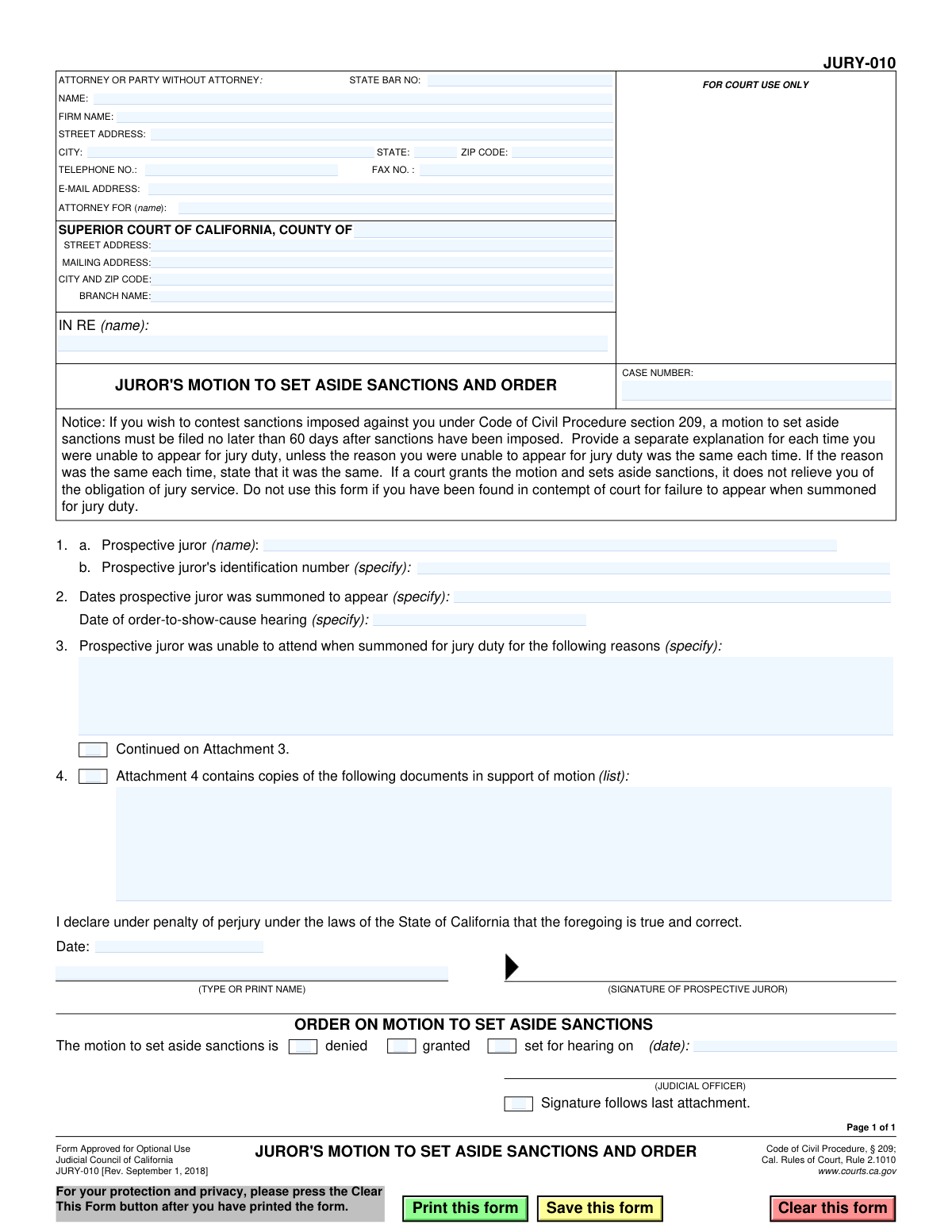
Yes! You can use AI to fill out Form JURY-010, Juror's Motion to Set Aside Sanctions and Order
Form JURY-010, Juror's Motion to Set Aside Sanctions and Order, is a legal motion filed by a prospective juror in the Superior Court of California. It is used to formally request that the court remove (set aside) financial or other sanctions that were imposed because the juror failed to appear for jury duty as summoned. This form provides a structured way for the juror to explain the reasons for their absence and must be filed within 60 days of the sanctions being imposed. Today, this form can be filled out quickly and accurately using AI-powered services like Instafill.ai, which can also convert non-fillable PDF versions into interactive fillable forms.
JURY-010 is part of the
California court forms category on Instafill.
Our AI automatically handles information lookup, data retrieval, formatting, and form filling.
It takes less than a minute to fill out JURY-010 using our AI form filling.
Securely upload your data. Information is encrypted in transit and deleted immediately after the form is filled out.
Form specifications
| Form name: | Form JURY-010, Juror's Motion to Set Aside Sanctions and Order |
| Number of fields: | 37 |
| Number of pages: | 1 |
| Language: | English |
Instafill Demo: How to fill out PDF forms in seconds with AI
How to Fill Out JURY-010 Online for Free in 2026
Are you looking to fill out a JURY-010 form online quickly and accurately? Instafill.ai offers the #1 AI-powered PDF filling software of 2026, allowing you to complete your JURY-010 form in just 37 seconds or less.
Follow these steps to fill out your JURY-010 form online using Instafill.ai:
- 1 Navigate to Instafill.ai and upload or select the JURY-010 form.
- 2 Provide your personal and court information, including the county, case name, and your contact details in the header.
- 3 Enter your prospective juror identification number, the dates you were summoned to appear, and the date of the order-to-show-cause hearing.
- 4 In section 3, write a clear and concise explanation for why you were unable to attend jury duty on the specified dates.
- 5 If you have supporting documents (e.g., a doctor's note), check the box in section 4 to indicate you are including attachments.
- 6 Review all entered information for accuracy, then date and sign the declaration under penalty of perjury.
- 7 Download the completed form to file with the appropriate court, ensuring it is filed no later than 60 days after sanctions were imposed.
Our AI-powered system ensures each field is filled out correctly, reducing errors and saving you time.
Why Choose Instafill.ai for Your Fillable JURY-010 Form?
Speed
Complete your JURY-010 in as little as 37 seconds.
Up-to-Date
Always use the latest 2026 JURY-010 form version.
Cost-effective
No need to hire expensive lawyers.
Accuracy
Our AI performs 10 compliance checks to ensure your form is error-free.
Security
Your personal information is protected with bank-level encryption.
Frequently Asked Questions About Form JURY-010
This form is used to formally ask a California court to cancel (set aside) monetary sanctions that were imposed on you for failing to appear for jury duty.
You should fill out this form if you were summoned for jury duty, failed to appear, and had sanctions imposed against you under Code of Civil Procedure section 209. Do not use this form if you have been found in contempt of court.
Yes, you must file this motion no later than 60 days after the sanctions have been imposed on you.
You will need your personal information, the court's address, your prospective juror ID number, the dates you were summoned to appear, and the date of your order-to-show-cause hearing.
You must provide a specific and truthful reason for your absence. If you missed multiple dates for different reasons, you must provide a separate explanation for each one.
If the reason you were unable to appear was the same for each date, you can state that in your explanation instead of writing it out multiple times.
It is highly recommended to attach copies of any documents that support your reason for absence, such as a doctor's note, travel records, or a letter from your employer. Note any attachments in Section 4.
No. Even if the court sets aside the sanctions, this does not relieve you of your obligation to perform jury service in the future.
A judicial officer will review your motion. They will then either grant your request, deny it, or set a new hearing date to decide on the matter.
You must file the form with the Superior Court that imposed the sanctions. The court's address should be filled in at the top of the form.
Yes, services like Instafill.ai use AI to accurately auto-fill form fields with your information, which can save you time and help prevent errors.
You can use a service like Instafill.ai to upload the PDF. The platform will make the form fillable online, allowing you to type your information directly into the fields before printing and signing.
Tools like Instafill.ai can convert flat, non-fillable PDFs into interactive forms. Simply upload your document, and the service will make the fields available for you to complete on your computer.
Compliance JURY-010
Validation Checks by Instafill.ai
1
Prospective Juror Name Presence
Ensures the name of the prospective juror is provided in field 1.a. This field is critical for identifying the individual filing the motion. If this field is empty, the court cannot process the motion as it's unclear who is seeking relief, leading to immediate rejection of the form.
2
Juror Identification Number Requirement
Validates that the 'Prospective juror's identification number' in field 1.b is filled out. This number is the primary key used by the jury services system to locate the juror's record and the specific sanctions order. A missing ID number makes it impossible to associate the motion with the correct case file.
3
Summons Date(s) Presence and Format
Checks that at least one date is specified in field 2, 'Dates prospective juror was summoned to appear', and that all entries are valid dates. These dates establish the factual basis for the failure to appear. An invalid or missing date invalidates the motion's core claim.
4
Order-to-Show-Cause Hearing Date Validation
Verifies that the 'Date of order-to-show-cause hearing' in field 3 is a single, validly formatted date. This date is crucial as it typically marks when sanctions were officially imposed. The motion's timeliness is calculated from this date, so its accuracy is paramount.
5
Logical Date Sequence
Performs a consistency check to ensure the 'order-to-show-cause hearing' date (field 3) is on or after the latest 'summoned to appear' date (field 2). A hearing about a failure to appear cannot logically occur before the appearance date itself. A failure indicates a data entry error that must be corrected.
6
Reason for Absence Completeness
Ensures that the juror provides a justification for their absence. This check verifies that either the text area in field 4 contains an explanation, or the 'Continued on Attachment 3' checkbox is marked. A motion without any stated reason is incomplete and will be denied.
7
Printed Name for Signature Requirement
Validates that the 'TYPE OR PRINT NAME' field accompanying the signature line is not empty. This printed name confirms the identity of the signatory on the legally binding declaration. An unsigned or unidentified declaration is legally invalid.
8
Signature Date Presence and Format
Checks that the 'Date' field next to the signature is filled with a valid date. The date of signature is required for the 'under penalty of perjury' declaration to be valid. An undated motion may be rejected as legally insufficient.
9
Filing Deadline Adherence
Calculates the difference between the form's submission date and the 'order-to-show-cause hearing' date from field 3. It then flags any submission filed more than 60 days after the hearing date, as specified in the form's notice. Filing after this statutory deadline will likely result in the motion being automatically denied as untimely.
10
Case Number Presence
Verifies that the 'CASE NUMBER' field is filled. The case number is the unique identifier for the legal proceeding within the court system. Without it, the clerk's office cannot file the document in the correct record, causing significant processing delays or rejection.
11
Court County Specification
Ensures that the 'COUNTY OF' field in the court header is completed. This specifies the jurisdiction (e.g., 'Los Angeles', 'San Francisco') of the Superior Court where the motion is being filed. Failure to specify the county means the document cannot be routed correctly.
12
Attorney State Bar Number Format
Checks that if an attorney is listed, the 'STATE BAR NO.' field contains only numeric characters. This ensures the validity of the attorney's credentials and allows the court to verify their standing with the State Bar. This check only applies if the filer is represented by an attorney.
13
Email Address Format Validation
Validates that any value entered in the 'E-MAIL ADDRESS' field conforms to the standard email format (e.g., '[email protected]'). This ensures that the court can reliably send electronic notices and correspondence to the filer or their attorney. An invalid format could lead to missed communications.
14
Attachment Checkbox Consistency
Checks if the 'Attachment 4 contains copies of the following documents' checkbox is ticked. If it is, the system should flag the submission for manual verification to ensure supporting documents were actually included. This prevents processing a motion that references non-existent evidence.
Common Mistakes in Completing JURY-010
Prospective jurors often leave the top-left section for contact information blank, assuming it is only for lawyers. As a 'Party Without Attorney,' the juror must fill this section with their own name, address, and phone number. Leaving it blank can lead to the court being unable to contact the juror, causing the motion to be rejected or delayed. To avoid this, always complete this section with your personal contact information.
People frequently enter the wrong court branch name or address, especially in large counties with multiple courthouses. This information must match the court that issued the sanction, which can be found on the original summons or sanction notice. Using the wrong information will cause the motion to be misfiled or returned, potentially causing you to miss the filing deadline. Double-check all court notices for the precise address and branch name.
The case number is the court's primary identifier for your sanction proceeding and is absolutely critical for proper filing. Jurors may forget to include it or transcribe it incorrectly from their notice. An incorrect or missing case number will prevent the clerk from associating the motion with the correct file, leading to significant delays or rejection. This number is typically found on the Order to Show Cause or the notice of sanctions.
This form asks for both a 'Case Number' in the header and a 'Prospective juror's identification number' in the body. Users often mix these up or provide only one. The Juror ID is for the jury services office, while the Case Number is for the court proceeding itself; both are required for different administrative purposes. To prevent errors, carefully locate both distinct numbers on your court paperwork and enter them in their respective fields.
The explanation in section 4 is the most important part of the motion, yet it is often too vague or lacks a compelling reason. Simply stating 'I was sick' or 'I had a conflict' is not enough; you must provide specific details about the circumstances that prevented your attendance. A weak explanation is the most common reason for a motion to be denied, so be clear, detailed, and honest about why you could not appear.
Many jurors write an explanation but fail to provide physical evidence to support their claim, such as a doctor's note, a flight itinerary, or a car repair invoice. The form includes a checkbox for 'Attachment 4' specifically for listing these documents. Forgetting to attach the documents, or failing to check the box and list them, severely weakens the credibility of the motion and makes it less likely to be granted.
Forgetting to sign and date the form under penalty of perjury is a simple but fatal mistake that renders the entire motion invalid. People often fill out the form on a computer, print it, and forget the final step of physically signing it before submission. An unsigned motion will be immediately rejected by the court clerk. Always perform a final review to ensure you have signed and dated the document in the designated area.
The form explicitly states that the motion must be filed no later than 60 days after the sanctions were imposed. Jurors may miscalculate this deadline or procrastinate, leading to their motion being automatically denied for being untimely. It is crucial to calculate the deadline immediately upon receiving the sanction order and file the motion well in advance to avoid this procedural bar.
In field 3, 'Dates prospective juror was summoned to appear,' individuals sometimes list only the most recent date or provide a vague range. The instructions require a separate explanation for each missed appearance, so it is essential to list every single date you were summoned but failed to appear. Incomplete information may lead the court to believe you are not being fully transparent, harming the credibility of your motion.
The notice clearly warns not to use this form if you have been found in contempt of court, which is a more serious offense than a standard sanction. A juror may not understand the legal distinction and use this form incorrectly, resulting in a rejected filing and wasted time. If your paperwork mentions 'contempt of court,' this JURY-010 form is inappropriate, and you should seek legal advice or clarification from the court clerk.
Saved over 80 hours a year
“I was never sure if my IRS forms like W-9 were filled correctly. Now, I can complete the forms accurately without any external help.”
Kevin Martin Green
Your data stays secure with advanced protection from Instafill and our subprocessors

Robust compliance program
Transparent business model
You’re not the product. You always know where your data is and what it is processed for.
ISO 27001, HIPAA, and GDPR
Our subprocesses adhere to multiple compliance standards, including but not limited to ISO 27001, HIPAA, and GDPR.
Security & privacy by design
We consider security and privacy from the initial design phase of any new service or functionality. It’s not an afterthought, it’s built-in, including support for two-factor authentication (2FA) to further protect your account.
Fill out JURY-010 with Instafill.ai
Worried about filling PDFs wrong? Instafill securely fills form-jury-010-jurors-motion-to-set-aside-sanctions-and-order forms, ensuring each field is accurate.