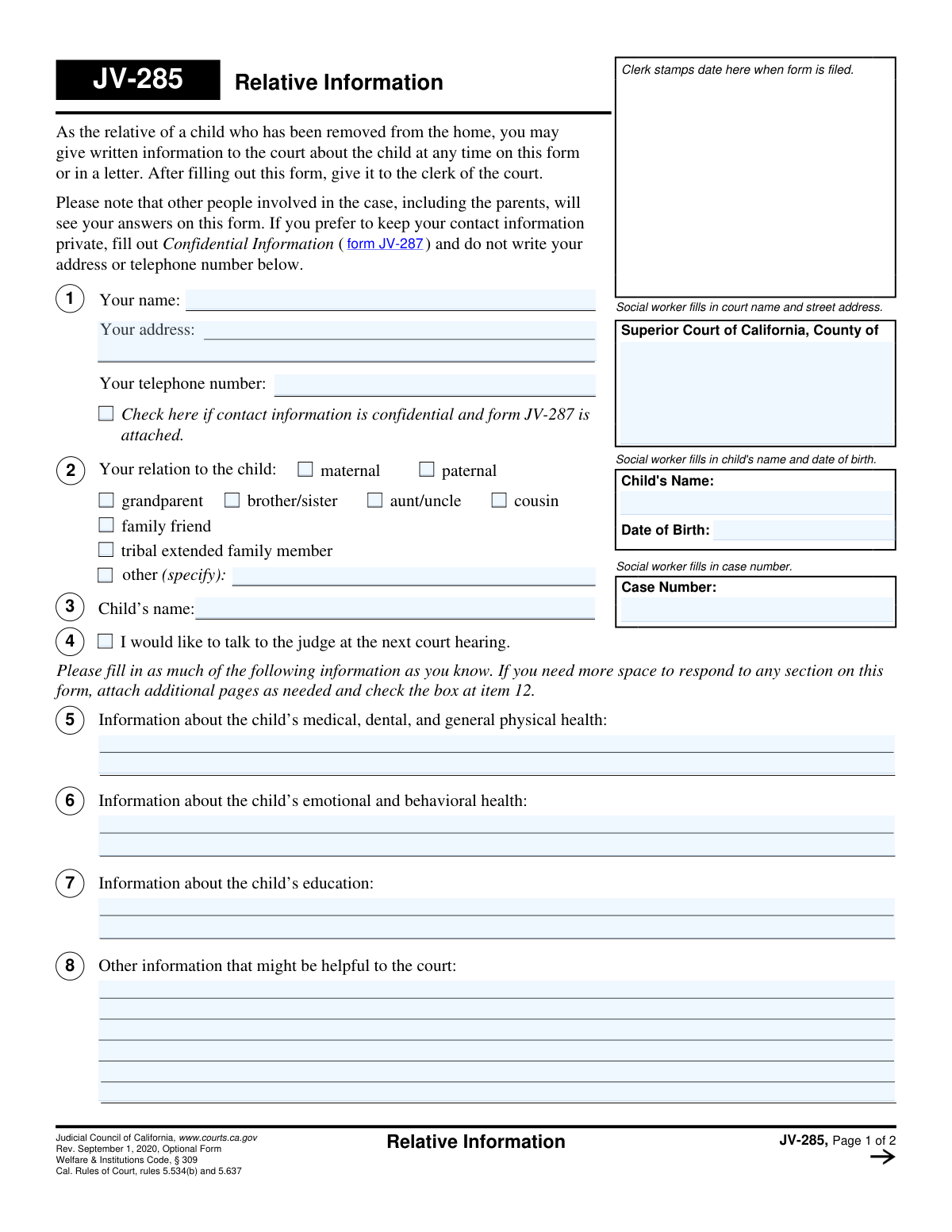
Yes! You can use AI to fill out Form JV-285, Relative Information

Form JV-285, Relative Information, is a crucial document in California's juvenile court system that allows relatives of a child who has been removed from their home to communicate directly with the court. By submitting this form, relatives can provide vital information about the child's health, education, and well-being, and can also express their willingness to help the child or parents, which helps the judge make informed decisions. Today, this form can be filled out quickly and accurately using AI-powered services like Instafill.ai, which can also convert non-fillable PDF versions into interactive fillable forms.
JV-285 is part of the California court forms category on Instafill.
Our AI automatically handles information lookup, data retrieval, formatting, and form filling.
It takes less than a minute to fill out JV-285 using our AI form filling.
Securely upload your data. Information is encrypted in transit and deleted immediately after the form is filled out.

Form specifications

Form name: Form JV-285, Relative Information
Number of fields: 68
Number of pages: 1
Language: English
main-image

Instafill Demo: How to fill out PDF forms in seconds with AI

How to Fill Out JV-285 Online for Free in 2026

Are you looking to fill out a JV-285 form online quickly and accurately? Instafill.ai offers the #1 AI-powered PDF filling software of 2026, allowing you to complete your JV-285 form in just 37 seconds or less.
Follow these steps to fill out your JV-285 form online using Instafill.ai:
  1. 1 Navigate to Instafill.ai and upload or select Form JV-285, Relative Information.
  2. 2 Use the AI assistant to accurately fill in the court name, case number, and the child's name and date of birth in the top section.
  3. 3 Enter your personal details in Part 1, including your name, contact information, and relationship to the child. Check the box if you are attaching a confidential information form (JV-287).
  4. 4 Complete Parts 5 through 8 with as much detail as possible regarding the child's health, education, and other helpful information for the court.
  5. 5 In Parts 9 and 10, indicate how you would like to help the child or the parents by checking the appropriate boxes and providing descriptions.
  6. 6 List any other relatives who may be able to help in Part 11, or choose to keep their contact information confidential.
  7. 7 Carefully review all entered information, then date and sign the form. You can then download the completed document to file with the court clerk.

Our AI-powered system ensures each field is filled out correctly, reducing errors and saving you time.

Why Choose Instafill.ai for Your Fillable JV-285 Form?

Speed

Complete your JV-285 in as little as 37 seconds.

Up-to-Date

Always use the latest 2026 JV-285 form version.

Cost-effective

No need to hire expensive lawyers.

Accuracy

Our AI performs 10 compliance checks to ensure your form is error-free.

Security

Your personal information is protected with bank-level encryption.

Frequently Asked Questions About Form JV-285

This form allows relatives and other close individuals to provide the court with important information about a child who has been removed from their home. It is also used to express how you might be able to help the child or their parents.

Any relative, including grandparents, siblings, aunts, uncles, cousins, or tribal extended family members, can fill out this form. The form also includes an option for a 'family friend' to provide information.

Yes, the form explicitly states that other people involved in the case, including the parents, will be able to see your answers. If you need to keep your contact information private, you must use a separate form.

To keep your contact information private, you must fill out form JV-287 (Confidential Information). On form JV-285, check the box in item 1 indicating that form JV-287 is attached and do not write your address or phone number on the JV-285.

The child's social worker is responsible for filling in the court name, street address, and the case number at the top of the form.

Provide any details you know regarding the child's medical history, allergies, medications, emotional state, behavioral patterns, school performance, and educational needs. This information helps the court make informed decisions.

Checking this box informs the court of your willingness to have the child placed with you. However, the final decision on placement rests with the social worker and the court after a thorough assessment.

Once you have filled out the form, you should give it to the clerk of the court for the county where the child's case is being heard.

If you need more space for any section, you can use additional pages. Be sure to check the box at item 12 and indicate the number of pages you have attached.

Yes, you can check the box in item 4 to let the court know you would like to talk to the judge at the next hearing. The judge will then decide whether to grant your request to speak.

Yes, item 11 provides a space for you to list other relatives who might be able to help the child. You can provide their name, relationship, and contact information or request that the social worker obtain it from you confidentially.

Yes, services like Instafill.ai use AI to accurately auto-fill form fields, which can save you time and help prevent errors.

You can use a service like Instafill.ai to upload the form and fill it out on any device. This allows you to type your answers directly into the fields and sign the document electronically.

If you have a non-fillable PDF, you can use a tool like Instafill.ai. It can convert flat PDFs into interactive, fillable forms that you can complete online.

Compliance JV-285
Validation Checks by Instafill.ai

1
Ensures Relative's Name is Provided
This check verifies that the 'Your name' field (item 1) is not empty. The identity of the person submitting the information is fundamental for the court to assess the context and credibility of the information. If this field is left blank, the form submission should be rejected as it cannot be attributed to a specific individual.
2
Validates Child's Date of Birth
This validation ensures the 'Date of Birth' for the child is a valid date and is in the past. An invalid or future date would be a data entry error, making the record inaccurate. This check is crucial for correctly identifying the child and for legal considerations related to the child's age.
3
Requires Relation to Child Selection
This check confirms that at least one checkbox in the 'Your relation to the child' section (item 2) is selected. The relative's relationship to the child is critical information for the court. If no relationship is specified, the submission should be flagged for completion before it can be processed.
4
Conditional Requirement for 'Other' Relation
This validation ensures that if the 'other (specify)' checkbox is selected in the 'Your relation to the child' section (item 2), the corresponding text field is filled out. This prevents incomplete submissions where the relationship is ambiguous. A failure would prompt the user to specify their relationship.
5
Contact Information Confidentiality Logic
This check verifies that if the 'contact information is confidential' checkbox (item 1) is checked, the 'Your address' and 'Your telephone number' fields are empty. This is a critical privacy protection feature to prevent accidental disclosure of sensitive information. If the box is checked and contact details are present, a warning should be issued to the user to either clear the fields or uncheck the box.
6
Child's Name Consistency Across Pages
This validation compares the 'Child's Name' fields on page 1 (header and item 3) and page 2 (item 9) to ensure they are identical. Inconsistent names could lead to confusion and clerical errors, potentially associating the information with the wrong case file. A mismatch should trigger a review to confirm the correct child's name.
7
Conditional Requirement for 'Help Parent' Description
This check ensures that if the user checks 'father' or 'mother' in the 'I want to help the' section (item 10), the corresponding description text field is not empty. The court needs to understand the specific ways the relative intends to help a parent. An empty description makes the selection meaningless and requires clarification.
8
Conditional Requirement for 'Other' Help Description
This validation confirms that if the 'other (describe)' checkbox is selected in the list of ways to help the child (item 9), the associated text field is filled in. This ensures that the user's specific, unlisted intention to help is captured. A failure would prompt the user to provide the description.
9
Attached Pages Count Logic
This check validates the logic for attached pages (item 12). If the 'attach additional pages' checkbox is checked, the 'Number of pages attached' field must contain a positive integer. Conversely, if a number greater than zero is entered, the checkbox should be checked. This ensures accurate document management and that all parts of the submission are accounted for.
10
Valid Signature Date
This check ensures the 'Date' field in the signature block is a valid date that is not in the future. An incorrect or future date can call the document's execution time into question. The system should default to the current date or require the user to enter a valid date on or before the submission day.
11
Printed Name for Signature Presence
This validation verifies that the 'Type or print your name' field is filled out alongside the signature. A printed name is required to ensure the signatory's identity is legible, as signatures can often be difficult to read. A missing printed name would render the signature unverified and should halt submission.
12
Case Number Format Validation
This check validates that the 'Case Number' field matches the expected format for the Superior Court of California. An incorrectly formatted case number can lead to the document being misfiled or rejected by the court clerk. This validation helps ensure the form is correctly associated with the proper juvenile case from the outset.
13
Maternal/Paternal Specificity Check
This validation suggests or requires that if a relationship like 'grandparent', 'aunt/uncle', or 'cousin' is checked, either the 'maternal' or 'paternal' checkbox is also selected. This provides more precise information to the court about the family structure. While the form is optional, this check improves the quality and usefulness of the data provided.
14
Other Relatives Confidentiality Logic
For each of the 'Other relatives' listed in item 11, this check ensures that if the 'I want to keep the contact information confidential' box is checked, the corresponding 'Contact information' field is empty. This protects the privacy of third parties mentioned in the form. A failure would trigger a warning to prevent unintentional data disclosure.

Common Mistakes in Completing JV-285

Mishandling Confidential Information

People often fill in their address and phone number in Section 1 and then also check the box to keep their contact information confidential via form JV-287. This creates a contradiction that can lead to the unintended disclosure of sensitive information. To avoid this, decide beforehand if you want your contact details to be private; if so, leave the address and phone fields blank, check the box, and attach form JV-287.

Failing to Specify Paternal/Maternal Relationship

In Section 2, a person might check 'grandparent' or 'aunt/uncle' without also checking the 'maternal' or 'paternal' box. This incomplete information makes it harder for the social worker and court to quickly and accurately map the family structure. Always specify which side of the family you are on, as it is crucial for establishing relationships and potential placements.

Providing Vague or Subjective Information

In Sections 5-8, relatives may write emotional but non-specific statements like 'the child is unhappy' or 'school is okay'. These statements are not as helpful as concrete, factual observations. To provide useful information, describe specific behaviors, events, or academic details, such as 'The child has nightmares three times a week' or 'The child's last report card showed a drop from a B to a D in math'.

Forgetting to Request to Address the Court

Many relatives overlook the simple checkbox in Section 4, 'I would like to talk to the judge at the next court hearing.' Missing this means losing a valuable opportunity to speak directly to the judge and provide personal context. If you wish to speak, ensure you check this box so the court is aware of your request ahead of the hearing.

Inconsistent Child's Name or Case Number

The child's name and case number are requested in multiple locations on the form, and people sometimes introduce typos or use different names (e.g., a nickname vs. a legal name). This can cause filing delays and administrative confusion, potentially disconnecting the form from the correct case file. Using an AI-powered tool like Instafill.ai can help prevent this by auto-populating repeated fields consistently and accurately.

Improperly Documenting Attachments

A person may attach several pages of critical information but forget to check the box in Section 12 and write the number of attached pages. This can result in the attachments being overlooked or separated from the main form during processing, meaning the court never sees the extra information. Always check the box and specify the page count to ensure all your information is considered.

Forgetting to Sign and Date the Form

Forgetting to sign and date the form is one of the most common and critical errors, as it renders the document legally invalid. This often happens when people are in a hurry to complete the last page. Always double-check the bottom of page 2 to ensure you have provided a physical signature and the current date before filing.

Offering Undefined Help to a Parent

In Section 10, a relative may check the box to help the mother or father but then provide a vague or empty description in the required field. Simply stating 'I want to help' is not actionable for the court or social worker. To be effective, you must describe the specific help you can offer, such as 'I can provide transportation for the mother to her weekly counseling appointments'.

Leaving 'Other' Fields Blank or Vague

When a person's situation doesn't fit the standard checkboxes in sections like 2 (Relation) or 9 (How I want to help), they may check 'other' but fail to provide a clear explanation. This leaves the court guessing about their relationship or intended actions. If you select 'other', always provide a concise and specific description, such as 'Family Godparent' or 'Help with homework via video call twice a week'.

Filling in Sections Reserved for Court Staff

The form explicitly states 'Social worker fills in...' for the court address and case number at the top of page 1. Relatives sometimes attempt to fill this in themselves, which can lead to incorrect information and require correction by court staff, slowing down the process. It is best to leave any fields designated for official use blank. If the form is a non-fillable PDF, a tool like Instafill.ai can convert it to a smart, fillable version that can help guide you on which fields to complete.
Saved over 80 hours a year

“I was never sure if my IRS forms like W-9 were filled correctly. Now, I can complete the forms accurately without any external help.”

Kevin Martin Green

Your data stays secure with advanced protection from Instafill and our subprocessors

Robust compliance program

Transparent business model

You’re not the product. You always know where your data is and what it is processed for.

ISO 27001, HIPAA, and GDPR

Our subprocesses adhere to multiple compliance standards, including but not limited to ISO 27001, HIPAA, and GDPR.

Security & privacy by design

We consider security and privacy from the initial design phase of any new service or functionality. It’s not an afterthought, it’s built-in, including support for two-factor authentication (2FA) to further protect your account.

Fill out JV-285 with Instafill.ai

Worried about filling PDFs wrong? Instafill securely fills form-jv-285-relative-information forms, ensuring each field is accurate.