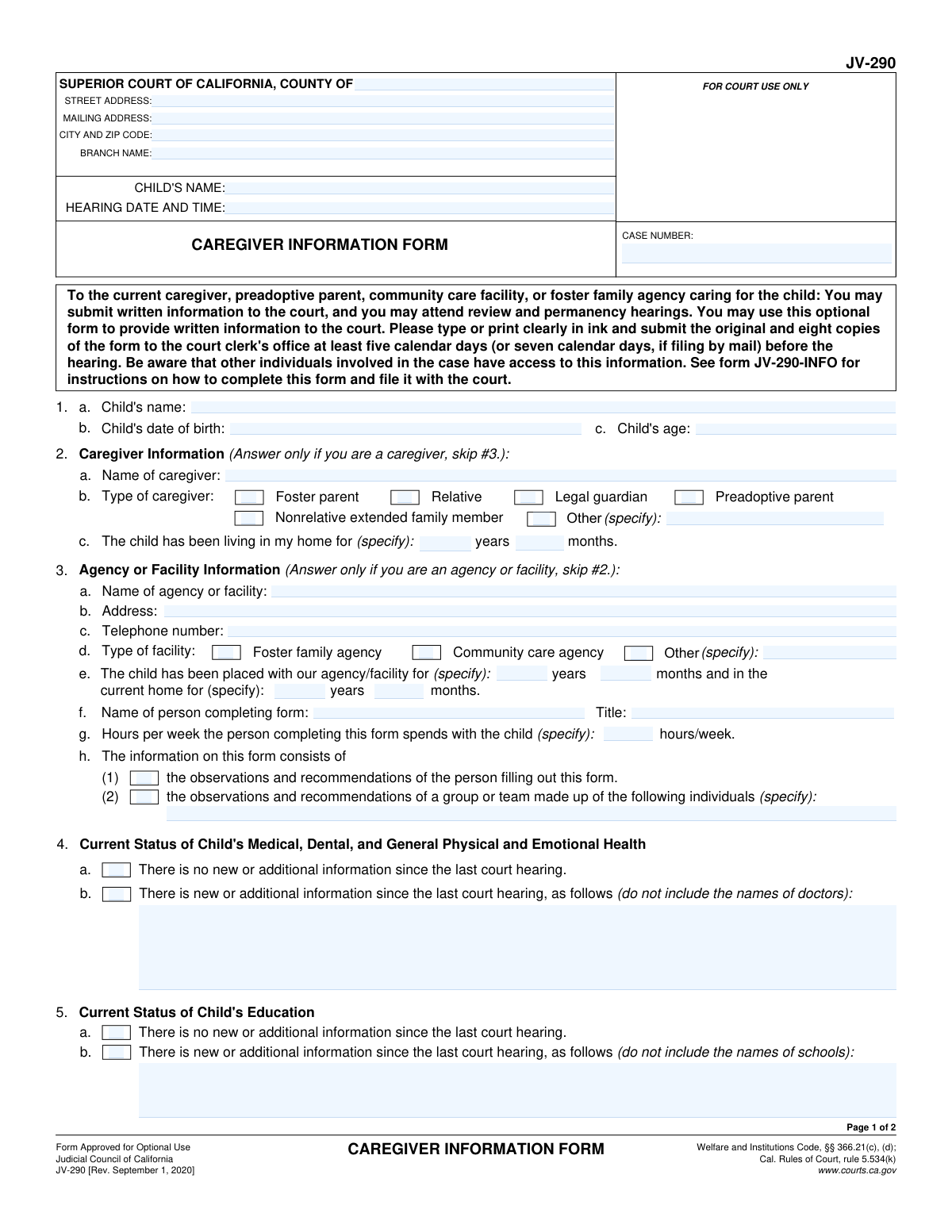
Yes! You can use AI to fill out Form JV-290, Caregiver Information Form

Form JV-290, the Caregiver Information Form, is an optional form from the Judicial Council of California for caregivers, preadoptive parents, or facilities to submit written information to the court regarding a child's status before a hearing. It allows the court to receive direct updates on the child's health, education, and general well-being from the person providing daily care. Today, this form can be filled out quickly and accurately using AI-powered services like Instafill.ai, which can also convert non-fillable PDF versions into interactive fillable forms.
JV-290 is part of the California court forms category on Instafill.
Our AI automatically handles information lookup, data retrieval, formatting, and form filling.
It takes less than a minute to fill out JV-290 using our AI form filling.
Securely upload your data. Information is encrypted in transit and deleted immediately after the form is filled out.

Form specifications

Form name: Form JV-290, Caregiver Information Form
Number of fields: 73
Number of pages: 1
Language: English
main-image

Instafill Demo: How to fill out PDF forms in seconds with AI

How to Fill Out JV-290 Online for Free in 2026

Are you looking to fill out a JV-290 form online quickly and accurately? Instafill.ai offers the #1 AI-powered PDF filling software of 2026, allowing you to complete your JV-290 form in just 37 seconds or less.
Follow these steps to fill out your JV-290 form online using Instafill.ai:
  1. 1 Navigate to Instafill.ai and upload or select the JV-290 Caregiver Information Form.
  2. 2 Provide the court and case information, including the county, case number, and hearing date, into the designated fields.
  3. 3 Complete the section with your information, identifying yourself as either an individual caregiver or a representative of an agency or facility.
  4. 4 Use the AI assistant to provide detailed updates on the child's current status, including their health, education, adjustment, and social skills.
  5. 5 Indicate your recommendation for the case outcome, if any, and attach additional pages if necessary.
  6. 6 Review the entire form for accuracy, then digitally or physically sign and date it.
  7. 7 Download the completed form and submit the original and required copies to the court clerk's office according to the instructions.

Our AI-powered system ensures each field is filled out correctly, reducing errors and saving you time.

Why Choose Instafill.ai for Your Fillable JV-290 Form?

Speed

Complete your JV-290 in as little as 37 seconds.

Up-to-Date

Always use the latest 2026 JV-290 form version.

Cost-effective

No need to hire expensive lawyers.

Accuracy

Our AI performs 10 compliance checks to ensure your form is error-free.

Security

Your personal information is protected with bank-level encryption.

Frequently Asked Questions About Form JV-290

This optional form allows caregivers, preadoptive parents, or agencies to provide written information and recommendations to the court about a child's current status before a review or permanency hearing.

No, this form is for optional use. You may use it to provide written information to the court, but you are not required to do so.

Individual caregivers, such as foster parents, relatives, or preadoptive parents, should fill out Section 2. Agencies or facilities, like a foster family agency or community care facility, should skip Section 2 and fill out Section 3.

You must submit the original and eight copies to the court clerk's office. It must be received at least five calendar days before the hearing, or seven calendar days if you are submitting it by mail.

The information you provide is not confidential. It will be accessible to other individuals involved in the child's court case.

For sections 4 through 10, if nothing has changed, you can simply check the box that says, 'There is no new or additional information since the last court hearing.'

If you need more space, check box 12 on the second page and attach additional pages. Make sure to write down the number of pages you have attached.

No, the form specifically instructs you not to include the names of doctors or schools when providing new information in sections 4 and 5.

This is where you can state your recommendation for the outcome of the hearing regarding the child's care and placement. If you don't have a recommendation, you can check the box indicating that.

For more detailed instructions on how to complete and file this form, you should refer to form JV-290-INFO, which is available on the California Courts website.

Yes, services like Instafill.ai use AI to help you accurately auto-fill form fields from your saved profile, which can save time and help avoid mistakes.

You can use a service like Instafill.ai to upload the form, fill it out on your computer or phone, and then download or print the completed document for submission to the court.

If you have a non-fillable or 'flat' PDF, you can upload it to a platform like Instafill.ai. It can convert the document into an interactive, fillable form that you can easily complete online.

Compliance JV-290
Validation Checks by Instafill.ai

1
Ensures Child's Age and Date of Birth are Consistent
This validation calculates the child's age based on the 'Child's date of birth' field and compares it to the value entered in the 'Child's age' field. This is important for ensuring the accuracy of the child's core identifying information for legal and administrative purposes. If the values do not match, the system should flag the discrepancy and require the user to correct either the date of birth or the age.
2
Enforces Mutual Exclusivity of Caregiver and Agency Sections
This check verifies that the user has filled out information in either Section 2 ('Caregiver Information') or Section 3 ('Agency or Facility Information'), but not both. The form instructions explicitly state to skip one section based on the filer's role. Enforcing this prevents contradictory or redundant data entry and ensures the submission is clear. If data is present in both sections, an error should prompt the user to clear the irrelevant section.
3
Validates Agency Placement Duration Logic
In Section 3e, this check ensures the duration entered for 'in the current home' is not greater than the duration for 'placed with our agency/facility'. It is logically impossible for a child to be in the current home longer than they have been with the placing agency. This validation prevents data entry errors and maintains the logical integrity of the placement history. A failed validation would require the user to correct the year/month values.
4
Requires Specification for 'Other' Caregiver/Facility Type
This validation rule applies to Section 2b ('Type of caregiver') and Section 3d ('Type of facility'). If the user selects the 'Other' checkbox in either section, this check ensures the corresponding 'specify' text field is not empty. This is crucial for capturing complete and specific information that falls outside the predefined categories. If 'Other' is checked and the specification is missing, the user must be prompted to provide the required detail.
5
Verifies Conditional Information Fields are Filled
For sections 4, 5, 7, 8, 9, 10, and 11, if the checkbox indicating 'new or additional information' or 'I am recommending' is selected, this validation ensures the associated text field is not empty. This prevents submissions where the user indicates they have information to share but fails to provide it. If the box is checked but the field is empty, an error should appear, requiring the user to either provide the information or uncheck the box.
6
Enforces Mutually Exclusive Choices within Sections
In sections 4, 5, 7, 8, 9, and 10, this check ensures the user has not selected both 'There is no new or additional information' and 'There is new or additional information'. These options are contradictory. This validation maintains data integrity and prevents ambiguity in the submission. If both are checked, the system should require the user to select only one.
7
Validates Conditional IEP Date for Special Education Status
This check is triggered in Section 6. If the checkbox for 'The child is a special education student' (6a) is selected, the system must verify that the 'Date of last Individualized Education Plan (IEP)' field contains a valid, non-future date. This ensures that required documentation dates are captured accurately when a specific status is declared. If the box is checked but the date is missing or invalid, the submission should be blocked until corrected.
8
Ensures Exclusive Selection for Special Education Status
In Section 6, this validation confirms that only one of the three checkboxes (6a, 6b, or 6c) regarding the child's special education status is selected. A child cannot simultaneously be, not be, and have an unknown special education status. This check prevents conflicting data and ensures a clear answer is provided. If more than one option is selected, an error should force the user to make a single choice.
9
Validates Attachment Count when Indicated
This rule applies to Section 12. If the user checks the box indicating that additional pages are attached, this validation ensures that the 'Number of pages attached' field contains a positive integer (e.g., '1' or greater). This confirms the user's intent and helps court clerks verify that all parts of the submission are present. If the box is checked and the number is missing or zero, the user should be prompted to enter a valid count.
10
Verifies Consistency of Case Information Across Pages
This check confirms that the 'CHILD'S NAME' and 'CASE NUMBER' entered in the header of Page 1 match the corresponding fields in the header of Page 2. This is a critical data integrity check to ensure that pages of the document do not get mismatched during processing. A mismatch could lead to incorrect filing and serious administrative errors.
11
Requires Filer's Name to be Provided
This validation ensures that a name is provided for the person or entity submitting the form. If Section 2 is filled, the 'Name of caregiver' (2a) must be completed. If Section 3 is filled, the 'Name of agency or facility' (3a) and 'Name of person completing form' (3f) must be completed. This is essential for identifying the source of the information. A submission should be rejected if this primary identifying information is missing.
12
Validates Signature Date
This check ensures the 'Date' field next to the signature on Page 2 is a valid date and is not a future date. The signature date authenticates when the information was attested to by the filer. Allowing a future date would be illogical and could compromise the document's legal standing. The system should reject future dates and require a date that is on or before the current day.

Common Mistakes in Completing JV-290

Incomplete Case and Hearing Information

People often forget to fill in the complete court address, Case Number, and the specific Hearing Date and Time at the top of the form. This happens when filers are rushed or don't have the court notice handy. An incomplete header can lead to the form being misfiled or rejected by the court clerk, preventing the caregiver's input from being considered at the hearing. Always double-check these details against official court documents before submitting.

Confusing Individual vs. Agency Sections

The form directs users to fill out either Section 2 (for individual caregivers) or Section 3 (for agencies), but not both. A common error is filling out parts of both sections, which creates confusion about who is submitting the information. This can cause the court to disregard the submission or require clarification, delaying the process. Carefully read the instructions to complete only the section that applies to your role.

Omitting Header Information on Page 2

A frequent oversight is failing to re-enter the Child's Name and Case Number in the header of the second page. When court documents are processed, pages can get separated, and without this identifying information, the second page becomes useless. This results in the court seeing an incomplete report, which weakens the caregiver's statement. To prevent this, make it a habit to fill out the headers on all pages of a multi-page form first.

Contradictory Status Update Selections

In sections 4 through 11, users must choose between 'no new information' and 'new information.' A frequent error is checking the 'new information' box but leaving the text field blank, or checking both boxes for the same section. This ambiguity forces the court to guess the filer's intent and may lead to the information being ignored. To avoid this, select only one checkbox per section and provide clear details if you indicate there is new information.

Including Prohibited Identifying Information

The form explicitly warns filers in Section 4 ('do not include the names of doctors') and Section 5 ('do not include the names of schools'). However, wanting to be thorough, caregivers often include these specific names, violating confidentiality rules. This can lead to parts of the form being redacted or the entire document being questioned by the court. Always describe the services, progress, or issues without using specific provider or school names.

Forgetting to Sign and Date the Form

An unsigned or undated form is legally invalid and will be rejected. This is one of the most critical yet common mistakes, often happening when people are in a rush to submit the document. Without a valid signature and date, the court cannot accept the form, and the caregiver's valuable input will not be part of the case record. Always perform a final review, paying special attention to the signature block on page 2.

Failing to Specify 'Other' Categories

In Section 2b (Type of caregiver) and 3d (Type of facility), there is an 'Other' option with a line for specification. Users frequently check the 'Other' box but neglect to write in the required description. This leaves the court with incomplete information about the filer's relationship to the child or the nature of the facility. To ensure clarity, always provide a concise explanation whenever you select an 'Other' category.

Submitting Illegible or Unclear Information

The form requests that information be typed or printed clearly, but handwritten submissions are often difficult to read. This makes it challenging for court staff to process the information accurately. If the form is a non-fillable PDF, this problem is more common; AI-powered tools like Instafill.ai can convert it to a fillable version, allowing you to type responses for maximum clarity and professionalism.

Incorrectly Handling Additional Pages

Section 12 provides a checkbox and a field for noting the number of attached pages. Common mistakes include attaching extra pages without checking the box, or checking the box but forgetting to include the attachments or write the page count. This can lead to the court being unaware of the additional information or the attachments being lost. Ensure you check the box, accurately count and list the number of attached pages, and securely staple them to the main form.

Miscalculating Time Durations

Sections 2c and 3e require the user to specify how long the child has been in their care in years and months. People sometimes estimate this duration inaccurately or provide conflicting information, such as in Section 3e where the time in the current home cannot exceed the time with the agency. These inaccuracies can reduce the credibility of the entire document. Carefully calculate these time periods before filling them in to ensure they are precise and consistent.
Saved over 80 hours a year

“I was never sure if my IRS forms like W-9 were filled correctly. Now, I can complete the forms accurately without any external help.”

Kevin Martin Green

Your data stays secure with advanced protection from Instafill and our subprocessors

Robust compliance program

Transparent business model

You’re not the product. You always know where your data is and what it is processed for.

ISO 27001, HIPAA, and GDPR

Our subprocesses adhere to multiple compliance standards, including but not limited to ISO 27001, HIPAA, and GDPR.

Security & privacy by design

We consider security and privacy from the initial design phase of any new service or functionality. It’s not an afterthought, it’s built-in, including support for two-factor authentication (2FA) to further protect your account.

Fill out JV-290 with Instafill.ai

Worried about filling PDFs wrong? Instafill securely fills form-jv-290-caregiver-information-form forms, ensuring each field is accurate.