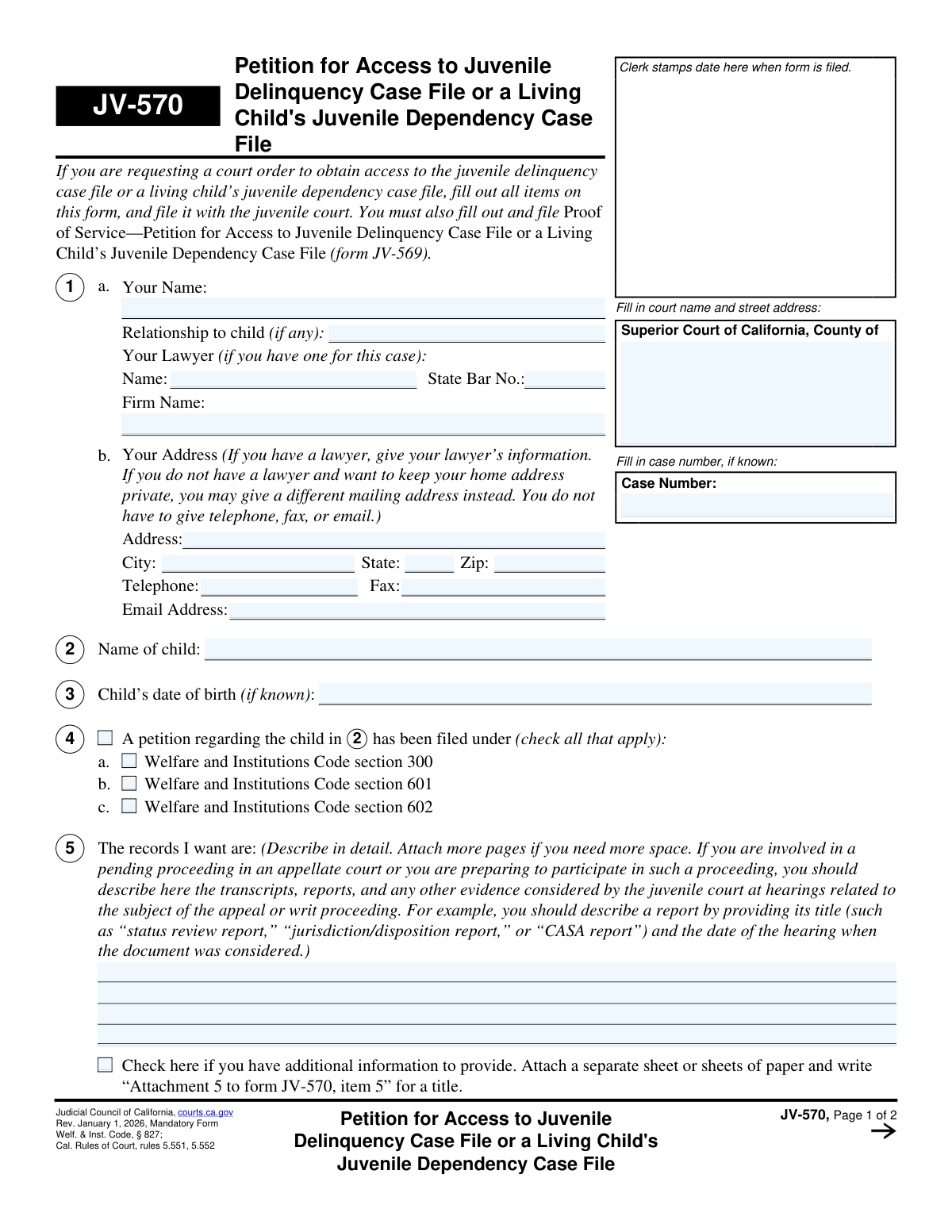
Yes! You can use AI to fill out Form JV-570, Petition for Access to Juvenile Delinquency Case File or a Living Child's Juvenile Dependency Case File

Form JV-570 is a legal document used in California to formally request a court order granting access to a juvenile delinquency case file or a living child's juvenile dependency case file. It is essential for individuals, such as family members or legal professionals, who need to review these confidential records for valid reasons like related court proceedings. Today, this form can be filled out quickly and accurately using AI-powered services like Instafill.ai, which can also convert non-fillable PDF versions into interactive fillable forms.
JV-570 is part of the California court forms category on Instafill.
Our AI automatically handles information lookup, data retrieval, formatting, and form filling.
It takes less than a minute to fill out JV-570 using our AI form filling.
Securely upload your data. Information is encrypted in transit and deleted immediately after the form is filled out.

Form specifications

Form name: Form JV-570, Petition for Access to Juvenile Delinquency Case File or a Living Child's Juvenile Dependency Case File
Number of fields: 56
Number of pages: 1
Language: English
main-image

Instafill Demo: How to fill out PDF forms in seconds with AI

How to Fill Out JV-570 Online for Free in 2026

Are you looking to fill out a JV-570 form online quickly and accurately? Instafill.ai offers the #1 AI-powered PDF filling software of 2026, allowing you to complete your JV-570 form in just 37 seconds or less.
Follow these steps to fill out your JV-570 form online using Instafill.ai:
  1. 1 Navigate to Instafill.ai and upload or select Form JV-570.
  2. 2 Enter your personal information, relationship to the child, and your lawyer's details (if applicable) in section 1.
  3. 3 Provide the child's name and date of birth, and specify the type of case file you are requesting access to in sections 2, 3, and 4.
  4. 4 In section 5, describe in detail the specific records you are requesting from the juvenile case file.
  5. 5 Indicate the reason for your petition in section 6 by checking the relevant pending court case and providing its details.
  6. 6 In section 7, provide a thorough explanation of why you need access to these specific records.
  7. 7 Carefully review the entire form for accuracy, then date and sign the declaration under penalty of perjury in section 8 before filing with the court.

Our AI-powered system ensures each field is filled out correctly, reducing errors and saving you time.

Why Choose Instafill.ai for Your Fillable JV-570 Form?

Speed

Complete your JV-570 in as little as 37 seconds.

Up-to-Date

Always use the latest 2026 JV-570 form version.

Cost-effective

No need to hire expensive lawyers.

Accuracy

Our AI performs 10 compliance checks to ensure your form is error-free.

Security

Your personal information is protected with bank-level encryption.

Frequently Asked Questions About Form JV-570

Form JV-570 is a petition used to formally request a court order for access to confidential records in a juvenile delinquency case or a living child's juvenile dependency case in California.

You need to fill out this form if you are not a party to the juvenile case but have a legitimate reason to view the case file, such as for a related civil, criminal, or family law proceeding.

Yes, you must also complete and file Form JV-569, 'Proof of Service,' to show that you have provided a copy of your petition to all required individuals and agencies involved in the case.

You will need your personal information, the child's name and date of birth, the juvenile case number (if known), a detailed description of the specific records you need, and a thorough explanation of why you need them.

Be as specific as possible. Include document titles (like 'status review report' or 'CASA report'), dates of reports, or dates of court hearings where the documents were considered to help the court identify the exact records.

Clearly explain how the juvenile records are relevant and necessary for your specific purpose, such as a pending court case or appeal. The court needs to understand your 'good cause' for accessing these confidential files.

A dependency case (WIC 300) involves a child who may be a victim of abuse or neglect. A delinquency case (WIC 601 or 602) involves a minor who is accused of breaking the law.

You must file the form with the clerk's office of the Superior Court in the county where the juvenile case is being heard.

No, if you do not have a lawyer and wish to keep your home address private, you may provide a different mailing address in Section 1b.

After you file the petition and serve all parties, the court will review your request. The court may schedule a hearing to decide whether to grant, deny, or limit your access to the records.

Yes, services like Instafill.ai use AI to help you accurately auto-fill form fields, which can save you time and reduce errors.

You can use a service like Instafill.ai to fill out the form online. Simply upload the JV-570 PDF, and the platform will make it fillable, allowing you to type your information directly into the fields.

If you have a non-fillable or 'flat' PDF, you can upload it to a service like Instafill.ai. The platform can convert it into an interactive, fillable form that you can complete on your computer.

Compliance JV-570
Validation Checks by Instafill.ai

1
Ensures Petitioner Name is Provided
Validates that the 'Your Name' field in section 1a is not empty. This field is essential for identifying the person filing the petition and is required for all legal correspondence and court records. A failed validation would prevent form submission, as the petitioner is unknown.
2
Ensures Child's Name is Provided
Verifies that the 'Name of child' field in section 2 is filled out. The entire petition is centered around accessing the case file of a specific child, making this a mandatory piece of information for the court to locate the correct file. Without this, the petition cannot be processed.
3
Requires Selection of Case Type Code
This check ensures that at least one checkbox in section 4 (Welfare and Institutions Code section 300, 601, or 602) is selected. This selection specifies the legal basis of the juvenile case, which is critical for the court to understand the context of the request and locate the correct type of file. The form cannot be processed without knowing the case type.
4
Validates Records Description is Not Empty
Confirms that the petitioner has provided a detailed description of the records they want in section 5. A vague or empty request is not actionable for the court clerk. This detail is necessary to identify and retrieve the specific documents, reports, or transcripts being requested.
5
Ensures a Reason for Petition is Selected
Validates that the petitioner has selected at least one reason for their request by checking a box in section 6 (a-f). The court needs to understand the context and legal justification for granting access to confidential juvenile records. Failure to provide a reason will result in the petition being rejected as incomplete.
6
Validates Conditional Fields for Selected Reason
If a petitioner selects a reason in section 6 (e.g., 'a. Civil court case pending'), this validation ensures the associated fields ('name of county', 'case number', 'hearing date') are also filled. This information allows the court to verify the related proceeding and assess the necessity of the record access. Missing details for a selected reason makes the justification incomplete.
7
Requires Specification for 'Other' Reason
This check is triggered if the petitioner selects 'f. Other' in section 6. It verifies that the corresponding text field, explaining the other reason, is not empty. This is crucial because 'Other' is not a valid reason by itself; it requires a specific explanation for the court to consider.
8
Ensures Detailed Justification is Provided
Verifies that the text field in section 7, which asks why the records are needed, is filled out. This is the petitioner's primary argument for why the court should grant access to highly confidential files. An empty or insufficient justification will almost certainly lead to the petition being denied.
9
Validates Lawyer's State Bar Number Format
If a lawyer's name is entered in section 1a, this check ensures the 'State Bar No.' field contains a valid number. The State Bar number is used to verify that the individual is a licensed attorney in good standing. An invalid or missing number would call the legitimacy of the legal representation into question.
10
Validates Child's Date of Birth is a Plausible Past Date
If a date is entered in the 'Child's date of birth' field (section 3), this validation confirms it is a valid calendar date and that it is in the past. A future date of birth is logically impossible for a living child who is the subject of a case file. This helps ensure data accuracy and can be used as a secondary identifier.
11
Ensures Declaration Date and Name are Present
This check confirms that the 'Date' and 'Type or print your name' fields in section 8 are both filled out. The date of signature is legally significant, and the printed name confirms the identity of the signatory. A missing date or name can invalidate the declaration.
12
Verifies Petitioner Name Consistency
This validation compares the petitioner's name entered in section 1a on page 1 with the name entered in the header of page 2. This ensures consistency across the document, which is important for multi-page legal filings to prevent confusion. A mismatch could indicate a data entry error or an incomplete form.
13
Validates Completeness of Mailing Address
Checks that if an address is provided in section 1b, the 'Address', 'City', 'State', and 'Zip' fields are all filled in. A complete mailing address is required for the court to send notices, orders, and other official correspondence to the petitioner or their lawyer. An incomplete address will lead to communication failures and delays.

Common Mistakes in Completing JV-570

Providing a Vague Description of Requested Records

In Item 5, petitioners often write generic requests like 'the entire case file' instead of providing specific details. The court requires precise identification of documents, such as a 'status review report' or 'CASA report,' including the date of the hearing when the document was considered. A vague request is likely to be denied for being overly broad or significantly delayed while the court asks for clarification. To avoid this, review the form's examples and list the specific titles and dates of the reports you need.

Submitting an Insufficient Justification for Access

Item 7 requires a detailed explanation of why the confidential juvenile records are necessary. A common mistake is providing a weak or conclusory reason, such as 'I need them for my family law case.' This fails to establish the compelling need required to unseal confidential records. Consequently, a judge is likely to deny the petition. To prevent this, clearly articulate how specific information in the juvenile file is directly relevant and essential to proving a point or resolving an issue in your other legal proceeding.

Failing to File the Required Proof of Service (Form JV-569)

The instructions explicitly state that Form JV-569, Proof of Service, must be filed along with this petition. Petitioners often focus solely on the JV-570 form and forget this critical procedural step. This will cause the court clerk to reject the filing or prevent the court from hearing the petition until proper service is documented, leading to major delays. Always download and complete both forms as part of a single filing package to ensure compliance.

Neglecting to Serve All Interested Parties

A note at the end of the form mandates that a copy of the completed petition be provided to all interested parties, such as the child's parents, their attorneys, and the social services agency. Overlooking this step violates due process requirements. The court cannot rule on the petition until all parties have been properly notified and given an opportunity to respond. To avoid this, identify all parties to the juvenile case and ensure each receives a copy, then document this action on the Proof of Service (JV-569) form.

Forgetting to Sign and Date the Petition

The signature and date in Item 8 are a declaration under penalty of perjury, which makes the document legally valid. Forgetting to sign is a frequent and critical error, often made in haste. An unsigned petition is invalid and will be immediately rejected by the court clerk, forcing the petitioner to correct the mistake and refile from the beginning. Always make signing and dating the form your final check before filing.

Omitting or Entering Incorrect Related Case Information

In Item 6, petitioners must provide the case number, county, and hearing date for the related proceeding where the records are needed. People often leave this information blank or enter it incorrectly because they don't have the documents handy. This makes it difficult for the court to verify the petition's basis and assess its urgency, weakening the request. Before starting, gather all documents for the related case to ensure accurate data entry. AI-powered form fillers like Instafill.ai can also help by validating formats for case numbers and dates.

Forgetting to Complete the Page 2 Header

The top of page 2 requires the petitioner's name and the case number to be re-entered. It is very common for filers to complete page 1 and overlook these repeating fields on the subsequent page. If the pages are separated during court processing or scanning, the second page can become 'orphaned,' rendering the petition incomplete and causing rejection or delays. To avoid this, double-check every page to ensure all required fields, including headers, are filled out.

Exposing a Private Address Unnecessarily

Item 1b explicitly advises petitioners without a lawyer that they may use an alternative mailing address to keep their home address private. Many filers miss this instruction and automatically enter their home address. This can compromise personal safety by making a sensitive address part of the public record in a potentially contentious case. Carefully read all field instructions and consider using a P.O. Box or other secure address if privacy is a concern.

Entering Incorrect Superior Court Information

The header of the form requires the full name and street address of the specific Superior Court handling the juvenile case. A common error is to enter the wrong county or an incomplete court name. This can cause the petition to be filed in the wrong jurisdiction entirely, leading to immediate rejection and the loss of the filing fee. Always verify the precise name and address of the juvenile courthouse for the correct county before filling out the form. If the form is a non-fillable PDF, a tool like Instafill.ai can convert it to a fillable version and help populate correct court details.

Improperly Attaching Additional Information

Items 5 and 7 allow for attachments if more space is needed, but instruct the user to label them specifically (e.g., 'Attachment 5 to form JV-570'). People often attach a continuation page without the proper heading. This can cause confusion for the clerk and judge, who may not know which part of the petition the extra information belongs to. To ensure clarity, always label any attached pages exactly as instructed on the form.
Saved over 80 hours a year

“I was never sure if my IRS forms like W-9 were filled correctly. Now, I can complete the forms accurately without any external help.”

Kevin Martin Green

Your data stays secure with advanced protection from Instafill and our subprocessors

Robust compliance program

Transparent business model

You’re not the product. You always know where your data is and what it is processed for.

ISO 27001, HIPAA, and GDPR

Our subprocesses adhere to multiple compliance standards, including but not limited to ISO 27001, HIPAA, and GDPR.

Security & privacy by design

We consider security and privacy from the initial design phase of any new service or functionality. It’s not an afterthought, it’s built-in, including support for two-factor authentication (2FA) to further protect your account.

Fill out JV-570 with Instafill.ai

Worried about filling PDFs wrong? Instafill securely fills form-jv-570-petition-for-access-to-juvenile-delinquency-case-file-or-a-living-childs-juvenile-dependency-case-file forms, ensuring each field is accurate.