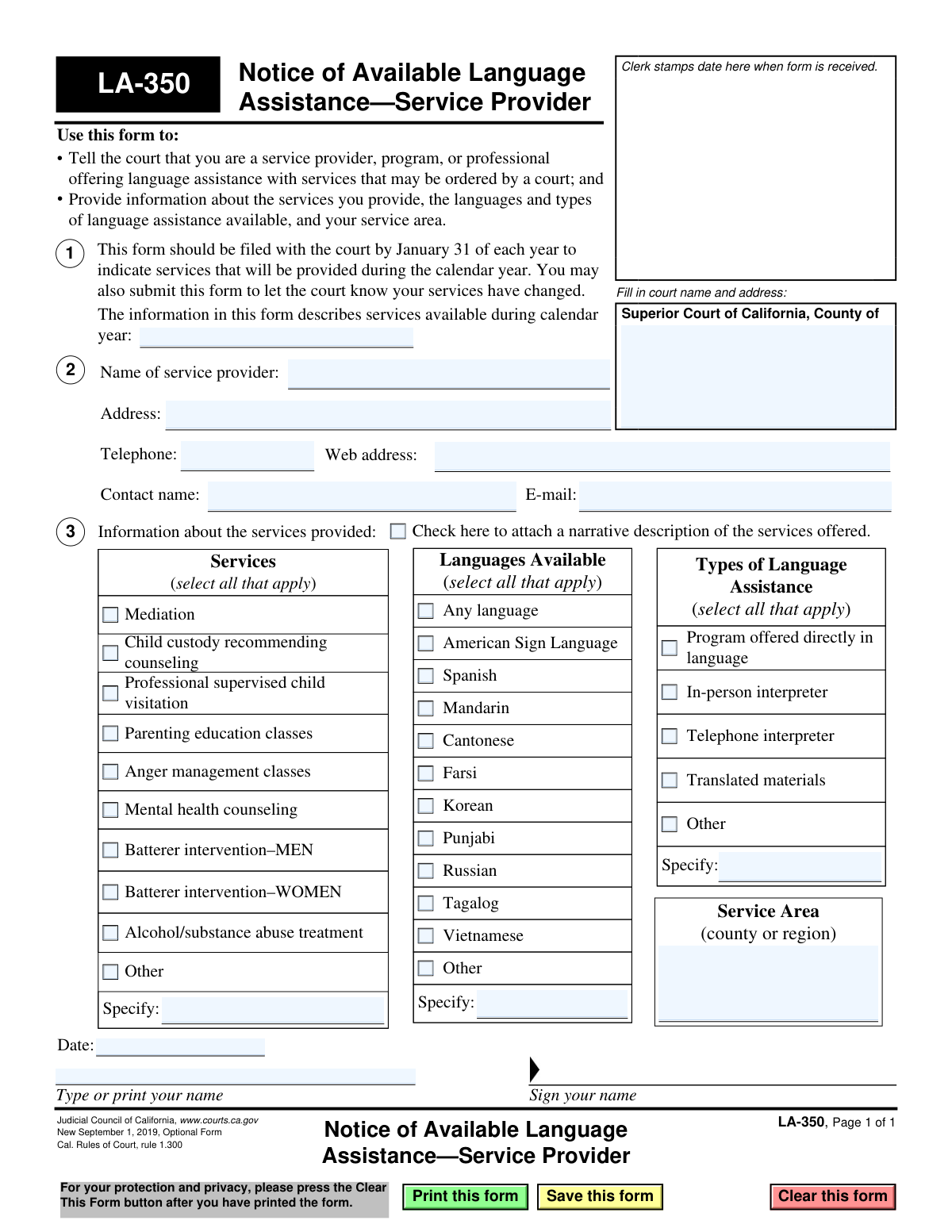
Yes! You can use AI to fill out Form LA-350, Notice of Available Language Assistance—Service Provider

This is a Judicial Council of California form for service providers, programs, or professionals to notify the court of their available language assistance services. It details the types of services offered (e.g., mediation, counseling), the languages supported, and the service area, helping the court connect individuals with necessary resources. Today, this form can be filled out quickly and accurately using AI-powered services like Instafill.ai, which can also convert non-fillable PDF versions into interactive fillable forms.
LA-350 is part of the California court forms category on Instafill.
Our AI automatically handles information lookup, data retrieval, formatting, and form filling.
It takes less than a minute to fill out LA-350 using our AI form filling.
Securely upload your data. Information is encrypted in transit and deleted immediately after the form is filled out.

Form specifications

Form name: Form LA-350, Notice of Available Language Assistance—Service Provider
Number of fields: 46
Number of pages: 1
Language: English
main-image

Instafill Demo: How to fill out PDF forms in seconds with AI

How to Fill Out LA-350 Online for Free in 2026

Are you looking to fill out a LA-350 form online quickly and accurately? Instafill.ai offers the #1 AI-powered PDF filling software of 2026, allowing you to complete your LA-350 form in just 37 seconds or less.
Follow these steps to fill out your LA-350 form online using Instafill.ai:
  1. 1 Navigate to Instafill.ai and upload or select the LA-350 form.
  2. 2 Use the AI assistant to automatically fill in your service provider name, address, and contact details.
  3. 3 Review the 'Services' section and check all applicable boxes, such as mediation, counseling, or parenting education.
  4. 4 In the 'Languages Available' and 'Types of Language Assistance' sections, select all options that your organization provides.
  5. 5 Enter your service area (county or region) and the calendar year for which the services are available.
  6. 6 Carefully review all entered information for accuracy, then digitally sign and date the form.
  7. 7 Download the completed LA-350 to file with the appropriate Superior Court of California by the January 31 deadline.

Our AI-powered system ensures each field is filled out correctly, reducing errors and saving you time.

Why Choose Instafill.ai for Your Fillable LA-350 Form?

Speed

Complete your LA-350 in as little as 37 seconds.

Up-to-Date

Always use the latest 2026 LA-350 form version.

Cost-effective

No need to hire expensive lawyers.

Accuracy

Our AI performs 10 compliance checks to ensure your form is error-free.

Security

Your personal information is protected with bank-level encryption.

Frequently Asked Questions About Form LA-350

This form is used by service providers to inform the California Superior Court about the language assistance they offer for court-ordered services. It helps the court maintain a list of resources for individuals who require services in a language other than English.

Any service provider, program, or professional who offers court-ordered services like mediation, counseling, or parenting classes and provides language assistance should file this form. This includes both organizations and individual practitioners.

You should file this form with the court by January 31 of each year to list the services you will provide during that calendar year. You can also submit it anytime during the year if your service information changes.

If your services, available languages, or other details change after you've filed, you should submit a new, updated Form LA-350 to the court. This ensures the court has the most current information about your offerings.

If your service is not on the list, check the 'Other' box and write a brief description of the service in the space labeled 'Specify.' You can also check the box at the bottom to attach a more detailed narrative description of your offerings.

The form includes a checklist of common languages, but if a language you support is not listed, simply check the 'Other' box. Then, write the name of the language in the provided 'Specify' space.

You will need your business name and contact information, a list of the court-ordered services you provide, and the languages you support. You also need to specify the types of language assistance available (e.g., interpreters, translated materials) and your service area.

No, attaching a narrative description of your services is optional. You should only check the box at the bottom of the form if you are choosing to include a separate, more detailed document about your program.

You must file the completed form with the Superior Court of California for the county where you wish to be listed as a service provider. Be sure to fill in the specific court's name and address in the box at the top of the form.

In the field for 'calendar year', you should enter the four-digit year for which the service information is valid. For example, if you are filing in January 2025 for the upcoming year, you would write '2025'.

Yes, you can use AI-powered services like Instafill.ai to help fill out your forms. These tools can accurately auto-fill fields with your information, which saves time and helps reduce errors.

You can easily fill out this form online by uploading it to a service like Instafill.ai. The platform allows you to type directly into the fields, add your signature, and then download the completed document for submission.

If you have a non-fillable or 'flat' PDF, you can use a tool like Instafill.ai to make it interactive. Simply upload the file, and the service will automatically convert it into a fillable form that you can complete on your computer.

Compliance LA-350
Validation Checks by Instafill.ai

1
Date Field Presence and Format
Checks that the 'Date' field is not empty and is formatted as a valid date (e.g., MM/DD/YYYY). This date confirms when the form was signed and is essential for record-keeping. A missing or invalid date can lead to the form being rejected as incomplete or improperly filed.
2
Court Information Completeness
Validates that the 'Superior Court of California, County of' field is filled out with the name of the court. This information is critical for routing the form to the correct judicial body. An empty field would make it impossible to file the form correctly, causing significant processing delays or outright rejection.
3
Service Provider Name Requirement
Ensures the 'Name of service provider' field is not empty. This is the primary identifier for the organization offering services to the court. Without this information, the court cannot identify the provider, rendering the entire form and the services listed useless.
4
Telephone Number Format
Checks that the 'Telephone' field contains a number in a valid US phone number format (e.g., (XXX) XXX-XXXX or XXX-XXX-XXXX). This ensures the court has a reliable, direct method of contact. An invalid format could lead to communication failures when trying to reach the provider for referrals or clarifications.
5
Email Address Format
Validates that the 'E-mail' field contains a properly formatted email address (e.g., [email protected]). Email is a primary method of communication for non-urgent matters and document exchange. An invalid email address will result in bounced messages and communication breakdowns with the service provider.
6
Service Selection Requirement
Ensures that at least one checkbox is selected in the 'Services' section. The purpose of the form is to inform the court of available services, so at least one must be specified. If no services are selected, the form fails its primary purpose and should be rejected as incomplete.
7
Conditional 'Other Services' Specification
Checks that if the 'Other' checkbox in the 'Services' section is selected, the corresponding 'Specify' text field is not empty. This provides necessary details about the unlisted service being offered. Failure to specify the 'Other' service makes the selection meaningless and requires follow-up, delaying the processing of the form.
8
Language Selection Requirement
Validates that at least one checkbox is selected in the 'Languages Available' section. The form's core purpose is to identify language assistance resources, making this information fundamental. A submission without any language specified is incomplete and cannot be used by the court to direct individuals in need.
9
Conditional 'Other Languages' Specification
Ensures that if the 'Other' checkbox in the 'Languages Available' section is checked, the associated 'Specify' text field is filled out. This clarifies which additional, unlisted languages are supported by the provider. Without this specification, the 'Other' selection is ambiguous and provides no value to the court.
10
Assistance Type Selection Requirement
Verifies that at least one checkbox is selected under 'Types of Language Assistance'. This clarifies how the language support is delivered (e.g., in-person interpreter, translated materials). This detail is crucial for the court to understand the practical application of the provider's services and make appropriate referrals.
11
Conditional 'Other Assistance Type' Specification
Checks that if the 'Other' checkbox in the 'Types of Language Assistance' section is selected, the 'Specify' text field is not empty. This provides essential details on the unlisted method of assistance. An empty specification field makes the 'Other' selection uninformative and incomplete.
12
Service Area Requirement
Ensures the 'Service Area (county or region)' field is filled out. This information defines the geographic scope of the provider's services, which is critical for the court to make appropriate and convenient referrals. A blank service area makes it impossible to know where the services are available.
13
Calendar Year Format and Logic
Validates that the 'calendar year' field contains a valid 4-digit year (YYYY) and that the year is not in the past. The form is meant to declare services for the current or an upcoming calendar year. Submitting a form for a past year is a logical error and would be rejected.
14
Contact Name Requirement
Verifies that the 'Contact name' field is not empty. This provides the court with a specific point of contact within the service provider's organization for any questions or follow-up. A missing contact name can hinder communication and create administrative friction when trying to coordinate services.

Common Mistakes in Completing LA-350

Omitting Court Name and Address

Providers often overlook the box at the top right, assuming the court clerk will fill it in, but the instruction explicitly asks the filer to 'Fill in court name and address.' Submitting the form without this information can lead to it being misrouted, delayed, or rejected, as the clerk's office may not know which specific court or branch it's intended for. To avoid this, always complete the full name and address of the Superior Court where you are filing before submission.

Missing Signature, Date, or Printed Name

In a rush to submit, filers frequently forget to sign, date, or print their name in the designated area on the left side of the form. An unsigned form is legally invalid and will be rejected by the court, requiring resubmission. A missing date creates ambiguity about when the service information was current. Always perform a final check for these three critical elements before filing to ensure the form's validity.

Using an Inconsistent or Unofficial Provider Name

Service providers may use an informal name, an acronym, or a 'Doing Business As' (DBA) name that differs from their official legal entity name. This inconsistency can create duplicate or confusing entries in the court's database, making it difficult to track services year-over-year and potentially causing missed referrals. To prevent this, use the full, official name of your organization consistently on all court filings. AI-powered tools like Instafill.ai can help maintain consistency by saving and auto-filling the correct entity name.

Checking 'Other' but Leaving the 'Specify' Field Blank

A very common error is checking the 'Other' box in the 'Services,' 'Languages Available,' or 'Types of Language Assistance' sections without filling in the corresponding 'Specify' text field. This makes the selection meaningless, as the court has no idea what the 'other' option is. This can lead to missed referral opportunities for unique services or languages. Always provide a clear and concise description whenever you select an 'Other' option.

Providing a Vague 'Service Area' Description

When asked for the 'Service Area,' providers sometimes enter overly broad or vague terms like 'California,' 'Bay Area,' or 'SoCal.' The court needs specific geographic information to make appropriate client referrals, and an ambiguous entry may cause your service to be overlooked. Be specific by listing the exact counties (e.g., 'Los Angeles, Orange, and Riverside Counties') or well-defined regions you serve to ensure you appear in relevant searches.

Forgetting to Enter the Applicable Calendar Year

The form is intended for annual submission and requires the provider to state the calendar year for which the services are available. Filers often forget to fill in this field at the bottom of the form, creating confusion for the court, which won't know if the form is an update for the current year or a new submission for the upcoming year. Always enter the correct four-digit year to ensure your listing is current and accurate.

Listing an Outdated or Generic Contact Person/Email

Providers may list a general 'info@' email address or a contact person who has since left the organization. When the court has a question or needs to coordinate a referral, this outdated information creates a communication breakdown and delays, resulting in lost opportunities. Ensure the 'Contact name' and 'E-mail' are for a specific, responsible individual who can promptly respond to court inquiries.

Misclassifying the Type of Language Assistance Offered

There is often confusion between offering a 'Program directly in language' versus using an 'In-person interpreter.' A provider might incorrectly select the former when they actually use interpreters, which is a different experience for the client. This misrepresentation can lead to improper referrals and client dissatisfaction. Carefully evaluate how your services are delivered and select the most accurate description to set correct expectations.

Failing to Attach a Referenced Document

Providers may check the box at the bottom to indicate they are attaching a narrative description of their services but then forget to include the document with their submission. This oversight leaves the court with incomplete information and prevents them from understanding the full scope or nuances of the services offered. If you check this box, double-check that the narrative document is physically or digitally attached before you file the form.

Submitting an Illegible, Hand-Written Form

Although the form allows for printing, submitting a form with illegible handwriting makes it impossible for court staff to accurately enter the data into their system. This can lead to incorrect contact information, misspelled service names, or completely unreadable entries, rendering the form useless. To avoid this, type directly into the fillable PDF. If the form is a non-fillable scan, tools like Instafill.ai can convert it into a fillable version, ensuring all entries are clear and legible.
Saved over 80 hours a year

“I was never sure if my IRS forms like W-9 were filled correctly. Now, I can complete the forms accurately without any external help.”

Kevin Martin Green

Your data stays secure with advanced protection from Instafill and our subprocessors

Robust compliance program

Transparent business model

You’re not the product. You always know where your data is and what it is processed for.

ISO 27001, HIPAA, and GDPR

Our subprocesses adhere to multiple compliance standards, including but not limited to ISO 27001, HIPAA, and GDPR.

Security & privacy by design

We consider security and privacy from the initial design phase of any new service or functionality. It’s not an afterthought, it’s built-in, including support for two-factor authentication (2FA) to further protect your account.

Fill out LA-350 with Instafill.ai

Worried about filling PDFs wrong? Instafill securely fills form-la-350-notice-of-available-language-assistanceservice-provider forms, ensuring each field is accurate.