Yes! You can use AI to fill out Form LA-450, Service Not Available in My Language: Order
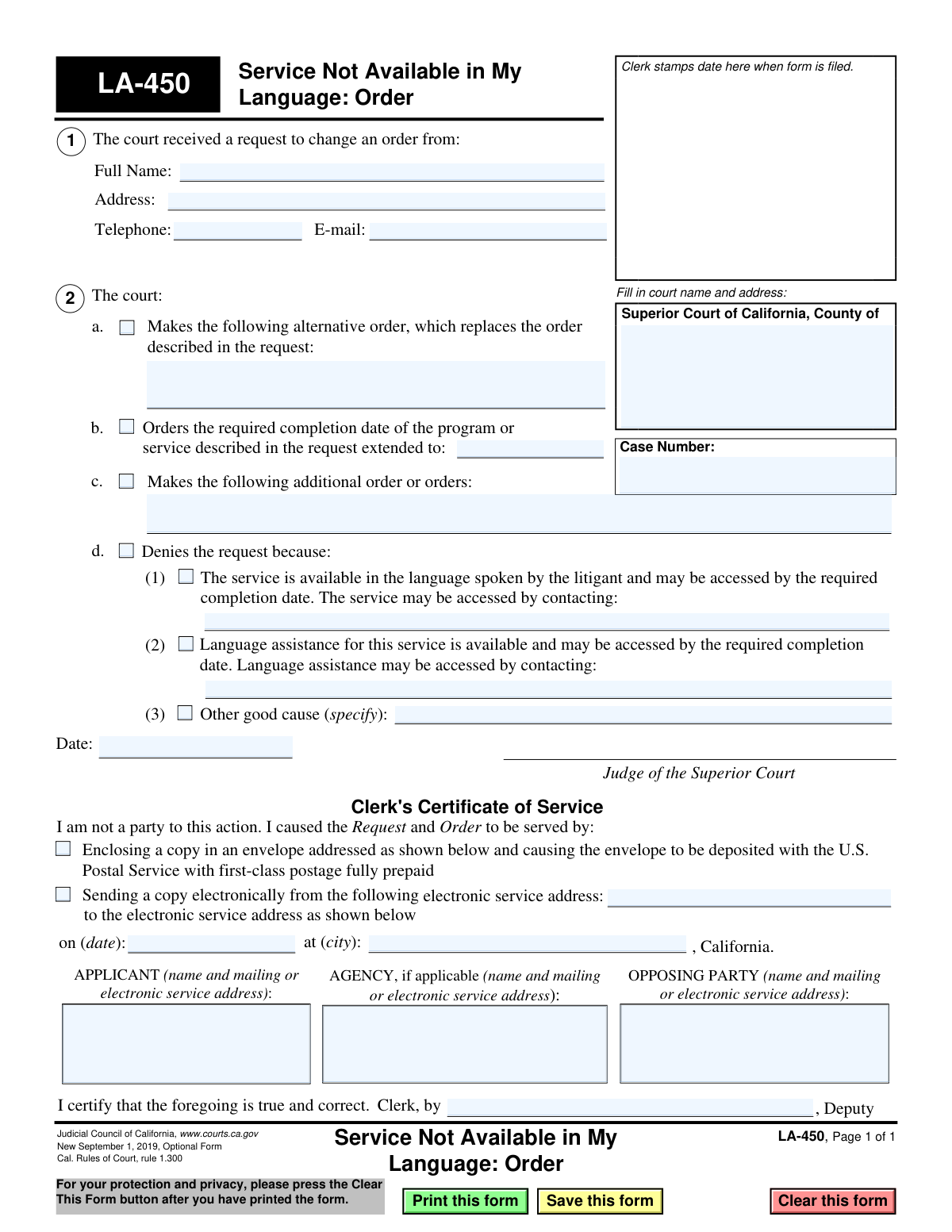
Form LA-450, Service Not Available in My Language: Order, is a legal document issued by the Superior Court of California. It is used by a judge to make a formal order in response to a request filed by a party who cannot access a required court service or program because it is not available in their language. The order may extend deadlines, provide alternatives, or deny the request, ensuring that language barriers do not impede a litigant's ability to comply with court requirements. Today, this form can be filled out quickly and accurately using AI-powered services like Instafill.ai, which can also convert non-fillable PDF versions into interactive fillable forms.
LA-450 is part of the
California court forms category on Instafill.
Our AI automatically handles information lookup, data retrieval, formatting, and form filling.
It takes less than a minute to fill out LA-450 using our AI form filling.
Securely upload your data. Information is encrypted in transit and deleted immediately after the form is filled out.
Form specifications
| Form name: | Form LA-450, Service Not Available in My Language: Order |
| Number of fields: | 33 |
| Number of pages: | 1 |
| Language: | English |
Instafill Demo: How to fill out PDF forms in seconds with AI
How to Fill Out LA-450 Online for Free in 2026
Are you looking to fill out a LA-450 form online quickly and accurately? Instafill.ai offers the #1 AI-powered PDF filling software of 2026, allowing you to complete your LA-450 form in just 37 seconds or less.
Follow these steps to fill out your LA-450 form online using Instafill.ai:
- 1 Navigate to Instafill.ai and upload the LA-450 form or select it from the template library to start.
- 2 Use the AI assistant to populate the court name and address, and then enter the specific case number.
- 3 Identify the party who submitted the original request that this order is responding to.
- 4 Indicate the court's decision by checking the appropriate box to deny the request, extend a deadline, or issue an alternative or additional order.
- 5 Fill in the specific details for the court's order, such as the reason for denial, the new completion date, or the text of the alternative/additional orders.
- 6 Review the completed form for accuracy before the judge dates and signs the order. The clerk will then complete the certificate of service section.
- 7 Securely download, print, or e-file the finalized Form LA-450 directly from the platform as required by the court.
Our AI-powered system ensures each field is filled out correctly, reducing errors and saving you time.
Why Choose Instafill.ai for Your Fillable LA-450 Form?
Speed
Complete your LA-450 in as little as 37 seconds.
Up-to-Date
Always use the latest 2026 LA-450 form version.
Cost-effective
No need to hire expensive lawyers.
Accuracy
Our AI performs 10 compliance checks to ensure your form is error-free.
Security
Your personal information is protected with bank-level encryption.
Frequently Asked Questions About Form LA-450
This is a court order, not a request form. It is used by a judge to issue a decision in response to a litigant's request about a court-mandated service that was not available in their primary language.
No, you do not fill out this form. The judge and court clerk complete and file Form LA-450 to communicate the court's official decision on a request that was previously submitted.
You received this form because a judge has made a ruling on a request you submitted, likely concerning a court-ordered program or service not being available in your language. This document is the official court order.
The judge can deny your request, extend the completion date for the service, make an alternative order, or issue other related orders. The judge's decision will be checked and explained on the form.
If your request is denied, the form will state the reason, such as the service or language assistance actually being available. The order may also provide contact information for you to access the service.
The court completes this form using existing case information, such as the court name, case number, and party details. As the litigant, you do not need to provide any new information for this specific order form.
This section is where the court clerk certifies that they have officially sent a copy of the judge's order to all parties involved in the case. It serves as proof that everyone has been notified of the court's decision.
You must carefully read the judge's decision and follow any new instructions. This may include noting a new deadline or contacting a specific person or agency as directed in the order.
No, this form is the court's response. To make the initial request, you would likely use a different form, such as Form LA-400, 'Request for Order: Service Not Available in My Language'.
Since this form is completed by the court, you will not fill it out yourself. However, for other court forms that you do need to complete, services like Instafill.ai can use AI to accurately auto-fill your information and save time.
You can upload your required court form to a platform like Instafill.ai. The service then helps you fill in your personal information, case details, and other fields interactively, making the process faster and more accurate.
Services like Instafill.ai can convert flat, non-fillable PDFs into interactive, fillable forms. This allows you to easily type your information directly onto the form online before printing for submission.
Compliance LA-450
Validation Checks by Instafill.ai
1
Case Number Presence and Format
Checks that the 'Case Number' field is not empty and conforms to the standard format used by the California court system. This is crucial for correctly filing the order and associating it with the proper legal case. A missing or malformed case number will result in filing rejection or misfiling.
2
Court County Specification
Validates that the county name has been filled in next to 'Superior Court of California, County of'. Each court is jurisdiction-specific, so identifying the correct county is a fundamental requirement for the document to be legally valid. Failure to provide the county will make the document's origin and jurisdiction ambiguous.
3
Exclusive Court Order Selection
Ensures that only one of the primary judicial decisions (extend completion date, deny request, make alternative order, or make additional order) is selected. These actions are typically mutually exclusive, and selecting more than one creates a contradictory and unenforceable order. The form should be returned for clarification if multiple conflicting options are chosen.
4
Conditional Date for Extension Order
Verifies that if the checkbox 'Orders the required completion date... extended to' is marked, the corresponding date field is populated with a valid, future date. Extending a deadline to a past or invalid date is illogical and would render the order meaningless. This check ensures the order is actionable.
5
Conditional Specification for 'Other' Denial
This check ensures that if the 'Denies the request because: Other good cause' option is selected, the accompanying 'specify' text field is not empty. Court orders, especially denials, require clear reasoning for due process and potential appeals. A missing specification makes the denial arbitrary and legally insufficient.
6
Conditional Details for Alternative Order
Validates that if the 'Makes the following alternative order' checkbox is selected, the associated text area contains a description of that order. The purpose of this option is to replace a previous order, so the new terms must be explicitly stated. An empty field would make the order void for vagueness.
7
Judge's Signature Date Validity
Checks that the date entered next to the judge's signature is a valid calendar date and is not set in the future. The signature date authenticates the order and establishes when it was officially made. A future date would invalidate the order's timeline and legal effect.
8
Logical Service Date
Ensures the date of service listed in the 'Clerk's Certificate of Service' is on or after the date the judge signed the order. It is logically and legally impossible to serve a document before it has been created and signed. This validation prevents chronological errors in the case record.
9
Service Method Selection
Verifies that at least one method of service (either by U.S. Postal Service or electronically) is checked in the Clerk's Certificate of Service section. Proof of service is a critical legal requirement to ensure all parties have been properly notified of the court's order. Without a selected method, the certificate is incomplete and service cannot be proven.
10
Conditional Electronic Service Address Presence
This check confirms that if the 'Sending a copy electronically' service method is chosen, the 'from the following electronic service address' field is filled with a validly formatted email address. This is necessary to create a clear record of where the electronic service originated from. An empty or invalid address would invalidate the proof of electronic service.
11
Applicant Service Address Completeness
Validates that the applicant listed in the service section has either a mailing address or an electronic service address provided. Proper service requires a valid address to send the order to. Missing address information for the applicant would mean they cannot be properly notified of the court's decision on their request.
12
Deputy Clerk Name Presence for Service
Ensures that the name of the deputy clerk who performed the service is filled in the 'Clerk, by ___, Deputy' line. This identifies the individual responsible for certifying that service was completed, which is essential for accountability and the legal validity of the certificate. An anonymous certification is not legally sound.
13
Email Address Format Validation
This validation scans all fields intended for email addresses to ensure they match a standard email format (e.g., '[email protected]'). This is critical for ensuring that communications and electronic service can be successfully delivered. Failed delivery due to a typo can have serious legal consequences for the case.
14
Telephone Number Format Validation
Checks that the 'Telephone' field, if filled, contains a value in a recognizable U.S. phone number format, such as (XXX) XXX-XXXX or XXX-XXX-XXXX. While optional, if a number is provided, it should be valid to ensure the court or other parties can contact the filer if necessary. This improves communication and can help resolve issues quickly.
Common Mistakes in Completing LA-450
Applicants mistakenly complete the main body of the order, including checking boxes for the court's decision and signing where the judge should. This happens because the form's layout doesn't explicitly fence off the sections for court personnel. Filling these areas will cause the form to be immediately rejected, as only a judicial officer can make an order. To avoid this, applicants should only fill the top-left information box (name, address, case number) and leave the rest of the form blank for the court to complete.
A critical error is using this form (LA-450, Order) to initiate a request for language services. Litigants may find this form when searching for language assistance, not realizing it's the document the court issues *after* a request has been made and approved. Submitting an 'Order' form as a request will be rejected, as it's procedurally incorrect and serves no legal purpose. Always ensure you are using the correct 'Request' form, not the 'Order' form that finalizes the decision.
Applicants sometimes fill out the 'Clerk's Certificate of Service' at the bottom of the form, including the method of service and party addresses. This section is a legal declaration that must be completed and signed *only* by the court clerk who is officially serving the document. An applicant filling this section invalidates the certification and will lead to the form's rejection. This area should always be left blank for the clerk.
Entering the case number incorrectly, with typos, or in the wrong format is a frequent mistake. Case numbers are long and specific, and a single wrong digit can prevent the document from being associated with the correct court file. This leads to the form being rejected or lost in the system, causing significant delays. AI-powered form filling tools like Instafill.ai can help prevent this by saving and accurately auto-filling correct case information across multiple documents.
Failing to provide current and accurate contact information (address, email, phone number) in the top-left box is a common oversight. People forget to update their details if they have recently moved or changed their phone number or email. This can result in you not receiving important notices, subsequent orders, or hearing dates from the court, potentially causing you to miss critical deadlines. Always verify that your contact information is the most current on every form you file.
Filers may enter a generic court name (e.g., 'Superior Court') without the specific county, or use an incorrect courthouse address. This is common in counties with multiple court locations or for individuals dealing with cases in different jurisdictions. An incorrect court identifier can lead to the document being misrouted or rejected, delaying the legal process. Always use the full, official name and address of the specific courthouse handling your case.
When the form is printed and filled out by hand, illegible handwriting can make critical information like names, addresses, and case numbers impossible for the court clerk to read. This forces the clerk to either guess, which can lead to errors in the official record, or reject the form entirely. Since many court PDFs are not fillable, tools like Instafill.ai can convert them into interactive, fillable versions, ensuring all entries are typed and perfectly legible.
The form requires dates in several locations, and users often use inconsistent or ambiguous formats (e.g., 01/02/24). This can lead to confusion between MM/DD/YY and DD/MM/YY formats, potentially causing misunderstandings about deadlines or filing dates. To avoid this, use a clear and unambiguous format like 'Month Day, Year' (e.g., 'January 2, 2024'). AI-powered tools like Instafill.ai can help by standardizing date formats automatically to meet court requirements.
While the applicant should not fill out the court sections, it's a common error on the clerk's side to miss parts of the certification. A clerk might sign but forget to print their name, or stamp the date but forget to sign as deputy. This can create an incomplete official record, potentially raising questions about the order's validity or service date later on. Proper internal checks are necessary to prevent this clerical error.
Saved over 80 hours a year
“I was never sure if my IRS forms like W-9 were filled correctly. Now, I can complete the forms accurately without any external help.”
Kevin Martin Green
Your data stays secure with advanced protection from Instafill and our subprocessors

Robust compliance program
Transparent business model
You’re not the product. You always know where your data is and what it is processed for.
ISO 27001, HIPAA, and GDPR
Our subprocesses adhere to multiple compliance standards, including but not limited to ISO 27001, HIPAA, and GDPR.
Security & privacy by design
We consider security and privacy from the initial design phase of any new service or functionality. It’s not an afterthought, it’s built-in, including support for two-factor authentication (2FA) to further protect your account.
Fill out LA-450 with Instafill.ai
Worried about filling PDFs wrong? Instafill securely fills form-la-450-service-not-available-in-my-language-order forms, ensuring each field is accurate.