Yes! You can use AI to fill out Form MC-010, Memorandum of Costs (Summary)

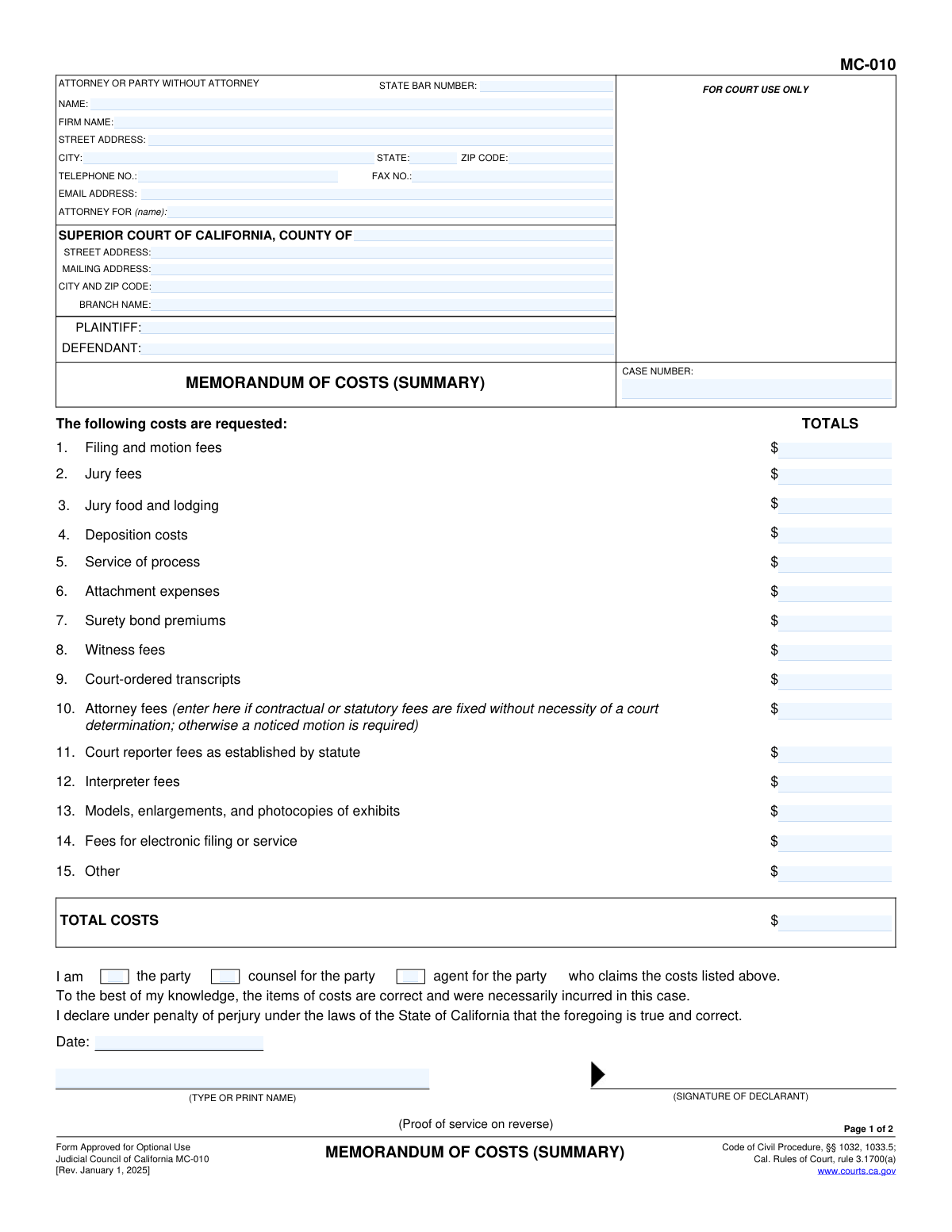
Form MC-010, the Memorandum of Costs (Summary), is a crucial legal document filed in California Superior Courts by the winning party of a lawsuit to claim allowable litigation expenses from the opposing party. It provides a standardized summary for costs such as filing fees, service of process, and deposition costs, as outlined in the California Code of Civil Procedure. Today, this form can be filled out quickly and accurately using AI-powered services like Instafill.ai, which can also convert non-fillable PDF versions into interactive fillable forms for easy completion.
MC-010 is part of the California court forms category on Instafill.
Our AI automatically handles information lookup, data retrieval, formatting, and form filling.
It takes less than a minute to fill out MC-010 using our AI form filling.
Securely upload your data. Information is encrypted in transit and deleted immediately after the form is filled out.

Form specifications

Form name: Form MC-010, Memorandum of Costs (Summary)
Number of fields: 64
Number of pages: 1
Language: English
main-image

Instafill Demo: How to fill out PDF forms in seconds with AI

How to Fill Out MC-010 Online for Free in 2026

Are you looking to fill out a MC-010 form online quickly and accurately? Instafill.ai offers the #1 AI-powered PDF filling software of 2026, allowing you to complete your MC-010 form in just 37 seconds or less.
Follow these steps to fill out your MC-010 form online using Instafill.ai:
  1. 1 Navigate to Instafill.ai and upload or select the MC-010 form.
  2. 2 Provide the case information, including the court, county, plaintiff/defendant names, and case number, letting the AI assist with proper formatting.
  3. 3 Enter your information as the attorney or party filing the form, including your name, address, and State Bar number if applicable.
  4. 4 Itemize all recoverable costs in the designated fields (lines 1-15), such as filing fees, deposition costs, and service fees, and allow the AI to calculate the total cost.
  5. 5 Complete the declaration section by checking the box that indicates your role (party, counsel, or agent), dating the form, and typing your name.
  6. 6 Fill out the 'Proof of Service' on the second page to document how and when the form was delivered to the other party.
  7. 7 Review all entered information for accuracy, then download, print, and sign the completed form for filing with the court and service on the opposing party.

Our AI-powered system ensures each field is filled out correctly, reducing errors and saving you time.

Why Choose Instafill.ai for Your Fillable MC-010 Form?

Speed

Complete your MC-010 in as little as 37 seconds.

Up-to-Date

Always use the latest 2026 MC-010 form version.

Cost-effective

No need to hire expensive lawyers.

Accuracy

Our AI performs 10 compliance checks to ensure your form is error-free.

Security

Your personal information is protected with bank-level encryption.

Frequently Asked Questions About Form MC-010

This form is used by the prevailing party in a California lawsuit to request reimbursement for the allowable costs they incurred during the case. It serves as a summary of expenses being claimed from the losing party.

The winning party in a civil case, or their attorney, must fill out this form if they wish to recover their litigation costs. It is filed with the court and served on the opposing party after a judgment or dismissal has been entered.

You will need your case information (court name, case number, party names), a detailed breakdown of all costs you are claiming, and the name and address of the opposing party for the Proof of Service.

You can only list attorney fees on line 10 if the amount is fixed by a contract or statute and does not require a court's decision. In most other situations, you must file a separate noticed motion to ask the court to determine the amount of attorney fees.

The Proof of Service is a required declaration stating that a copy of the Memorandum of Costs was properly delivered to the other party. It must be completed and signed by someone who is over 18 and not a party in the case.

After signing the form, you must file the original with the court clerk and serve a copy on the opposing party. The person who serves the copy must then complete and sign the Proof of Service on page 2 of the copy you file with the court.

Yes, you must file and serve this form within 15 days after the notice of entry of judgment is mailed, or within 180 days after the judgment is entered, whichever is earlier. It is crucial to check the specific rules and deadlines for your case.

The opposing party has a right to object by filing a 'Motion to Tax Costs' with the court. If they do, a judge will decide which of your claimed costs are reasonable and necessary.

No, you do not need to attach documentation when you initially file the form. However, you must keep all receipts and invoices, as you will need to provide them as proof if the other party challenges your costs.

The 'Other' category is for any allowable costs that are not specifically listed in items 1-14, such as certain travel expenses or other costs permitted by law. Be prepared to provide a detailed explanation and justification for these items if asked.

Yes, services like Instafill.ai use AI to auto-fill form fields accurately and save time. It can help populate your personal, case, and court information, reducing the risk of manual errors.

You can upload the MC-010 PDF to the Instafill.ai platform. The service will make the form fillable online, allowing you to type in your information and costs, save your progress, and download the completed document.

If you have a non-fillable or 'flat' PDF, you can use a tool like Instafill.ai. It can convert the document into an interactive, fillable form so you can easily type your information into the correct fields.

Compliance MC-010
Validation Checks by Instafill.ai

1
Total Costs Calculation Accuracy
Verifies that the 'TOTAL COSTS' field is the correct sum of all individual cost items (lines 1-15). This is a critical check to ensure financial accuracy and prevent mathematical errors in the cost claim. If the sum is incorrect, the filing may be rejected or require correction, delaying the cost recovery process.
2
Case Number Consistency Across Pages
Ensures the 'CASE NUMBER' entered on Page 1 is identical to the 'CASE NUMBER' on Page 2. This validation is crucial for document integrity, linking the cost summary with its proof of service. A mismatch could lead to the proof of service being invalidated or associated with the wrong case file.
3
State Bar Number Format
Validates that the 'STATE BAR NUMBER' field contains only numeric digits. This check ensures the data quality for a key professional identifier, as an incorrect format can hinder attorney verification. If the field is filled, it must be a valid number.
4
Declarant Capacity Selection
Confirms that exactly one of the declarant capacity checkboxes ('the party', 'counsel for the party', 'agent for the party') on Page 1 is selected. This is legally significant as it specifies the authority of the person signing the declaration. Failure to select a role makes the declaration ambiguous and potentially invalid.
5
Proof of Service Method Selection
Checks that one, and only one, of the primary proof of service methods ('MAILING' or 'PERSONAL DELIVERY') is selected on Page 2. This selection determines which subsequent sections are relevant and required. An invalid or missing selection makes the proof of service incomplete and unenforceable.
6
Conditional Requirement for Mailing Details
If 'Mail' (item 3a) is chosen as the service method, this validation ensures that all related fields, including the name of the person served, address, date of mailing, and place of mailing, are completed. Omitting any of this information invalidates the proof of service by mail. This check enforces the procedural rules for proper service.
7
Conditional Requirement for Personal Delivery Details
If 'Personal delivery' (item 3b) is chosen, this check mandates that the name of the person served, delivery address, date, and time of delivery are all filled in. This information is essential for creating a legally sufficient record of personal service. Incomplete details can render the proof of service defective.
8
Uniform Date Format
Verifies that all date fields on the form (e.g., declaration dates, service dates) adhere to a valid and consistent format, such as MM/DD/YYYY. This is important for legal record-keeping and establishing timelines. Invalid date formats can cause data entry errors and create ambiguity about critical event dates.
9
Numeric-Only Cost Fields
Ensures that all individual cost amount fields (lines 1-15) only accept numeric input, including decimals for cents. This prevents non-numeric characters from being entered, which would break the total cost calculation. This validation is fundamental for maintaining the financial integrity of the document.
10
Attorney Information Completeness for Counsel
If 'counsel for the party' is checked on Page 1, this validation requires the attorney's name, State Bar number, and firm address to be filled out. This is necessary to properly identify the legal representative submitting the costs. Missing information can lead to communication issues and delays in processing the document.
11
Valid Email Address Format
Checks the 'EMAIL ADDRESS' field to ensure the entry conforms to a standard email format (e.g., '[email protected]'). This is important for ensuring that electronic communications and notifications from the court or other parties are deliverable. An invalid email address can result in missed communications.
12
Party Identification Completeness
Validates that both the 'PLAINTIFF' and 'DEFENDANT' fields are filled out. These fields are essential for identifying the primary parties to the litigation and correctly associating the document with the case. A form missing this core information is incomplete and cannot be properly filed.
13
Proof of Service Declaration Completeness
Ensures that the declaration on Page 2 includes the server's printed name and the date of signature. These elements are required to execute a valid declaration under penalty of perjury. Omitting the name or date renders the proof of service declaration invalid.
14
Server Address Requirement
Verifies that the server's residence or business address field on Page 2 is not empty. This information is required by court rules to identify the person who performed the service and is a necessary component of a valid proof of service. An empty address field makes the proof of service defective.

Common Mistakes in Completing MC-010

Incorrect Total Costs Calculation

Filers often manually add the individual cost items and make simple arithmetic errors, resulting in an incorrect figure in the 'TOTAL COSTS' field. This discrepancy can lead to challenges from the opposing party and may require filing an amended memorandum. To prevent this, carefully double-check your calculations or use a spreadsheet before entering the final number. AI-powered tools like Instafill.ai can perform these calculations automatically, eliminating the risk of human error.

Improperly Claiming Attorney Fees on Line 10

A frequent and significant error is entering attorney fees on line 10 when a separate noticed motion is legally required. This line is strictly for fees that are fixed by contract or statute and do not require a court determination. Listing fees here improperly can result in the court striking them, forcing the filer to start over with a formal motion, which wastes time and risks missing deadlines.

Forgetting Case Information on Page 2

Users often meticulously fill out page 1 but forget to enter the 'SHORT TITLE' and 'CASE NUMBER' at the top of page 2. If the pages are separated during processing, the Proof of Service becomes an orphan document that cannot be linked to the case file. This can invalidate the service of the cost memorandum, jeopardizing the entire claim.

Using an Invalid Server for Proof of Service

The Proof of Service on page 2 must be completed and signed by someone who is at least 18 years old and not a party to the action. Parties representing themselves (pro se litigants) often make the mistake of filling out and signing this section themselves. This renders the service invalid and is a common reason for a motion to strike the cost memorandum to be granted.

Missing Signature or Date on a Declaration

Forgetting to sign or date the declaration on page 1 or the Proof of Service declaration on page 2 is a critical omission. A declaration made 'under penalty of perjury' is invalid without a signature and date. This can lead to immediate rejection by the court clerk or allow the opposing party to have the filing thrown out entirely.

Incomplete or Contradictory Proof of Service Details

The Proof of Service section is often filled out incompletely, with missing dates, addresses, or names of persons served. Another common error is checking both 'Mail' and 'Personal delivery' or filling in details for both methods. These errors create ambiguity and can be used by the opposing counsel to challenge the validity of the service, forcing a re-filing.

Failing to Check Declarant Status on Page 1

On page 1, directly above the signature line, there are checkboxes to indicate whether the declarant is the 'party,' 'counsel for the party,' or 'agent for the party.' It is a simple but common oversight to leave these boxes unchecked. This makes the form technically incomplete and can cause it to be rejected by the clerk for correction, delaying the filing.

Unsubstantiated 'Other' Costs

Filers may enter a significant amount on line 15 for 'Other' costs without attaching a separate worksheet (like form MC-011) that itemizes and justifies these expenses. The summary form itself has no space for this explanation. Without detailed documentation, these 'Other' costs are highly likely to be disputed by the opposing party and disallowed by the court.

Incorrect Court Name or Address

Data entry errors in the court information section, such as listing the wrong county, branch name, or street address, are common. This can cause the document to be misrouted or filed in the wrong courthouse, leading to significant delays and potentially missed deadlines. Verifying the precise court details from the case's prior documents is essential. AI form-filling tools like Instafill.ai can help prevent this by saving and reusing correct case information across multiple forms.

Omitting the Attorney's State Bar Number

Attorneys sometimes forget to enter their State Bar Number in the caption at the top of the form. While it may seem like a minor detail, it is required information for proper identification and record-keeping by the court. A clerk may reject the filing as incomplete for this reason, requiring the attorney to add the number and refile.
Saved over 80 hours a year

“I was never sure if my IRS forms like W-9 were filled correctly. Now, I can complete the forms accurately without any external help.”

Kevin Martin Green

Your data stays secure with advanced protection from Instafill and our subprocessors

Robust compliance program

Transparent business model

You’re not the product. You always know where your data is and what it is processed for.

ISO 27001, HIPAA, and GDPR

Our subprocesses adhere to multiple compliance standards, including but not limited to ISO 27001, HIPAA, and GDPR.

Security & privacy by design

We consider security and privacy from the initial design phase of any new service or functionality. It’s not an afterthought, it’s built-in, including support for two-factor authentication (2FA) to further protect your account.

Fill out MC-010 with Instafill.ai

Worried about filling PDFs wrong? Instafill securely fills form-mc-010-memorandum-of-costs-summary forms, ensuring each field is accurate.