Yes! You can use AI to fill out Form MD-109, Notice of Hearing (Menacing Dog)
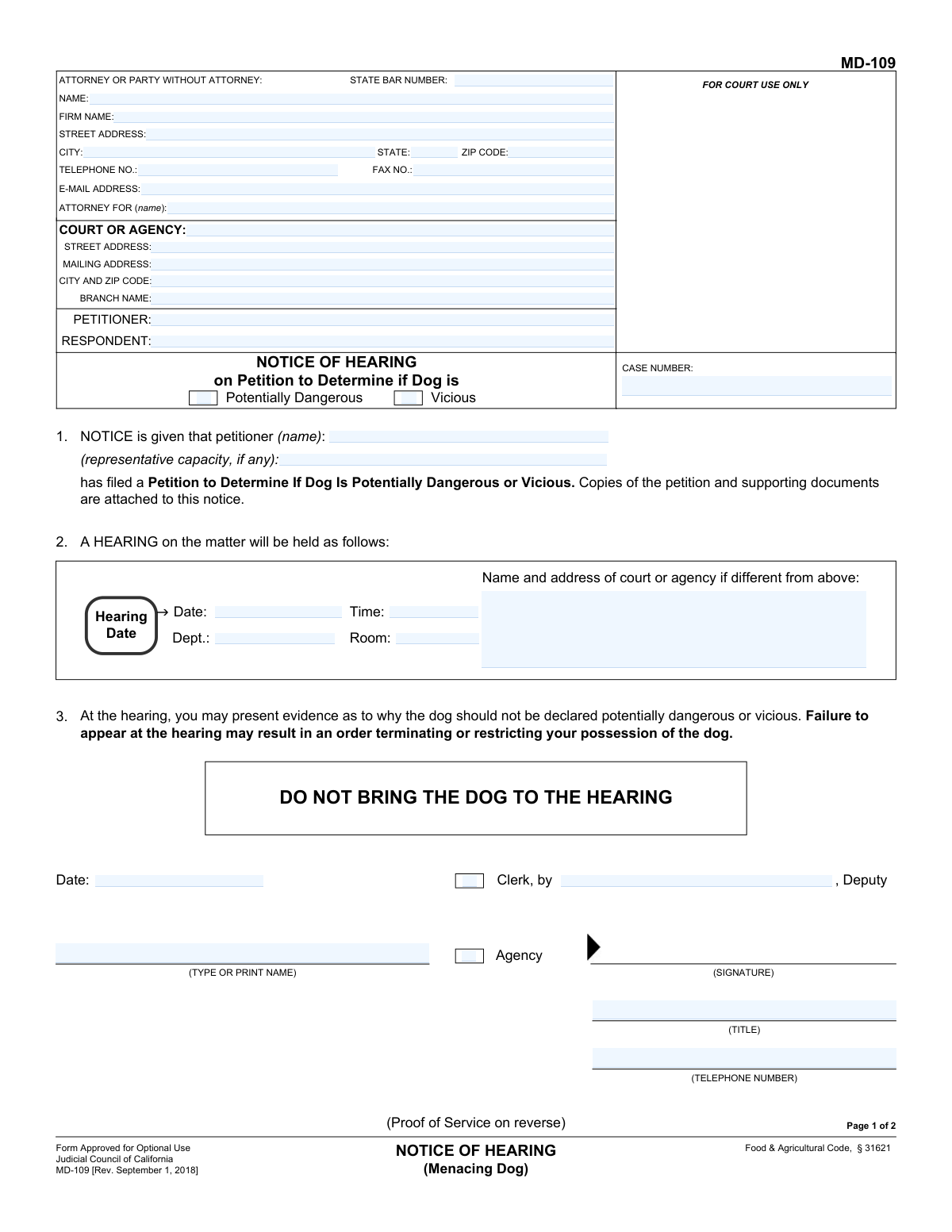
Form MD-109, Notice of Hearing (Menacing Dog), is a legal document used in California to formally notify a dog's owner that a petition has been filed to declare their dog potentially dangerous or vicious. This notice sets the date, time, and location for a hearing where the owner can present evidence to contest the petition, making it a critical step in legal proceedings concerning animal control. Today, this form can be filled out quickly and accurately using AI-powered services like Instafill.ai, which can also convert non-fillable PDF versions into interactive fillable forms.
MD-109 is part of the
California court forms category on Instafill.
Our AI automatically handles information lookup, data retrieval, formatting, and form filling.
It takes less than a minute to fill out MD-109 using our AI form filling.
Securely upload your data. Information is encrypted in transit and deleted immediately after the form is filled out.
Form specifications
| Form name: | Form MD-109, Notice of Hearing (Menacing Dog) |
| Number of fields: | 56 |
| Number of pages: | 1 |
| Language: | English |
Instafill Demo: How to fill out PDF forms in seconds with AI
How to Fill Out MD-109 Online for Free in 2026
Are you looking to fill out a MD-109 form online quickly and accurately? Instafill.ai offers the #1 AI-powered PDF filling software of 2026, allowing you to complete your MD-109 form in just 37 seconds or less.
Follow these steps to fill out your MD-109 form online using Instafill.ai:
- 1 Navigate to Instafill.ai and upload or select Form MD-109, Notice of Hearing (Menacing Dog).
- 2 Enter the court or agency information, petitioner and respondent names, and the case number in the designated fields.
- 3 Provide the information for the attorney or the party without an attorney, including name, address, and contact details.
- 4 Fill in the hearing details, specifying the date, time, department, and location of the scheduled hearing.
- 5 Complete the Proof of Service section on the second page after the notice has been delivered, indicating the method of service and server's details.
- 6 Review all entered information for accuracy with the AI assistant's guidance, then date and sign the form where required.
- 7 Securely download, print, or share the completed Form MD-109 for filing with the court and serving to the respondent.
Our AI-powered system ensures each field is filled out correctly, reducing errors and saving you time.
Why Choose Instafill.ai for Your Fillable MD-109 Form?
Speed
Complete your MD-109 in as little as 37 seconds.
Up-to-Date
Always use the latest 2026 MD-109 form version.
Cost-effective
No need to hire expensive lawyers.
Accuracy
Our AI performs 10 compliance checks to ensure your form is error-free.
Security
Your personal information is protected with bank-level encryption.
Frequently Asked Questions About Form MD-109
This form officially notifies a dog owner that a legal petition has been filed to declare their dog as potentially dangerous or vicious. It specifies the date, time, and location of the court hearing where the case will be heard.
Receiving this form means you are the 'Respondent' in a legal action concerning your dog's behavior. You are being summoned to a hearing where you can present evidence as to why your dog should not be declared dangerous or vicious.
No, you must not bring the dog to the hearing. The form explicitly states in bold, capital letters, 'DO NOT BRING THE DOG TO THE HEARING'.
If you fail to appear at the hearing, the court may proceed without you and issue an order based on the petitioner's evidence. This could result in an order terminating or restricting your possession of the dog.
The Petitioner is the person or agency that filed the complaint against the dog. The Respondent is the owner or keeper of the dog who is required to appear at the hearing.
The 'Proof of Service' is a sworn statement confirming that the notice was legally delivered to the dog's owner (the Respondent). It must be completed by the person who served the papers and filed with the court.
The notice must be delivered, or 'served', by an individual who is at least 18 years old and is not a party to the case (i.e., not the petitioner). This person can deliver it personally or send it via certified mail.
As the petitioner, you or your attorney must provide your contact information, the respondent's name, and the court information. The court clerk will then add the case number and hearing details.
This notice must be served along with a copy of the 'Petition to Determine If Dog Is Potentially Dangerous or Vicious' and any other supporting documents that were filed with the court.
Yes, services like Instafill.ai use AI to help you accurately auto-fill form fields with your saved information, which can save time and help prevent errors when completing the form.
You can upload the form to a platform like Instafill.ai. Their service will make the PDF interactive, allowing you to type your information directly into the fields, then save or print the completed document.
If you have a non-fillable or 'flat' PDF, you can use a service like Instafill.ai. Simply upload the file, and it will be converted into an interactive, fillable form that you can complete on your computer.
You may present any evidence that shows why your dog should not be declared dangerous, such as witness testimony about your dog's good temperament, veterinary records, or certificates from obedience training.
Compliance MD-109
Validation Checks by Instafill.ai
1
Case Number Format and Consistency
This check verifies that the 'CASE NUMBER' field is present and follows a standard court-defined format. It also ensures the case number is identical on both page 1 and page 2 of the form. This is critical for correctly filing and tracking the legal document within the court system, and failure to match can lead to processing delays or rejection.
2
Attorney State Bar Number Validation
Validates that the 'STATE BAR NUMBER' field contains a numeric value corresponding to a valid, active attorney in the State of California. This is important for verifying the credentials of the legal representative. If the number is invalid or missing when an attorney's name is provided, the form may be considered incomplete or improperly filed.
3
Email Address Format
Ensures that the value entered in the 'E-MAIL ADDRESS' field for the attorney follows the standard '[email protected]' format. Proper email formatting is essential for electronic communication and service of documents. An invalid format would prevent the court or other parties from successfully contacting the attorney, potentially delaying proceedings.
4
Dog Status Selection Requirement
This validation confirms that at least one of the checkboxes for 'Potentially Dangerous' or 'Vicious' has been selected. This selection is the core subject of the petition and hearing, defining the legal context. Failure to select a status means the petition lacks a clear purpose and would be rejected as incomplete.
5
Petitioner Name Consistency Check
Verifies that the petitioner's name listed in the top caption of the form matches the petitioner's name entered in section 1 ('NOTICE is given that petitioner (name):'). This consistency is crucial for avoiding ambiguity about who is filing the petition. A mismatch could cause confusion and legal challenges regarding the identity of the filing party.
6
Future Hearing Date
This check ensures that the 'Date' provided for the hearing in section 2 is a date in the future, not the current day or a past date. A hearing must be scheduled in advance to provide adequate notice to all parties. An invalid or past date would render the notice defective and require re-issuance.
7
Logical Hearing and Notice Dates
Validates that the 'Hearing Date' in section 2 is chronologically after the clerk's issuance 'Date' in section 3. A hearing cannot be scheduled to occur before the notice is officially issued by the court or agency. If this validation fails, it indicates a logical error that makes the notice invalid.
8
Exclusive Manner of Service Selection
This check ensures that exactly one of the two 'Manner of service' checkboxes ('Personal service' or 'Certified mail') on page 2 is selected. The method of service must be clearly and unambiguously declared. Selecting both or neither would make the Proof of Service invalid and could be grounds for challenging that the respondent was properly notified.
9
Conditional Personal Service Fields Completion
If the 'Personal service' checkbox is selected, this validation ensures that all associated sub-fields (Name, Address where served, Date served, Time served) are filled out. These details are legally required to prove that service was properly executed in person. Missing information would invalidate the proof of personal service.
10
Conditional Certified Mail Fields Completion
If the 'Certified mail' checkbox is selected, this validation ensures that all associated sub-fields (Name, Address, Date of mailing, Place of mailing) are completed. This information is necessary to create a verifiable record of service by mail. Incomplete details would prevent the court from confirming that the notice was sent correctly.
11
Service Date Validity
Verifies that the 'Date served' or 'Date of mailing' on the Proof of Service is on or after the notice issuance date (from page 1) and before the scheduled hearing date. Service cannot occur before the notice exists, and it must occur with sufficient time before the hearing to be considered valid notice. An illogical date would invalidate the service.
12
Proof of Service Declaration Date Logic
This check ensures the date the server signs the Proof of Service declaration is on or after the date service was actually performed ('Date served' or 'Date of mailing'). A person cannot legally swear that an action was completed before it has happened. This validation prevents perjurious statements and ensures the integrity of the legal declaration.
13
ZIP Code Format Validation
This validation checks all ZIP code fields on the form to ensure they contain a valid 5-digit or 9-digit (ZIP+4) numeric format. Correct ZIP codes are essential for mail delivery and for accurately identifying court and party locations. An invalid format could lead to returned mail and failed service notifications.
Common Mistakes in Completing MD-109
Users often mix up the 'Petitioner' (the person filing the complaint) and the 'Respondent' (the dog owner being complained about). This happens due to unfamiliarity with legal terminology. Incorrectly identifying the parties can lead to the entire legal action being misdirected, causing significant confusion, and potentially requiring a complete refiling of all documents. To avoid this, carefully read the form and remember the Petitioner is the one initiating the action.
Individuals representing themselves (pro se) may mistakenly leave the attorney section blank or try to fill it out as if they were a law firm. This can cause confusion about whether the party has legal representation. If you do not have an attorney, you should enter your own name, address, and contact information in this section, as you are the 'Party Without Attorney'. Clearly state your status to avoid processing delays.
People may prematurely write a case number that has not been assigned or forget to include an existing one. The 'FOR COURT USE ONLY' box indicates the clerk will often assign this number upon initial filing. Filing a notice without a pre-existing case number can cause it to be lost or misfiled. Always leave this field blank on the initial petition and then carefully copy the assigned case number exactly on all subsequent documents, like this Notice of Hearing.
The form requires the filer to check a box indicating if the petition is to determine the dog is 'Potentially Dangerous' or 'Vicious'. Forgetting to check a box, or checking the wrong one, makes the legal basis for the hearing unclear. This ambiguity can lead to the hearing being postponed or the petition being dismissed. Before filing, understand the distinct legal definitions for each term and select the one that applies to your petition.
A critical mistake is for the Petitioner, who is a party to the case, to complete and sign the Proof of Service on page 2. The form explicitly states the server must NOT be a party to the legal proceeding. This error invalidates the service of notice, which is a major procedural flaw that can get the case dismissed, forcing the petitioner to start the entire process over. A neutral third party over 18 must perform the service and sign this section.
When filling out the Proof of Service, the server may fail to check the manner of service (Personal or Certified Mail) or neglect to fill in all required details like the date, time, and specific address of service. A defective Proof of Service can be challenged by the respondent, potentially invalidating the notice and delaying the case. The person serving the documents must meticulously record all details at the time of service to ensure the form is legally sound.
When filling out multi-page forms manually, it's common to introduce small errors, such as misspelling a name or transcribing the case number differently on page 2 than on page 1. These inconsistencies create ambiguity, can cause filing rejections by the court clerk, and make the document appear unprofessional. To prevent this, proofread carefully or use an AI-powered form filling tool like Instafill.ai, which automatically populates recurring data across the entire document to ensure perfect consistency.
The signature block on page 1 for the 'Clerk, by, Deputy' or 'Agency' is often mistakenly signed by the petitioner. This section is reserved for the court or agency official who formally issues the notice after it has been filed and the hearing has been scheduled. Signing here yourself is a misrepresentation that can invalidate the notice. This section must be left blank by the petitioner.
The petitioner might fill in a speculative date and time for the hearing in Section 2 before one has been officially set by the court. A notice of hearing is invalid without a correct, court-assigned date, time, and location. This information is provided by the court clerk after the initial petition is processed. You must wait to receive the official hearing details from the court before preparing and serving this notice.
A person might download the form from an unofficial source and inadvertently use an outdated version. This form clearly shows a revision date of September 1, 2018. Courts often update their forms, and submitting an obsolete version can lead to an automatic rejection by the clerk's office, wasting time and effort. Always download legal forms directly from the official court or Judicial Council website. If the form is a non-fillable PDF, tools like Instafill.ai can make it fillable while ensuring the official layout is preserved.
Saved over 80 hours a year
“I was never sure if my IRS forms like W-9 were filled correctly. Now, I can complete the forms accurately without any external help.”
Kevin Martin Green
Your data stays secure with advanced protection from Instafill and our subprocessors

Robust compliance program
Transparent business model
You’re not the product. You always know where your data is and what it is processed for.
ISO 27001, HIPAA, and GDPR
Our subprocesses adhere to multiple compliance standards, including but not limited to ISO 27001, HIPAA, and GDPR.
Security & privacy by design
We consider security and privacy from the initial design phase of any new service or functionality. It’s not an afterthought, it’s built-in, including support for two-factor authentication (2FA) to further protect your account.
Fill out MD-109 with Instafill.ai
Worried about filling PDFs wrong? Instafill securely fills form-md-109-notice-of-hearing-menacing-dog forms, ensuring each field is accurate.