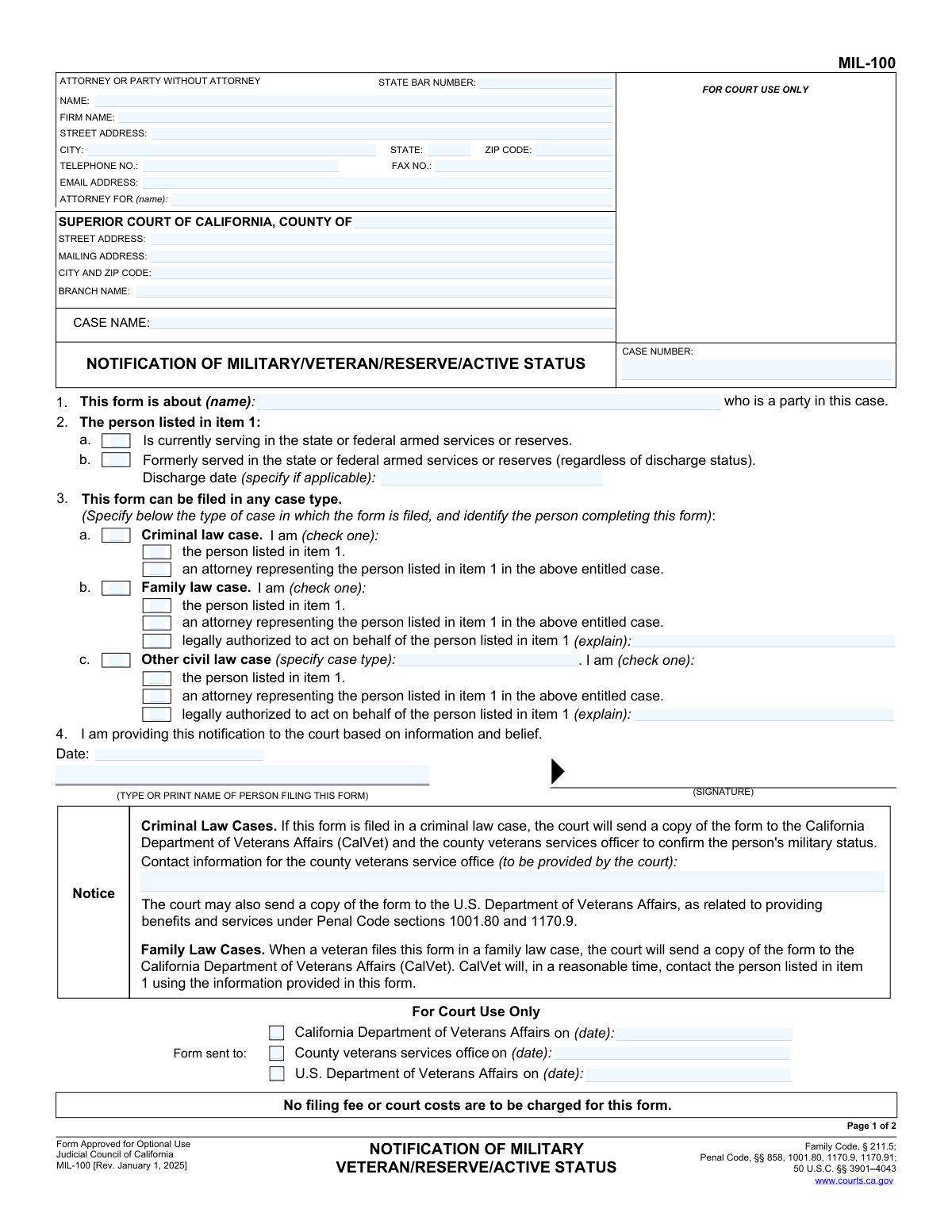
Yes! You can use AI to fill out Form MIL-100, Notification of Military Veteran/Reserve/Active Status

Form MIL-100, Notification of Military Veteran/Reserve/Active Status, is a legal document filed in California courts to inform them that a party involved in a case is a current or former member of the U.S. military. This notification is important because it can make the individual eligible for specific protections, benefits, and alternative considerations in criminal, family, and civil law cases under state and federal law. Today, this form can be filled out quickly and accurately using AI-powered services like Instafill.ai, which can also convert non-fillable PDF versions into interactive fillable forms.
MIL-100 is part of the California court forms category on Instafill.
Our AI automatically handles information lookup, data retrieval, formatting, and form filling.
It takes less than a minute to fill out MIL-100 using our AI form filling.
Securely upload your data. Information is encrypted in transit and deleted immediately after the form is filled out.

Form specifications

Form name: Form MIL-100, Notification of Military Veteran/Reserve/Active Status
Number of fields: 52
Number of pages: 1
Language: English
main-image

Instafill Demo: How to fill out PDF forms in seconds with AI

How to Fill Out MIL-100 Online for Free in 2026

Are you looking to fill out a MIL-100 form online quickly and accurately? Instafill.ai offers the #1 AI-powered PDF filling software of 2026, allowing you to complete your MIL-100 form in just 37 seconds or less.
Follow these steps to fill out your MIL-100 form online using Instafill.ai:
  1. 1 Navigate to Instafill.ai and upload or select Form MIL-100.
  2. 2 Use the AI assistant to automatically fill in your contact information, attorney details (if applicable), and court case information like county, case name, and case number.
  3. 3 In item 1, specify the name of the party whose military status is being reported.
  4. 4 In item 2, check the appropriate box to indicate if the person is currently serving or formerly served, providing a discharge date if known.
  5. 5 In item 3, select the type of case (Criminal, Family, or other Civil) and check the box that identifies who is completing the form (e.g., the party themselves, their attorney).
  6. 6 Review all the information populated by the AI for accuracy, then electronically sign and date the form in item 4.
  7. 7 Download the completed, signed form to file with the court and serve on the other parties as required for your case type.

Our AI-powered system ensures each field is filled out correctly, reducing errors and saving you time.

Why Choose Instafill.ai for Your Fillable MIL-100 Form?

Speed

Complete your MIL-100 in as little as 37 seconds.

Up-to-Date

Always use the latest 2026 MIL-100 form version.

Cost-effective

No need to hire expensive lawyers.

Accuracy

Our AI performs 10 compliance checks to ensure your form is error-free.

Security

Your personal information is protected with bank-level encryption.

Frequently Asked Questions About Form MIL-100

The MIL-100 form is used to voluntarily notify the court that a party in a legal case has current or former military service. This allows the court to consider potential benefits, rights, and protections available to service members and veterans.

This form can be completed by the party who has military experience, their attorney, or another person legally authorized to act on their behalf.

No, providing this information to the court is completely voluntary. You only need to file it once per case if you choose to do so.

Yes, this form can be filed in any case type, including criminal, family law, and other civil law cases. You will need to specify the case type in section 3.

No, the form states that no filing fee or court costs are to be charged for filing form MIL-100.

The court will send a copy to the California Department of Veterans Affairs (CalVet) and/or other relevant agencies. These agencies may then contact you to provide information about available benefits and services.

Not necessarily. For criminal cases, the form explicitly states you are not required to have an honorable discharge to be eligible for possible rights and protections.

No, this form is only a notification. It does not substitute for filing other required forms, such as a request for relief from financial obligations or a request to modify a support order due to deployment.

You will need to provide your personal and case information, indicate whether you are a current or former service member, and specify the type of case you are involved in.

If you submit this form in a criminal case, you must file it with the court and also serve a copy of it to the prosecuting attorney and your defense counsel.

Yes, services like Instafill.ai use AI to help you accurately auto-fill form fields with your information, which can save time and reduce errors.

You can upload the MIL-100 PDF to the Instafill.ai platform. The AI will identify the fields, and you can quickly fill them in, then download the completed document for submission.

If you have a flat, non-fillable PDF, you can use a service like Instafill.ai. It can convert the document into an interactive, fillable form that you can complete on your computer.

Compliance MIL-100
Validation Checks by Instafill.ai

1
Party Name Presence (Item 1)
Checks that the name of the party who is the subject of the notification is filled in for item 1. This field is critical as it identifies the individual whose military status is being reported to the court. A failure to provide this name makes the entire form invalid as the subject is unknown.
2
Case Number Presence
Ensures the 'CASE NUMBER' field is not empty. The case number is the primary identifier used by the court to associate this notification with the correct legal proceeding. Without a valid case number, the form cannot be filed or processed correctly, leading to delays or rejection.
3
Exclusive Military Status Selection (Item 2)
Validates that only one of the two checkboxes in item 2 ('Is currently serving' or 'Formerly served') is selected. A person cannot be both currently serving and formerly served simultaneously in the context of this form. Selecting both would create a logical contradiction, so the user must choose only one.
4
Mandatory Military Status Selection (Item 2)
Verifies that at least one checkbox in item 2 is selected to indicate the person's military status. The entire purpose of the form is to notify the court of this status, so this section must be completed. If neither option is checked, the form fails to provide the necessary information.
5
Valid Discharge Date (Item 2b)
Checks that if a 'Discharge date' is entered in item 2b, it is a valid calendar date and is not a future date. An invalid or future date is logically impossible for a past event like a military discharge. This ensures the data provided is accurate and chronologically correct.
6
Exclusive Case Type Selection (Item 3)
Ensures that exactly one of the main case type checkboxes (3a Criminal, 3b Family, or 3c Other civil) is selected. The form must be filed in the context of a single case type for proper routing and application of relevant laws. Selecting none or more than one would cause ambiguity.
7
Conditional 'Other Civil' Case Type Specification (Item 3c)
Requires the text field specifying the case type to be filled if the 'Other civil law case' checkbox (3c) is selected. This provides necessary context for the court when the case does not fall into the common categories of criminal or family law. Failure to specify makes the filing incomplete.
8
Mandatory Filer Identity Selection (Item 3)
Validates that for the selected case type in item 3, one of the sub-options identifying the person completing the form is checked. The court needs to know who is submitting the information (the party, their attorney, or an authorized representative). This is required for establishing the authority of the filer.
9
Conditional 'Legally Authorized' Explanation (Items 3b/3c)
Checks that if the 'legally authorized to act on behalf of the person' checkbox is selected in item 3b or 3c, the corresponding explanation text field is filled. This is crucial for the court to verify the filer's standing and legal authority to submit information on behalf of the party. An empty explanation would invalidate the filer's claim of authority.
10
Signature Date Presence and Validity
Verifies that the 'Date' field in the signature block is filled with a valid calendar date that is not in the future. The signature date authenticates when the document was signed and is a standard requirement for legal forms. An invalid or future date would call the document's authenticity into question.
11
Printed Name Presence
Ensures the 'TYPE OR PRINT NAME OF PERSON FILING THIS FORM' field is completed. This field legibly identifies the signatory, which is essential for accountability and verification. A missing printed name makes it difficult to confirm who signed the document.
12
Conditional Attorney Information
Validates that if the filer is identified as an 'attorney' in item 3, the 'STATE BAR NUMBER' field is filled out in the header. The State Bar Number is the unique identifier for an attorney, and its presence is required to verify their credentials and good standing. This check ensures that individuals representing themselves as attorneys are properly identified.
13
Email Address Format Validation
Checks that any value entered into the 'EMAIL ADDRESS' field follows the standard '[email protected]' format. This ensures that the court has a valid electronic contact method for the filer, which is important for modern communication and service of documents. An incorrectly formatted email will lead to communication failures.
14
ZIP Code Format Validation
Ensures that the 'ZIP CODE' field in the attorney/party address block contains a valid 5-digit or 9-digit (ZIP+4) numeric format. Correctly formatted ZIP codes are essential for the reliable delivery of physical mail by the postal service. This prevents correspondence from being lost or returned.
15
Phone Number Format Validation
Validates that the 'TELEPHONE NO.' field follows a recognizable phone number format (e.g., 10 digits, possibly with parentheses, spaces, or hyphens). This ensures the court has a reliable way to contact the filer by phone if necessary. An invalid number would hinder direct communication.

Common Mistakes in Completing MIL-100

Incorrect Party Name in Item 1

Filers, especially attorneys or legal representatives, sometimes mistakenly enter their own name in Item 1 instead of the name of the party who is the veteran or service member. This error invalidates the notification, as the court and veterans' services will be looking for information on the wrong person. To avoid this, carefully read Item 1 and ensure it contains the full legal name of the party whose military status is being reported.

Ambiguous Military Status in Item 2

People often make errors in Section 2 by either checking both boxes for 'currently serving' and 'formerly served,' or by checking 'formerly served' but failing to provide a discharge date. This ambiguity can delay the verification process by veterans' affairs agencies. You must select only one status and, if you are a veteran, provide the discharge date if known to ensure your notification is processed efficiently.

Incomplete Filer Identification in Item 3

A frequent mistake is checking the case type (e.g., 3b. Family law case) but forgetting to complete the section by checking the box that identifies who is filing the form (e.g., 'I am the person listed in item 1'). The court needs to know both the case type and the filer's relationship to the case. Failing to select one of the sub-options will result in an incomplete form that may be rejected.

Missing Explanation for 'Legally Authorized' Filer

In sections 3b and 3c, if the filer checks the box for 'legally authorized to act on behalf of the person listed in item 1,' they often forget to provide the mandatory explanation. The court must understand the basis of this authority, such as a power of attorney, conservatorship, or other legal appointment. Leaving this field blank will lead to rejection or requests for more information, delaying the notification.

Forgetting to Specify 'Other Civil Case' Type

When a case is not criminal or family law, filers correctly check box 3c for 'Other civil law case' but then neglect to write in the specific case type (e.g., 'Probate,' 'Juvenile Dependency,' 'Unlawful Detainer'). This information is required for proper routing and context within the court system. Always specify the exact nature of the civil case to prevent filing delays.

Missing or Incorrect Case Number

Leaving the 'CASE NUMBER' field blank or entering it incorrectly is a critical error that guarantees the form will be rejected by the court clerk. The case number is the primary identifier used to link the document to the correct court file. To prevent this, double-check the case number against other official court documents before submitting the form. AI-powered tools like Instafill.ai can help by auto-filling this information from a case file, reducing the risk of typos.

Confusing Attorney and Self-Represented Party Information

Parties representing themselves (pro se) often get confused by the 'ATTORNEY OR PARTY WITHOUT ATTORNEY' section at the top. They may leave it blank or incorrectly fill out the 'FIRM NAME' field. If you are self-represented, you must enter your own name, address, and contact information in this section and can write 'Pro Se' or 'Self-Represented' on the 'ATTORNEY FOR (name):' line.

Missing Signature or Date

Forgetting to physically or digitally sign the form and enter the date in Item 4 is one of the most common reasons for rejection. An unsigned document has no legal effect and will be returned by the court clerk, which can cause you to miss important deadlines. Always review the form one last time to ensure it is signed and dated before filing.

Misunderstanding the Form's Limited Purpose

Some filers mistakenly believe that submitting form MIL-100 is the same as formally requesting specific legal protections, such as a stay of proceedings under the Servicemembers Civil Relief Act (SCRA). As noted on page 2, this form is only a notification; it does not replace required petitions or motions for specific relief. You must file separate, appropriate forms to request specific legal actions from the court.

Illegible Handwriting on a Printed Form

Many court forms are available as non-fillable PDFs, leading people to print and fill them out by hand. If the handwriting is illegible, court clerks may misenter critical information like the case number or party name, causing filing errors or misdirected correspondence. To avoid this, use a fillable PDF whenever possible. If the form is a flat PDF, a tool like Instafill.ai can convert it into a fillable version, ensuring all entries are clear and legible.
Saved over 80 hours a year

“I was never sure if my IRS forms like W-9 were filled correctly. Now, I can complete the forms accurately without any external help.”

Kevin Martin Green

Your data stays secure with advanced protection from Instafill and our subprocessors

Robust compliance program

Transparent business model

You’re not the product. You always know where your data is and what it is processed for.

ISO 27001, HIPAA, and GDPR

Our subprocesses adhere to multiple compliance standards, including but not limited to ISO 27001, HIPAA, and GDPR.

Security & privacy by design

We consider security and privacy from the initial design phase of any new service or functionality. It’s not an afterthought, it’s built-in, including support for two-factor authentication (2FA) to further protect your account.

Fill out MIL-100 with Instafill.ai

Worried about filling PDFs wrong? Instafill securely fills form-mil-100-notification-of-military-veteranreserveactive-status forms, ensuring each field is accurate.