Yes! You can use AI to fill out Form MOD S, Separation Details
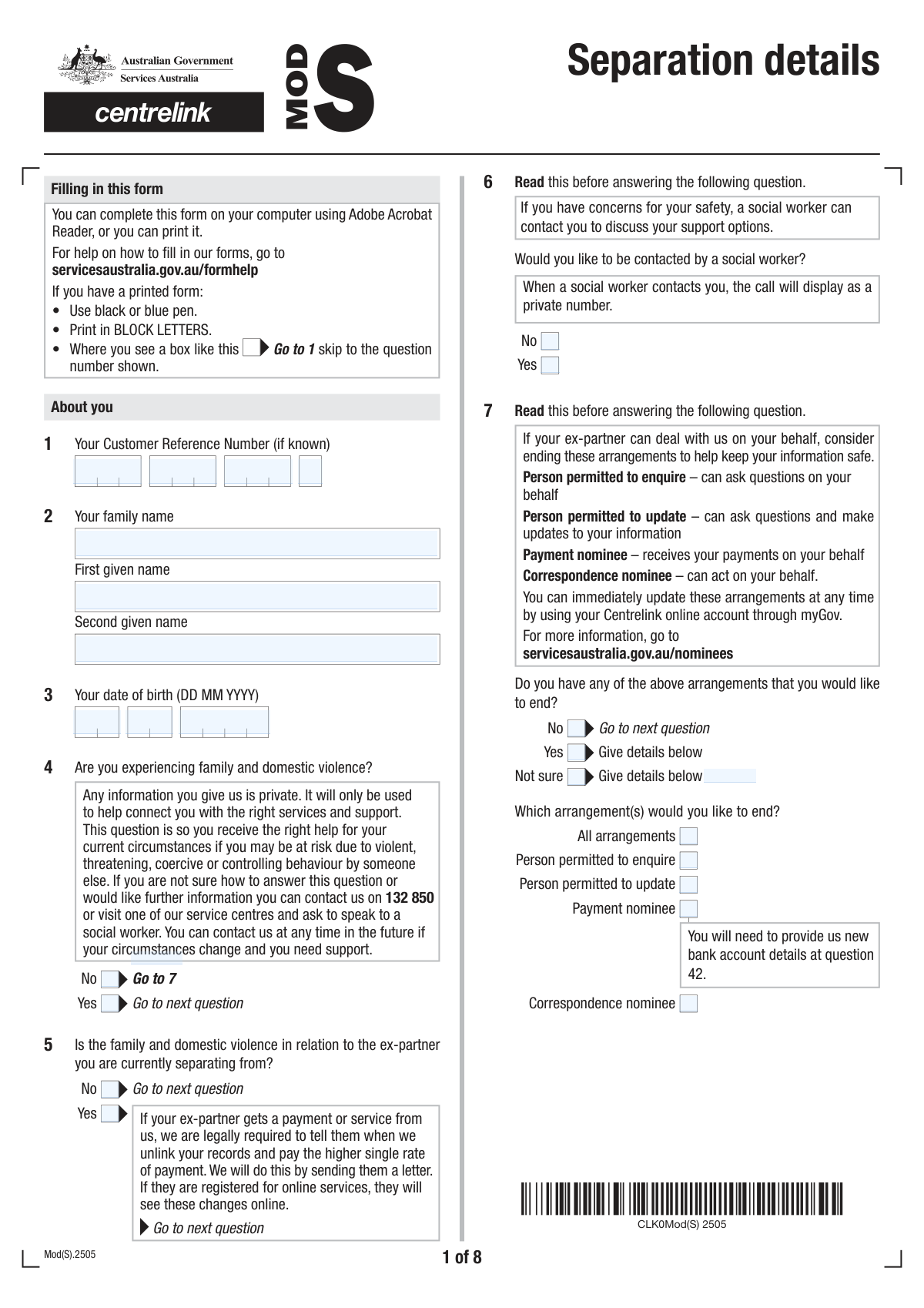
Form MOD S, Separation Details, is an official document from Services Australia used to report that you have separated from your partner. It's important because your relationship status affects your eligibility and payment rate for many government benefits, such as Family Tax Benefit and Rent Assistance. This form collects information about your separation date, living arrangements, and any changes to your assets or care for children to ensure you receive the correct support. Today, this form can be filled out quickly and accurately using AI-powered services like Instafill.ai, which can also convert non-fillable PDF versions into interactive fillable forms.
MOD S is part of the
ETA forms category on Instafill.
Our AI automatically handles information lookup, data retrieval, formatting, and form filling.
It takes less than a minute to fill out MOD S using our AI form filling.
Securely upload your data. Information is encrypted in transit and deleted immediately after the form is filled out.
Form specifications
| Form name: | Form MOD S, Separation Details |
| Number of fields: | 269 |
| Number of pages: | 10 |
| Language: | English |
More forms in ETA forms
Instafill Demo: How to fill out PDF forms in seconds with AI
How to Fill Out MOD S Online for Free in 2026
Are you looking to fill out a MOD S form online quickly and accurately? Instafill.ai offers the #1 AI-powered PDF filling software of 2026, allowing you to complete your MOD S form in just 37 seconds or less.
Follow these steps to fill out your MOD S form online using Instafill.ai:
- 1 Navigate to Instafill.ai and upload or select the Separation Details (MOD S) form to begin.
- 2 Use the AI assistant to accurately fill in your personal information, including your Customer Reference Number, name, and date of birth.
- 3 Provide details about your separation, including the date, information about your ex-partner, and your current living arrangements (e.g., separated but living under one roof).
- 4 Answer the detailed questions about your accommodation, assets, and any changes to your income to ensure your payment eligibility is correctly assessed.
- 5 Detail any changes to the care of your children and confirm if you need to submit additional forms like the FA012 or SS293, which the AI can help identify.
- 6 Update your bank account details for payments if necessary, and review the checklist of required documents.
- 7 Review all the information for accuracy, then sign and date the declaration section before submitting the form to Services Australia.
Our AI-powered system ensures each field is filled out correctly, reducing errors and saving you time.
Why Choose Instafill.ai for Your Fillable MOD S Form?
Speed
Complete your MOD S in as little as 37 seconds.
Up-to-Date
Always use the latest 2026 MOD S form version.
Cost-effective
No need to hire expensive lawyers.
Accuracy
Our AI performs 10 compliance checks to ensure your form is error-free.
Security
Your personal information is protected with bank-level encryption.
Frequently Asked Questions About Form MOD S
This form is used to inform us about changes in your personal circumstances, particularly after a separation. Completing it ensures your records and payments are updated accurately based on your new living arrangements, relationship status, and contact details.
You should complete this form if you are receiving payments from us and have recently separated from your partner or experienced other significant life changes. This includes changes to your address, accommodation, income, assets, or care arrangements for children.
Your Customer Reference Number (CRN) is a unique identifier located on letters we have sent you, on your concession card, or in your online account. Please enter each part of the number in the corresponding fields on the form.
If you indicate you are experiencing family violence and would like contact, one of our social workers will reach out to you confidentially. They can discuss your support options, ensure your information is handled safely, and connect you with specialist services.
This means you and your ex-partner consider your relationship to have ended, but you continue to live in the same home. This information is important as it affects your payment eligibility and may require you to complete an additional form (SS293) to detail your circumstances.
Your accommodation details, such as whether you rent, own, or board, help us determine your eligibility for assistance like Rent Assistance. Providing accurate information ensures you receive all the payments you are entitled to based on your living costs.
Depending on your answers, you may need to submit additional forms, such as the 'Relationship details – Separated under one roof (SS293)' or 'Income and assets (Mod iA)' form. The checklist at the end of this form will guide you on exactly what is required for your situation.
If you have safety concerns, please indicate this in the relevant section. We will take precautions to protect your privacy, which may mean only you will be required to complete certain follow-up forms, and we will not contact your ex-partner in a way that could compromise your safety.
You can typically submit this form through your online account, by mail, or in person at a service center. If you submit a paper copy, remember to sign and date the declaration.
Processing times can vary depending on the complexity of your changes and whether all required documents are provided. You can often track the progress of your update through your online account.
Yes, services like Instafill.ai use AI to help you fill out forms accurately and efficiently. These tools can auto-fill your personal information, saving you time and helping to prevent common errors.
To use Instafill.ai, you just need to upload the form's PDF to the platform. The AI will make the document interactive, allowing you to type your answers directly or use the auto-fill feature to complete it in minutes.
If you have a non-fillable or 'flat' PDF, you can use a service like Instafill.ai to convert it into an interactive, fillable form. Simply upload the file, and the tool will make the fields editable so you can complete it on your computer.
This section allows you to cancel the authority you've given to another person to act on your behalf (e.g., a payment nominee or correspondence nominee). If you no longer want someone to manage your payments or information, you can terminate that arrangement here.
Information about your ex-partner is required to confirm your change in relationship status from partnered to single. This is essential for correctly calculating your payments, as your rate of payment often differs based on your relationship status.
Compliance MOD S
Validation Checks by Instafill.ai
1
Valid and Chronological Date of Birth
This check ensures that the combined 'Birth Day', 'Birth Month', and 'Birth Year' fields form a valid calendar date. It also verifies that the date is in the past and not in the future. This is crucial for identity verification and eligibility assessment, preventing data entry errors. If the date is invalid or in the future, the user will be prompted to correct the entry before proceeding.
2
Mutually Exclusive Yes/No Selection
This validation applies to all pairs of 'Yes' and 'No' checkboxes for a single question, such as 'Family and Domestic Violence Experience'. It ensures that a user cannot select both options simultaneously. This prevents contradictory data and ensures the form's logic flows correctly. If both are selected, an error message will appear, forcing the user to choose only one.
3
Conditional Requirement for New Phone Number
This check enforces that if the user selects 'Yes' for 'Phone Number Change Status', the 'Phone Number' field becomes mandatory. This ensures that updated contact information is captured when the user indicates a change. Failure to provide the new number after indicating a change will result in a validation error, preventing submission until the required information is entered.
4
Conditional Requirement for Arrangement Termination Selection
This validation ensures that if a user selects 'Yes' or 'Not sure' for the 'Arrangements Termination Inquiry', they must then select at least one of the specific arrangement checkboxes to end (e.g., 'All arrangements', 'Person permitted to enquire'). This prevents an ambiguous state where intent to end is declared but no specific action is chosen. An error will be displayed if no specific arrangement is selected.
5
Logical Date Chronology for Separation
This check verifies that the 'Separation Date' (composed of day, month, year) occurs on or before the 'Declaration Date'. A separation cannot logically happen after the form is signed. This maintains data integrity and chronological accuracy of life events. If the separation date is in the future relative to the declaration, the form will show an error and require correction.
6
Financial Consistency of Home Sale Proceeds
This validation ensures that the 'Intended Amount for New Home' is less than or equal to the 'Net Sale Proceeds Amount'. The form explicitly states this rule, and the check enforces it to ensure financial data is logical and accurate. If the intended amount exceeds the net proceeds, the user will be notified with an error message to review and correct the figures.
7
Conditional Requirement for New Address Details
This check is triggered when the user selects 'Yes' for 'Home Address Change Status'. It makes the 'Address Line 1', 'Address Line 3 (suburb/city)', and 'Postcode' fields mandatory. This ensures that a complete and usable new address is captured when a change is reported. If these fields are left blank after indicating an address change, the submission will be blocked.
8
Bank Branch (BSB) Number Format
This validation checks that the 'Branch BSB' and 'Branch Number (BSB)' fields are entered in the correct format, which is typically a 6-digit number. Correct formatting is essential for successful electronic payments and preventing financial transaction failures. An invalid format will trigger an error message prompting the user to enter a valid 6-digit BSB.
9
Conditional Requirement for 'Other' Reason Explanation
This validation applies when a user selects an 'Other' checkbox, such as 'Other (Reason For Not Living In Home)'. It makes the corresponding free-text field ('Other Reason for Not Living in Home') mandatory. This ensures that when a user chooses a non-standard option, they provide the necessary context for processing. The form will not be submittable until the explanation is provided.
10
Mandatory Declaration Agreement
This is a critical check to ensure the 'I have read, understood and agree to the above' checkbox is ticked before submission. This confirms the user's legally binding agreement to the form's terms and the accuracy of the provided information. The form cannot be submitted without this acknowledgment, and the 'Declaration Date' fields will remain disabled until it is checked.
11
Logical Date Sequence for Home Settlement and Completion
This validation ensures that the 'Expected New Home Completion Date' is chronologically after the 'Settlement Date' of the former home. It is illogical to complete the purchase of a new home before the settlement of the old one is finalized. This check maintains the logical consistency of the reported financial and housing timeline. An error will be shown if the dates are out of sequence.
12
Conditional Requirement for Reconciliation Details
This check ensures that if the user selects 'Yes' for 'Reconciliation Details', they must provide an explanation in the 'Reconciliation Explanation' text field. This provides necessary context for why the user believes a reconciliation is likely, which can affect their eligibility or case processing. If the explanation is missing, the form will prompt the user to fill it in.
13
Completeness of Customer Reference Number
This validation ensures that all four parts of the 'Customer Reference Number' are filled out. Since the number is segmented into four distinct fields, it is critical that none are left empty to reconstruct the full, correct identifier. This is essential for matching the submission to the correct customer record. If any part is missing, an error will prompt the user to complete the full number.
14
Checklist Item Consistency for Home Sale
This validation cross-references answers within the form, specifically checking that if the user answers 'Yes' to question 13 ('Former Home Sale Status'), the corresponding checklist item 'Copy of documents to verify sale details' is also checked. This serves as a reminder and verification that required supporting documentation is being provided. A warning or soft validation error could prompt the user to ensure they have included the necessary documents.
Common Mistakes in Completing MOD S
The form requires the Customer Reference Number to be split across four separate fields. Applicants often make transcription errors or enter the entire number into the first field, leaving the others blank. This mistake prevents the system from matching the form to the applicant's file, leading to immediate processing delays or rejection until the number is corrected.
This form heavily relies on conditional logic, with many fields requiring completion only if a specific 'Yes' or 'No' box is checked. A frequent error is either failing to fill in these dependent fields after checking 'Yes', or filling out sections that are not applicable. This results in an incomplete or confusing submission that requires manual clarification, significantly delaying the application process.
The accommodation section presents numerous, specific, and often mutually exclusive categories. Users frequently get confused by the detailed descriptions (e.g., 'Private Rent' vs. 'Boarding House' vs. 'Community housing') and select an incorrect option. This error can lead to an incorrect assessment of their living situation and eligibility for certain benefits or support, potentially resulting in incorrect payment amounts.
Multiple sections require dates (birth, separation, address change) to be entered into separate Day, Month, and Year fields. Common mistakes include swapping the day and month, especially for users accustomed to different regional formats, or entering an invalid date like the 30th of February. These errors can cause failures in identity verification or create incorrect legal timelines for important events, requiring correction and resubmission.
The form asks for precise financial details, such as rent, board, lodgings, and property sale proceeds, often including a payment period (e.g., weekly, fortnightly). People often provide estimates, forget to specify the payment frequency, or struggle to separate combined costs like board and lodgings. Inaccurate or incomplete financial data can lead to incorrect benefit calculations, potential overpayments that need to be repaid, or audits.
The final checklist requires applicants to confirm which supplementary forms (e.g., 'Relationship details – Separated under one roof (SS293)', 'Income and assets (Mod iA)') are being provided. A critical error is checking a box for a document that is not actually attached, or forgetting to attach a required document altogether. An incomplete submission package will be rejected, causing major delays until all required paperwork is received.
On a long and complex form, it is easy to provide conflicting answers. For example, an applicant might state their address has not changed in one question, but then provide new address details in the accommodation section. Such inconsistencies immediately flag the form for a manual review, requiring a processor to contact the applicant for clarification and stalling the entire process.
When providing details for a new payment account, applicants frequently enter their 16-digit debit card number instead of the actual account number, or they may transpose digits in the BSB or account number. This simple data entry error will cause all payment attempts to fail. This leads to significant delays in receiving funds and requires a follow-up process to correct the banking information.
The form contains nuanced questions about domestic violence, separation, and cohabitation that determine the level of support and specific follow-up procedures. Applicants may misunderstand the distinction between 'Family and Domestic Violence Experience' and it being 'in relation to the ex-partner', leading to incorrect case categorization. This can result in the applicant not being offered critical support services, like contact from a social worker, when needed.
The declaration at the end of the form is a legally binding statement, and it is often overlooked. Applicants sometimes forget to check the agreement box, enter the date, or provide a signature (if submitting a hard copy). An unsigned or incomplete declaration renders the entire form invalid, leading to its rejection and requiring the applicant to complete and resubmit the entire document.
Saved over 80 hours a year
“I was never sure if my IRS forms like W-9 were filled correctly. Now, I can complete the forms accurately without any external help.”
Kevin Martin Green
Your data stays secure with advanced protection from Instafill and our subprocessors

Robust compliance program
Transparent business model
You’re not the product. You always know where your data is and what it is processed for.
ISO 27001, HIPAA, and GDPR
Our subprocesses adhere to multiple compliance standards, including but not limited to ISO 27001, HIPAA, and GDPR.
Security & privacy by design
We consider security and privacy from the initial design phase of any new service or functionality. It’s not an afterthought, it’s built-in, including support for two-factor authentication (2FA) to further protect your account.
Fill out MOD S with Instafill.ai
Worried about filling PDFs wrong? Instafill securely fills form-mod-s-separation-details forms, ensuring each field is accurate.