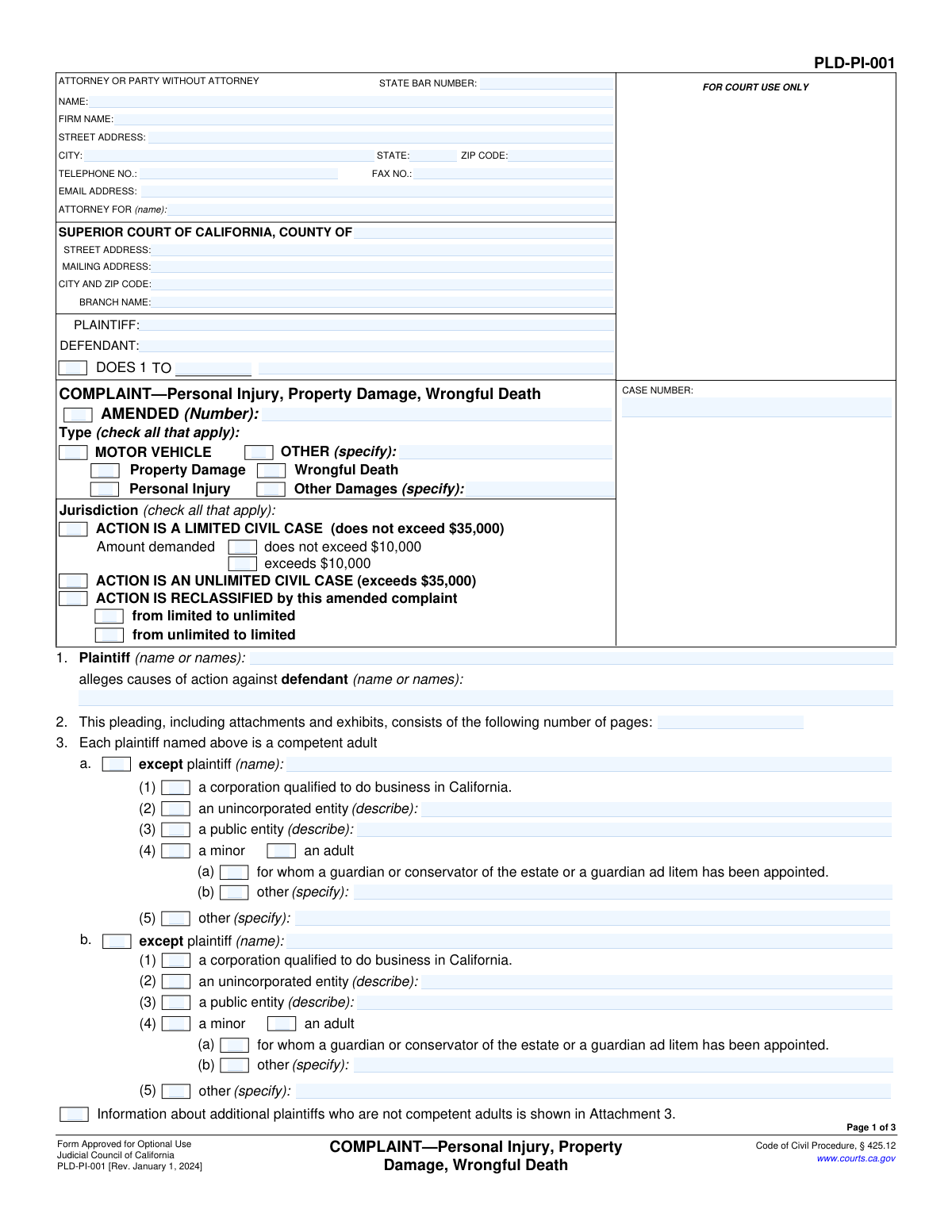
Yes! You can use AI to fill out Form PLD-PI-001, COMPLAINT—Personal Injury, Property Damage, Wrongful Death

Form PLD-PI-001 is a legal pleading used in the Superior Court of California to formally start a lawsuit seeking compensation for harm. Filed by the plaintiff, it details the parties involved, the legal claims (causes of action), and the damages being sought, serving as the foundational document for the entire case. Today, this form can be filled out quickly and accurately using AI-powered services like Instafill.ai, which can also convert non-fillable PDF versions into interactive fillable forms.
PLD-PI-001 is part of the California court forms category on Instafill.
Our AI automatically handles information lookup, data retrieval, formatting, and form filling.
It takes less than a minute to fill out PLD-PI-001 using our AI form filling.
Securely upload your data. Information is encrypted in transit and deleted immediately after the form is filled out.

Form specifications

Form name: Form PLD-PI-001, COMPLAINT—Personal Injury, Property Damage, Wrongful Death
Number of fields: 167
Number of pages: 1
Language: English
main-image

Instafill Demo: How to fill out PDF forms in seconds with AI

How to Fill Out PLD-PI-001 Online for Free in 2026

Are you looking to fill out a PLD-PI-001 form online quickly and accurately? Instafill.ai offers the #1 AI-powered PDF filling software of 2026, allowing you to complete your PLD-PI-001 form in just 37 seconds or less.
Follow these steps to fill out your PLD-PI-001 form online using Instafill.ai:
  1. 1 Navigate to Instafill.ai and upload your PLD-PI-001 form or select it from the template library.
  2. 2 Use the AI assistant to fill in the court information, case caption, and details for the attorney or party filing the complaint.
  3. 3 Identify each plaintiff and defendant, providing their names and legal status (e.g., individual, corporation, public entity).
  4. 4 Specify the type of case (e.g., Motor Vehicle, Other), the damages sought, and the jurisdictional basis for the action (e.g., Limited or Unlimited Civil Case).
  5. 5 Select and attach the appropriate cause of action forms that detail the specific legal claims against the defendant(s).
  6. 6 Check the boxes corresponding to all damages suffered, such as wage loss, medical expenses, and property damage, and state the relief you are praying for.
  7. 7 Carefully review all sections for completeness and accuracy, then date and sign the form before filing it with the appropriate court.

Our AI-powered system ensures each field is filled out correctly, reducing errors and saving you time.

Why Choose Instafill.ai for Your Fillable PLD-PI-001 Form?

Speed

Complete your PLD-PI-001 in as little as 37 seconds.

Up-to-Date

Always use the latest 2026 PLD-PI-001 form version.

Cost-effective

No need to hire expensive lawyers.

Accuracy

Our AI performs 10 compliance checks to ensure your form is error-free.

Security

Your personal information is protected with bank-level encryption.

Frequently Asked Questions About Form PLD-PI-001

Form PLD-PI-001, titled 'COMPLAINT—Personal Injury, Property Damage, Wrongful Death,' is a legal document used in California to initiate a lawsuit for cases involving these issues. It serves as the official complaint that is filed with the court to begin the legal process.

The 'plaintiff' is the person or entity who has suffered harm and is filing the lawsuit. The 'defendant' is the person or entity being sued and accused of causing the harm.

A limited civil case is for when the total amount of money you are seeking is $35,000 or less. An unlimited civil case is for claims that exceed $35,000.

'Doe' defendants are placeholders for parties you believe may be responsible for your damages but whose names you don't know at the time of filing. This allows you to add them to the lawsuit later once their identity is discovered.

This form is a cover sheet, and you must attach other specific forms that detail your legal claims, known as 'causes of action.' For example, you would attach a 'General Negligence' or 'Motor Vehicle' form to explain the basis of your lawsuit.

Section 8 helps you determine the proper court. Generally, you file in the county where at least one defendant lives or where the injury or property damage occurred.

If you are suing a government agency or public entity, you are typically required to first file a formal claim with that entity before you can file a lawsuit in court. This section confirms you have complied with that requirement or are excused from it.

For personal injury or wrongful death cases in California, the law requires you to check the box for damages 'according to proof' instead of stating a specific amount in the initial complaint. The exact amount of damages will be determined as the case progresses.

After completing the complaint and all necessary attachments, you must file it with the correct Superior Court, pay the required filing fees, and then legally deliver ('serve') a copy to all named defendants.

You should have the full names and addresses for all plaintiffs and defendants, the location and date of the incident, and an understanding of which 'cause of action' forms you will need to attach to support your claim.

Yes, services like Instafill.ai use AI to help you accurately auto-fill form fields with your information. This can speed up the process and help you avoid common mistakes.

You can use a service like Instafill.ai to upload the form and complete it in your web browser. The platform makes it easy to enter your information, save your work, and download the finished document for filing.

If you have a non-fillable or 'flat' PDF, you can upload it to a service like Instafill.ai. Their technology can convert the document into an interactive, fillable form that you can complete online.

Compliance PLD-PI-001
Validation Checks by Instafill.ai

1
Jurisdiction Selection Consistency
This check ensures that the form submitter does not select both 'ACTION IS A LIMITED CIVIL CASE' and 'ACTION IS AN UNLIMITED CIVIL CASE' simultaneously. These options are mutually exclusive and selecting both creates a logical contradiction regarding the case's value. If this validation fails, the system should prompt the user to choose only one jurisdiction type, ensuring the court filing is clear and unambiguous.
2
Conditional Limited Case Amount
Validates that if 'ACTION IS A LIMITED CIVIL CASE' is checked, then one of the two sub-options ('does not exceed $10,000' or 'exceeds $10,000') must also be selected. This is a required detail for limited civil cases in California. Failure to provide this information would result in an incomplete filing, potentially causing rejection by the court clerk.
3
Mandatory Cause of Action
Ensures that at least one checkbox is selected under section 10, 'The following causes of action are attached'. A complaint is legally insufficient without at least one stated cause of action, as this forms the basis of the lawsuit. If no cause of action is selected, the form submission should be blocked until the user specifies the legal grounds for their complaint.
4
Conditional 'Other' Specification for Cause of Action
This check verifies that if the 'Other' checkbox (10f) is selected under 'causes of action', the corresponding 'specify' text field is not empty. This is crucial for the court and the defendant to understand the specific, non-standard legal claim being made. An empty specification field would make the complaint vague and legally deficient, requiring clarification.
5
State Bar Number Format
Verifies that the 'STATE BAR NUMBER' field, if populated, contains only numeric digits. This ensures the integrity of the attorney's identification data, which is used for verification and communication by the court. An invalid format could lead to difficulties in identifying the attorney of record, causing administrative delays.
6
Email Address Format Validation
Checks that the value entered in the 'EMAIL ADDRESS' field follows the standard format for an email address (e.g., '[email protected]'). This is important for ensuring that electronic communications and service from the court and other parties are deliverable. An invalid email address would prevent the attorney or party from receiving critical case updates.
7
Page Count Validity
Ensures the 'number of pages' field in section 2 contains a positive integer. The number should logically be at least 3, as the base complaint form itself is three pages long. This count is used by the court to verify that the entire document has been received and filed correctly, preventing issues with missing pages or attachments.
8
Conditional Entity Description
In sections 3 and 5, if a plaintiff or defendant is identified as an 'unincorporated entity', 'public entity', or 'other', this check ensures the corresponding description field is filled out. This detail is necessary to properly identify the legal nature of the party being sued or suing. Failure to describe the entity could lead to dismissal for failure to name a proper party.
9
Venue Justification Requirement
Validates that at least one checkbox is selected in section 8 to justify why the chosen court is the proper venue for the action. This is a jurisdictional prerequisite, and failure to establish proper venue can be grounds for the case to be transferred or dismissed. If 'other' is selected, the specification must be provided.
10
Damages Specification for Personal Injury/Wrongful Death
This check enforces the form's explicit instruction in section 14: if the complaint type is 'Personal Injury' or 'Wrongful Death', the '(1) according to proof' checkbox must be selected for damages. This is a specific procedural rule for such cases in California. Selecting a specific dollar amount in these cases is improper and would lead to a defective pleading.
11
Amended Complaint Number Requirement
Verifies that if the 'AMENDED' checkbox is checked in the form's title section, the associated '(Number)' field is populated with a positive integer. This number indicates which version of the complaint is being filed (e.g., First Amended Complaint, Second Amended Complaint). Omitting this number would create confusion in the court record.
12
Party Name Consistency
Ensures the names listed for 'PLAINTIFF' and 'DEFENDANT' in the top caption of the form are consistent with the names listed in section 1 ('Plaintiff...alleges causes of action against defendant...'). This consistency is fundamental for correctly identifying the parties to the lawsuit throughout the document. Discrepancies can cause confusion and require correction via amendment.
13
Signature Date Presence and Format
This validation confirms that the 'Date' field in the signature block is not empty and contains a valid date. The signature date is legally significant as it marks when the party or attorney certified the complaint's contents. An absent or invalid date can call the document's authenticity into question and cause filing issues.
14
Wrongful Death Damages Detail
If 'Wrongful Death' is selected as a 'Type' of complaint, this check ensures that section 12 is properly completed by selecting either 'listed in Attachment 12' or filling out the 'as follows' text box. This information is required to establish the claimants and their relationship to the deceased. Omitting these details would make the wrongful death claim incomplete.

Common Mistakes in Completing PLD-PI-001

Failing to Attach Required Cause of Action Forms

A frequent and fatal error is filing this main complaint form (PLD-PI-001) without the necessary attachments that detail the specific legal claims. This form acts as a cover sheet, and without attached forms like 'General Negligence' or 'Motor Vehicle', the complaint is legally insufficient and will be dismissed by the court. Always review Section 10 and ensure you attach one or more cause of action forms to your complaint.

Incorrectly Selecting Case Jurisdiction

Filers often misunderstand the difference between a 'Limited Civil Case' (damages do not exceed $35,000) and an 'Unlimited Civil Case' (damages exceed $35,000). Selecting the wrong jurisdiction can lead to filing in the wrong court, resulting in case reclassification, additional fees, and significant delays. Carefully evaluate the potential damages before checking the appropriate box to ensure your case starts in the correct jurisdictional track.

Improperly Stating a Specific Damage Amount

In Section 14, the form explicitly states that for personal injury or wrongful death cases, you must check the box for damages 'according to proof.' Many filers mistakenly enter a specific dollar amount, which is against California civil procedure for these types of complaints. This can lead to the court clerk rejecting the filing, requiring an amendment and causing delays.

Using Incomplete or Incorrect Party Names

Failing to use the full, correct legal names for all plaintiffs and defendants is a critical error. For individuals, this means their complete name, and for businesses, it means their exact registered name (e.g., 'ABC Corporation' not just 'ABC'). Incorrect names can create major problems with legally serving the complaint and may render any future judgment unenforceable.

Omitting or Misusing 'Doe' Defendant Allegations

Many filers either ignore or misunderstand the purpose of 'Doe' defendants in Sections 1 and 6. These are placeholders for parties who are responsible but whose identities are not yet known. Failing to properly include Doe defendants can prevent you from adding a responsible party to the lawsuit if they are discovered after the statute of limitations has expired.

Misidentifying a Party's Legal Capacity

Sections 3 and 5, which require identifying the legal status of each party (e.g., corporation, minor, public entity), are often filled out incorrectly. A person might not know the defendant's business structure or how to properly plead a case involving a minor. This mistake can create legal defects in the complaint that can be challenged by the opposing side, potentially delaying or dismissing the case.

Ignoring Government Claim Requirements

When suing a public entity (like a city or state agency), a specific pre-lawsuit claim must be filed with that entity first. In Section 9, filers often are unaware of this requirement and incorrectly check 'has complied' or ignore the section entirely. Failure to follow the strict government claims process will almost always result in the lawsuit being dismissed.

Leaving Headers on Subsequent Pages Blank

It is a common oversight to fill out the 'SHORT TITLE' and 'CASE NUMBER' on the first page but forget to complete them on pages 2 and 3. While the case number is assigned at filing, leaving these headers blank on subsequent pages can lead to clerical errors and document management issues if pages get separated. AI-powered tools like Instafill.ai can automatically populate repeating information across all pages to prevent this.

Providing an Inaccurate Total Page Count

In Section 2, filers often enter the page count before attaching all the required cause of action forms and exhibits, and then forget to update it. An incorrect page count can lead the court clerk to believe the filing is incomplete, potentially causing it to be rejected. To avoid this, always fill in the total page count as the very last step before signing.

Selecting an Improper Court Venue

Section 8 requires the filer to state why the chosen court is the correct location (venue) for the lawsuit. People may file in the county they live in, even if the incident occurred and the defendant resides elsewhere, which is incorrect. Choosing the wrong venue can result in a motion to transfer the case, causing significant delays and additional legal costs. If the form is a non-fillable PDF, a tool like Instafill.ai can convert it to a fillable version, making it easier to complete accurately.
Saved over 80 hours a year

“I was never sure if my IRS forms like W-9 were filled correctly. Now, I can complete the forms accurately without any external help.”

Kevin Martin Green

Your data stays secure with advanced protection from Instafill and our subprocessors

Robust compliance program

Transparent business model

You’re not the product. You always know where your data is and what it is processed for.

ISO 27001, HIPAA, and GDPR

Our subprocesses adhere to multiple compliance standards, including but not limited to ISO 27001, HIPAA, and GDPR.

Security & privacy by design

We consider security and privacy from the initial design phase of any new service or functionality. It’s not an afterthought, it’s built-in, including support for two-factor authentication (2FA) to further protect your account.

Fill out PLD-PI-001 with Instafill.ai

Worried about filling PDFs wrong? Instafill securely fills form-pld-pi-001-complaintpersonal-injury-property-damage-wrongful-death forms, ensuring each field is accurate.