Yes! You can use AI to fill out Form PLD-PI-003, ANSWER—Personal Injury, Property Damage, Wrongful Death
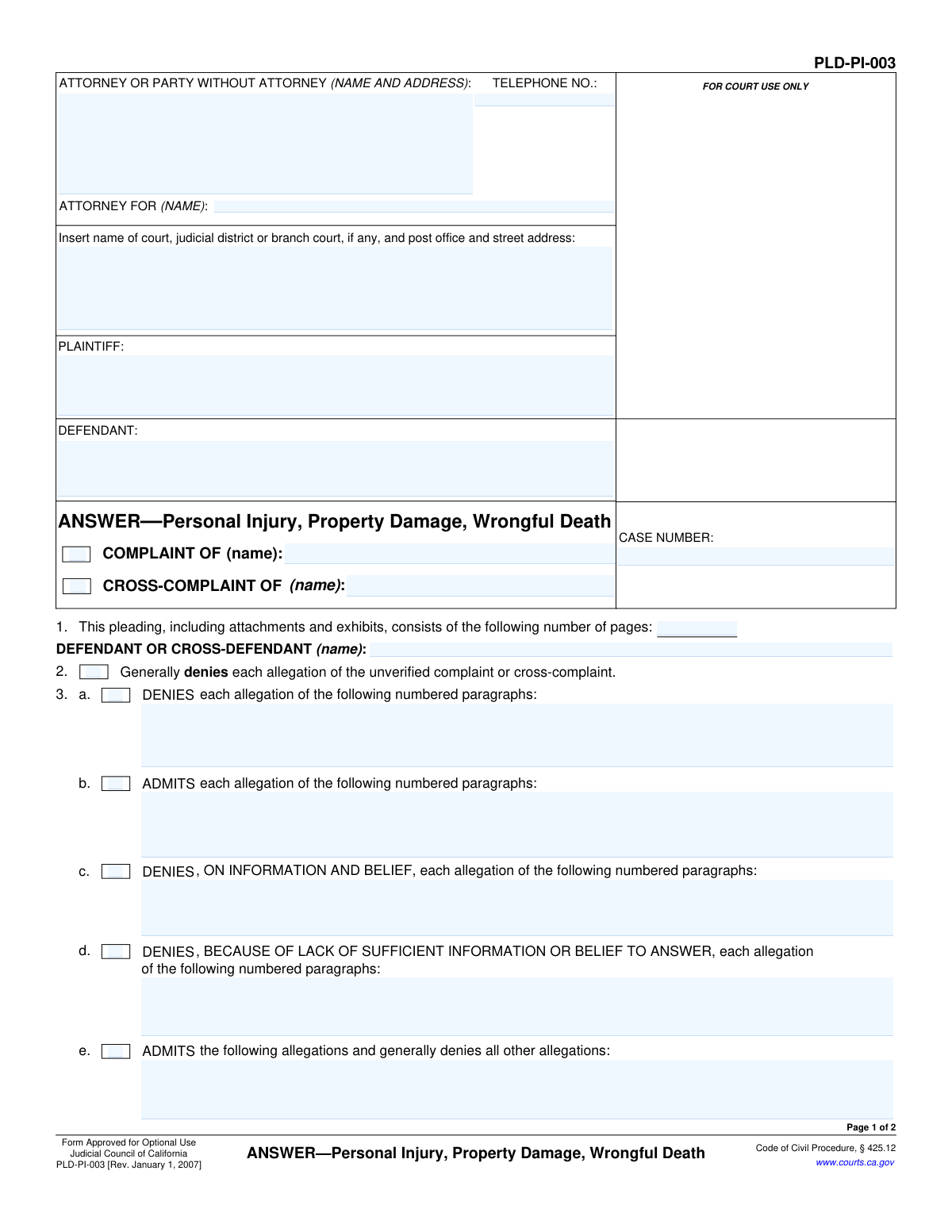
This is Form PLD-PI-003, the official pleading used in California courts for a defendant to file an answer to a complaint concerning personal injury, property damage, or wrongful death. It allows the defendant to systematically admit or deny the allegations made by the plaintiff and to assert affirmative defenses. Today, this form can be filled out quickly and accurately using AI-powered services like Instafill.ai, which can also convert non-fillable PDF versions into interactive fillable forms.
PLD-PI-003 is part of the
California court forms category on Instafill.
Our AI automatically handles information lookup, data retrieval, formatting, and form filling.
It takes less than a minute to fill out PLD-PI-003 using our AI form filling.
Securely upload your data. Information is encrypted in transit and deleted immediately after the form is filled out.
Form specifications
| Form name: | Form PLD-PI-003, ANSWER—Personal Injury, Property Damage, Wrongful Death |
| Number of fields: | 43 |
| Number of pages: | 1 |
| Language: | English |
Instafill Demo: How to fill out PDF forms in seconds with AI
How to Fill Out PLD-PI-003 Online for Free in 2026
Are you looking to fill out a PLD-PI-003 form online quickly and accurately? Instafill.ai offers the #1 AI-powered PDF filling software of 2026, allowing you to complete your PLD-PI-003 form in just 37 seconds or less.
Follow these steps to fill out your PLD-PI-003 form online using Instafill.ai:
- 1 Navigate to Instafill.ai and upload or select the PLD-PI-003 form.
- 2 Provide the court, case number, and party information (plaintiff and defendant names) in the header section.
- 3 Indicate whether you are responding to a complaint or cross-complaint and specify the responding party's name.
- 4 Use the checkboxes and text fields to admit, deny, or deny on information and belief the specific numbered paragraphs of the complaint.
- 5 Clearly state any affirmative defenses you are raising, such as comparative fault or the statute of limitations, in the appropriate sections.
- 6 Complete the 'prayer for relief' section, typically requesting that the plaintiff take nothing and that you be awarded costs of the suit.
- 7 Review the entire completed form for accuracy, then have the party or their attorney sign and date it before filing with the court.
Our AI-powered system ensures each field is filled out correctly, reducing errors and saving you time.
Why Choose Instafill.ai for Your Fillable PLD-PI-003 Form?
Speed
Complete your PLD-PI-003 in as little as 37 seconds.
Up-to-Date
Always use the latest 2026 PLD-PI-003 form version.
Cost-effective
No need to hire expensive lawyers.
Accuracy
Our AI performs 10 compliance checks to ensure your form is error-free.
Security
Your personal information is protected with bank-level encryption.
Frequently Asked Questions About Form PLD-PI-003
This form is a legal document used in California courts by a defendant to formally respond to a lawsuit (a complaint or cross-complaint) involving personal injury, property damage, or wrongful death.
You must fill out this form if you have been named as a defendant or cross-defendant in a personal injury, property damage, or wrongful death lawsuit in California and you wish to respond to the allegations made against you.
A general denial (Section 2) is a blanket denial of all allegations and can only be used if the complaint is 'unverified.' If the complaint is 'verified' (sworn to be true by the plaintiff), you must use Section 3 to admit or deny each specific allegation paragraph by paragraph.
This means you do not have firsthand knowledge to confirm or deny the allegation, but based on information you have, you believe it to be false. This is common when the allegation concerns matters you wouldn't directly know about.
An affirmative defense is a legal reason why the plaintiff should not win their case, even if their allegations are true. Common examples include the expiration of the Statute of Limitations or that the plaintiff's own negligence contributed to their injuries (comparative fault).
You will need the original complaint or cross-complaint to reference the paragraph numbers, the case number, and the court information. You should also gather any facts or documents that support your responses and defenses.
Yes, there is a strict deadline, typically 30 days from the date you were personally served with the summons and complaint. Failing to respond on time can result in a default judgment against you.
After completing the form, you must file it with the court listed on the complaint and 'serve' (formally deliver) a copy to the plaintiff or their attorney. You must follow the court's specific rules for filing and service.
Yes, you can fill out this form yourself as a 'party without an attorney' (also known as 'pro per' or 'pro se'). However, lawsuits can be very complex, and consulting with an attorney is highly recommended to protect your rights.
If you fail to file an Answer within the legal time limit, the plaintiff can ask the court for a 'default judgment.' This means you automatically lose the case and may be ordered to pay the damages requested without getting to present your side.
Yes, services like Instafill.ai use AI to help you accurately auto-fill form fields from your saved profile, which can save time and reduce errors. However, AI cannot provide legal advice, so you should consult an attorney for help with legal strategy and choosing your responses.
Simply upload the PLD-PI-003 form to Instafill.ai, and its AI will identify the fields. You can then click to fill in your personal information, case details, and responses, making the process faster and more efficient.
Instafill.ai can convert flat, non-fillable PDFs into interactive, fillable forms. Just upload your non-fillable version, and the platform will make it easy for you to type directly into the fields online.
Compliance PLD-PI-003
Validation Checks by Instafill.ai
1
Ensures Case Number Consistency Across Pages
This check verifies that the Case Number entered in the header of page 1 is identical to the Case Number entered in the header of page 2. Maintaining consistency is critical for document integrity and ensures all pages of the filing are correctly associated with the same legal case. A mismatch can lead to filing errors, rejection by the court clerk, or incorrect docketing.
2
Verifies Completeness of Party Identification
This validation ensures that the 'PLAINTIFF' and 'DEFENDANT' name fields in the main caption on page 1 are not empty. These fields are fundamental to identifying the primary parties involved in the lawsuit. A filing without this information is legally insufficient and would be rejected by the court.
3
Validates Total Page Count Entry
This check confirms that the field in Item 1, which specifies the total number of pages, contains a positive integer. The number should be at least 2, as the base form itself is two pages long. This count helps the court clerk verify the completeness of the submitted document, and an incorrect or missing value can cause processing delays and confusion.
4
Conditional Requirement for Specific Denials/Admissions
If any of the checkboxes in Item 3 (sub-parts a, b, c, d, e, or f) are selected, this validation ensures the corresponding text field is not empty. For example, if '3a. DENIES' is checked, the text field must list the specific paragraph numbers being denied. This prevents incomplete or ambiguous responses that would require legal clarification and slow down proceedings.
5
Conditional Requirement for Affirmative Defenses
This check ensures that if a checkbox for an affirmative defense (Item 4, 5, or 6) is selected, the associated text field providing details is also filled out. An affirmative defense must be properly pleaded with supporting facts or specifications to be considered by the court. Failure to provide these details can result in the defense being legally insufficient and struck from the record.
6
Confirms Presence of Signature Information
This validation verifies that the 'Type or print name' field is filled out and that a signature has been applied in the designated signature area on page 2. A signature is required to certify the document's contents and make it legally binding. An unsigned or improperly signed document is invalid and will be rejected by the court.
7
Validates Attorney/Party Phone Number Format
This validation ensures the telephone number provided in the attorney/party information block follows a recognizable North American format (e.g., NPA-NXX-XXXX). A valid phone number is essential for the court and opposing counsel to contact the filing party. An invalid or missing number can hinder communication and cause procedural delays.
8
Ensures Responding Party is Identified
This check verifies that the name of the 'DEFENDANT OR CROSS-DEFENDANT' is filled in next to Item 2. This field explicitly identifies which party is filing the answer, which is critical in cases involving multiple defendants. Omitting this information creates ambiguity regarding who is responding to the complaint or cross-complaint.
9
Checks for Conflicting General and Specific Responses
This validation flags a potential conflict if the user checks 'Generally denies each allegation' (Item 2) and also checks any of the specific admission boxes in Item 3 (e.g., 3b or 3e). A general denial is typically inconsistent with specific admissions. The system should warn the user to prevent logically contradictory pleadings that could be challenged by the opposing party.
10
Requires Specification for 'Other' Selections
This check validates that if the 'Other' checkbox is selected in Item 3g (response), Item 6 (affirmative defense), or Item 7 (prayer for relief), the corresponding text field is filled with a description. Selecting 'Other' without providing an explanation makes the response or request legally meaningless. This rule ensures all pleadings are clear, specific, and actionable.
11
Ensures Court Information is Provided
This validation verifies that the field for the court's name, judicial district, and address is filled out on page 1. This information is mandatory for identifying the specific court where the case is being heard and the document should be filed. Submitting a document without the correct court information will lead to immediate rejection by the filing clerk.
12
Validates Format of Paragraph Number Fields
For the text fields associated with Items 3a through 3d, this check ensures the input consists only of numbers, commas, spaces, and hyphens (for ranges). This prevents users from entering narrative text where specific paragraph citations are required. Maintaining the correct format is essential for the clarity and legal precision of the defendant's answer.
13
Validates 'Attorney For' Field When Attorney is Listed
This check ensures that if an attorney's name is provided in the 'ATTORNEY OR PARTY WITHOUT ATTORNEY' field, the 'ATTORNEY FOR (NAME)' field is also completed. This clarifies the attorney-client relationship by explicitly stating which party the attorney represents. This prevents ambiguity, especially in multi-party litigation.
Common Mistakes in Completing PLD-PI-003
Filers often mistype the case number or misspell the names of the plaintiff or defendant. These details must match the original Complaint exactly to ensure the Answer is filed into the correct case record. An incorrect case number can lead to the document being rejected by the court clerk, causing critical delays.
The 'SHORT TITLE' and 'CASE NUMBER' fields at the top of page 2 are frequently left blank. This is a risky oversight, as pages can become separated during processing or handling by the court. Filling out the header on every page ensures the entire document remains identifiable and properly associated with the case file.
Checking box 2 for a 'General Denial' is only appropriate when responding to an unverified complaint. A common legal error is using this option for a verified complaint (one signed under penalty of perjury), which can lead to the court striking the Answer. Always confirm the verification status of the complaint before choosing this response.
A critical mistake is not listing all applicable affirmative defenses in sections 4, 5, and 6. Affirmative defenses are reasons the defendant may not be liable even if the plaintiff's claims are true. Defenses not raised in the Answer are often considered waived for the rest of the case, severely weakening the defendant's legal position.
Section 3 provides specific ways to respond, such as a direct denial or a denial based on lack of information. Filers often use a simple denial for facts they are unsure of, which is legally incorrect. It is crucial to use the 'DENIES, BECAUSE OF LACK OF SUFFICIENT INFORMATION OR BELIEF' option for allegations you cannot truthfully admit or deny.
Section 1, which asks for the total number of pages including attachments, is often forgotten. Filers may also fill it out before adding exhibits and forget to update the count. An incorrect page count can raise questions about the completeness of the filing and may cause issues if an attachment is misplaced.
An unsigned pleading is invalid and has no legal effect. A frequent and serious error is forgetting to physically sign the form or failing to type the corresponding name below the signature line. This will result in an immediate rejection by the court and can lead to a default judgment if not corrected promptly.
Individuals representing themselves ('in pro per') often get confused by the 'ATTORNEY OR PARTY WITHOUT ATTORNEY' section. They may omit their own address and phone number or incorrectly fill out the 'ATTORNEY FOR' field. This contact information is mandatory for the court and opposing parties to serve notices and other documents.
When listing paragraph numbers in section 3, filers sometimes use ambiguous ranges like '5-10' or make typos. This creates confusion as to which specific allegations are being admitted or denied, potentially leading to legal disputes over the scope of the response. To avoid this, list each paragraph number clearly and separately.
The form requires the filer to specify whether they are answering a 'COMPLAINT' or a 'CROSS-COMPLAINT'. A common mistake is checking the wrong box or naming the incorrect party who filed the pleading. This creates ambiguity and may require filing an amended Answer to clarify which claims are being addressed. AI-powered tools like Instafill.ai can help prevent many of these data entry and formatting errors, and can also convert flat, non-fillable PDFs into interactive forms.
Saved over 80 hours a year
“I was never sure if my IRS forms like W-9 were filled correctly. Now, I can complete the forms accurately without any external help.”
Kevin Martin Green
Your data stays secure with advanced protection from Instafill and our subprocessors

Robust compliance program
Transparent business model
You’re not the product. You always know where your data is and what it is processed for.
ISO 27001, HIPAA, and GDPR
Our subprocesses adhere to multiple compliance standards, including but not limited to ISO 27001, HIPAA, and GDPR.
Security & privacy by design
We consider security and privacy from the initial design phase of any new service or functionality. It’s not an afterthought, it’s built-in, including support for two-factor authentication (2FA) to further protect your account.
Fill out PLD-PI-003 with Instafill.ai
Worried about filling PDFs wrong? Instafill securely fills form-pld-pi-003-answerpersonal-injury-property-damage-wrongful-death forms, ensuring each field is accurate.