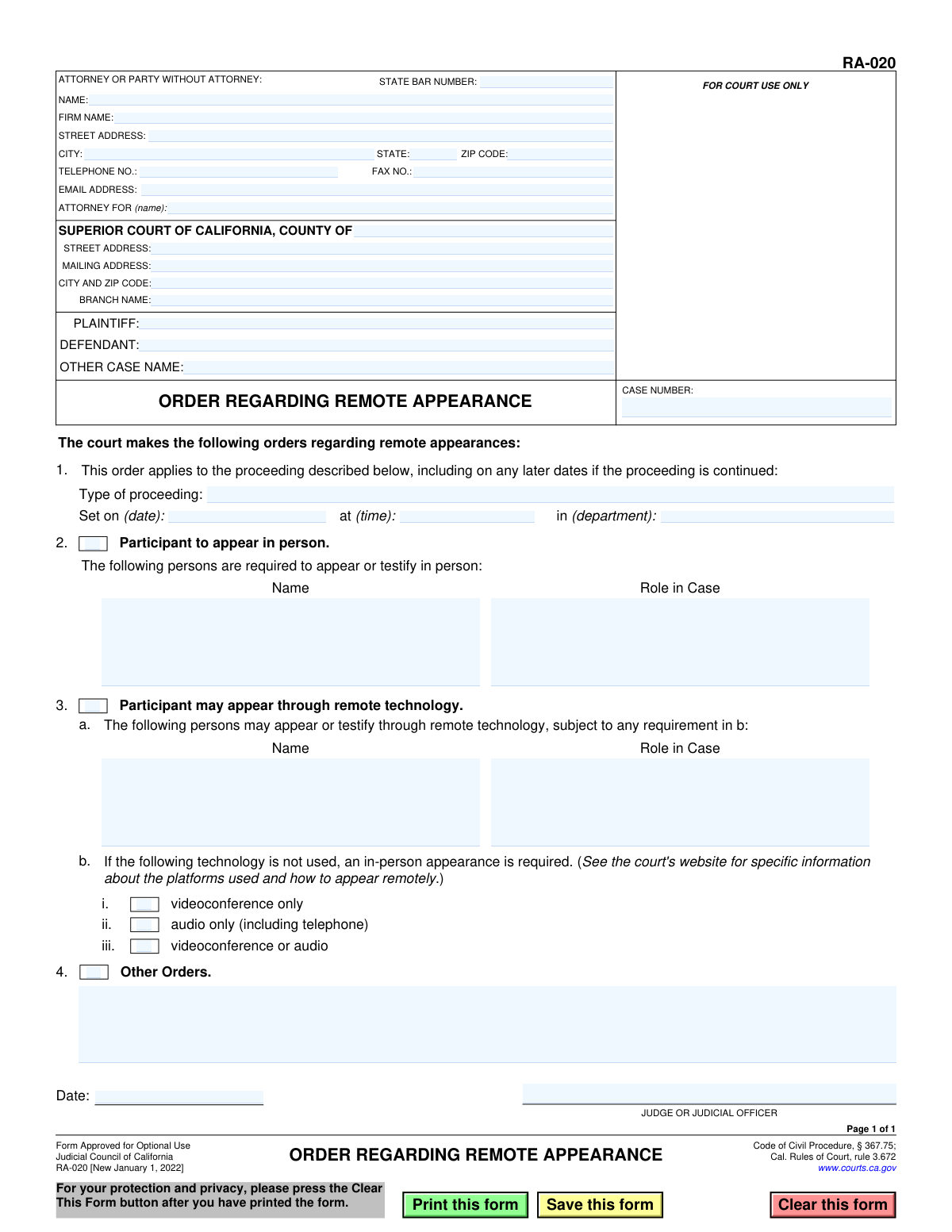
Yes! You can use AI to fill out Form RA-020, Order Regarding Remote Appearance
This form, officially titled "Order Regarding Remote Appearance," is used by the Judicial Council of California to formalize a court's decision on how parties will attend a specific hearing or proceeding. A judge issues this order to clarify who must be physically present in the courtroom and who is permitted to participate via remote technology like video or telephone. Today, this form can be filled out quickly and accurately using AI-powered services like Instafill.ai, which can also convert non-fillable PDF versions into interactive fillable forms.
RA-020 is part of the
California court forms category on Instafill.
Our AI automatically handles information lookup, data retrieval, formatting, and form filling.
It takes less than a minute to fill out RA-020 using our AI form filling.
Securely upload your data. Information is encrypted in transit and deleted immediately after the form is filled out.
Form specifications
| Form name: | Form RA-020, Order Regarding Remote Appearance |
| Number of fields: | 42 |
| Number of pages: | 1 |
| Language: | English |
Instafill Demo: How to fill out PDF forms in seconds with AI
How to Fill Out RA-020 Online for Free in 2026
Are you looking to fill out a RA-020 form online quickly and accurately? Instafill.ai offers the #1 AI-powered PDF filling software of 2026, allowing you to complete your RA-020 form in just 37 seconds or less.
Follow these steps to fill out your RA-020 form online using Instafill.ai:
- 1 Navigate to Instafill.ai and upload or select Form RA-020, Order Regarding Remote Appearance.
- 2 Enter the case information, including the case number, court county and branch, and the names of the plaintiff and defendant.
- 3 Provide the contact details for the attorney or party without an attorney, including name, address, and state bar number if applicable.
- 4 Specify the details of the proceeding this order applies to, including the type of proceeding, date, time, and department.
- 5 Indicate which participants are required to appear in person by listing their names and roles in the case.
- 6 List the participants who are permitted to appear remotely and specify the required technology (videoconference, audio only, or either).
- 7 Review all entered information for accuracy before saving the document, which will then be ready for the judge's signature and official filing.
Our AI-powered system ensures each field is filled out correctly, reducing errors and saving you time.
Why Choose Instafill.ai for Your Fillable RA-020 Form?
Speed
Complete your RA-020 in as little as 37 seconds.
Up-to-Date
Always use the latest 2026 RA-020 form version.
Cost-effective
No need to hire expensive lawyers.
Accuracy
Our AI performs 10 compliance checks to ensure your form is error-free.
Security
Your personal information is protected with bank-level encryption.
Frequently Asked Questions About Form RA-020
This form is an official court order issued by a judge. It specifies whether participants in a legal proceeding are required to appear in person or are permitted to appear remotely via video or phone.
A judge or judicial officer completes and signs this form. It is not a form for parties or attorneys to fill out; it is an order they receive from the court.
No, this is the court's decision, or order, on remote appearances. To make a request, you would typically use a different form, such as Form RA-010 (Notice of Remote Appearance).
This means the court has ordered you to be physically present in the courtroom for the proceeding. You are not permitted to appear remotely.
This means you have permission to appear remotely. You must use the technology specified (e.g., videoconference, audio only) and should check the court's website for specific connection details like links or phone numbers.
The form directs you to the court's website for specific instructions on how to appear remotely. You need to visit the website for the Superior Court listed at the top of the form.
Yes, Section 1 states that the order applies to the proceeding on the date it is set and on any later dates if it is continued, unless the court issues a new order.
You must contact the court clerk or your attorney immediately to explain your situation. Failure to comply with a court order to appear in person can have serious legal consequences.
You do not fill out this specific form, as it is an order from the court. However, for other court forms you need to complete, services like Instafill.ai use AI to accurately auto-fill your information, saving you time and effort.
While you don't fill out this order, you can use Instafill.ai to manage the document. For example, you can upload the PDF to fill out related forms, like a request for remote appearance, quickly and easily online.
If you receive a 'flat' or non-fillable PDF, you can use a service like Instafill.ai to convert it into an interactive form. This is especially helpful for other court forms that you do need to complete and file.
The top section contains case-identifying information, including the case number, court location, and the names of the parties (plaintiff and defendant). It also includes contact information for the attorney or party filing documents in the case.
The 'Other Orders' section is a space for the judge to write any additional, specific instructions or conditions related to appearances for this particular hearing that are not covered by the standard options on the form.
Compliance RA-020
Validation Checks by Instafill.ai
1
Case Number Presence
Ensures the 'CASE NUMBER' field is not empty. The case number is a critical identifier for filing the document with the court and associating it with the correct legal matter. If this validation fails, the form cannot be processed as it's impossible to determine which case it belongs to.
2
Party Identification
Verifies that at least one party, either 'PLAINTIFF' or 'DEFENDANT', is identified on the form. This is necessary to correctly caption the legal document and clearly identify the primary parties involved in the case. A submission lacking this information is incomplete and may be rejected.
3
State Bar Number Format
Checks that the 'STATE BAR NUMBER' field contains only numeric digits if a value is entered. This validation is important for ensuring the accuracy of attorney records and for verification purposes with the state bar association. An invalid format could lead to misidentification of legal counsel.
4
Email Address Format
Validates that the 'EMAIL ADDRESS' field, if filled, contains a string in a valid email format (e.g., '[email protected]'). This ensures that any electronic communications or service from the court can be successfully delivered. An invalid email address would cause communication failures.
5
ZIP Code Format
Confirms that the 'ZIP CODE' field in both the attorney and court address blocks contains a valid 5-digit or 9-digit (ZIP+4) format. Correctly formatted ZIP codes are essential for mail delivery and location verification. Failure could result in returned mail and delays.
6
Proceeding Date and Time Validity
Checks that the 'Set on (date)' and 'at (time)' fields in section 1 are filled with a valid, future date and a proper time format. This information is fundamental to the order, as it specifies when the proceeding will occur. An invalid or past date would render the order nonsensical and unenforceable.
7
Order Specificity Requirement
Verifies that at least one of the main order checkboxes (section 2, 3, or 4) is selected. A court order must contain at least one directive to be valid. A form submitted without any orders selected is an empty document and serves no purpose.
8
In-Person Appearance Detail Completeness
Ensures that if the checkbox in section 2 ('Participant to appear in person') is checked, the corresponding 'Name' and 'Role in Case' fields are filled out. The order is meaningless if it requires an in-person appearance but doesn't specify who. Failure to provide these details makes the order ambiguous and unenforceable.
9
Remote Appearance Detail Completeness
Ensures that if the checkbox in section 3.a ('Participant may appear through remote technology') is checked, the corresponding 'Name' and 'Role in Case' fields are filled out. The order must specify who is being granted permission to appear remotely. Without this information, the order is incomplete.
10
Remote Technology Specification
Validates that if section 3.a is checked, at least one technology option in section 3.b (videoconference, audio, or either) is also selected. Permitting a remote appearance without specifying the required technology creates uncertainty for the participant and the court. This check ensures the order is clear and actionable.
11
Exclusive Remote Technology Selection
Checks that only one option is selected within section 3.b. Specifically, if 'videoconference or audio' is checked, the other two options should not be. This prevents contradictory or ambiguous instructions regarding the technology to be used for the remote appearance.
12
Other Orders Detail Requirement
Verifies that if the 'Other Orders' checkbox in section 4 is checked, the corresponding text field is not empty. Checking this box indicates the judge is issuing a specific, custom order that must be described. An empty text field would make the selection meaningless and the order incomplete.
13
Signature Date Validity
Checks that the 'Date' field for the judicial signature is filled with a valid date that is not in the future. The signature date authenticates when the order was made. A future date is logically impossible and would invalidate the document.
14
Logical Date Consistency
Ensures the 'Date' of the judicial signature is on or before the proceeding date specified in section 1. A court order must be issued before the event it governs. An order signed after the proceeding has already occurred is invalid and illogical.
Common Mistakes in Completing RA-020
Users often mistype the case number or omit parts of it, such as the year or case type letters. This is a critical error because the case number is the primary identifier for the court's filing system. An incorrect number will cause the document to be rejected by the clerk or misfiled, leading to significant delays and potentially missed deadlines.
Many counties have multiple courthouse locations or branches, and filers often forget to specify the exact branch name where the case is being heard. This can lead to the order being sent to the wrong courthouse, causing confusion and delays in processing. Always verify the correct branch from the court's website or previous case documents before filling out this section.
Parties, especially those representing themselves, frequently leave the 'ATTORNEY FOR (name)' field blank or fill it out incorrectly. Attorneys must state the name of the party they represent, while self-represented individuals should write 'In Pro Per' or 'Self-Represented'. Failure to clarify this can cause confusion for the court and opposing counsel regarding who is being represented.
The form requires the exact date, time, and department for the proceeding. People make mistakes by entering an old hearing date or guessing the department number. An order with incorrect proceeding details is invalid for the intended hearing, making it unenforceable and requiring the submission of a corrected version.
In sections 2 and 3, which list participants, users sometimes write generic descriptions like 'plaintiff' or 'the expert' instead of the person's full name and specific role (e.g., 'John Smith, Plaintiff' or 'Dr. Eva Roe, Defendant's Expert Witness'). This ambiguity can cause confusion on the day of the hearing about who is permitted to appear remotely versus who must be present in person. Always use full names and clear role descriptions for every individual listed.
In section 3.b, the form requires selecting the approved remote technology. A common mistake is choosing an option (e.g., 'audio only') without confirming if the specific judge or department allows it for that type of proceeding. As the form notes, you must check the court's website for local rules, as selecting the wrong option may result in the participant being unexpectedly required to appear in person.
This form is an 'Order,' which must be signed by a judge or judicial officer to be valid. When a party prepares this as a 'Proposed Order' for the judge's review, they must leave the signature and date lines at the bottom blank. A frequent error is for the party or their attorney to sign it themselves, which invalidates the document as an order and will lead to its rejection.
In Section 1, the form asks for the 'Type of proceeding' to which the order applies. Filers often leave this blank, making it unclear if the order is for a status conference, a motion hearing, or a trial. This omission creates ambiguity and may render the order ineffective, as it's not tied to a specific court event.
Court forms are updated periodically, and this form is marked as 'New January 1, 2022'. Using an older, obsolete version is a common reason for a filing to be rejected by the court clerk. Always ensure you are using the most current version available from the Judicial Council website to prevent processing delays.
Sometimes, filers can only access a flat, non-fillable PDF and are forced to complete it by hand. This often results in illegible text, especially for addresses and case numbers, which can lead to data entry errors by court staff or outright rejection of the form. To avoid this, AI-powered tools like Instafill.ai can convert non-fillable PDFs into fillable versions, ensuring all entries are clear, legible, and correctly placed.
Saved over 80 hours a year
“I was never sure if my IRS forms like W-9 were filled correctly. Now, I can complete the forms accurately without any external help.”
Kevin Martin Green
Your data stays secure with advanced protection from Instafill and our subprocessors

Robust compliance program
Transparent business model
You’re not the product. You always know where your data is and what it is processed for.
ISO 27001, HIPAA, and GDPR
Our subprocesses adhere to multiple compliance standards, including but not limited to ISO 27001, HIPAA, and GDPR.
Security & privacy by design
We consider security and privacy from the initial design phase of any new service or functionality. It’s not an afterthought, it’s built-in, including support for two-factor authentication (2FA) to further protect your account.
Fill out RA-020 with Instafill.ai
Worried about filling PDFs wrong? Instafill securely fills form-ra-020-order-regarding-remote-appearance forms, ensuring each field is accurate.