Yes! You can use AI to fill out Form RA-025, Request To Appear Remotely—Juvenile Dependency
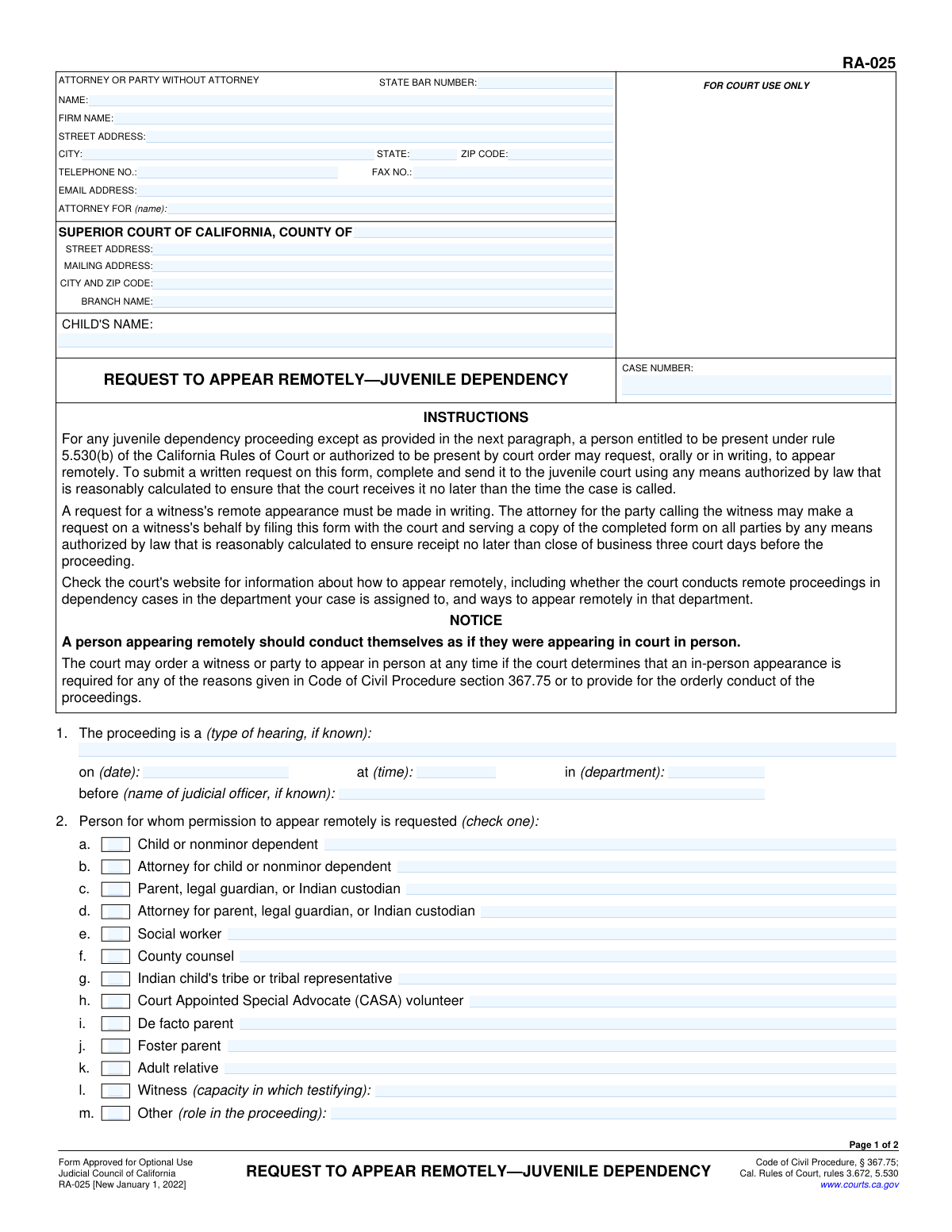
Form RA-025, Request To Appear Remotely—Juvenile Dependency, is a legal document filed in the Superior Court of California. It is used by a party, attorney, or witness in a juvenile dependency case to formally ask the court for permission to attend a hearing or proceeding via videoconference or telephone instead of in person. This form is crucial for ensuring access to justice when physical presence is difficult or impossible. Today, this form can be filled out quickly and accurately using AI-powered services like Instafill.ai, which can also convert non-fillable PDF versions into interactive fillable forms.
RA-025 is part of the
California court forms category on Instafill.
Our AI automatically handles information lookup, data retrieval, formatting, and form filling.
It takes less than a minute to fill out RA-025 using our AI form filling.
Securely upload your data. Information is encrypted in transit and deleted immediately after the form is filled out.
Form specifications
| Form name: | Form RA-025, Request To Appear Remotely—Juvenile Dependency |
| Number of fields: | 59 |
| Number of pages: | 1 |
| Language: | English |
Instafill Demo: How to fill out PDF forms in seconds with AI
How to Fill Out RA-025 Online for Free in 2026
Are you looking to fill out a RA-025 form online quickly and accurately? Instafill.ai offers the #1 AI-powered PDF filling software of 2026, allowing you to complete your RA-025 form in just 37 seconds or less.
Follow these steps to fill out your RA-025 form online using Instafill.ai:
- 1 Navigate to Instafill.ai and upload or select Form RA-025, Request To Appear Remotely—Juvenile Dependency.
- 2 Provide your personal information, including your name, contact details, and attorney information if applicable.
- 3 Enter the court and case details, such as the county, court address, child's name, and case number.
- 4 Specify the details of the proceeding for which you are requesting remote appearance, including the date, time, and department.
- 5 Indicate who is requesting to appear remotely (e.g., parent, attorney, witness) and their preferred method (video or audio).
- 6 Review all the information populated by the AI for accuracy, then date and e-sign the declaration under penalty of perjury.
- 7 Download the completed form and file it with the appropriate court according to the instructions and local court rules.
Our AI-powered system ensures each field is filled out correctly, reducing errors and saving you time.
Why Choose Instafill.ai for Your Fillable RA-025 Form?
Speed
Complete your RA-025 in as little as 37 seconds.
Up-to-Date
Always use the latest 2026 RA-025 form version.
Cost-effective
No need to hire expensive lawyers.
Accuracy
Our AI performs 10 compliance checks to ensure your form is error-free.
Security
Your personal information is protected with bank-level encryption.
Frequently Asked Questions About Form RA-025
This form is used to submit a written request to appear remotely, either by video or telephone, in a California juvenile dependency court proceeding instead of appearing in person.
Any person entitled to be present at a juvenile dependency hearing can use this form, including the child, parents, attorneys, social workers, and witnesses. Section 2 of the form provides a detailed list of eligible individuals.
You will need your personal or attorney contact information, the court's address, the case number, the child's name, and the date, time, and department of the hearing.
The court must receive your request no later than the time your case is called for the hearing. However, if the request is for a witness, it must be filed and served at least three court days before the proceeding.
You should check the local court's website for information on the specific technology they use for remote appearances. This will help you select the appropriate and available method for your hearing.
Yes, an attorney can file this form on behalf of a witness. Note that a request for a witness's remote appearance must be made in writing and served on all parties at least three court days before the proceeding.
No, it is not guaranteed. The court may still order any party or witness to appear in person if it determines an in-person appearance is necessary for any reason.
You can use a service like Instafill.ai, which can convert flat, non-fillable PDFs into interactive forms that you can complete and download easily.
Yes, services like Instafill.ai use AI to help you accurately auto-fill form fields, which can save you time and reduce errors.
To fill out this form online, you can upload it to a platform like Instafill.ai. Their service will make the form fillable, and you can type your information directly into the fields before saving or printing the completed document.
It means you must ensure that no unauthorized individuals can see or hear the court proceeding while you are appearing remotely. You must maintain the same level of privacy as if you were physically in the courtroom.
The case number and court address can be found on any previous court documents or notices you have received for this case. If you cannot find them, contact the clerk of the court where your case is being heard.
Compliance RA-025
Validation Checks by Instafill.ai
1
Ensures Case Number is Present and Consistent
This check verifies that the 'CASE NUMBER' field is filled on both page 1 and page 2, and that the values are identical. The case number is the primary identifier for a legal matter, and its absence or inconsistency can lead to the document being misfiled or rejected. Failure to provide a consistent case number will prevent the form from being processed correctly.
2
Validates Child's Name is Present and Consistent
This validation ensures the 'CHILD'S NAME' field is populated on both page 1 and page 2 and that the name is the same in both locations. The child is the subject of a juvenile dependency proceeding, so their name is a critical piece of identifying information. If the name is missing or differs between pages, the request may be considered invalid or cause confusion.
3
Requires Filer's Name
This check confirms that the 'NAME' field in the 'ATTORNEY OR PARTY WITHOUT ATTORNEY' section is not empty. The court must know the identity of the person or attorney submitting the request. An anonymous filing is not permissible, and failure to provide a name will result in the form's rejection.
4
Validates State Bar Number for Attorneys
This check validates that if the 'ATTORNEY FOR (name)' field is filled, the 'STATE BAR NUMBER' field must also be filled and contain only numbers. This is important for verifying the attorney's credentials and standing with the State Bar. If a party is self-represented, this field can be left blank, but for an attorney, it is mandatory.
5
Validates Hearing Date is a Future Date
This check ensures that the hearing 'date' provided in section 1 is a valid date and is not in the past. A request to appear remotely must be for an upcoming proceeding. Submitting a request for a hearing that has already occurred is illogical and would be rejected.
6
Ensures Proceeding Details are Complete
This validation verifies that the 'type of hearing', 'date', 'time', and 'department' fields in section 1 are all completed. These details are essential for the court to identify the specific proceeding for which the remote appearance is being requested. Incomplete information would make it impossible to process the request, leading to its denial.
7
Enforces Single Selection for Requesting Person
This check ensures that exactly one checkbox is selected in section 2, which identifies the person for whom the remote appearance is requested. Selecting multiple roles or no role creates ambiguity and makes the request unclear. The system should enforce a single choice to ensure the court knows precisely who plans to appear remotely.
8
Requires 'Capacity' for Witness Selection
This validation rule is triggered if the 'Witness' checkbox is selected in section 2. It ensures that the corresponding text field '(capacity in which testifying)' is filled out. This context is crucial for the court and other parties to understand the witness's relevance to the case. A request for a witness without specifying their capacity is incomplete.
9
Requires 'Role' for 'Other' Selection
If the 'Other' checkbox is selected in section 2, this check ensures the '(role in the proceeding)' text field is completed. The court needs to understand the standing of any individual not explicitly listed. Failure to specify the role for an 'Other' person will result in an incomplete and likely rejected request.
10
Enforces Single Selection for Appearance Method
This check validates that exactly one method of appearance ('Videoconference' or 'Audio only') is selected in section 3. The court needs to know the specific technology the person intends to use to make appropriate arrangements. Selecting both or neither would cause logistical problems for the court clerk.
11
Validates Signature Date Presence
This check ensures that the 'Date' field in the signature block is filled out with a valid date. The date is a required component of the declaration under penalty of perjury. An undated signature invalidates the declaration, making the entire request legally insufficient.
12
Requires Printed Name in Signature Block
This validation confirms that the '(TYPE OR PRINT NAME)' field is completed in the signature block. This printed name legibly identifies the person signing the document, which is essential for accountability and record-keeping. A missing printed name can make it difficult to verify the identity of the signatory.
13
Validates Email Address Format
This check verifies that if a value is entered into the 'EMAIL ADDRESS' field, it follows the standard format for an email address (e.g., '[email protected]'). This is important for ensuring that electronic communications and notices from the court are deliverable. An invalid format could lead to the filer missing critical information about their case.
14
Validates Telephone Number Format
This check ensures that the 'TELEPHONE NO.' field, if filled, contains a valid phone number format (e.g., 10 digits, possibly with parentheses, spaces, or dashes). This contact information is vital for the court or other parties to be able to reach the filer. An incorrectly formatted number could prevent timely communication.
Common Mistakes in Completing RA-025
Users often enter an incorrect case number or misspell the child's name. A very common error is forgetting to repeat the child's name and case number in the header of the second page. This can lead to the form being rejected, misfiled, or the pages being separated and lost, causing significant delays and potentially resulting in the request not being processed for the correct case.
People frequently provide incomplete information about the hearing, such as leaving the date, time, or department blank, or writing a generic term like 'hearing' for the type. Court clerks process numerous requests, and without specific details like 'Jurisdictional Hearing' and the exact date and department, they cannot link the request to the correct calendar event. This will likely lead to the request being denied or ignored.
In Item 2, filers may check the wrong box to identify the person requesting remote appearance, for example, a foster parent checking 'Parent' instead of 'Foster parent'. This creates confusion and can affect how the court views the requestor's standing in the case. It is crucial to select the single most accurate role from the list to ensure the court has a clear understanding of who is making the request.
When selecting 'Witness' (2.l) or 'Other' (2.m), filers often forget to fill in the required descriptive text specifying the witness's capacity or the person's role in the proceeding. This information is not optional; its absence makes the request incomplete and subject to denial. The court needs this context to understand why the person's remote testimony or presence is relevant.
This field is a common point of confusion. An attorney might forget to list their client's name, or a party representing themselves (pro per) might incorrectly enter their own name again instead of writing 'Self-Represented' or leaving it blank as appropriate. This ambiguity can confuse court staff about the filer's representational status, potentially delaying processing. To avoid this, attorneys must list the party they represent, and self-represented individuals should clarify their status.
A frequent and critical error is forgetting to sign and date the declaration in Item 4. Some users also mistakenly type their name on the signature line instead of providing a valid physical or electronic signature. An unsigned or undated form is legally invalid and will be rejected, as the declaration under penalty of perjury is not complete, nullifying the entire request.
In Item 3, individuals may check a preferred method ('Videoconference' or 'Audio only') without first checking the specific court's website as instructed on the form. Not all courts or departments offer both options for all hearing types. This can result in the request being denied or the person being unable to connect on the day of the hearing. Always verify the available technology for your assigned department before submitting the form.
Filers often list the address of the main county courthouse instead of the specific street and branch address of the juvenile dependency court where the case is being heard. This can cause the form to be mailed or delivered to the wrong location, leading to significant filing delays or the document being lost entirely. To prevent this, always verify the exact address for the juvenile court branch handling the case.
The form's instructions specify filing deadlines, particularly the strict requirement that a request for a witness must be filed and served at least three court days before the proceeding. Many filers miss this deadline, leading to an automatic denial of the request to appear remotely. It is essential to be aware of and adhere to these timelines to ensure the request can be considered by the court.
Often, court forms are only available as flat, non-fillable PDFs, forcing users to print them and fill them out by hand. This can result in illegible handwriting, leading to data entry errors by court clerks, incorrect information, and potential rejection of the form. AI-powered tools like Instafill.ai can convert these non-fillable PDFs into interactive forms, ensuring all entries are clear, legible, and properly formatted, which helps prevent these issues.
Saved over 80 hours a year
“I was never sure if my IRS forms like W-9 were filled correctly. Now, I can complete the forms accurately without any external help.”
Kevin Martin Green
Your data stays secure with advanced protection from Instafill and our subprocessors

Robust compliance program
Transparent business model
You’re not the product. You always know where your data is and what it is processed for.
ISO 27001, HIPAA, and GDPR
Our subprocesses adhere to multiple compliance standards, including but not limited to ISO 27001, HIPAA, and GDPR.
Security & privacy by design
We consider security and privacy from the initial design phase of any new service or functionality. It’s not an afterthought, it’s built-in, including support for two-factor authentication (2FA) to further protect your account.
Fill out RA-025 with Instafill.ai
Worried about filling PDFs wrong? Instafill securely fills form-ra-025-request-to-appear-remotelyjuvenile-dependency forms, ensuring each field is accurate.