
Instafill.ai
7 days free
AI form filling · 42 fields · 1 page · done in seconds

Yes! You can use AI to fill out Form RA-030, Request To Compel Physical Presence—Juvenile Dependency

Don't type 42 fields by hand. Tell our AI about yourself, or upload a document you already have, and it fills every field in seconds. You check it, then download, print or sign.
7 days free, then $19.99/month · Cancel anytime
AI fills it, no typingEncrypted, never used to train AICancel in two clicks
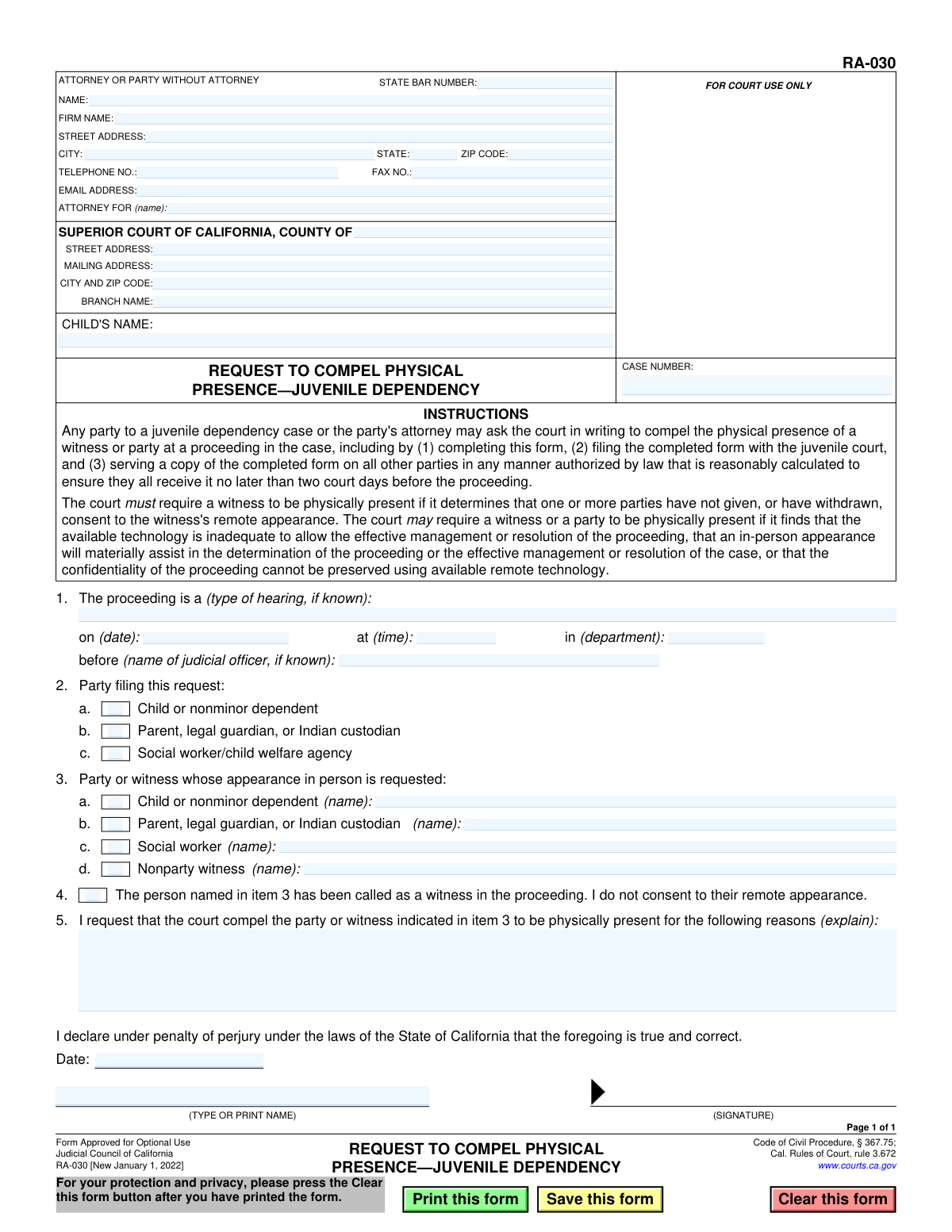
Form RA-030, Request To Compel Physical Presence—Juvenile Dependency, page 1
Basic · 39/100Form Complexity Index

The AI does the filling. You just check it.

No typing into boxes, nothing to install.

Tell the AI about youAnswer a few questions in plain words, or upload a document you already have. That is all the typing there is.
AI fills every field in secondsIt puts each answer in the right box on every page, checkboxes included.
Check it and downloadReview every field, change anything, then download, print or sign the PDF.

What this form asks for

The AI fills all of it, from your answers or your documents.

Form RA-030, Request To Compel Physical Presence—Juvenile Dependency, is a legal document filed in the Superior Court of California. It allows a party in a juvenile dependency case to formally ask the court to require a witness or another party to attend a hearing in person rather than remotely. This is important when consent for remote appearance is withdrawn, technology is inadequate, or an in-person appearance is deemed necessary for the effective resolution of the case. Today, this form can be filled out quickly and accurately using AI-powered services like Instafill.ai, which can also convert non-fillable PDF versions into interactive fillable forms.
Fillable fields42
Pages1
Form Complexity IndexBasic, 39/100

The AI checks your answers before you download

13 checks built for this form, so a wrong date or a missing answer is caught before anyone else sees it.

Ensures Case Number is Provided

This check verifies that the 'CASE NUMBER' field is not empty. The case number is the unique identifier for the court proceeding, and it is essential for associating this request with the correct juvenile dependency case file. If the case number is missing, the court clerk cannot file the document, and it will be rejected.

Validates Proceeding Date

This check ensures that the date provided in item 1, 'on (date):', is a valid calendar date and is set for a future date. A request to compel physical presence must be for an upcoming hearing, not one that has already passed. An invalid or past date would render the request moot and cause it to be rejected by the court.

Requires Identification of Requesting Party

This validation confirms that exactly one checkbox is selected in item 2 to identify the party filing the request (e.g., 'Child or nonminor dependent', 'Parent', etc.). The court must know who is making the request to assess its standing and context. Failure to identify the filing party makes the request anonymous and unprocessable.

Ensures Compelled Party is Named

This check verifies that if a checkbox is selected in item 3, the corresponding name field for the party or witness is also filled out. The court cannot issue an order compelling an individual's presence without knowing their specific name. An incomplete entry in this section makes the request ambiguous and legally unenforceable.

Requires Justification for Compelling Presence

This validation ensures that a reason for the request is provided by either checking the box in item 4 or providing a written explanation in item 5. Court rules require a legal or factual basis to grant such a request, so a justification is mandatory. A request submitted without any reason will be summarily denied by the judicial officer.

Validates State Bar Number Format

This check ensures that the 'STATE BAR NUMBER' field, if filled, contains only numeric digits. A valid bar number is crucial for correctly identifying a licensed attorney within the California State Bar database. An invalid format could lead to misidentification or delays in verifying the attorney's credentials.

And 7 more checks
  • Ensures Filer's Contact Information is Complete
  • Validates ZIP Code Format
  • Requires Child's Name
  • Validates Signature Date
  • Requires Printed Name of Signatory
  • Requires Superior Court County
  • Validates Email Address Format

Let AI fill out your RA-030

No typing. Every field filled in seconds, checked, ready to sign.

7 days free, then $19.99/month · Cancel anytime

How to Fill Out RA-030 Online for Free in 2026

What the AI walks you through.

  1. Navigate to Instafill.ai and upload or select Form RA-030.
  2. Use the AI assistant to fill in your information as the attorney or party, including name, address, and contact details.
  3. Enter the Superior Court information, the child's name, and the case number in the designated fields.
  4. Provide details about the proceeding, such as the hearing type, date, and time, and identify yourself as the filing party.
  5. Specify the name of the party or witness whose physical presence is being requested.
  6. Clearly state the reasons for compelling physical presence, explaining why it is necessary for the proceeding.
  7. Review all the information for accuracy, then date and sign the form electronically before downloading it for filing and service.

Common Mistakes in Completing RA-030

The ones the AI is built to catch.

Entering Incorrect Case Number or Court Information
Users often make typos in the case number or enter information for the wrong court branch. This is a critical error as it can cause the document to be rejected by the clerk or misfiled, leading to significant delays and potentially causing the request to be missed for the intended hearing. To avoid this, always double-check the case number and court address against official court notices or documents. AI-powered tools like Instafill.ai can help by auto-filling correct case and court information from a central case file, reducing the risk of manual entry errors.
Insufficient Justification in Section 5
The most common reason for denial is providing a weak, vague, or legally insufficient reason in the explanation box. Simply stating 'it is important for them to be here' is not enough. The court needs specific facts explaining why physical presence is necessary, such as the need to judge a witness's demeanor for credibility, complex evidence that is difficult to present remotely, or specific technological failures. A well-reasoned, detailed justification is crucial for the request to be granted.
Failure to Properly Serve the Form
A frequent procedural error is failing to serve the completed form on all other parties or missing the deadline of two court days before the proceeding. Even if the request is perfectly filled out and justified, improper or untimely service will cause it to be denied. Filers must follow the legal rules for service and be prepared to prove it. This mistake happens due to ignorance of procedural rules and can be avoided by carefully reading the instructions and understanding the service requirements for your jurisdiction.
Forgetting to Sign or Date the Form
An unsigned or undated legal document is invalid and will be immediately rejected by the court. This simple oversight, often happening when filers are in a rush, completely nullifies the request. Always perform a final review of the form before filing, paying special attention to the signature and date fields at the bottom. Ensure the signature is original (or compliant with e-filing rules) and the date is correct.
Ambiguous Identification of the Person to be Compelled
In Section 3, filers sometimes check a box (e.g., 'Nonparty witness') but forget to write the person's full name in the corresponding field. A request to compel an unidentified person is unenforceable and will be ignored by the court. It is essential to provide the full, correct legal name of the party or witness whose physical presence is being requested to ensure the court's order is clear and directed at the correct individual.
Confusing 'Attorney For' and Self-Representation
Parties representing themselves (pro per litigants) often get confused by the 'ATTORNEY OR PARTY WITHOUT ATTORNEY' box at the top. They may leave it blank or incorrectly fill out the 'ATTORNEY FOR' field, causing confusion and processing delays. If you are self-represented, you should enter your own name, address, and contact information, and you can write 'Self-Represented' or 'Pro Per' in the 'ATTORNEY FOR' line.
Omitting Critical Hearing Information
Leaving the hearing date, time, department, or judicial officer's name blank in Section 1 makes the request ambiguous and difficult for the court to process in a timely manner. Court staff may not know which proceeding the request applies to, causing it to be disregarded. Always confirm these details from the official hearing notice and fill them in completely to ensure your request is reviewed for the correct event.
Misunderstanding the 'No Consent' Checkbox
The checkbox in Section 4 is a specific legal declaration that the filer does not consent to a witness's remote appearance, which can automatically trigger the need for physical presence under the law. Many filers either check it without understanding its legal weight or fail to check it when it is their primary basis for the request. This misunderstanding can weaken the legal argument or misrepresent the filer's position, so it should only be checked when you are explicitly withdrawing consent for a witness's remote testimony.
Failing to Identify the Filing Party
In Section 2, the filer must check the box that accurately describes their role in the case (e.g., 'Parent,' 'Social worker'). Forgetting to check a box leaves the court uncertain about who is making the request, which can be grounds for rejection. This simple mistake creates ambiguity and undermines the formality of the request. Always ensure you have clearly identified yourself by checking the appropriate box.
Submitting an Illegible or Messy Form
When a form is filled out by hand, illegible handwriting can lead to critical errors when court staff enter the data into their system. Names, dates, and case numbers can be easily misinterpreted, causing delays or misfiling. To prevent this, it is best to use a fillable PDF. If the form is only available as a flat, non-fillable PDF, a service like Instafill.ai can convert it into an interactive, fillable version, ensuring all entries are clear, legible, and professional.

Frequently Asked Questions About RA-030


Is it really free for 7 days?
Yes. You pay $0 today. Cancel before Nov 4 and you are never charged. Keep it, and it is $19.99 a month for 5 fills of your RA-030.
Can I fill other forms too?
This plan is for your RA-030: your own AI agent fills it as often as 5 times a month. To fill other forms and upload your own, choose a Professional plan from your account.
How do I cancel?
From your account, in two clicks, any time. No email, no call.
How does the AI fill out RA-030?
You answer a few questions in plain words, or upload a document you already have. The AI reads what you give it and puts each answer into the right field of RA-030, on every page, in seconds. It checks the answers against the form's own rules, and you review and change anything before you download, print or sign.
What happens to my information?
It is encrypted in transit and at rest, and it is never used to train AI.
How complex is RA-030 to fill out?
RA-030 has a Form Complexity Index of 39 out of 100, in the basic tier: 42 fillable fields across 1 page. Instafill.ai's AI fills it in under a minute, with every field there for you to review before you download.
What is the purpose of Form RA-030?
This form is used to ask a juvenile dependency court to require a party or witness to attend a court hearing in person, instead of appearing remotely by video or phone.
Who can file the Request to Compel Physical Presence?
Any party involved in a juvenile dependency case or their attorney can file this form. This includes the child's attorney, a parent, a legal guardian, or the social worker from the child welfare agency.
Is there a deadline to file this form?
Yes, you must file the completed form with the court and serve a copy on all other parties at least two court days before the proceeding is scheduled to take place.
What information do I need to have ready to fill out this form?
You will need your case number, the child's name, court information, and the specific details of the hearing (date, time, and department). You also need the name of the person you are requesting to appear in person.
What is the difference between checking box 4 and filling out section 5?
Check box 4 if you are compelling a witness to appear simply because you do not consent to their remote testimony. Use section 5 to provide a specific reason why any party or witness must appear in person, such as inadequate technology or if their presence is critical to resolving the case.
What are some good reasons to put in section 5 for compelling physical presence?
You can state that the available technology is poor, that an in-person appearance will materially assist in determining the facts of the case, or that the confidentiality of the proceeding cannot be guaranteed using remote technology.
Does filing this form guarantee the person will have to appear in court?
No, this form is a request to the judge. The court will review the reasons you provided and make the final decision on whether to order the person to be physically present.
What happens after I submit Form RA-030?
After you file the form with the court and serve it on the other parties, the judge will review your request. The court will then issue an order either granting or denying your request to compel a physical appearance.
Where do I file the completed form?
You must file the completed form with the clerk of the Superior Court in the county where your juvenile dependency case is being heard.
Can I use AI to help me fill out this form?
Yes, services like Instafill.ai use AI to help you accurately auto-fill form fields with your case and personal information, which saves time and reduces errors.
How can I fill out Form RA-030 online?
You can use a service like Instafill.ai to fill out the form online. Simply upload the form to the platform, and its AI will guide you in filling out all the necessary fields electronically.
The PDF of this form I have isn't fillable. What should I do?
If you have a non-fillable or 'flat' PDF, you can use a tool like Instafill.ai. It can convert the document into an interactive, fillable form that you can complete on your computer.
Encrypted in transit and at restNever used to train AIDelete your forms any time

Get your RA-030 filled out by AI

$0 today. Cancel before Nov 4 and you pay nothing.

7 days free, then $19.99/month · Cancel anytime