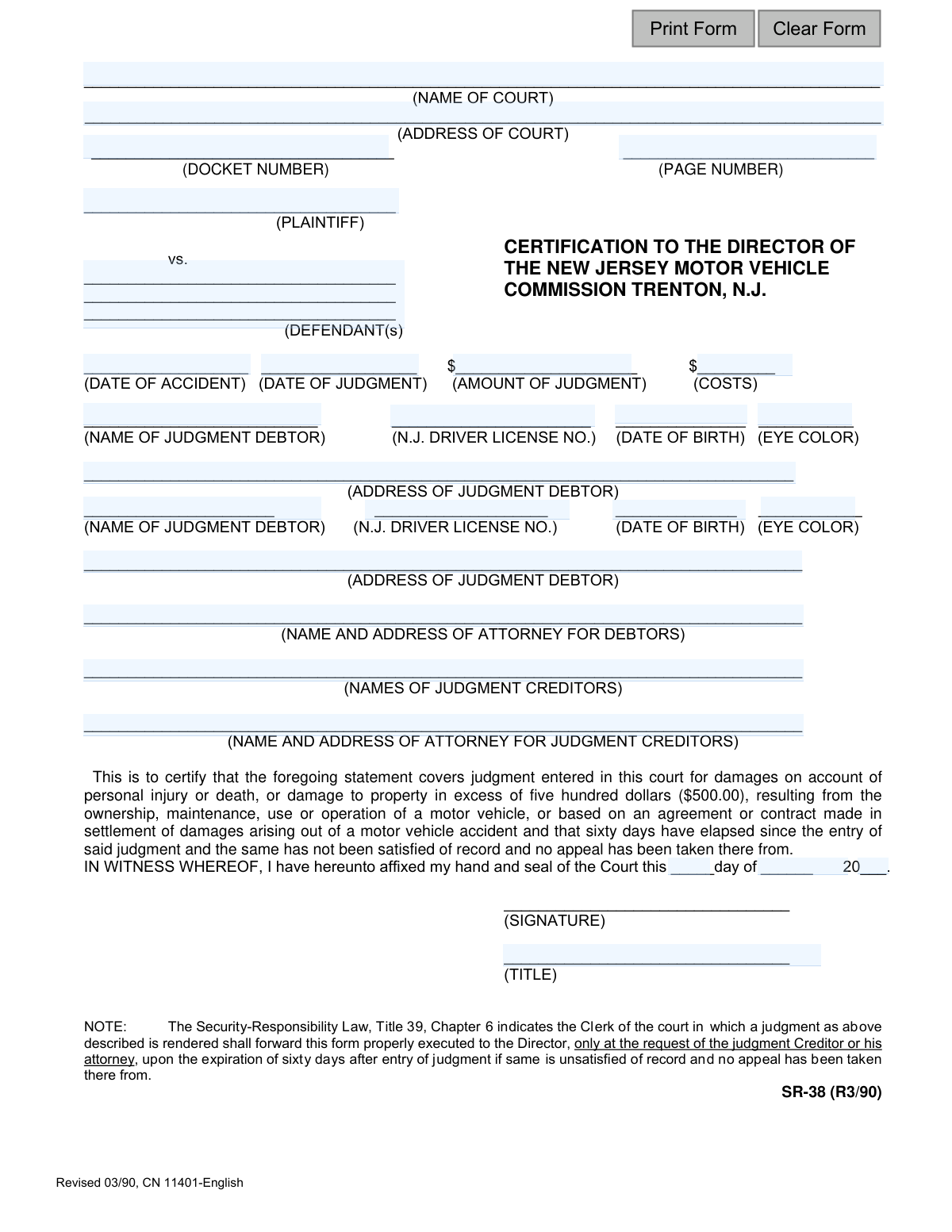
Yes! You can use AI to fill out Form SR-38, Certification to Director NJ MVC

The New Jersey Form SR-38, Certification to Director NJ MVC, is used by a court clerk to notify the Motor Vehicle Commission that a judgment for damages from a motor vehicle accident has remained unsatisfied for over sixty days. This official notice, requested by the judgment creditor, can lead to the suspension of the debtor's driving privileges until the judgment is paid. Today, this form can be filled out quickly and accurately using AI-powered services like Instafill.ai, which can also convert non-fillable PDF versions into interactive fillable forms.
SR-38 is part of the New Jersey forms category on Instafill.
Our AI automatically handles information lookup, data retrieval, formatting, and form filling.
It takes less than a minute to fill out SR-38 using our AI form filling.
Securely upload your data. Information is encrypted in transit and deleted immediately after the form is filled out.

Form specifications

Form name: Form SR-38, Certification to Director NJ MVC
Number of fields: 29
Number of pages: 1
Language: English
main-image

Instafill Demo: How to fill out PDF forms in seconds with AI

How to Fill Out SR-38 Online for Free in 2026

Are you looking to fill out a SR-38 form online quickly and accurately? Instafill.ai offers the #1 AI-powered PDF filling software of 2026, allowing you to complete your SR-38 form in just 37 seconds or less.
Follow these steps to fill out your SR-38 form online using Instafill.ai:
  1. 1 Navigate to Instafill.ai and upload or select the NJ Form SR-38.
  2. 2 Provide the court information, including the court name, address, and docket number.
  3. 3 Enter the details of the case, such as the plaintiff and defendant names, date of the accident, and date of the judgment.
  4. 4 Input the financial details, including the amount of the judgment and any associated costs.
  5. 5 Provide the personal information of the judgment debtor(s), including their name, address, driver's license number, and date of birth.
  6. 6 Enter the names and addresses of the judgment creditor(s) and their respective attorneys.
  7. 7 Review all the information auto-filled by the AI for accuracy before the court clerk signs, dates, and seals the document for submission to the NJ MVC.

Our AI-powered system ensures each field is filled out correctly, reducing errors and saving you time.

Why Choose Instafill.ai for Your Fillable SR-38 Form?

Speed

Complete your SR-38 in as little as 37 seconds.

Up-to-Date

Always use the latest 2026 SR-38 form version.

Cost-effective

No need to hire expensive lawyers.

Accuracy

Our AI performs 10 compliance checks to ensure your form is error-free.

Security

Your personal information is protected with bank-level encryption.

Frequently Asked Questions About Form SR-38

This form is used to notify the New Jersey Motor Vehicle Commission (MVC) that a court judgment related to a motor vehicle accident has not been paid. It is requested by the winning party (judgment creditor) to prompt the MVC to suspend the driving privileges of the non-paying party (judgment debtor).

The Clerk of the Court where the judgment was entered completes and signs this form. However, the clerk only does this upon the request of the judgment creditor or their attorney.

You must wait until 60 days have passed after the judgment was officially entered by the court. The form can only be requested if the judgment is still unpaid and no appeal has been filed by the debtor.

Yes, the form applies to judgments for personal injury, death, or property damage in excess of $500 that resulted from the use or operation of a motor vehicle.

Upon receiving a valid SR-38 certification, the NJ MVC will typically suspend the driver's license and registration of the judgment debtor. The suspension remains in effect until the judgment is paid and the MVC is notified.

The form requires the judgment debtor's full name, address, NJ driver's license number, date of birth, and eye color. This information is essential for the MVC to correctly identify the individual and take action.

Providing the correct driver's license number is crucial for the form to be effective. If you lack this information, you may need to obtain it through legal discovery or other means before asking the court clerk to process the form.

The form includes fields for two separate judgment debtors. If your judgment is against more than two people, you should consult with the court clerk for instructions on how to properly list all parties.

The Judgment Creditor is the person or entity who won the lawsuit and is owed money from the judgment. This is typically the same party as the 'Plaintiff' listed on the form.

Yes, you can use AI-powered services like Instafill.ai to help you accurately populate the form fields with the correct information. This can save time and help prevent errors before you provide the details to the court clerk.

You can use a tool like Instafill.ai to fill out the form online. Simply upload the SR-38 PDF, and the platform will make it an interactive, fillable document that you can complete, save, and print.

Services like Instafill.ai can convert flat, non-fillable PDFs into interactive forms. Upload your document to the platform, and it will automatically detect the fields, allowing you to type in your information directly.

The form must be signed and sealed by an official of the court, such as the Clerk of the Court. This signature certifies that the judgment information is accurate according to the court's official records.

Compliance SR-38
Validation Checks by Instafill.ai

1
Logical Date Sequence Check
This validation ensures that the 'Date of Judgment' is on or after the 'Date of Accident'. It is logically impossible for a court judgment regarding an accident to be dated before the accident occurred. A failure of this check indicates a critical data entry error that would invalidate the legal standing of the certification.
2
60-Day Judgment Elapse Check
This validation verifies that the signature date of the form is at least 60 days after the 'Date of Judgment'. The form's instructions explicitly state it should only be forwarded after this period has elapsed with the judgment unsatisfied. This check prevents premature submissions that are not yet actionable by the NJ MVC.
3
Minimum Judgment Amount Verification
This check confirms that the 'Amount of Judgment' field is greater than $500.00. The form's text specifies it applies to judgments for property damage 'in excess of five hundred dollars'. This validation ensures the form is used only for cases that meet the statutory threshold for reporting to the MVC.
4
NJ Driver's License Number Format
This validation ensures the 'N.J. Driver License No.' field adheres to the standard New Jersey format, typically a single letter followed by 14 numbers. Correct formatting is crucial for the MVC's system to accurately identify the judgment debtor and access their record. An incorrectly formatted number would result in a record-not-found error and failure to process the certification.
5
Judgment Debtor Identification Completeness
This check verifies that at least one judgment debtor is fully identified with a name, driver's license number, and address. The primary purpose of this form is to report a specific individual to the MVC. If this core identifying information is missing, the MVC has no one to take action against, rendering the submission useless.
6
Core Case Information Completeness
This validation ensures that essential case details such as 'Name of Court', 'Docket Number', 'Plaintiff', and 'Defendant(s)' are not empty. This information is fundamental to establishing the legal context and authenticity of the judgment. Missing any of these fields would make the certification legally insufficient and difficult to verify.
7
Judgment Debtor Date of Birth Plausibility
This check validates that the debtor's 'Date of Birth' is a real date and represents a plausible age for a licensed driver (e.g., not in the future, older than 16). This serves as a secondary verification data point and helps prevent typographical errors that could lead to misidentification of the debtor. An impossible date would cause record-matching to fail.
8
Signature Date Validity and Logic
This validation ensures the signature date fields ('Day', 'Month', 'Year') combine to form a valid calendar date that is not in the future. It also confirms the signature date is on or after the 'Date of Judgment', as the certification cannot be attested to before the judgment exists. This maintains the logical and chronological integrity of the document.
9
Judgment Creditor Completeness Check
This validation ensures the 'Names of Judgment Creditors' field is filled out. Identifying the creditor is essential for the official record and for the debtor to know who to contact to satisfy the judgment. An omission creates an incomplete record and could cause legal and administrative problems later.
10
Docket Number Presence Verification
This check confirms that the 'Docket Number' field contains a value. The docket number is the unique identifier for the case within the court system and is non-negotiable for referencing the original judgment. A submission without a docket number cannot be officially traced or verified, making it invalid.
11
Costs and Judgment Amount Numeric Format
This validation ensures that the values entered in the 'Amount of Judgment' and 'Costs' fields are valid numerical or currency formats. These fields represent the financial basis for the certification, and their values must be machine-readable and unambiguous. Non-numeric characters or formatting could lead to calculation errors and rejection of the form.
12
Eye Color Standardized Entry
This check validates that the 'Eye Color' field contains a value from a predefined list of standard abbreviations (e.g., BLU, BRO, GRN, HAZ). Using standardized codes is critical for matching the debtor's information against the official MVC database, which uses the same standards. A non-standard entry like 'blue-green' would cause a data mismatch and prevent positive identification.

Common Mistakes in Completing SR-38

Incorrectly Formatting the Docket Number

The docket number is a unique case identifier with a specific format of letters, numbers, and dashes that varies by court. People often misread or mistype this number from the original court documents. An incorrect docket number will prevent the MVC from locating the case record, leading to an automatic rejection of the certification and significant delays.

Confusing Plaintiff/Defendant with Creditor/Debtor

Filers sometimes automatically copy the Plaintiff's name into the Judgment Creditor field and the Defendant's name into the Judgment Debtor field. While often the same, this is not always the case, especially in complex suits or settlements. This error can invalidate the form, as the MVC must have the precise legal names of the party owed money (Creditor) and the party who owes it (Debtor).

Combining Judgment Amount and Costs

This form requires the 'Amount of Judgment' and 'Costs' to be entered in separate, distinct fields. A common mistake is to add them together and enter the total in the 'Amount of Judgment' field, leaving 'Costs' blank. This creates an inaccurate record and can cause the form to be returned for correction, as the MVC needs the itemized amounts for proper processing.

Using an Incorrect 'Date of Judgment'

People may mistakenly enter the date of the accident or the date they are filling out the form instead of the official 'Date of Judgment'. The form can only be filed 60 days after this specific date, so using the wrong one can lead to premature filing and rejection. Always use the exact date the judgment was formally entered by the court, as shown on the official judgment order.

Submitting the Form Prematurely

The note at the bottom of the form explicitly states it should be filed only after sixty days have passed since the judgment was entered. Filers who miss this instruction and submit the form too early will have it rejected by the MVC. This wastes time and requires the filer to track the dates and resubmit the form after the waiting period has been met.

Entering an Inaccurate or Incomplete Driver's License Number

The Judgment Debtor's NJ Driver License Number is the most critical piece of information for the MVC to take action. Transcription errors, such as swapping numbers or using an old license number, are frequent. An incorrect number makes it impossible for the MVC to identify the correct individual's record, rendering the entire certification ineffective.

Omitting Required Debtor Identification Details

Fields such as 'Date of Birth' and 'Eye Color' are often left blank because the filer may not have the information readily available. However, these details are crucial for the MVC to cross-reference and confirm the debtor's identity, especially with common names. Missing information can lead to processing delays or an inability to process the suspension at all.

Illegible Handwriting on a Non-Fillable Form

Since this form is often a flat PDF, it must be printed and filled out by hand, leading to illegible entries for names, addresses, and numbers. Poor handwriting can cause data entry clerks at the MVC to misinterpret critical information, resulting in errors or form rejection. To avoid this, it's best to use a tool like Instafill.ai, which can convert non-fillable PDFs into fillable versions, allowing you to type directly onto the form for perfect clarity.

Providing Incomplete Attorney Information

The form asks for the 'Name and Address' of the attorneys for both parties, but filers often provide only the name of the attorney or law firm. Omitting the full address prevents the MVC from sending necessary correspondence or seeking clarification. This can halt the process until the missing information is provided, delaying the enforcement of the judgment.
Saved over 80 hours a year

“I was never sure if my IRS forms like W-9 were filled correctly. Now, I can complete the forms accurately without any external help.”

Kevin Martin Green

Your data stays secure with advanced protection from Instafill and our subprocessors

Robust compliance program

Transparent business model

You’re not the product. You always know where your data is and what it is processed for.

ISO 27001, HIPAA, and GDPR

Our subprocesses adhere to multiple compliance standards, including but not limited to ISO 27001, HIPAA, and GDPR.

Security & privacy by design

We consider security and privacy from the initial design phase of any new service or functionality. It’s not an afterthought, it’s built-in, including support for two-factor authentication (2FA) to further protect your account.

Fill out SR-38 with Instafill.ai

Worried about filling PDFs wrong? Instafill securely fills form-sr-38-certification-to-director-nj-mvc forms, ensuring each field is accurate.