Yes! You can use AI to fill out Form SUM-110, Summons—Cross-Complaint
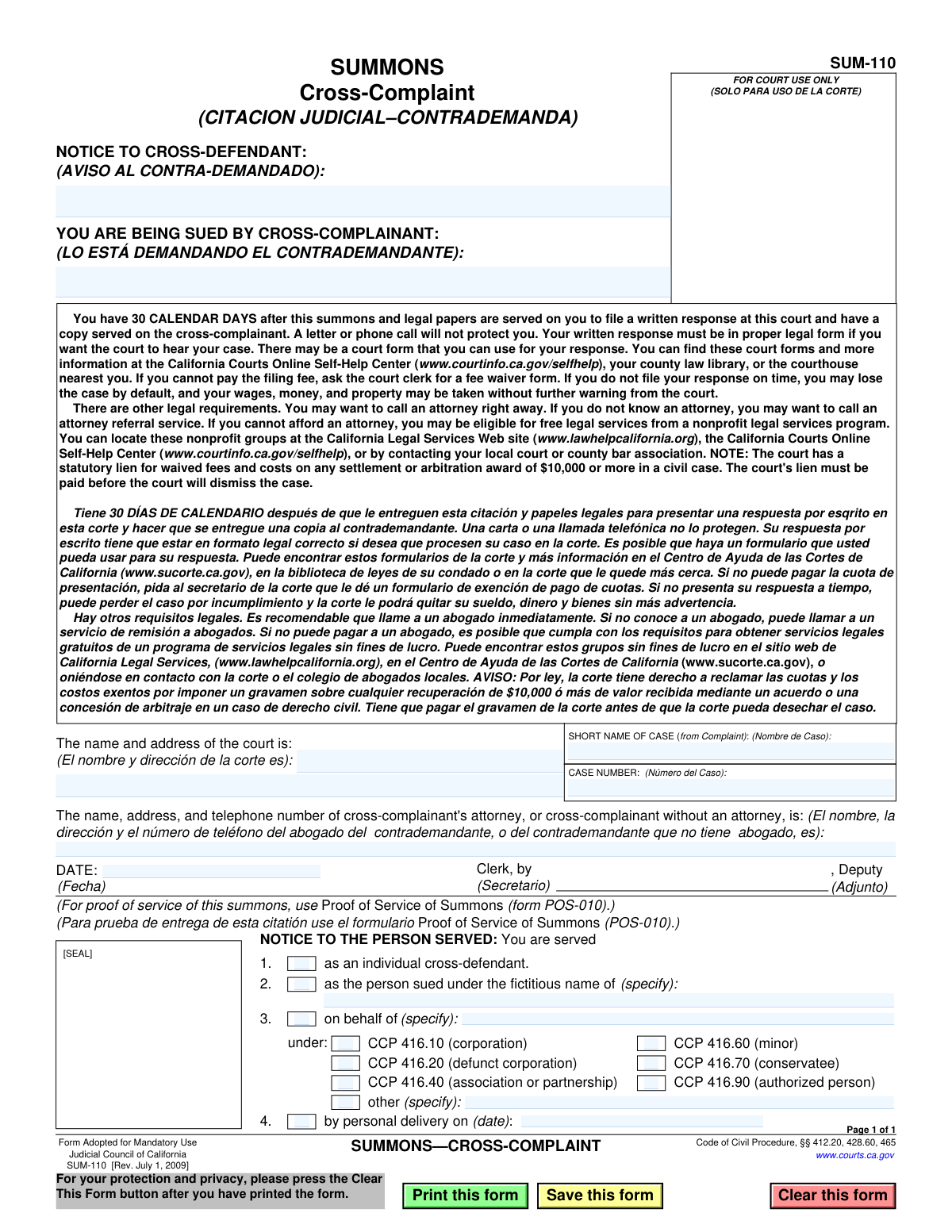
California Form SUM-110 is a legal document that serves as a summons for a cross-complaint, officially notifying a party that they are being sued by a defendant in an existing case. It is critically important because it initiates the legal requirement for the cross-defendant to respond within 30 calendar days, and failure to do so can result in a default judgment. Today, this form can be filled out quickly and accurately using AI-powered services like Instafill.ai, which can also convert non-fillable PDF versions into interactive fillable forms.
SUM-110 is part of the
California court forms category on Instafill.
Our AI automatically handles information lookup, data retrieval, formatting, and form filling.
It takes less than a minute to fill out SUM-110 using our AI form filling.
Securely upload your data. Information is encrypted in transit and deleted immediately after the form is filled out.
Form specifications
| Form name: | Form SUM-110, Summons—Cross-Complaint |
| Number of fields: | 27 |
| Number of pages: | 1 |
| Language: | English |
Instafill Demo: How to fill out PDF forms in seconds with AI
How to Fill Out SUM-110 Online for Free in 2026
Are you looking to fill out a SUM-110 form online quickly and accurately? Instafill.ai offers the #1 AI-powered PDF filling software of 2026, allowing you to complete your SUM-110 form in just 37 seconds or less.
Follow these steps to fill out your SUM-110 form online using Instafill.ai:
- 1 Navigate to Instafill.ai and upload or select the Form SUM-110, Summons—Cross-Complaint.
- 2 Enter the name and address of the court where the case is filed.
- 3 Provide the short name of the case and the official case number from the original complaint.
- 4 Input the full name, address, and telephone number of the cross-complainant or their legal representative.
- 5 In the 'Notice to the Person Served' section, check the appropriate boxes to specify who is being served and in what capacity (e.g., as an individual, on behalf of a corporation).
- 6 Review all auto-filled and manually entered information for complete accuracy, ensuring all details match the legal case file.
- 7 Download the completed form to be dated, signed, and sealed by the court clerk before it is formally served on the cross-defendant.
Our AI-powered system ensures each field is filled out correctly, reducing errors and saving you time.
Why Choose Instafill.ai for Your Fillable SUM-110 Form?
Speed
Complete your SUM-110 in as little as 37 seconds.
Up-to-Date
Always use the latest 2026 SUM-110 form version.
Cost-effective
No need to hire expensive lawyers.
Accuracy
Our AI performs 10 compliance checks to ensure your form is error-free.
Security
Your personal information is protected with bank-level encryption.
Frequently Asked Questions About Form SUM-110
This form is a legal notice informing you that you are being sued by a party involved in an existing lawsuit. It officially brings you into the case as a 'cross-defendant'.
You must file a formal written response with the court within 30 calendar days of being served. It is strongly recommended that you contact an attorney immediately to understand your rights and obligations.
If you fail to file a response on time, you may lose the case by default. This could allow the court to take your wages, money, and property without further warning.
The cross-complainant is the person or entity who has filed a new claim against you within the ongoing lawsuit. You are the 'cross-defendant' who must respond to their claims.
The name and address of the court, the short case name, and the case number are all located in the boxes at the top of the form. You will need this information to file your response.
The form lists resources for free or low-cost legal help, such as nonprofit legal services programs and attorney referral services. You can find more information on the California Courts' self-help website.
You can ask the court clerk for a 'fee waiver' form. If you meet the requirements, the court may allow you to file your response without paying the associated fees.
This section specifies in what capacity you are being sued. For example, it indicates whether you are being served as an individual, on behalf of a corporation, or as a minor's guardian.
The cross-complainant or their attorney fills in the case details, the court clerk signs and issues it, and the person who serves you the documents completes the 'Notice to the Person Served' section.
Yes, services like Instafill.ai use AI to help you accurately auto-fill your response forms, which can save time and reduce errors. However, AI is not a substitute for legal advice from a qualified attorney.
You can upload the appropriate legal response form to Instafill.ai. The platform will make it an interactive, fillable document and assist you in entering your information before you print it for filing with the court.
You can use a tool like Instafill.ai to convert the flat, non-fillable PDF into an interactive form. This allows you to easily type your answers directly into the fields on your computer.
If you get a fee waiver and later receive a settlement or award of $10,000 or more, the court has a legal claim to be repaid for those waived fees. This lien must be paid before the court will dismiss the case.
Compliance SUM-110
Validation Checks by Instafill.ai
1
Case Number Presence
This check ensures that the 'CASE NUMBER' field (FillText26[0]) is not empty. The case number is a unique identifier assigned by the court to a specific legal action. Without it, the document cannot be correctly filed or associated with the existing case, leading to processing delays or rejection by the court clerk.
2
Court Name and Address Completeness
Validates that the field for the court's name and address (FillText180[0]) is filled. This information is critical as it specifies the jurisdiction and physical location where the legal proceedings are taking place and where the response must be filed. An omission would make the summons legally deficient and confusing for the recipient.
3
Cross-Complainant Identification
Ensures the 'YOU ARE BEING SUED BY CROSS-COMPLAINANT' field (FillText25[0]) contains a name. It is a fundamental requirement of due process that the person being sued (the cross-defendant) knows the identity of the party bringing the action against them. Failure to provide this name would invalidate the summons.
4
Attorney or Pro Se Filer Information Completeness
This check verifies that the name, address, and telephone number of the cross-complainant's attorney or the cross-complainant themselves (if self-represented) is provided in field FillText30[0]. This contact information is essential for all parties to communicate and serve subsequent legal documents. Missing information would halt communication and violate rules of procedure.
5
Valid Filing Date
This validation confirms that the 'DATE' field (FillText34[0]) contains a valid date in a recognized format (e.g., MM/DD/YYYY) and is not a future date. The filing date is the official date the document is submitted to the court and is crucial for calculating legal deadlines. An invalid or future date would be rejected by the court clerk.
6
Manner of Service Selection
Verifies that at least one of the primary checkboxes in the 'NOTICE TO THE PERSON SERVED' section (items 1, 2, or 3) is selected. This section is legally required to inform the recipient of the capacity in which they are being served (e.g., as an individual, on behalf of a corporation). Without this selection, the service of the summons may be deemed improper.
7
Fictitious Name Specification
This is a conditional check that ensures if checkbox 2, 'as the person sued under the fictitious name of', is selected, the corresponding text field (FillText422[0]) is not empty. When suing someone under a fictitious name, that name must be specified on the form. Failure to do so makes the notice incomplete and legally insufficient.
8
Entity Name Specification for 'On Behalf Of' Service
This check triggers if checkbox 3, 'on behalf of', is selected. It validates that the name of the entity (e.g., a corporation or partnership) is specified in the corresponding text field (FillText15[0]). Serving someone on behalf of an entity requires identifying that entity clearly.
9
Entity Type Selection for 'On Behalf Of' Service
If checkbox 3, 'on behalf of', is selected, this validation ensures that one of the sub-checkboxes specifying the legal authority for service (e.g., CCP 416.10 for a corporation) is also checked. This detail is required by the Code of Civil Procedure to confirm the service is legally valid for the specific type of entity being sued.
10
'Other' Entity Type Specification
This is a conditional check for the 'NOTICE TO THE PERSON SERVED' section. If the 'other (specify)' checkbox under item 3 is selected, this validation ensures the accompanying text field (FillText38[0]) is filled in. This is necessary to define any non-standard entity type not explicitly listed, ensuring clarity and legal compliance.
11
Personal Delivery Date Presence
This check ensures that if checkbox 4, 'by personal delivery on (date):', is selected, the corresponding date field (FillText51[0]) is filled. The date of personal service is legally significant as it starts the 30-day clock for the defendant to respond. Omitting the date would make it impossible to determine if a response is timely.
12
Personal Delivery Date Validity
Validates that the date of personal delivery (FillText51[0]) is a valid, non-future date. The date must be logically possible, occurring on or before the date the form is signed or filed. An invalid date would call the validity of the service of process into question and could be grounds for dismissal.
13
Short Case Name Presence
Ensures the 'SHORT NAME OF CASE' field (FillText21[0]) is populated. This abbreviated name is used throughout the legal process on all documents for quick identification and sorting by court staff. Leaving it blank can lead to filing errors and delays as the document may be difficult to associate with the correct case file.
14
Attorney/Party Phone Number Format
This check inspects the attorney/party information block (FillText30[0]) and validates that the provided telephone number conforms to a standard format (e.g., (XXX) XXX-XXXX). A valid phone number is crucial for opposing counsel and the court to make contact. An improperly formatted number could be unusable and hinder case communication.
Common Mistakes in Completing SUM-110
Filers often enter a partial court name, such as 'Los Angeles Superior Court,' without specifying the exact branch and address. This mistake occurs due to uncertainty about the specific courthouse handling the case. An incorrect court name or address can lead to the document being filed in the wrong venue, causing significant delays, rejection by the clerk, and the need to re-file and re-serve the documents. To avoid this, verify the exact court name and full street address from the original complaint or the court's official website.
Users frequently make typos, transpose numbers, or omit characters when entering the case number from the original complaint. This is a critical error because the case number is the primary identifier that links the cross-complaint to the existing lawsuit. An incorrect case number will cause the court clerk to reject the filing or misfile the document, disconnecting it from the main case and potentially invalidating the filing deadline. Always double-check the case number against the original complaint or other official court documents before submission.
The 'SHORT NAME OF CASE' must be identical to the one used on the original complaint (e.g., 'Smith v. Jones'). Filers sometimes create a new variation or abbreviate it differently, causing confusion. This can lead to filing clerks being unable to match the cross-complaint to the correct case file, resulting in processing delays or rejection. To prevent this, copy the short case name exactly as it appears on the initial complaint.
The form requires the name of the cross-complainant in the section 'YOU ARE BEING SUED BY CROSS-COMPLAINANT.' Filers sometimes overlook this field, assuming the information in the attorney box is sufficient. Leaving this blank fails to properly and formally notify the cross-defendant who is suing them, which can be grounds for a legal challenge to the summons's validity. Ensure the full legal name of the party or parties filing the cross-complaint is clearly entered in this specific field.
This section requires the name, address, and phone number of the filing party's representative or the party themselves if they have no attorney. Common mistakes include missing a phone number, using a P.O. Box when a physical address is required, or having illegible handwriting. Incomplete or incorrect contact information can prevent other parties and the court from communicating effectively, leading to missed notices and potential prejudice in the case. Carefully fill in all required contact details and ensure they are current and legible.
In the 'NOTICE TO THE PERSON SERVED' section, the server must check the correct box to indicate in what capacity the person is being served (e.g., as an individual, on behalf of a corporation). Servers often check the wrong box or fail to provide required specifics, such as the name of the corporation. This mistake can invalidate the service of process, forcing the cross-complainant to re-serve the documents and potentially miss legal deadlines. The person serving the summons must understand the legal status of the cross-defendant and accurately complete this section.
When serving a person under a fictitious name (Box 2) or on behalf of an entity (Box 3), the form requires specifying the name (e.g., 'Doe 1') or the entity being represented. People often check the box but forget to write in the required name on the 'specify' line. This omission makes the service ambiguous and legally insufficient, as it doesn't clearly state who is being brought into the lawsuit. Always complete the 'specify' line next to the checked box with the appropriate information.
When serving a business entity (Box 3), the form lists several California Code of Civil Procedure (CCP) sections (e.g., 416.10 for a corporation). Choosing the wrong code is a common error for non-lawyers who may not know the entity's exact legal status. This technical error can be used by the opposing side to challenge the validity of the service, potentially leading to the dismissal of the cross-complaint against that party. It is crucial to verify the legal status of the entity being served and select the corresponding CCP code.
Self-represented litigants sometimes mistakenly sign or write in the areas designated 'FOR COURT USE ONLY,' such as the box for the Clerk's signature and seal. This happens because they are trying to be thorough but don't understand the form's layout. Any markings in this area can cause the clerk to reject the form, requiring the filer to submit a clean, corrected version. Filers should only complete the sections clearly intended for the parties or their attorneys.
Submitting a form with illegible handwriting, cross-outs, or information written outside the designated fields is a frequent problem. A messy or unreadable form can be rejected by the court clerk or lead to critical data entry errors in the court's system, such as misspelling a name. To ensure clarity, it is best to fill out the form electronically. If the form is a non-fillable PDF, AI-powered tools like Instafill.ai can convert it into a fillable version to facilitate clean, typed entries.
Saved over 80 hours a year
“I was never sure if my IRS forms like W-9 were filled correctly. Now, I can complete the forms accurately without any external help.”
Kevin Martin Green
Your data stays secure with advanced protection from Instafill and our subprocessors

Robust compliance program
Transparent business model
You’re not the product. You always know where your data is and what it is processed for.
ISO 27001, HIPAA, and GDPR
Our subprocesses adhere to multiple compliance standards, including but not limited to ISO 27001, HIPAA, and GDPR.
Security & privacy by design
We consider security and privacy from the initial design phase of any new service or functionality. It’s not an afterthought, it’s built-in, including support for two-factor authentication (2FA) to further protect your account.
Fill out SUM-110 with Instafill.ai
Worried about filling PDFs wrong? Instafill securely fills form-sum-110-summonscross-complaint forms, ensuring each field is accurate.