Yes! You can use AI to fill out Form SUM-200(A), Additional Parties Attachment (Attachment to Summons)

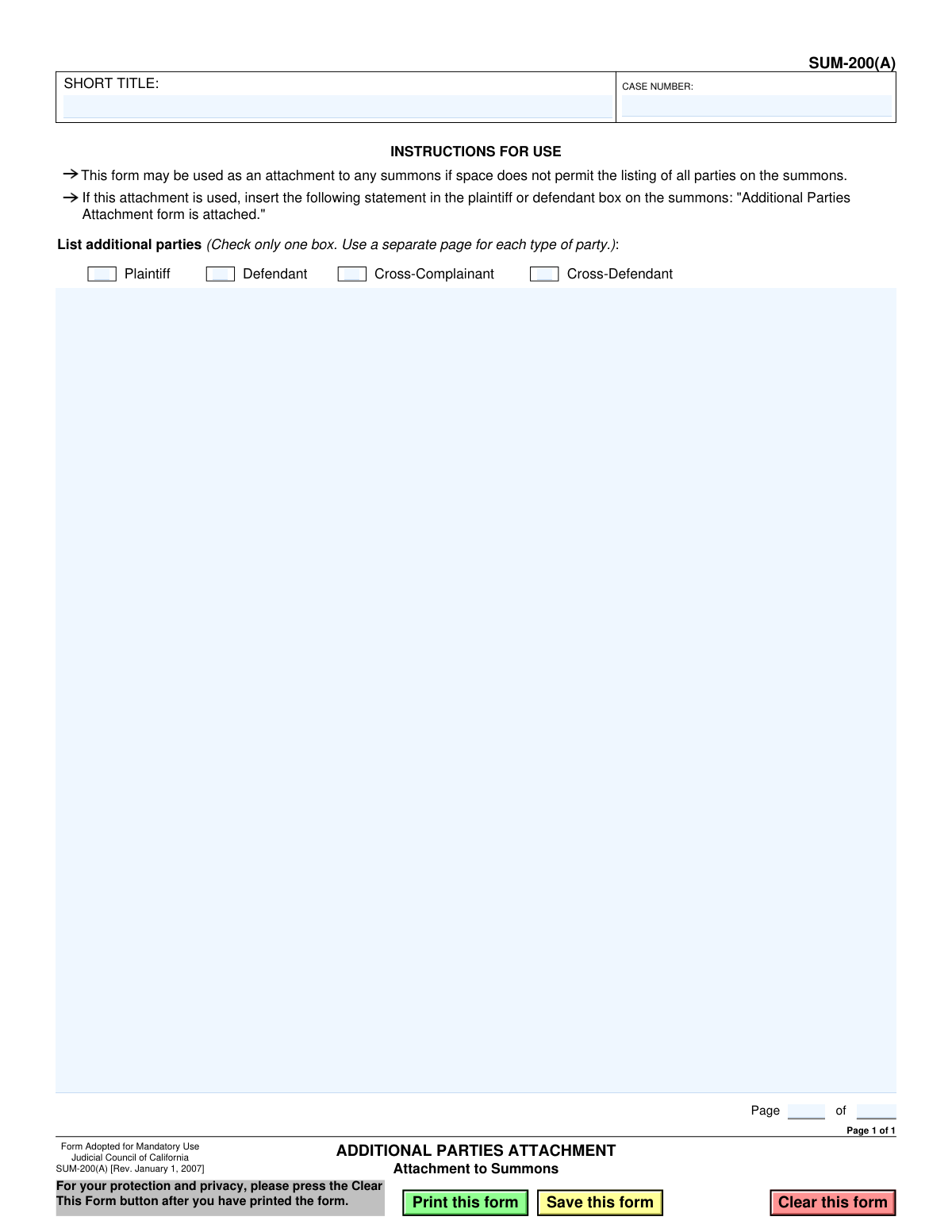
The SUM-200(A), Additional Parties Attachment, is a mandatory California court form used to supplement a summons in a legal case. Its purpose is to provide a complete list of all plaintiffs, defendants, cross-complainants, or cross-defendants when the primary summons form lacks sufficient space. This ensures all parties are properly named and served in the legal action. Today, this form can be filled out quickly and accurately using AI-powered services like Instafill.ai, which can also convert non-fillable PDF versions into interactive fillable forms.
SUM-200(A) is part of the California court forms category on Instafill.
Our AI automatically handles information lookup, data retrieval, formatting, and form filling.
It takes less than a minute to fill out SUM-200(A) using our AI form filling.
Securely upload your data. Information is encrypted in transit and deleted immediately after the form is filled out.

Form specifications

Form name: Form SUM-200(A), Additional Parties Attachment (Attachment to Summons)
Number of fields: 13
Number of pages: 1
Language: English
main-image

Instafill Demo: How to fill out PDF forms in seconds with AI

How to Fill Out SUM-200(A) Online for Free in 2026

Are you looking to fill out a SUM-200(A) form online quickly and accurately? Instafill.ai offers the #1 AI-powered PDF filling software of 2026, allowing you to complete your SUM-200(A) form in just 37 seconds or less.
Follow these steps to fill out your SUM-200(A) form online using Instafill.ai:
  1. 1 Navigate to an AI-powered form filler like Instafill.ai and upload or select the SUM-200(A) form.
  2. 2 Enter the short title of the case and the official case number in the header section.
  3. 3 Check the box that correctly identifies the type of parties being listed on this attachment (e.g., Plaintiff, Defendant).
  4. 4 List the full names of the additional parties in the space provided.
  5. 5 Indicate the page number for this attachment and the total number of attachment pages being used.
  6. 6 Review all the information auto-filled by the AI to ensure accuracy and completeness.
  7. 7 Download or print the completed SUM-200(A) to attach it to the corresponding summons form for filing.

Our AI-powered system ensures each field is filled out correctly, reducing errors and saving you time.

Why Choose Instafill.ai for Your Fillable SUM-200(A) Form?

Speed

Complete your SUM-200(A) in as little as 37 seconds.

Up-to-Date

Always use the latest 2026 SUM-200(A) form version.

Cost-effective

No need to hire expensive lawyers.

Accuracy

Our AI performs 10 compliance checks to ensure your form is error-free.

Security

Your personal information is protected with bank-level encryption.

Frequently Asked Questions About Form SUM-200(A)

This form, the Additional Parties Attachment, is used to list all the plaintiffs or defendants in a lawsuit when there is not enough space to list them on the main Summons form.

You must use this form if the number of parties in your case is too large to fit in the designated space on the original Summons. It serves as an official extension for listing names.

If you use this attachment, you must insert the statement 'Additional Parties Attachment form is attached' into the plaintiff or defendant box on the Summons itself.

You must use a separate SUM-200(A) page for each type of party. Use one page to list additional plaintiffs, and a second, separate page to list additional defendants, checking the correct box on each.

You will need the short case title, the case number assigned by the court, and the full legal names of all the additional parties you need to list.

You can use multiple pages of the SUM-200(A) form. Just be sure to number the pages correctly in the 'Page __ of __' section at the bottom to keep them organized.

After completing the form, you must attach it to the corresponding Summons. This entire packet is then filed with the court and served on the opposing parties.

No, the form instructions clearly state to check only one box per page. You must use a separate attachment for Plaintiffs, Defendants, Cross-Complainants, and Cross-Defendants.

This form is only mandatory if you have more parties than can be listed on the primary Summons form. If all parties fit on the Summons, you do not need to use this attachment.

Yes, services like Instafill.ai use AI to help you accurately auto-fill form fields with your case information, which can save time and reduce the risk of errors.

You can use a service like Instafill.ai to upload the SUM-200(A) form and fill it out electronically. The platform allows you to type directly into the fields and then save or print the completed document.

You can use a tool like Instafill.ai, which can convert flat, non-fillable PDFs into interactive forms. This allows you to easily type your information into the correct fields online.

Compliance SUM-200(A)
Validation Checks by Instafill.ai

1
Ensures Short Title is Provided
This check verifies that the 'SHORT TITLE' field is not empty. The short title is a critical identifier for the case, ensuring the attachment is associated with the correct legal proceeding. A submission with a missing short title would be considered incomplete and could be rejected by the court clerk.
2
Ensures Case Number is Provided
This validation confirms that the 'CASE NUMBER' field has been filled out. The case number is the unique official identifier for the court case, and its absence would make it impossible to file the document correctly. Failure to provide the case number will result in an invalid submission that cannot be processed.
3
Validates Case Number Format
This check ensures the 'CASE NUMBER' field conforms to a standard format, typically consisting of alphanumeric characters and possibly hyphens. This helps prevent typographical errors that could lead to the attachment being misfiled with the wrong case. An invalid format would trigger a warning, prompting the user to verify the number against official court documents.
4
Ensures Exactly One Party Type is Selected
This validation enforces the form's instruction to 'Check only one box' for the party type. It verifies that one and only one option among 'Plaintiff', 'Defendant', 'Cross-Complainant', or 'Cross-Defendant' is selected. Selecting none or more than one creates ambiguity and would render the filing defective, requiring correction before it can be accepted.
5
Verifies Additional Parties List is Not Empty
This check ensures that the text area for listing additional party names contains substantive text and is not blank. The entire purpose of this form is to list additional parties, so submitting it without any names is a critical error. This validation prevents the submission of a functionally empty attachment.
6
Validates Current Page Number is a Positive Integer
This check verifies that the value entered for the current page in the 'Page __ of __' field is a positive whole number. Page numbers are essential for organizing multi-page documents and ensuring all pages are accounted for. A non-numeric or invalid entry could lead to the document being assembled incorrectly or pages being lost.
7
Validates Total Pages Number is a Positive Integer
This check verifies that the value entered for the total number of pages in the 'Page __ of __' field is a positive whole number. This number informs the court clerk how many pages to expect for this attachment, which is crucial for confirming a complete submission. An invalid entry would create uncertainty about the document's completeness.
8
Ensures Page Number Logical Consistency
This validation confirms that the current page number is not greater than the total number of pages. A situation like 'Page 3 of 2' is a logical impossibility and indicates a data entry error. This check maintains the integrity of the document's pagination and prevents confusion during processing.
9
Prohibits Zero in Page Numbering
This check ensures that neither the current page number nor the total pages number is zero. Standard document pagination begins at 1, making zero an invalid value in this context. This validation catches clear data entry mistakes that would need to be corrected before submission.
10
Validates Short Title Character Length
This check ensures the 'SHORT TITLE' does not exceed a predefined maximum character limit (e.g., 50 characters). Court case management systems often have field size limitations, and an overly long title might be truncated, leading to incomplete data in the official record. This validation helps ensure full compatibility with court systems.
11
Validates Character Set in Party List
This check scans the list of additional parties for invalid characters that are not typically part of a person's or entity's name (e.g., #, $, %, &). This helps maintain data quality and prevents potential issues with how the names are stored or displayed in the court's electronic filing system. It encourages the user to enter names accurately and without extraneous symbols.
12
Reminder to Update Main Summons Form
This is a soft validation that triggers a warning or reminder message upon attempting to finalize the form. It reminds the user of the instruction to insert the statement 'Additional Parties Attachment form is attached' on the original summons. This is a critical procedural step to ensure the court clerk is aware of the attachment and processes it with the main document.

Common Mistakes in Completing SUM-200(A)

Mismatched Case Information

Users often enter a 'Short Title' or 'Case Number' that does not exactly match the information on the primary Summons form. This happens due to typos or using a slightly different abbreviation. A mismatch can lead to the attachment being misfiled or rejected by the court clerk, causing delays in the legal process.

Forgetting to Complete Page Numbering

The 'Page ___ of ___' fields are frequently left blank, especially when only one attachment page is used. However, if multiple pages are used for different party types (e.g., one for plaintiffs, one for defendants), missing page numbers can make it impossible for the court to verify that the full set of documents was received. Always fill this in, for example, as 'Page 1 of 2' and 'Page 2 of 2' to ensure clarity.

Selecting Multiple Party Types on One Sheet

A common error is checking more than one box (e.g., both 'Plaintiff' and 'Defendant') on a single attachment page. The form's instructions explicitly state to 'Check only one box' and 'Use a separate page for each type of party.' This mistake leads to ambiguity and will likely cause the court clerk to reject the filing for correction.

Failing to Select Any Party Type

Conversely, some filers forget to check any of the party type boxes ('Plaintiff', 'Defendant', 'Cross-Complainant', 'Cross-Defendant'). This makes the list of names useless, as the court has no way of knowing their role in the lawsuit. This omission guarantees the document will be returned, delaying the case.

Omitting the Required Notation on the Summons

This form is an attachment, and its instructions require the filer to write 'Additional Parties Attachment form is attached' on the main Summons. Forgetting this crucial step means the court clerk processing the Summons may not know to look for this attachment. This can result in the additional parties not being properly included in the official court record.

Incorrect or Incomplete Party Names

Data entry errors such as misspelling names, using informal nicknames instead of full legal names, or omitting necessary business suffixes like 'Inc.', 'LLC', or 'A California Corporation' are frequent. These inaccuracies can create serious legal problems, including challenges to proper service of process. It is critical to verify every name against the official complaint.

Failure to Physically Attach the Form

It is a simple but surprisingly common administrative error to fill out the SUM-200(A) but then forget to actually include it with the Summons packet during filing. This oversight completely negates the form's purpose, as the additional parties will not be named in the summons. To prevent this, use a checklist for all documents before submitting them to the court.

Mixing Different Party Types in the Name List

Even if only one box is checked, users sometimes list parties of a different type in the text field out of convenience. For example, they might check 'Defendant' but then add a few 'Cross-Defendant' names at the bottom of the list. This violates the 'separate page for each type' rule and creates a confusing, incorrect legal document that will be rejected.

Using an Outdated Form

Court forms are updated periodically, and using an obsolete version is a common reason for rejection. The provided form is from 2007, and a newer version may be required. Filers must always verify they are using the most current version by checking the official California Courts (Judicial Council) website before filling it out.

Improper Formatting of the Party List

When listing many names, users may format the list poorly by running names together in a paragraph or not clearly separating them. This can create ambiguity about where one party's name ends and another begins. The best practice is to list each distinct party on a new, numbered line to ensure absolute clarity for the court and all other parties.
Saved over 80 hours a year

“I was never sure if my IRS forms like W-9 were filled correctly. Now, I can complete the forms accurately without any external help.”

Kevin Martin Green

Your data stays secure with advanced protection from Instafill and our subprocessors

Robust compliance program

Transparent business model

You’re not the product. You always know where your data is and what it is processed for.

ISO 27001, HIPAA, and GDPR

Our subprocesses adhere to multiple compliance standards, including but not limited to ISO 27001, HIPAA, and GDPR.

Security & privacy by design

We consider security and privacy from the initial design phase of any new service or functionality. It’s not an afterthought, it’s built-in, including support for two-factor authentication (2FA) to further protect your account.

Fill out SUM-200(A) with Instafill.ai

Worried about filling PDFs wrong? Instafill securely fills form-sum-200a-additional-parties-attachment-attachment-to-summons forms, ensuring each field is accurate.