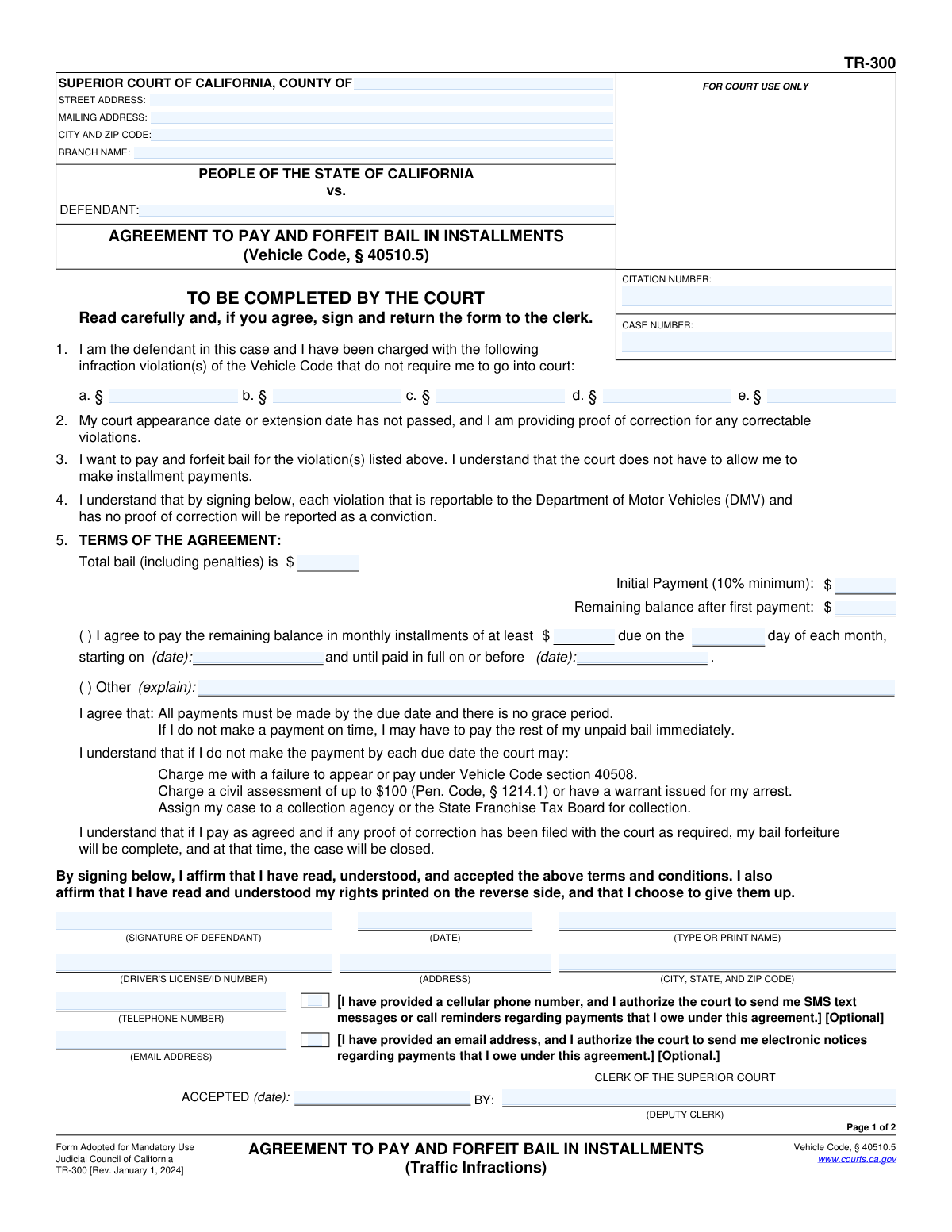
Yes! You can use AI to fill out Form TR-300, Agreement to Pay and Forfeit Bail in Installments (Traffic Infractions)
Form TR-300 is a legal document for defendants in California who wish to resolve traffic infraction citations by paying bail in installments rather than a lump sum. By signing, the defendant agrees to the payment terms, forfeits bail (which acts as a conviction for DMV purposes), and waives certain rights, such as the right to a trial. Today, this form can be filled out quickly and accurately using AI-powered services like Instafill.ai, which can also convert non-fillable PDF versions into interactive fillable forms.
TR-300 is part of the
California court forms category on Instafill.
Our AI automatically handles information lookup, data retrieval, formatting, and form filling.
It takes less than a minute to fill out TR-300 using our AI form filling.
Securely upload your data. Information is encrypted in transit and deleted immediately after the form is filled out.
Form specifications
| Form name: | Form TR-300, Agreement to Pay and Forfeit Bail in Installments (Traffic Infractions) |
| Number of fields: | 37 |
| Number of pages: | 1 |
| Language: | English |
Instafill Demo: How to fill out PDF forms in seconds with AI
How to Fill Out TR-300 Online for Free in 2026
Are you looking to fill out a TR-300 form online quickly and accurately? Instafill.ai offers the #1 AI-powered PDF filling software of 2026, allowing you to complete your TR-300 form in just 37 seconds or less.
Follow these steps to fill out your TR-300 form online using Instafill.ai:
- 1 Navigate to Instafill.ai and upload or select the Form TR-300.
- 2 Use the AI assistant to populate your personal information, including your name, address, driver's license number, and contact details.
- 3 Enter your case number and citation number in the designated fields at the top of the form.
- 4 List the specific Vehicle Code violation sections you are charged with, as detailed on your citation.
- 5 Review the payment terms filled in by the court, including the total bail, initial payment, and the monthly installment schedule.
- 6 Carefully read the terms of the agreement and the advisement of rights you are waiving, then digitally sign and date the form.
- 7 Download the completed form and submit it to the appropriate Superior Court clerk as instructed.
Our AI-powered system ensures each field is filled out correctly, reducing errors and saving you time.
Why Choose Instafill.ai for Your Fillable TR-300 Form?
Speed
Complete your TR-300 in as little as 37 seconds.
Up-to-Date
Always use the latest 2026 TR-300 form version.
Cost-effective
No need to hire expensive lawyers.
Accuracy
Our AI performs 10 compliance checks to ensure your form is error-free.
Security
Your personal information is protected with bank-level encryption.
Frequently Asked Questions About Form TR-300
This form is used to request a payment plan from the court to pay the fine (bail) for a traffic infraction in monthly installments instead of paying the full amount at once.
You can use this form if you have a traffic infraction that doesn't require a court appearance, your court date has not passed, and you wish to pay the fine without going to court.
This means you are agreeing to pay the fine, which closes your case. The court will report the violation to the DMV as a conviction, which may add points to your driving record.
By signing this form, you are giving up your right to a court trial, to be represented by an attorney, to confront witnesses, and to remain silent. A full list of waived rights is on the second page of the form.
There is no grace period. If you miss a payment, the court may demand the full remaining balance, charge you with failure to pay, add a civil assessment of up to $100, or send your case to collections.
You need to provide your personal contact information, driver's license number, and your citation or case number. The court will typically fill in the violation codes and payment amounts.
Yes, the agreement requires an initial payment of at least 10% of the total bail amount when you submit the form.
You can ask the court to reconsider your ability to pay. The court has the option to modify your payment plan or allow community service, but it is not required to grant your request.
You must sign and return the completed form to the clerk of the Superior Court whose address is listed at the top of the form.
No, the form states that the court is not obligated to allow installment payments. Approval is at the discretion of the court.
Yes, services like Instafill.ai use AI to accurately auto-fill form fields with your information, which can save you time and help prevent errors.
You can use a service like Instafill.ai to easily fill out the form online. Simply upload the document, and the platform will make the fields interactive for you to complete and sign.
If you have a non-fillable PDF, you can use a tool like Instafill.ai. It can convert flat PDFs into interactive, fillable forms that you can complete and sign electronically.
Compliance TR-300
Validation Checks by Instafill.ai
1
Ensures Case or Citation Number is Provided
This check verifies that either the 'CITATION NUMBER' or 'CASE NUMBER' field is filled out. This is critical for the court to associate the payment agreement with the correct legal case file. A submission without either of these numbers cannot be processed and should be rejected, prompting the user to provide the necessary identifier.
2
Validates Defendant Name is Present
This check ensures that the 'DEFENDANT' name field is not empty. The defendant's name is a fundamental piece of information required to identify the individual entering into the agreement. Failure to provide a name makes the form legally invalid and unprocessable.
3
Requires at Least One Violation Code
This validation confirms that at least one of the five violation fields (1a through 1e) has been completed. The agreement is contingent on specific infractions, so the form must list the violation code(s) being addressed. If no violations are listed, the agreement has no basis and the form should be returned for completion.
4
Verifies Financial Fields are Valid Currency
This check ensures that the 'Total bail', 'Initial Payment', and 'monthly installments' fields contain valid, positive numeric currency values. Non-numeric or negative values would make the financial calculations impossible and the agreement void. The system should flag any invalid formats and require the user to input proper dollar amounts.
5
Validates Initial Payment is at Least 10% of Total Bail
This check confirms that the 'Initial Payment' amount is greater than or equal to 10% of the 'Total bail' amount, as specified in the form's terms. This is a mandatory condition for the installment agreement to be accepted by the court. If the initial payment is below the 10% threshold, the submission should be rejected with an error message explaining the requirement.
6
Verifies Remaining Balance Calculation
This validation performs the calculation 'Total bail' - 'Initial Payment' and compares the result to the value entered in the 'Remaining balance' field. This ensures the arithmetic on the form is correct and all parties agree on the amount to be paid in installments. If the numbers do not reconcile, the form should be flagged for correction to prevent future payment disputes.
7
Ensures Installment Plan Details are Complete
If the primary installment plan checkbox is selected, this check verifies that the monthly payment amount, day of the month, start date, and end date are all filled in. Missing any of these details makes the payment schedule ambiguous and unenforceable. The user must complete all fields to define the agreement terms clearly.
8
Validates Payment Day of Month is Within Range
This check ensures that the 'day of each month' for payment is a number between 1 and 31. This prevents the entry of an impossible date, such as the 35th of the month. An invalid day would cause confusion and potential missed payments, so the input must be a valid calendar day.
9
Verifies Logical Sequence of Installment Dates
This check ensures that the installment 'start date' is on or after the defendant's signature date and that the 'end date' is after the 'start date'. This maintains a logical time progression for the payment plan. A plan with an end date before its start date is nonsensical and must be corrected.
10
Reconciles Total Payments with Total Bail
This validation calculates the total amount to be paid over the installment period (monthly payment amount multiplied by the number of months) and adds the initial payment. This sum is then compared to the 'Total bail' amount to ensure the plan fully covers the debt. If the plan does not satisfy the total bail, it is incomplete and must be adjusted.
11
Validates Defendant Signature Date Format
This check verifies that the 'DATE' field next to the defendant's signature is a valid date and is not a future date. The signature date legally marks when the agreement was made and is essential for establishing timelines. An invalid or future date would compromise the document's legal standing and should be corrected.
12
Requires Defendant's Printed Name and Signature
This check verifies that the 'TYPE OR PRINT NAME' field is filled and that a signature is present in the 'SIGNATURE OF DEFENDANT' field. The printed name clarifies the identity of the signatory, and the signature is required for the agreement to be legally binding. A form missing either of these elements is incomplete and cannot be accepted.
13
Validates Email Address Format
This check ensures that if an email address is provided, it follows the standard '[email protected]' format. An incorrectly formatted email address will lead to failed communication attempts. This is particularly important if the user has authorized the court to send electronic notices.
14
Validates Telephone Number Format
This check verifies that the provided 'TELEPHONE NUMBER' conforms to a standard format (e.g., 10 digits, possibly with parentheses or hyphens). A valid phone number is crucial for court communication, especially if the user opts in to receive SMS text message reminders. An invalid number would prevent this contact and should be flagged.
Common Mistakes in Completing TR-300
Users often fail to completely fill out the payment terms in Section 5. They might enter a monthly payment amount but leave the due day, start date, or final payment date blank. This makes the agreement ambiguous and unenforceable, leading to its rejection by the court clerk and delaying the resolution of the case. To avoid this, carefully fill in every blank in the payment schedule section, ensuring the dates are logical and the plan allows the balance to be paid in full by the final date. AI-powered form fillers like Instafill.ai can help by flagging these required fields to ensure none are missed.
Forgetting to physically sign or date the form is one of the most common and critical errors. An unsigned or undated agreement is legally invalid and will be immediately rejected by the court. This can cause the defendant to miss their deadline for handling the ticket, potentially resulting in a 'failure to appear' charge and additional penalties. Always perform a final review of the form before submission, paying special attention to the signature and date fields at the bottom of page one.
Entering the wrong Citation Number or Case Number is a frequent data entry mistake. This often happens due to a simple typo or by referencing an old ticket. An incorrect number can cause the payment and agreement to be misapplied or not processed at all, leading the court to believe you have not responded to the citation. To prevent this, carefully double-check the numbers against the original traffic ticket or court notice before writing them on the form.
Item #2 on the form requires the defendant to affirm that their 'court appearance date or extension date has not passed.' Many people overlook this and attempt to submit the form after their deadline has already expired. This invalidates the agreement from the outset, and the defendant may have already incurred penalties for failure to appear. Before filling out the form, confirm the appearance date on your citation and ensure you submit the agreement to the court clerk before that date passes.
The form requires calculating the initial 10% minimum payment and the remaining balance. Errors in this simple arithmetic are common and will cause the form to be returned for correction, creating delays. For example, a user might calculate the 10% incorrectly or make a subtraction error when finding the remaining balance. To avoid this, use a calculator to verify your math. AI-powered tools like Instafill.ai can automate these calculations, eliminating the risk of human error.
The form is an agreement to pay fines, but it does not resolve the underlying issue of a 'fix-it' ticket. Defendants often submit the payment agreement but forget to also submit the separate, signed-off 'proof of correction' for their correctable violation. This results in the fine being paid but the violation itself not being cleared, which can lead to a conviction being reported to the DMV and a much higher total cost. Always remember to get correctable violations signed off by an authorized official and submit that proof along with this payment agreement.
Many individuals focus only on the payment aspect and sign the form without reading the 'Advisement of Rights' on page two. By signing, they are unknowingly giving up significant rights, including the right to a speedy trial, to confront witnesses, and to be represented by an attorney. This is a binding legal decision, not just a payment plan. To avoid unintended consequences, you must read and understand the rights you are waiving before signing the agreement to ensure it is the best course of action for your situation.
Scrawled handwriting or entering an old address or phone number can prevent the court from contacting the defendant about problems with the form or payment. If the court cannot reach you, a simple correctable error could escalate into a missed payment, a civil assessment, or even a warrant. It is crucial to print all contact information clearly and ensure the address, phone number, and email are current. If the form is a non-fillable PDF, tools like Instafill.ai can convert it to a fillable version, ensuring all text is typed and legible.
In Section 1, the defendant must list the specific Vehicle Code sections for their infractions. People often miscopy these numbers from their ticket or omit a violation if they have more than one. An incorrect or incomplete list can mean the agreement doesn't cover all outstanding charges, leaving some violations unresolved and subject to further penalties. To prevent this, carefully transcribe each violation code and section number directly from the original traffic citation onto the form.
Saved over 80 hours a year
“I was never sure if my IRS forms like W-9 were filled correctly. Now, I can complete the forms accurately without any external help.”
Kevin Martin Green
Your data stays secure with advanced protection from Instafill and our subprocessors

Robust compliance program
Transparent business model
You’re not the product. You always know where your data is and what it is processed for.
ISO 27001, HIPAA, and GDPR
Our subprocesses adhere to multiple compliance standards, including but not limited to ISO 27001, HIPAA, and GDPR.
Security & privacy by design
We consider security and privacy from the initial design phase of any new service or functionality. It’s not an afterthought, it’s built-in, including support for two-factor authentication (2FA) to further protect your account.
Fill out TR-300 with Instafill.ai
Worried about filling PDFs wrong? Instafill securely fills form-tr-300-agreement-to-pay-and-forfeit-bail-in-installments-traffic-infractions forms, ensuring each field is accurate.