
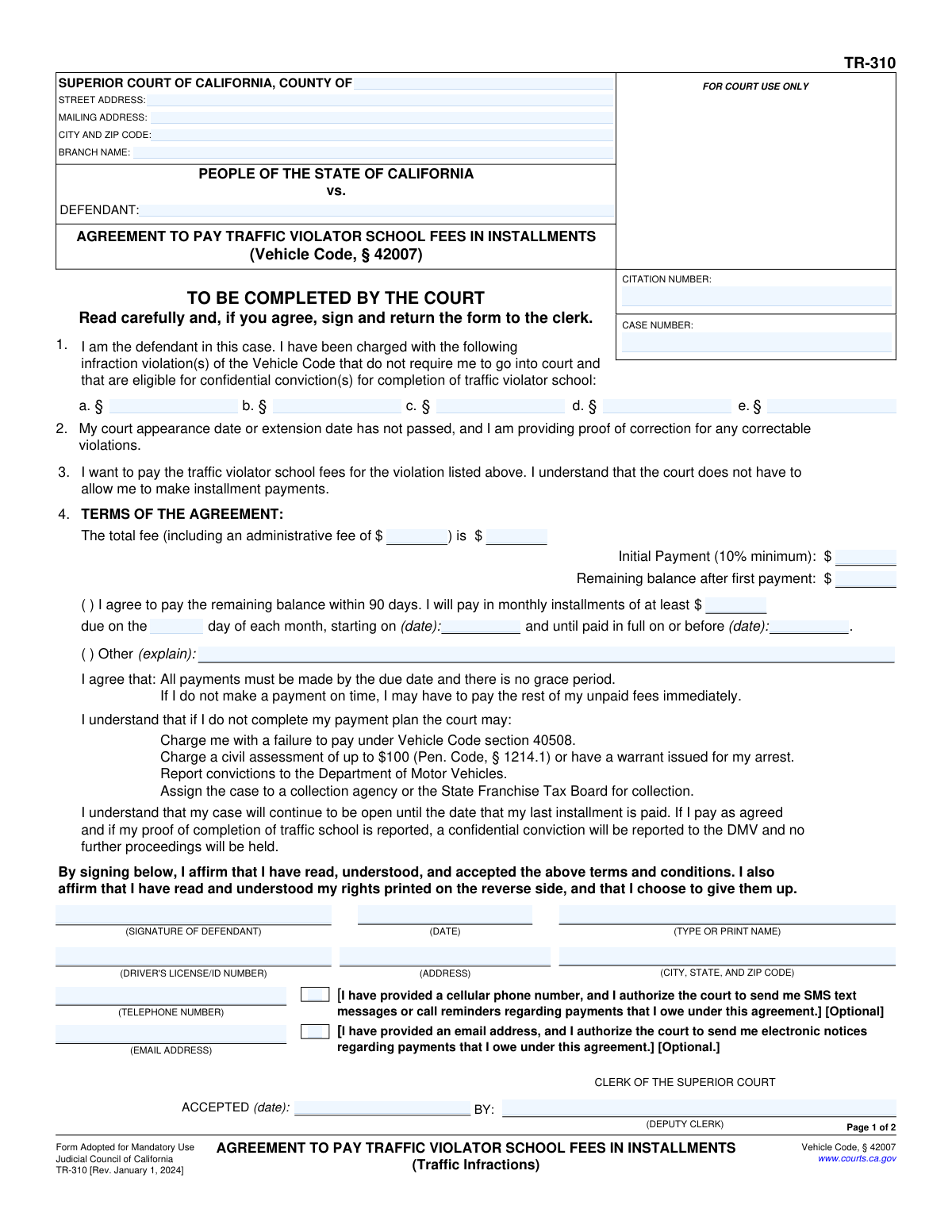
Yes! You can use AI to fill out Form TR-310, Agreement to Pay Traffic Violator School Fees in Installments
Don't type 39 fields by hand. Tell our AI about yourself, or upload a document you already have, and it fills every field in seconds. You check it, then download, print or sign.
The AI does the filling. You just check it.
No typing into boxes, nothing to install.
What this form asks for
The AI fills all of it, from your answers or your documents.
The AI checks your answers before you download
14 checks built for this form, so a wrong date or a missing answer is caught before anyone else sees it.
This check ensures that either the 'Citation Number' or the 'Case Number' field is filled out. These numbers are critical for uniquely identifying the case within the court's system. Without at least one of these identifiers, the form cannot be processed or linked to the correct defendant and violation, leading to submission rejection.
This validation verifies that at least one violation is listed in section 1 of the form. The agreement is predicated on specific violations, so this information is essential for defining the scope of the agreement. If no violations are listed, the form is incomplete and cannot be processed as the court would not know which charges the agreement applies to.
This check verifies the mathematical consistency of the financial fields in section 4, ensuring that 'Total Fee' minus 'Initial Payment' equals the 'Remaining balance'. This is crucial for maintaining accurate accounting and ensuring both the defendant and the court have a correct understanding of the payment obligation. A mismatch would cause the form to be rejected for correction to prevent billing errors.
This validation confirms that the 'Initial Payment' amount is at least 10% of the 'Total Fee', as specified by the form's terms. This rule ensures a minimum level of commitment from the defendant and complies with the court's standard procedure for installment plans. If the initial payment is below the 10% threshold, the submission will be flagged as non-compliant and require adjustment.
This check ensures the payment plan's 'Start Date' is on or before the 'End Date'. This maintains the logical chronological order of the payment schedule. An end date that occurs before the start date is a nonsensical entry that would make the agreement unenforceable and will cause an error, requiring the user to correct the dates.
This validation verifies that the final payment date is no more than 90 days after the agreement is signed. This enforces the time limit specified in the agreement terms, ensuring timely resolution of the fees. Submissions with a payment schedule extending beyond 90 days will be rejected, and the defendant will need to propose a compliant schedule or select the 'Other' option with a valid explanation.
And 8 more checks
- Defendant Signature Requirement
- Signature Date Validity
- Driver's License Number Format
- Contact Information Completeness
- Telephone Number Format
- Email Address Format
- Conditional Email Requirement for Notices
- Installment Day of Month Range
Let AI fill out your TR-310
No typing. Every field filled in seconds, checked, ready to sign.
How to Fill Out TR-310 Online for Free in 2026
What the AI walks you through.
- Navigate to Instafill.ai and upload or select the TR-310 form.
- Enter your personal information, including name, address, and driver's license number, along with the court and case details.
- List the specific Vehicle Code infraction violation(s) you are charged with.
- Review the payment terms, including the total fee, initial payment, and monthly installment amount, as determined by the court.
- Indicate your agreement to the payment plan and acknowledge the consequences of non-payment.
- Carefully read the 'Advisement of Rights' section, then digitally sign and date the form to affirm your understanding and acceptance.
- Download the completed form and submit it to the clerk of the appropriate Superior Court.
Common Mistakes in Completing TR-310
The ones the AI is built to catch.
Entering Incorrect Court Information
Missing or Incorrect Case/Citation Number
Forgetting to Sign and Date the Form
Illegible Handwriting
Incorrectly Listing Violation Codes
Filling Out Court-Use-Only Sections
Providing Outdated Contact Information
Misunderstanding the Waiver of Rights
Submitting the Form After the Deadline
Proposing an Invalid Payment Schedule
Frequently Asked Questions About TR-310
Is it really free for 7 days?
Can I fill other forms too?
How do I cancel?
How does the AI fill out TR-310?
What happens to my information?
How complex is TR-310 to fill out?
What is the purpose of Form TR-310, the Agreement to Pay Traffic Violator School Fees in Installments?
Who is eligible to use this form to set up a payment plan?
What information do I need to fill out this form?
What are the typical payment terms in this agreement?
What happens if I miss an installment payment?
What should I do if my financial situation changes and I can't afford the payments?
By signing this form, what rights am I giving up?
Where do I submit the completed Form TR-310?
Will my case be closed once I sign the agreement?
What happens after I successfully complete my payments and traffic school?
Can I use an AI tool to help me fill out this form?
How can I fill out Form TR-310 online using Instafill.ai?
The PDF version of the form I have is not fillable. What can I do?
Get your TR-310 filled out by AI
$0 today. Cancel before Nov 5 and you pay nothing.
Other forms like this one
California court forms: Judicial Council of California Form SC-105, Request for Court Order and Answer (Small Claims), Judicial Council of California Form SC-120, Defendant’s Claim and ORDER to Go to Small Claims Court (Small Claims), Judicial Council of California Form SER-001, Request for Sheriff to Serve Court Papers, Judicial Council of California Form SER-001, Request for Sheriff to Serve Court Papers, Affidavit for Collection of Personal Property California Probate Code Section 13100, Form POS-040, Proof of Service—Civil, Declaration of Facts of Death (California Superior Court), declaration-of-marriage-for-court-proceeding-california-family-law, ADOPT-200, Adoption Request, ADOPT-200, Stepparent Adoption Request, ADOPT-210, Adoption Agreement, ADOPT-310, Contact After Adoption Agreement, Judicial Council of California Form ADOPT-200, Adoption Request, Form ADR-107, Mediation Attendance Sheet, Form ADR-110, Order Appointing Referee, Form ADR-109, Stipulation or Motion for Order Appointing Referee, Form ADR-102, Request for Trial De Novo After Judicial Arbitration, Form ADR-108, Referee's Report (Code Civ. Proc., §§ 638, 639), Form ADR-106, Petition to Confirm, Correct, or Vacate Contractual Arbitration Award, Form ADR-104, Rejection of Award and Request for Trial After Attorney-Client Fee Arbitration
Let AI fill out your TR-310
Your trial starts once a card is added. You pay nothing before Nov 5.
Our AI already knows this form, all 39 fields of it. Skip the typing: tell it about yourself, or upload what you have, and it fills the whole form in seconds.
- AI fills every field on both pages, checkboxes included
- No typing into boxes: answer a few questions, or upload a document you already have, an old copy of this form, a photo of a document
- The AI checks the answers; you review and change anything before you download
- Download the finished PDF, print it, or sign it online
- Encrypted, and never used to train AI
Cancel before Nov 5 and you pay nothing.
A card is needed to start the trial. Cancel in two clicks from your account.
Terms · Privacy