Yes! You can use AI to fill out Form TR-321/CR-321, Can't Afford to Pay Fine: Traffic and Other Infractions (Court Order)
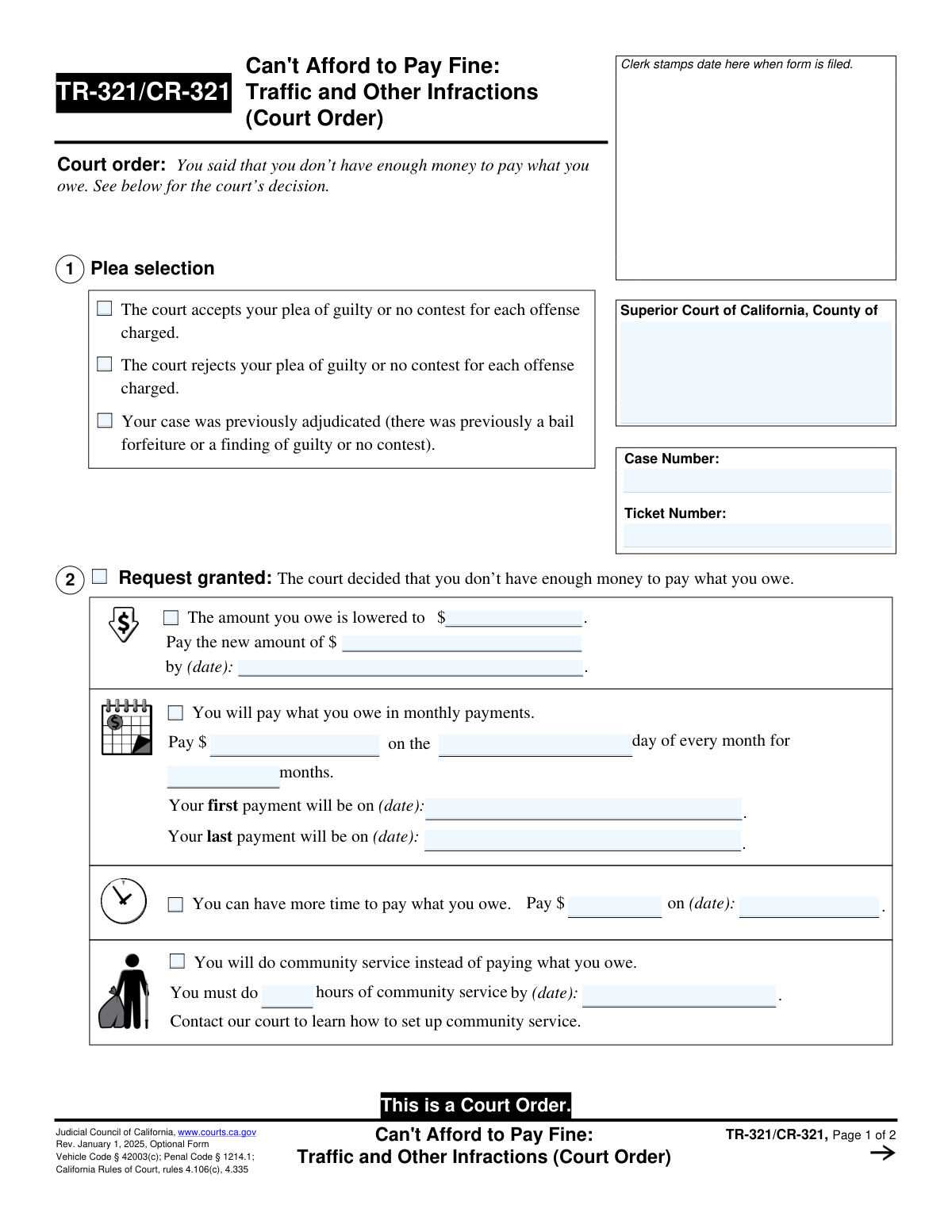
Form TR-321/CR-321 is a judicial order issued by a Superior Court of California in response to an individual's claim that they cannot afford to pay fines for traffic or other infractions. It documents the court's decision, which could be to grant the request (by reducing the fine, setting up a payment plan, or ordering community service), deny the request, or ask for more information. Today, court staff can prepare this form quickly and accurately using AI-powered services like Instafill.ai, which can also convert non-fillable PDF versions into interactive fillable forms.
TR-321/CR-321 is part of the
California court forms category on Instafill.
Our AI automatically handles information lookup, data retrieval, formatting, and form filling.
It takes less than a minute to fill out TR-321/CR-321 using our AI form filling.
Securely upload your data. Information is encrypted in transit and deleted immediately after the form is filled out.
Form specifications
| Form name: | Form TR-321/CR-321, Can't Afford to Pay Fine: Traffic and Other Infractions (Court Order) |
| Number of fields: | 61 |
| Number of pages: | 1 |
| Language: | English |
Instafill Demo: How to fill out PDF forms in seconds with AI
How to Fill Out TR-321/CR-321 Online for Free in 2026
Are you looking to fill out a TR-321/CR-321 form online quickly and accurately? Instafill.ai offers the #1 AI-powered PDF filling software of 2026, allowing you to complete your TR-321/CR-321 form in just 37 seconds or less.
Follow these steps to fill out your TR-321/CR-321 form online using Instafill.ai:
- 1 Navigate to an AI-powered platform like Instafill.ai and upload or select the TR-321/CR-321 form.
- 2 Enter the Superior Court information, Case Number, and Ticket Number in the designated fields at the top of the form.
- 3 Based on the judicial officer's decision, check the appropriate boxes in Section 1 regarding the plea and Section 2, 3, or 4 for the outcome of the request.
- 4 If the request is granted (Section 2), accurately fill in the details of the court's order, such as a new fine amount, a monthly payment plan schedule, or the number of community service hours required.
- 5 If more information is needed (Section 3), provide the clerk's contact details or the date, time, and location for the scheduled court appearance.
- 6 Complete the Judge's signature date and the Clerk's Certificate of Service (Section 5), indicating how and when the order was served to the individual.
- 7 Review the entire completed form to ensure all information accurately reflects the court's order, then save, print, or electronically file the document as required.
Our AI-powered system ensures each field is filled out correctly, reducing errors and saving you time.
Why Choose Instafill.ai for Your Fillable TR-321/CR-321 Form?
Speed
Complete your TR-321/CR-321 in as little as 37 seconds.
Up-to-Date
Always use the latest 2026 TR-321/CR-321 form version.
Cost-effective
No need to hire expensive lawyers.
Accuracy
Our AI performs 10 compliance checks to ensure your form is error-free.
Security
Your personal information is protected with bank-level encryption.
Frequently Asked Questions About Form TR-321/CR-321
This is not a form for you to fill out, but a court order that shows the judge's decision on your previous request for a reduced fine or alternative payment for a traffic ticket or other infraction.
You received this court order because you previously informed the court that you could not afford to pay your fine. This document is the court's official response and ruling on your request.
No, this form is completed by the court. Your responsibility is to read the judge's decision carefully and follow the instructions provided.
It means the court has approved your request for assistance. Section 2 will detail the specific outcome, such as a lower fine, a payment plan, more time to pay, or community service instead of payment.
If your request was denied, you must pay the full original fine amount by the new deadline listed in Section 4. The court has determined that you have the ability to pay the fine.
This means the judge requires more details before making a final decision. You must follow the instructions in Section 3, which may require you to contact the clerk or appear in court with specific documents.
Section 2 of the form will instruct you to contact the court to learn how to set up community service. You will need to complete the required number of hours by the specified deadline.
Failing to comply with a court order can lead to serious consequences, such as additional fees or a warrant for your arrest. If you anticipate missing a deadline, contact the court clerk immediately.
Your Case Number and Ticket Number are printed at the top right of the first page. You should have these numbers ready when communicating with the court.
Since this is a completed order from the court, you don't need to fill it out. However, for the initial request form you submitted, AI services like Instafill.ai can help auto-fill personal information accurately and save time.
You can upload a PDF of the form to Instafill.ai, which allows you to fill it out on your computer. The AI can help by auto-filling fields with your saved information, making the process faster and more accurate.
Services like Instafill.ai can convert flat, non-fillable PDFs into interactive forms. This allows you to type your answers directly into the fields instead of printing the form and filling it out by hand.
Compliance TR-321/CR-321
Validation Checks by Instafill.ai
1
Case Number Presence and Format
This check verifies that the 'Case Number' field is not empty and conforms to the expected format for the jurisdiction. The Case Number is a critical identifier for linking the order to the correct legal case file. If this field is empty or malformed, the document cannot be correctly processed or filed, leading to significant administrative delays.
2
Case Number Consistency Across Pages
Validates that the 'Case Number' entered on Page 1 matches the 'Case Number' entered on Page 2. This is crucial for ensuring the integrity of the multi-page document and preventing pages from different cases from being mixed up. A mismatch would invalidate the document and require manual correction.
3
Ensures a Single Court Decision is Selected
This validation ensures that only one of the main outcome sections (Section 2: Request Granted, Section 3: Need More Information, or Section 4: Request Denied) is selected and filled out. These outcomes are mutually exclusive, and selecting more than one would create a logically impossible and unenforceable court order. The form submission will be rejected if multiple outcomes are indicated.
4
Exclusive Plea Selection in Section 1
Verifies that only one of the three plea status options in Section 1 ('plea of guilty or no contest... accepted', '...rejected', or 'previously adjudicated') is checked. A case cannot have its plea simultaneously accepted and rejected. This check prevents contradictory information from being recorded in the court record.
5
Exclusive Outcome within 'Request Granted' Section
Within Section 2 ('Request granted'), this check ensures that only one method of satisfying the fine is selected (e.g., 'Pay the new amount', 'monthly payments', 'more time to pay', or 'community service'). The form's layout implies these options are mutually exclusive. This validation prevents ambiguity in the court's order regarding the defendant's obligations.
6
Conditional Requirement for Monthly Payment Plan
If the 'You will pay what you owe in monthly payments' checkbox in Section 2 is selected, this validation ensures all related fields are completed. This includes the monthly payment amount, the day of the month for payment, the total number of months, the first payment date, and the last payment date. Missing information would make the payment plan unenforceable.
7
Logical Date Sequence in Monthly Payment Plan
When a monthly payment plan is specified in Section 2, this check verifies that the 'last payment date' is chronologically after the 'first payment date'. It may also cross-reference that the duration between the dates corresponds to the specified 'number of months'. This prevents the creation of an illogical or impossible payment schedule.
8
Conditional Requirement for 'Request Denied' Details
If Section 4 ('Request denied') is checked, this validation confirms that at least one reason for the denial is also checked. Furthermore, it ensures that the 'Pay the full cost of what you owe' amount and the corresponding due date are both filled in. An incomplete denial order lacks the necessary information for the defendant to comply.
9
Valid Date Format for All Date Fields
This check ensures that all date fields across the form (e.g., payment deadlines, court dates, service dates) are entered in a valid and consistent format, such as MM/DD/YYYY. Incorrectly formatted dates can cause system errors and lead to misinterpretation of legal deadlines. The validation prevents data corruption and ensures clarity.
10
Future Date Validation for Deadlines and Appointments
Verifies that all dates for future actions, such as payment due dates or court appearance dates, are set to a date in the future relative to the Judge's signature date. A deadline or appointment set in the past is invalid and makes the order nonsensical. This check ensures the order is actionable.
11
Exclusive Clerk Service Method Selection
In Section 5, this validation ensures that only one method of service, either 'Service by mail' or 'Electronic service', is selected. The form is designed for the clerk to certify a single method of service for a given action. Selecting both would create ambiguity in the official record of service.
12
Conditional Requirement for Mail Service Details
If the 'Service by mail' checkbox in Section 5 is selected, this check confirms that all required address fields (Street, City, State, Zip) and the 'Place' and 'date' of mailing are filled out. Complete and accurate information is legally required to prove proper service was effectuated. Incomplete information could invalidate the service.
13
Conditional Requirement for Electronic Service Details
If the 'Electronic service' checkbox in Section 5 is selected, this validation ensures that the 'from' and 'to' electronic service addresses, as well as the date of service, are all provided. Similar to mail service, these details are essential for creating a valid legal record of electronic service. Failure to provide this information would render the certificate of service incomplete.
14
Valid Currency and Numeric Field Formats
This check verifies that all fields intended for monetary amounts (e.g., `FillField1`, `FillField3`, `CostField1`) contain valid numeric or currency values. It also validates that fields for quantities, like 'hours of community service' (`FillField7`), contain valid numbers. This prevents non-numeric characters from being entered, ensuring data integrity for financial calculations and reporting.
Common Mistakes in Completing TR-321/CR-321
Individuals often confuse their ticket number with their court case number or omit them entirely on their initial request forms. This happens because the numbers can be similar and appear on different documents. Without the correct identifier, the court cannot locate the case file, leading to processing delays or an outright rejection of the request, forcing the person to start over. To avoid this, carefully locate both the 'Case Number' and 'Ticket Number' on your citation or court notice and enter them accurately in the designated fields on all correspondence.
Section 4 of the order shows a request can be denied if the court decides you have enough money to pay. This outcome often stems from a weak initial application where the individual failed to submit compelling proof of their inability to pay. Simply stating you don't have money is not enough; you must provide documentation like pay stubs, tax returns, proof of government assistance, and a list of essential expenses. To prevent denial, gather and submit comprehensive evidence that paints a clear picture of your financial situation.
When the court needs more information (Section 3), it will issue an order to appear in court or contact the clerk. Some people ignore this, mistakenly believing it's optional or being too intimidated to respond. This is a serious error, as it is a direct court order; failure to comply can result in the request being denied, additional penalties, or even a bench warrant for failure to appear. Always treat any notice from the court as mandatory and respond by the specified date.
The court sends this order to the mailing or email address it has on file, as noted in the 'Clerk's certificate of service' (Section 5). If you move or change your email and fail to notify the court, you will not receive the order. This can cause you to miss a new payment deadline or a required court appearance, leading to license suspension or collections. To avoid this, you must formally file a change of address with the court clerk for any active case.
If your request is granted (Section 2), the court will set new terms, such as a monthly payment plan. A common mistake is misreading the payment amount, the specific day of the month it's due, or the start and end dates. Missing a single payment can void the agreement, making the entire original fine due immediately and triggering further penalties. To prevent this, carefully read the order, set multiple calendar reminders for each payment, and keep a copy of the order for reference.
When the court allows community service in lieu of payment (Section 2), the order explicitly states you must 'Contact our court to learn how to set up community service.' Many people passively wait to be contacted or forget to arrange it. This is a critical mistake, as the responsibility is on you to initiate the process. Failing to complete the required hours by the deadline will result in the original fine being reinstated in full.
The court's decision documented on this order is based on your initial request form. A frequent error is submitting a handwritten form that is messy, hard to read, or has missing information. A clerk or judge may be unable to process an illegible or incomplete application, leading to delays (Section 3) or denial (Section 4). To ensure your request is considered properly, print clearly or use a fillable PDF. AI-powered tools like Instafill.ai can convert non-fillable PDFs into fillable versions and validate data to help ensure all required fields are completed correctly.
Whether the fine is reduced (Section 2) or the request is denied (Section 4), the order will specify a final 'Pay by' date. It's easy to forget this single deadline, especially if it's weeks or months away. Missing this payment can result in the debt being sent to a collections agency, significant additional fees, and a hold being placed on your driver's license. To avoid severe consequences, mark this date prominently on your calendar and ensure you pay on or before the deadline.
If Section 3 orders you to appear in court, it may also list specific documents to bring, such as proof of income or expenses. People often show up unprepared, assuming they can just explain their situation verbally. This is a mistake, as the judge needs to see documented evidence. Arriving without the requested items will likely result in your request being denied or postponed, wasting your time and delaying a resolution.
Saved over 80 hours a year
“I was never sure if my IRS forms like W-9 were filled correctly. Now, I can complete the forms accurately without any external help.”
Kevin Martin Green
Your data stays secure with advanced protection from Instafill and our subprocessors
Robust compliance program
Transparent business model
You’re not the product. You always know where your data is and what it is processed for.
ISO 27001, HIPAA, and GDPR
Our subprocesses adhere to multiple compliance standards, including but not limited to ISO 27001, HIPAA, and GDPR.
Security & privacy by design
We consider security and privacy from the initial design phase of any new service or functionality. It’s not an afterthought, it’s built-in, including support for two-factor authentication (2FA) to further protect your account.
Fill out TR-321/CR-321 with Instafill.ai
Worried about filling PDFs wrong? Instafill securely fills form-tr-321cr-321-cant-afford-to-pay-fine-traffic-and-other-infractions-court-order forms, ensuring each field is accurate.