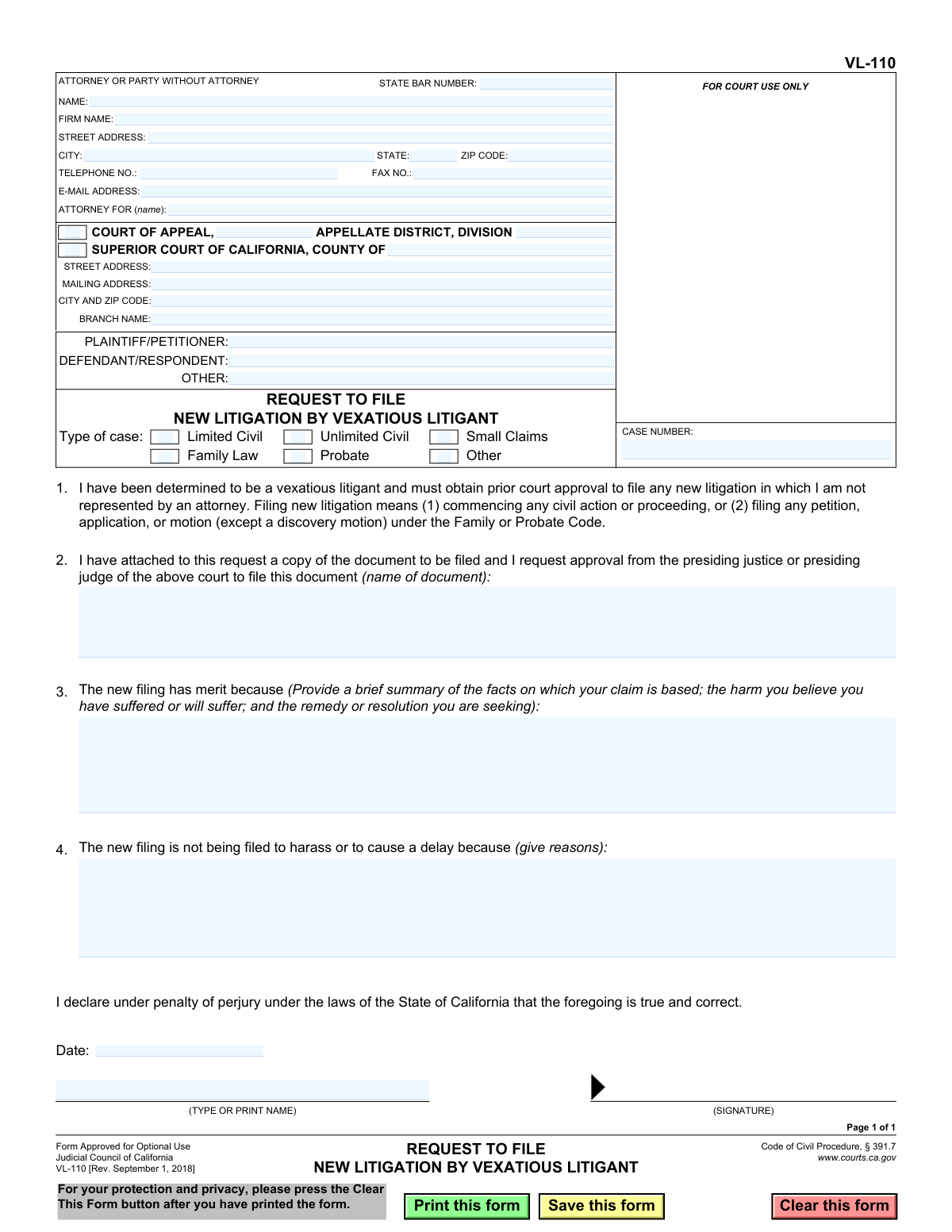
Yes! You can use AI to fill out Form VL-110, Request to File New Litigation by Vexatious Litigant
The Request to File New Litigation by Vexatious Litigant, Form VL-110, is a legal document required by the California courts under Code of Civil Procedure § 391.7. It must be submitted by a person who has been declared a 'vexatious litigant' to get pre-approval from a presiding judge before they can file a new civil action or proceeding. The form requires the litigant to demonstrate that the proposed litigation has merit and is not intended to harass or cause delay. Today, this form can be filled out quickly and accurately using AI-powered services like Instafill.ai, which can also convert non-fillable PDF versions into interactive fillable forms.
VL-110 is part of the
California court forms category on Instafill.
Our AI automatically handles information lookup, data retrieval, formatting, and form filling.
It takes less than a minute to fill out VL-110 using our AI form filling.
Securely upload your data. Information is encrypted in transit and deleted immediately after the form is filled out.
Form specifications
| Form name: | Form VL-110, Request to File New Litigation by Vexatious Litigant |
| Number of fields: | 39 |
| Number of pages: | 1 |
| Language: | English |
Instafill Demo: How to fill out PDF forms in seconds with AI
How to Fill Out VL-110 Online for Free in 2026
Are you looking to fill out a VL-110 form online quickly and accurately? Instafill.ai offers the #1 AI-powered PDF filling software of 2026, allowing you to complete your VL-110 form in just 37 seconds or less.
Follow these steps to fill out your VL-110 form online using Instafill.ai:
- 1 Navigate to Instafill.ai and upload the VL-110 form or select it from their template library.
- 2 Provide your personal details and attorney information (if any). The AI can assist in populating standard fields like your name and address.
- 3 Enter the specific court information, including the county, branch, and address, and identify the parties involved in the litigation.
- 4 Clearly state the type of case and describe the document you are requesting to file.
- 5 In the designated sections, provide a detailed summary of the facts supporting your claim and explain why the new filing is not for purposes of harassment or delay.
- 6 Review all the information auto-filled by the AI to ensure accuracy and completeness.
- 7 Electronically sign and date the form, then download the completed document for submission to the appropriate court.
Our AI-powered system ensures each field is filled out correctly, reducing errors and saving you time.
Why Choose Instafill.ai for Your Fillable VL-110 Form?
Speed
Complete your VL-110 in as little as 37 seconds.
Up-to-Date
Always use the latest 2026 VL-110 form version.
Cost-effective
No need to hire expensive lawyers.
Accuracy
Our AI performs 10 compliance checks to ensure your form is error-free.
Security
Your personal information is protected with bank-level encryption.
Frequently Asked Questions About Form VL-110
This form is used by individuals who have been declared a 'vexatious litigant' by a California court to request permission from a presiding judge to file a new lawsuit or certain legal motions without being represented by an attorney.
You must fill out this form if you are on the Vexatious Litigant List and wish to start a new civil case, or file a petition or motion in a Family or Probate case, while representing yourself.
A vexatious litigant is a person who a court has found to have a history of filing lawsuits that lack merit or are intended to harass or annoy the other party. The Judicial Council of California maintains an official list of these individuals.
No, the requirement to seek prior court approval only applies when a vexatious litigant is not represented by an attorney for the new litigation.
You must attach a complete copy of the document you want to file, such as the proposed complaint, petition, or motion, to this request form.
In Section 3, you should provide a brief and clear summary of the facts of your case, the harm you believe you've suffered, and the specific legal remedy you are asking the court to provide.
For Section 4, you need to explain your genuine reasons for filing the case, demonstrating that your goal is to resolve a legitimate legal dispute and not to harass the other party or cause unnecessary delays.
You submit this request to the presiding judge or justice of the court where you intend to file the new litigation, whether it is a Superior Court or a Court of Appeal.
No, an approved request only grants you permission to file. You must still follow the court's standard procedures to formally file your documents and pay any applicable fees.
If you are on the vexatious litigant list and attempt to file new litigation without permission, the court clerk is instructed not to file your documents. If they are filed by mistake, the case can be dismissed.
Yes, services like Instafill.ai use AI to help you accurately auto-fill form fields with your personal information, which can save time and help prevent errors.
You can upload the VL-110 PDF to the Instafill.ai platform. The service will make the form interactive, allowing you to fill it out online, save your progress, and download the completed document.
If you have a non-fillable or 'flat' PDF, you can use a service like Instafill.ai. Upload the form, and it will be converted into an interactive, fillable version that you can complete on your computer.
Compliance VL-110
Validation Checks by Instafill.ai
1
Court Jurisdiction Selection
Ensures that either the 'Superior Court' or 'Court of Appeal' checkbox is selected, but not both. The form must be directed to a single court jurisdiction. If validation fails, the user will be prompted to select one of the two court types to proceed.
2
Case Type Selection Requirement
Verifies that at least one checkbox under 'Type of case' (e.g., Limited Civil, Family Law) is selected. This information is mandatory for the court to understand the nature of the proposed litigation. A failure to select a case type will prevent submission and prompt the user to make a selection.
3
Plaintiff/Petitioner Identification
Checks that the 'PLAINTIFF/PETITIONER' field is not empty. The form requires the identification of the primary party initiating the request. This is essential for case creation and record-keeping.
4
Filer and Signer Name Consistency
Validates that the name entered in the 'ATTORNEY OR PARTY WITHOUT ATTORNEY' section matches the name in the 'TYPE OR PRINT NAME' field at the signature line. This ensures the person identified as the filer is the same person signing the document under penalty of perjury. A mismatch would trigger an error.
5
State Bar Number Exclusion
Confirms that the 'STATE BAR NUMBER' field is empty. This form is explicitly for litigants who are not represented by an attorney, as stated in item 1. The presence of a bar number would contradict the form's purpose and should be flagged as an error.
6
Required Document Name
Ensures the field specifying the 'name of document' to be filed in item 2 is not empty. The court must know exactly which document the litigant is seeking permission to file. Without this information, the request is incomplete and cannot be evaluated.
7
Merit Justification Completeness
Verifies that the text area in item 3, explaining why the new filing has merit, contains text. This justification is the core of the request and is required for the presiding judge to make a determination. An empty field will result in a validation failure.
8
Non-Harassment Justification Completeness
Checks that the text area in item 4, explaining why the filing is not for harassment or delay, is not empty. This directly addresses the concerns associated with a vexatious litigant designation, and the explanation is mandatory for the court's review. The submission will be blocked if this field is blank.
9
Valid and Current Signature Date
Validates that the 'Date' field contains a properly formatted date that is not in the future. The date certifies when the declaration was made. An invalid format or future date would render the declaration legally questionable and must be corrected.
10
Email Address Format
Checks if the value entered in the 'E-MAIL ADDRESS' field, if provided, follows the standard '[email protected]' format. This ensures that if the court uses email for communication, the address is deliverable. An invalid format will trigger a warning to the user to correct it.
11
Phone Number Format
Ensures the 'TELEPHONE NO.' field contains a valid 10-digit number, allowing for common formatting characters like parentheses and hyphens. This is a primary contact method for the court, and a valid number is crucial for communication. An invalid entry will prompt the user for correction.
12
ZIP Code Format Validation
Verifies that all ZIP code fields contain either a 5-digit or 9-digit (ZIP+4) numeric code. This is essential for ensuring mail from the court is deliverable to the correct address. Incorrect formats will be flagged for correction.
Common Mistakes in Completing VL-110
The form explicitly requires the filer to attach a copy of the new litigation (e.g., the complaint or petition) they wish to file. Many filers overlook this critical step, submitting only the VL-110 form itself. Without the proposed document, the judge cannot evaluate its merit, leading to an automatic denial of the request. To avoid this, always double-check that the complaint, petition, or motion is physically attached before submitting the request.
In section 3, filers often provide a vague, emotional, or legally conclusory statement instead of a clear, factual summary. The purpose of this section is to convince a judge that the case has a reasonable basis; simply stating 'I was wronged' is not enough. This mistake leads to denial because the judge has no basis to find potential merit. Filers must concisely state the key facts, the specific harm suffered, and the exact remedy they are seeking from the court.
Section 4 asks why the filing is not for harassment or delay, a key concern with vexatious litigants. A common error is providing a simple, unconvincing denial like 'This is a valid case.' This fails to address the court's specific concern. To avoid rejection, the filer should provide affirmative reasons demonstrating good faith, such as detailing previous, unsuccessful attempts to resolve the dispute out of court or explaining why litigation is now the only remaining option.
Filers frequently enter the wrong county, branch name, or address for the court in the header. This often happens from using outdated information or guessing the proper venue. Submitting the form to the wrong court results in significant delays, rejection, and the need to start the process over. Always verify the correct presiding court and its specific address on the official court website before filling out the form.
The declaration 'under penalty of perjury' at the bottom of the form must be signed and dated to be legally valid. Forgetting this simple step is a frequent and fatal error, as court clerks will reject any unsigned legal document on sight. This requires the filer to correct and resubmit the entire package, causing unnecessary delays. Always perform a final check for a signature and date before filing.
The box labeled 'ATTORNEY OR PARTY WITHOUT ATTORNEY' must be completely filled out by the person filing the request. Some filers, seeing the word 'Attorney,' mistakenly believe it doesn't apply to them and leave it blank. This is incorrect; the court needs the filer's name, address, and phone number to process the form and send notifications. An incomplete box can lead to rejection or, worse, missed hearings if the court cannot contact the filer.
In section 2, the form asks for the name of the document being attached. Filers may write something generic like 'document' or 'lawsuit,' which is too vague. The court needs the precise legal title of the document, such as 'Complaint for Breach of Contract and Fraud' or 'Petition to Establish Parental Relationship.' Using an incorrect or imprecise name can cause confusion and processing delays.
The form requires the filer to select a case type, such as 'Limited Civil,' 'Unlimited Civil,' or 'Family Law.' Each type has specific legal and monetary requirements. Choosing the wrong category (e.g., selecting 'Limited Civil' for a case seeking over $35,000) demonstrates a misunderstanding of the proposed action and can lead to the request being denied for seeking to file a jurisdictionally improper case.
Since this form may be filled out by hand, illegible writing in crucial sections like the summary of facts or party names can make it impossible for the court to process, leading to rejection. Using a typewriter or computer is highly recommended. If the form is a non-fillable PDF, AI-powered tools like Instafill.ai can convert it into a fillable version, allowing you to type directly and prevent legibility issues.
In the caption, the filer must correctly identify themselves as the 'PLAINTIFF/PETITIONER' and the opposing side as the 'DEFENDANT/RESPONDENT.' Confused or frustrated filers sometimes reverse these roles or use incorrect terminology. This creates ambiguity from the outset and may require correction, delaying the review of the request. The person initiating the lawsuit is always the plaintiff or petitioner.
Saved over 80 hours a year
“I was never sure if my IRS forms like W-9 were filled correctly. Now, I can complete the forms accurately without any external help.”
Kevin Martin Green
Your data stays secure with advanced protection from Instafill and our subprocessors

Robust compliance program
Transparent business model
You’re not the product. You always know where your data is and what it is processed for.
ISO 27001, HIPAA, and GDPR
Our subprocesses adhere to multiple compliance standards, including but not limited to ISO 27001, HIPAA, and GDPR.
Security & privacy by design
We consider security and privacy from the initial design phase of any new service or functionality. It’s not an afterthought, it’s built-in, including support for two-factor authentication (2FA) to further protect your account.
Fill out VL-110 with Instafill.ai
Worried about filling PDFs wrong? Instafill securely fills form-vl-110-request-to-file-new-litigation-by-vexatious-litigant forms, ensuring each field is accurate.