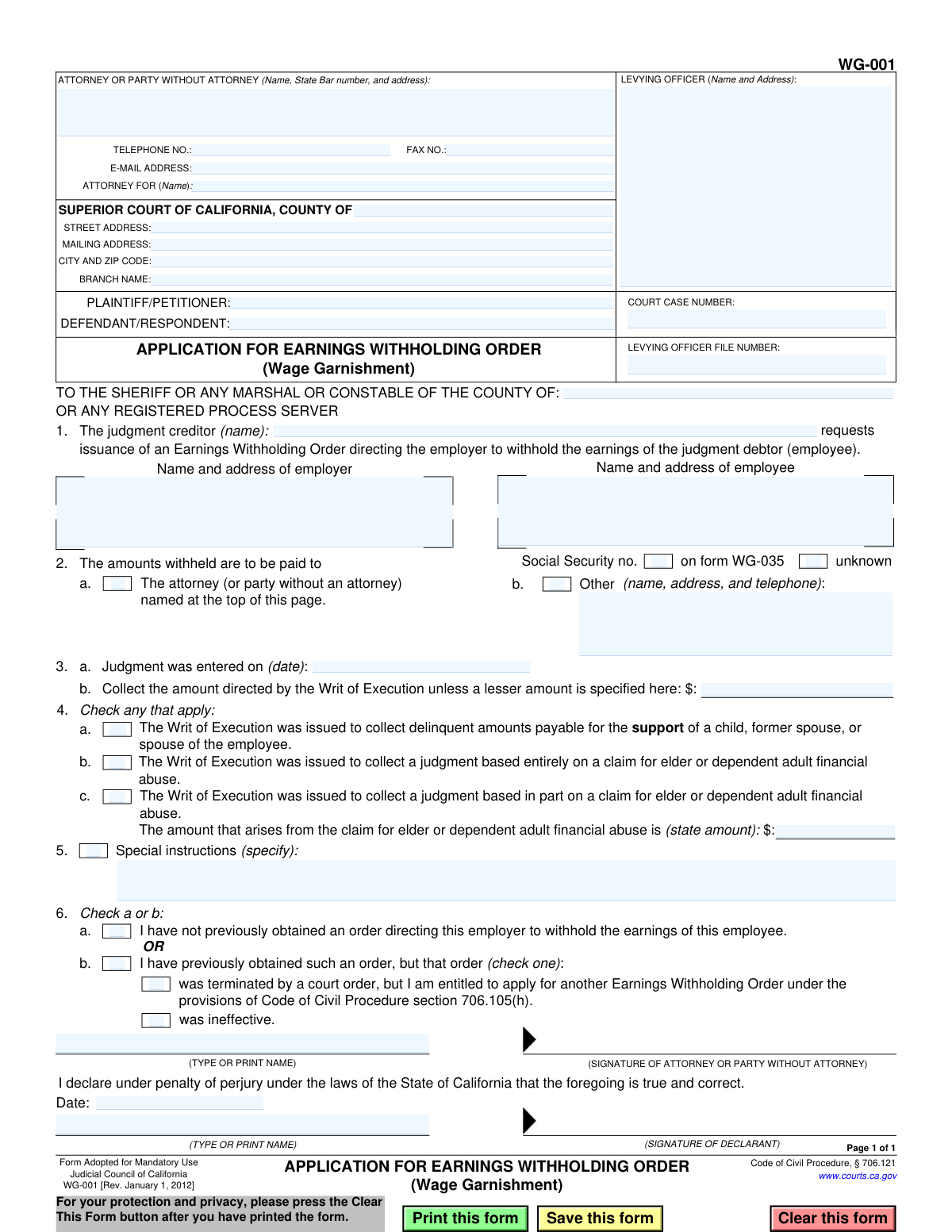
Yes! You can use AI to fill out Form WG-001, Application for Earnings Withholding Order (Wage Garnishment)
The Application for Earnings Withholding Order, Form WG-001, is a mandatory California Judicial Council form used by a judgment creditor to request that a court issue an order to an employer to withhold a portion of a debtor's earnings. This process, known as wage garnishment, is a common method for collecting on a court-ordered debt. Today, this form can be filled out quickly and accurately using AI-powered services like Instafill.ai, which can also convert non-fillable PDF versions into interactive fillable forms.
WG-001 is part of the
California court forms category on Instafill.
Our AI automatically handles information lookup, data retrieval, formatting, and form filling.
It takes less than a minute to fill out WG-001 using our AI form filling.
Securely upload your data. Information is encrypted in transit and deleted immediately after the form is filled out.
Form specifications
| Form name: | Form WG-001, Application for Earnings Withholding Order (Wage Garnishment) |
| Number of fields: | 44 |
| Number of pages: | 1 |
| Language: | English |
Instafill Demo: How to fill out PDF forms in seconds with AI
How to Fill Out WG-001 Online for Free in 2026
Are you looking to fill out a WG-001 form online quickly and accurately? Instafill.ai offers the #1 AI-powered PDF filling software of 2026, allowing you to complete your WG-001 form in just 37 seconds or less.
Follow these steps to fill out your WG-001 form online using Instafill.ai:
- 1 Navigate to Instafill.ai and upload the WG-001 form or select it from the platform's library of official documents.
- 2 Provide the court and case information, including the name of the California Superior Court, case number, and levying officer details.
- 3 Enter the required information for all parties, including the judgment creditor, the judgment debtor (employee), and the debtor's employer.
- 4 Specify the details of the judgment, such as the date it was entered and the total amount to be collected, and indicate where the withheld funds should be sent.
- 5 Check any boxes that apply to special circumstances, such as judgments related to child support or elder financial abuse.
- 6 Review all the information auto-filled by the AI for accuracy, then date and electronically sign the declaration under penalty of perjury.
- 7 Download the completed and signed Form WG-001, ready for filing with the sheriff, marshal, or other appropriate levying officer.
Our AI-powered system ensures each field is filled out correctly, reducing errors and saving you time.
Why Choose Instafill.ai for Your Fillable WG-001 Form?
Speed
Complete your WG-001 in as little as 37 seconds.
Up-to-Date
Always use the latest 2026 WG-001 form version.
Cost-effective
No need to hire expensive lawyers.
Accuracy
Our AI performs 10 compliance checks to ensure your form is error-free.
Security
Your personal information is protected with bank-level encryption.
Frequently Asked Questions About Form WG-001
This form is used by a judgment creditor (a person owed money from a court judgment) to ask a levying officer, like a sheriff, to issue an order for an employer to withhold or 'garnish' an employee's wages to pay off the debt.
The judgment creditor or their attorney must complete and sign this form to begin the wage garnishment process against a judgment debtor (the employee who owes the money).
You must provide the full name and address for both the employer and the employee (judgment debtor). You should also include the employee's Social Security number if known.
If you do not know the judgment debtor's Social Security number, you can simply check the 'unknown' box in Section 1. While helpful, it is not strictly required to submit the application.
The levying officer is a Sheriff, Marshal, or Constable who is legally authorized to serve the wage garnishment order on the employer. You need to provide their name and address in the designated box.
You can direct the payments to your attorney or to yourself if you are not represented by checking box 2a. If the money should go to another party, such as a collections agency, you must specify their name and address in box 2b.
This information is critical because the law allows for different, often higher, withholding amounts for judgments related to child/spousal support or elder financial abuse. Checking the correct box ensures the proper garnishment calculation is used.
This section is for any specific directions to the levying officer. For example, you could specify a request to collect a lesser amount than the full judgment or provide other details relevant to serving the order.
If you have previously obtained a withholding order for this employee and employer, you must check box 6b. Then, you must indicate whether the prior order was ineffective or was terminated by a court.
After you file the form with the levying officer, they will serve the Earnings Withholding Order on the employer. The employer is then legally required to begin withholding wages from the employee's paychecks and send the funds as you directed.
Yes, you can use services like Instafill.ai, which leverage AI to help you accurately auto-fill form fields. This can save you time and help prevent common errors.
Platforms like Instafill.ai allow you to upload and fill out this form online. Their guided process helps ensure you complete all the required sections correctly before saving or printing.
If you have a flat, non-fillable PDF, you can use a service like Instafill.ai to convert it into an interactive, fillable form. This allows you to easily type your information directly into the fields online.
Compliance WG-001
Validation Checks by Instafill.ai
1
Ensures Court Case Number is Provided
This check verifies that the 'COURT CASE NUMBER' field is not empty. The case number is a mandatory identifier that links this application to the correct legal proceeding in the court system. Without a valid case number, the application cannot be processed or filed correctly, leading to immediate rejection.
2
Validates Employee Social Security Number Format
This validation ensures the 'Social Security no.' for the employee (judgment debtor) is entered in a valid format, such as XXX-XX-XXXX. Correctly identifying the employee is critical for the employer to apply the wage garnishment to the right person. An incorrect or improperly formatted SSN could lead to a failed garnishment or, worse, garnishing the wages of the wrong individual.
3
Validates Judgment Date is in the Past
This check confirms that the 'Judgment was entered on (date)' in section 3a is a valid date and occurs before the current date. A judgment cannot be enforced before it has been officially entered by the court. An invalid or future date would render the application legally baseless and result in its rejection.
4
Exclusive Payee Selection in Section 2
This validation ensures that either checkbox 2a ('The attorney...') or 2b ('Other') is selected, but not both. This is a critical logical check to prevent ambiguity regarding where the withheld funds should be sent. Failure to select exactly one option would make the payment instruction unclear and halt the processing of the order.
5
Conditional Requirement for 'Other' Payee Details
This check is triggered if checkbox 2b ('Other') is selected. It verifies that the corresponding name, address, and telephone number fields are completely filled out. If this information is missing, the levying officer and employer have no way of directing payments to the specified third party, making the order unenforceable.
6
Exclusive Selection for Previous Order Status in Section 6
This validation ensures that the applicant selects either checkbox 6a ('I have not previously obtained an order...') or 6b ('I have previously obtained such an order...'), but not both. This declaration is required to establish the legal standing for the new application under the Code of Civil Procedure. Selecting both or neither creates a logical conflict and invalidates the declaration.
7
Conditional Sub-Selection for Previous Order Details
If checkbox 6b is selected, this check verifies that one of the two sub-options ('was ineffective' or 'was terminated by a court order...') is also checked. This additional detail is legally required to justify the issuance of a new Earnings Withholding Order. Failing to provide this specific reason will result in the application being deemed incomplete.
8
Conditional Amount for Elder Abuse Claim
This validation activates if checkbox 4c ('judgment based in part on a claim for elder or dependent adult financial abuse') is selected. It ensures the associated monetary amount field is filled with a valid, positive number. This amount is required by law to specify the portion of the judgment subject to special collection rules, and its absence makes the claim incomplete.
9
Completeness of Core Party Information
This check verifies that the names and addresses for the 'judgment creditor', 'employer', and 'employee' in section 1 are all provided. These three parties are the core entities involved in the wage garnishment process. Missing information for any of them would make it impossible for the levying officer or employer to execute the order.
10
Validates Declaration Date Presence
This check ensures that the 'Date' field accompanying the signature block is filled out with a valid date. This date is legally significant as it marks when the declarant attested to the application's accuracy under penalty of perjury. An application without a declaration date is legally incomplete and cannot be accepted.
11
Validates Attorney/Party Phone Number Format
This check verifies that the 'TELEPHONE NO.' field is in a recognizable format (e.g., (XXX) XXX-XXXX or XXXXXXXXXX). A valid contact number is essential for the court or levying officer to communicate with the filing party regarding any issues or questions. An invalid format could delay or prevent the processing of the application due to communication failures.
12
Completeness of Plaintiff and Defendant Names
This validation ensures that both the 'PLAINTIFF/PETITIONER' and 'DEFENDANT/RESPONDENT' fields in the case caption are filled out. These names are fundamental to identifying the case and the parties involved. Omitting either name would create ambiguity and cause the form to be rejected for being improperly identified.
Common Mistakes in Completing WG-001
Entering an incorrect or incomplete court case number is a frequent and critical error. This number is the primary identifier linking your application to the judgment, and any mistake, even a single digit, will cause the clerk or levying officer to reject the form. To avoid this, carefully copy the exact case number from the official Writ of Execution or judgment document. Using a tool like Instafill.ai can help by saving and accurately auto-filling this crucial information across related legal forms.
The top-left box for the 'LEVYING OFFICER (Name and Address)' is often left blank. This application is a directive to a specific entity (e.g., the Sheriff of a particular county) who will serve the order. Without this information, the form has no recipient and cannot be processed, leading to immediate rejection. Before filling out the form, you must identify and correctly enter the full name and address of the appropriate levying officer for the county where the employer is located.
Providing an incomplete or inaccurate employer name and address in Section 1 is a primary reason for failed garnishments. For example, writing a brand name like 'Starbucks' instead of the legal corporate entity name, or using a retail address instead of the payroll/HR department's address, will cause the order to be returned. You must verify the employer's full legal name and the correct address for service of legal documents to ensure the order is processed successfully.
In Section 1, while there is a box to check if the employee's Social Security Number (SSN) is 'unknown,' not providing it when it is available can cause significant delays. Employers, especially large ones, rely on the SSN to uniquely identify an employee, particularly if they have a common name. Failing to include the SSN increases the risk of the employer being unable to identify the debtor, rendering the withholding order ineffective.
This section dictates who receives the garnished funds, and any ambiguity will halt the process. A common mistake is either failing to check any box or checking box 2b ('Other') without providing the required full name, address, and telephone number. You must make a clear choice and provide all necessary details to ensure the levying officer knows exactly where to send the collected money.
The 'Judgment was entered on (date)' field in Section 3a must be perfectly accurate. People sometimes mistakenly enter the current date or guess the judgment date, leading to a mismatch with court records and rejection of the application. Always refer to the official court judgment document to find the exact date and transcribe it carefully. AI-powered tools like Instafill.ai can help prevent such data entry errors by validating date formats.
Section 3b is specifically for collecting an amount *less* than the total directed by the Writ of Execution. A frequent error is to re-enter the full judgment amount in this field, which is unnecessary and can create confusion. This field should be left blank unless you are intentionally instructing the levying officer to stop withholding after a smaller, specific partial amount has been collected.
The checkboxes in Section 4 for support orders or elder abuse judgments are critically important as they affect the percentage of wages that can be withheld. Forgetting to check an applicable box (4a, 4b, or 4c) can result in collecting a significantly smaller amount than you are legally entitled to. Furthermore, if box 4c is checked, the corresponding dollar amount must also be filled in, an omission that would make the instruction incomplete.
Section 6 requires an accurate declaration about any prior withholding orders for the same employee and employer. Applicants may mistakenly check 6a ('I have not previously obtained an order') out of habit, even if a prior order existed and was terminated or ineffective. This is a false statement under penalty of perjury and can have legal consequences, so it is vital to review case history and select the correct option.
An unsigned or undated application is legally invalid and will be rejected immediately. Filers often complete all the fields but forget to physically sign and date the form before submission, especially when working with printed copies of digital forms. The signature validates the entire document under penalty of perjury, so it is the most crucial final step. If the form is a non-fillable PDF, a tool like Instafill.ai can convert it into a fillable version, which can then be printed for a clear signature.
Saved over 80 hours a year
“I was never sure if my IRS forms like W-9 were filled correctly. Now, I can complete the forms accurately without any external help.”
Kevin Martin Green
Your data stays secure with advanced protection from Instafill and our subprocessors

Robust compliance program
Transparent business model
You’re not the product. You always know where your data is and what it is processed for.
ISO 27001, HIPAA, and GDPR
Our subprocesses adhere to multiple compliance standards, including but not limited to ISO 27001, HIPAA, and GDPR.
Security & privacy by design
We consider security and privacy from the initial design phase of any new service or functionality. It’s not an afterthought, it’s built-in, including support for two-factor authentication (2FA) to further protect your account.
Fill out WG-001 with Instafill.ai
Worried about filling PDFs wrong? Instafill securely fills form-wg-001-application-for-earnings-withholding-order-wage-garnishment forms, ensuring each field is accurate.