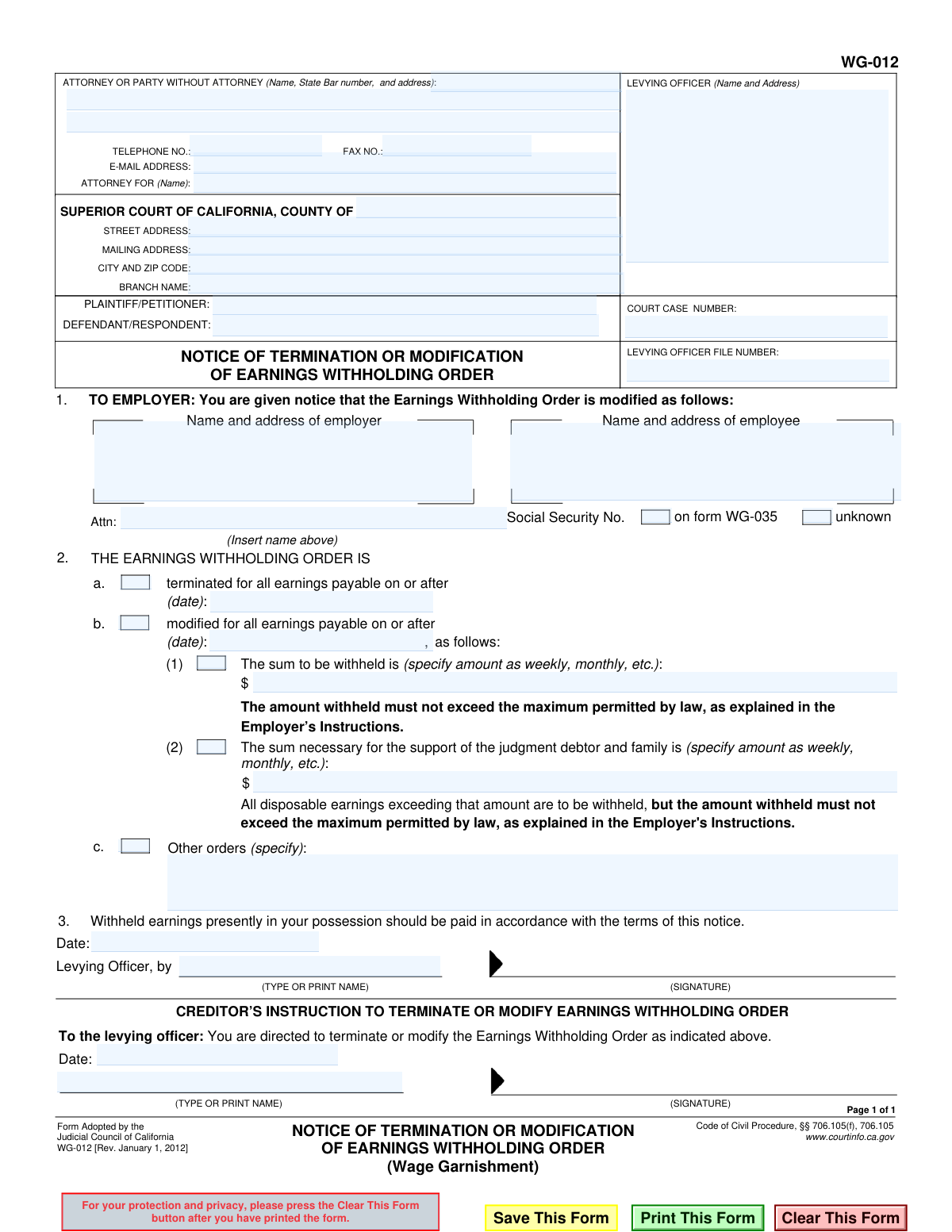
Yes! You can use AI to fill out Form WG-012, Notice of Termination or Modification of Earnings Withholding Order (Wage Garnishment)

Form WG-012, the Notice of Termination or Modification of Earnings Withholding Order, is a legal document used in California to instruct an employer to either stop (terminate) or change (modify) the amount of money being withheld from an employee's wages for a debt. This notice is typically issued by a levying officer based on instructions from the creditor or a court order, ensuring compliance with legal requirements for wage garnishment. Today, this form can be filled out quickly and accurately using AI-powered services like Instafill.ai, which can also convert non-fillable PDF versions into interactive fillable forms.
WG-012 is part of the California court forms category on Instafill.
Our AI automatically handles information lookup, data retrieval, formatting, and form filling.
It takes less than a minute to fill out WG-012 using our AI form filling.
Securely upload your data. Information is encrypted in transit and deleted immediately after the form is filled out.

Form specifications

Form name: Form WG-012, Notice of Termination or Modification of Earnings Withholding Order (Wage Garnishment)
Number of fields: 40
Number of pages: 1
Language: English
main-image

Instafill Demo: How to fill out PDF forms in seconds with AI

How to Fill Out WG-012 Online for Free in 2026

Are you looking to fill out a WG-012 form online quickly and accurately? Instafill.ai offers the #1 AI-powered PDF filling software of 2026, allowing you to complete your WG-012 form in just 37 seconds or less.
Follow these steps to fill out your WG-012 form online using Instafill.ai:
  1. 1 Navigate to Instafill.ai and upload your WG-012 form or select it from the template library.
  2. 2 Provide the court and case information, including the county, case number, and names of the plaintiff and defendant.
  3. 3 Enter the details of the levying officer and the employer who is receiving the notice.
  4. 4 Clearly identify the employee (judgment debtor) whose wage garnishment is being altered.
  5. 5 Indicate whether you are terminating the order entirely or modifying it, and specify the effective date for the change.
  6. 6 If modifying the order, provide the new specific amount to be withheld or the new calculation for withholding.
  7. 7 Review all the information populated by the AI for accuracy, then sign and date the form before providing it to the levying officer for execution.

Our AI-powered system ensures each field is filled out correctly, reducing errors and saving you time.

Why Choose Instafill.ai for Your Fillable WG-012 Form?

Speed

Complete your WG-012 in as little as 37 seconds.

Up-to-Date

Always use the latest 2026 WG-012 form version.

Cost-effective

No need to hire expensive lawyers.

Accuracy

Our AI performs 10 compliance checks to ensure your form is error-free.

Security

Your personal information is protected with bank-level encryption.

Frequently Asked Questions About Form WG-012

This form is used to officially notify an employer to either stop (terminate) or change (modify) an existing wage garnishment, also known as an Earnings Withholding Order.

The creditor (or their attorney) initiates the process by filling out the 'Creditor's Instruction' section and sending it to the levying officer. The levying officer then completes the top portion and serves the official notice to the employer.

You must comply with the instructions on the form starting on the effective date provided. This means you will either stop withholding wages entirely or adjust the amount you withhold as specified in the notice.

Terminating the order (Section 2a) means the wage garnishment stops completely. Modifying the order (Section 2b) means the amount of money being withheld from the employee's paycheck is changed to a new amount.

You will need the court case number, levying officer file number, the full names and addresses of the employer and employee, and the specific details of the termination or modification.

This notice means the amount of money being garnished from your wages is either stopping or changing. The form will specify the effective date and the new terms, if any.

If the judgment is fully paid, the creditor must use this form to terminate the wage garnishment. They would check box 2a, indicating the order is terminated, and send the instruction to the levying officer.

The form directs the employer to pay any withheld earnings currently in their possession according to the terms of this new notice. For a termination, these funds are typically sent to the levying officer to be applied a final time to the debt.

Yes, services like Instafill.ai use AI to help you accurately auto-fill form fields with your saved information, which saves time and reduces the chance of errors.

You can upload the WG-012 form to the Instafill.ai platform. The AI will make the document fillable, and you can use your saved profile to instantly populate your name, address, case number, and other details.

You can use a service like Instafill.ai, which can convert flat, non-fillable PDFs into interactive, fillable forms online. This allows you to easily type your information, check boxes, and complete the form digitally.

This specific amount is determined by the creditor, often as part of a payment agreement with the debtor. However, the amount withheld cannot exceed the legal maximum for wage garnishments.

This refers to a specific amount, usually set by a court order, that is protected from garnishment for the employee's basic living expenses. All disposable earnings above this amount are to be withheld, up to the legal limit.

Compliance WG-012
Validation Checks by Instafill.ai

1
Exclusive Termination or Modification Selection
This validation ensures that only one of the primary actions, 'terminated' (checkbox a) or 'modified' (checkbox b), is selected. The form's purpose is to either terminate OR modify an order, not both simultaneously. If both or neither are selected, the form's intent is ambiguous, and it should be rejected with an error prompting the user to choose exactly one option.
2
Conditional Date Requirement for Termination
This check verifies that if the 'terminated' option (checkbox a) is selected, the corresponding date field is filled out. The termination is legally effective on a specific date, so this information is mandatory for the employer to act upon. Failure to provide a date would render the termination notice invalid and unenforceable.
3
Conditional Date Requirement for Modification
This check verifies that if the 'modified' option (checkbox b) is selected, the corresponding date field is filled out. Similar to termination, a modification must have a specific effective date for the employer to know when to change the withholding amount. An error should be displayed if the 'modified' box is checked but the date is missing.
4
Conditional Modification Details Requirement
If the 'modified' option (checkbox b) is selected, this validation ensures that at least one of the modification detail sub-options ((1), (2), or (c)) is completed. A notice of modification without specifying the new terms is incomplete and provides no actionable instruction to the employer. The submission should be blocked until the specific modification is defined.
5
Case Number Presence and Format
This validation confirms that the 'COURT CASE NUMBER' field is not empty and, if possible, matches the expected format for the specified court jurisdiction. The case number is the primary identifier for the legal action and is essential for correctly filing the notice with the court and linking it to the existing case. A missing or malformed case number will lead to processing failure.
6
Levying Officer File Number Presence
Ensures the 'LEVYING OFFICER FILE NUMBER' field is populated. This number is a critical internal tracking identifier used by the levying officer's department to manage the wage garnishment case. Without this number, locating the file and processing the termination or modification would be difficult and prone to error.
7
Employer Name and Address Completeness
This check validates that the 'Name and address of employer' field is filled out completely. This information is absolutely essential as it directs the notice to the correct entity responsible for withholding earnings. A notice with missing or incomplete employer information cannot be served, making it ineffective.
8
Employee Name and Address Completeness
This validation ensures the 'Name and address of employee' field is populated. The notice must clearly identify the employee (judgment debtor) whose wages are subject to the order. This prevents incorrect application of the garnishment to the wrong person's earnings and is a fundamental requirement for legal validity.
9
Social Security Number Field Logic
This check validates the Social Security Number field. The field must either contain a number formatted as a valid SSN (XXX-XX-XXXX), or one of the specific text strings 'unknown' or 'on form WG-035'. This ensures the status of the SSN is explicitly accounted for, which is important for uniquely identifying the employee and complying with form instructions.
10
Modification Amount Format
If modification sub-option (1) or (2) is selected, this validation checks that the corresponding dollar amount fields contain a valid numeric or currency format (e.g., '150.00'). This is crucial for ensuring the employer withholds a precise and unambiguous amount. The system should reject any non-numeric or improperly formatted values to prevent calculation errors.
11
Creditor's Instruction Date Presence
This check ensures that if the 'CREDITOR’S INSTRUCTION' section is filled out (i.e., name or signature is present), the corresponding date field is also filled. The date authenticates when the creditor provided the instruction to the levying officer. This is important for establishing a clear timeline of events and for auditing purposes.
12
Court County Requirement
Validates that the 'COUNTY OF' field is populated to identify the Superior Court's jurisdiction. This is a fundamental piece of information for identifying the correct court where the case is filed. A form without a specified county cannot be correctly routed or filed.
13
Levying Officer Information Requirement
This validation ensures that the 'LEVYING OFFICER (Name and Address)' field at the top of the form is completed. This information identifies the official authority issuing the notice to the employer. Without it, the employer may not recognize the notice as a legitimate legal document, leading to non-compliance.
14
Party Information Completeness
This check verifies that the names of the 'PLAINTIFF/PETITIONER' and 'DEFENDANT/RESPONDENT' are both provided. These fields identify the primary parties involved in the underlying lawsuit. This information is essential for context and to ensure the notice is associated with the correct legal opponents.

Common Mistakes in Completing WG-012

Missing or Incorrect Case and Levy Numbers

Users often forget to enter the 'COURT CASE NUMBER' and 'LEVYING OFFICER FILE NUMBER' or transpose digits when filling them in. These numbers are the primary identifiers for the legal action, and their absence or inaccuracy will cause the levying officer to reject the form immediately. To prevent this, carefully copy the numbers from the original Earnings Withholding Order or other court documents. AI-powered tools like Instafill.ai can help by saving and auto-filling this information accurately across related forms.

Using an Incorrect Employer Address

The notice is frequently sent to a local branch or general corporate address instead of the specific legal or payroll processing address required for wage garnishments. This causes the notice to be lost or significantly delayed, meaning the employee's wages continue to be garnished incorrectly. Always verify the correct address for serving legal notices with the employer and use the 'Attn:' field to direct it to the Payroll Department.

Selecting Both Termination and Modification

A common error is checking both box 2a ('terminated') and 2b ('modified') simultaneously. These are mutually exclusive instructions, and selecting both creates a contradiction that invalidates the entire notice. The employer and levying officer cannot act on conflicting information, forcing the sender to correct and resubmit the form, thereby delaying the change.

Omitting the Effective Date

Whether terminating (2a) or modifying (2b) the order, a specific effective date is required. People often check the box but forget to write in the date on which the change should take effect. This ambiguity leaves the employer with no clear instruction on when to stop or alter withholdings, leading to continued garnishment under the old terms.

Specifying a Dollar Amount Without a Period

In section 2b for modification, users enter a dollar amount for withholding or support but fail to specify the time period (e.g., 'per week', 'per month'). An entry of just '$500' is unenforceable because the employer does not know the frequency of the deduction. This ambiguity will cause the notice to be rejected or questioned, delaying the modification.

Missing Signature or Printed Name in Creditor's Instruction

The creditor or their attorney must sign, date, and print their name in section 3 to authorize the levying officer to act. Forgetting any of these three elements invalidates the instruction. An unsigned form is merely a draft, not a directive, and will be returned without action, halting the termination or modification process.

Failing to Identify the Correct Levying Officer

The box at the top left for the 'LEVYING OFFICER (Name and Address)' is often left blank or filled with the court's or attorney's information. This form is an instruction to a specific levying officer (e.g., a County Sheriff's Department) who is enforcing the order. Failing to correctly identify this entity means the form is sent to the wrong place or cannot be processed by the intended recipient.

Illegible Handwriting on a Non-Fillable Form

This form is often distributed as a flat, non-fillable PDF, leading to submissions with poor handwriting. Illegible case numbers, names, or dollar amounts can be easily misinterpreted, causing processing errors or outright rejection. To ensure clarity, it is best to use a tool like Instafill.ai, which can convert the document into a fillable PDF, allowing all information to be typed cleanly.

Vague or Mismatched Party Names

The names of the plaintiff/petitioner and defendant/respondent must be written exactly as they appear on official court documents. Using informal names, abbreviations, or introducing misspellings can create confusion and risk the notice being misapplied or rejected for failing to match the case file. AI form-fillers can help maintain consistency by storing and reusing correct party information.

Writing Unclear 'Other Orders'

When using the 'Other orders' field in section 2c, individuals may write ambiguous or legally unenforceable instructions like 'garnish as much as possible' or 'hold until further notice'. Such vague terms cannot be acted upon by an employer, who must follow specific, lawful directives. Any instruction in this field must be precise, quantifiable, and compliant with wage garnishment laws.
Saved over 80 hours a year

“I was never sure if my IRS forms like W-9 were filled correctly. Now, I can complete the forms accurately without any external help.”

Kevin Martin Green

Your data stays secure with advanced protection from Instafill and our subprocessors

Robust compliance program

Transparent business model

You’re not the product. You always know where your data is and what it is processed for.

ISO 27001, HIPAA, and GDPR

Our subprocesses adhere to multiple compliance standards, including but not limited to ISO 27001, HIPAA, and GDPR.

Security & privacy by design

We consider security and privacy from the initial design phase of any new service or functionality. It’s not an afterthought, it’s built-in, including support for two-factor authentication (2FA) to further protect your account.

Fill out WG-012 with Instafill.ai

Worried about filling PDFs wrong? Instafill securely fills form-wg-012-notice-of-termination-or-modification-of-earnings-withholding-order-wage-garnishment forms, ensuring each field is accurate.