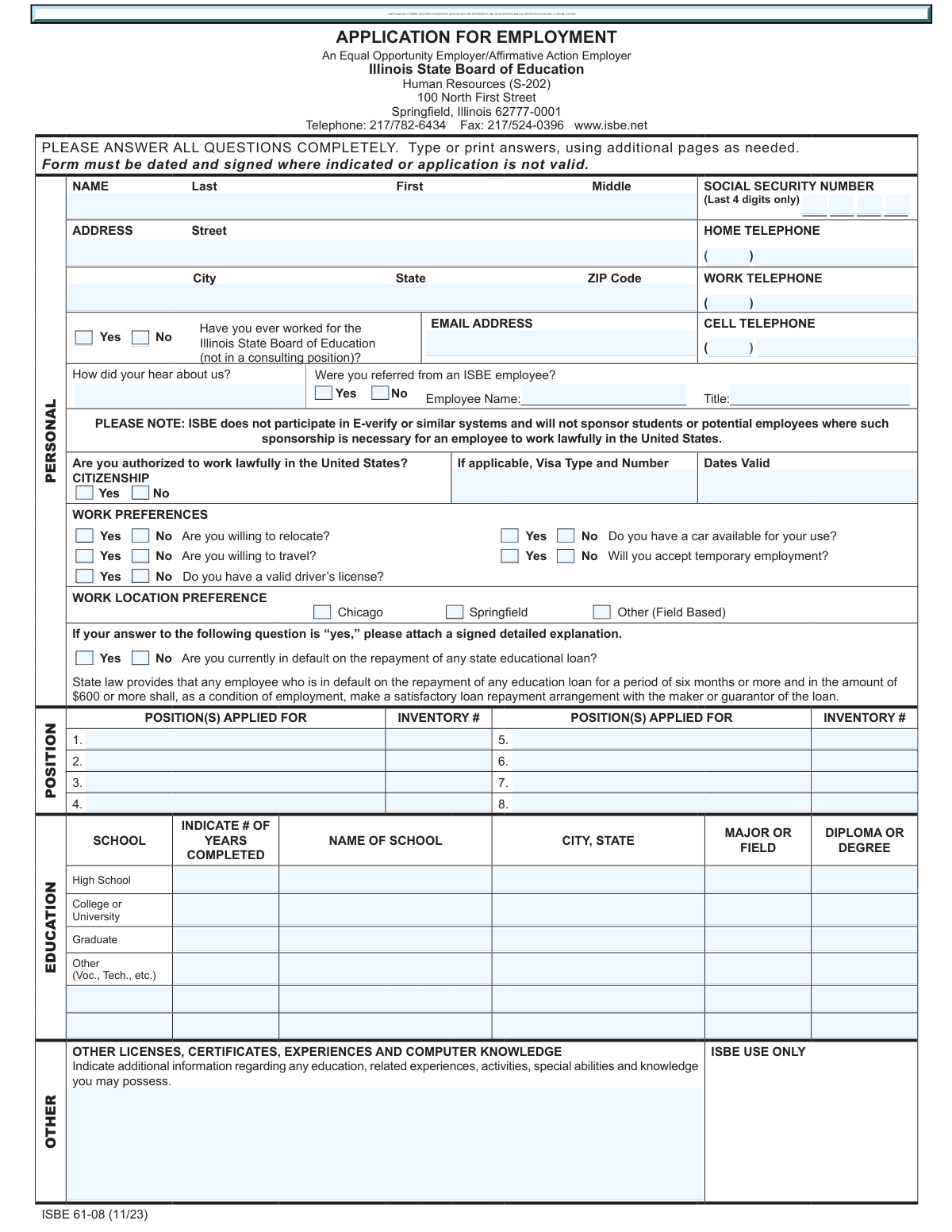
Yes! You can use AI to fill out ISBE 61-08, Application for Employment
Form ISBE 61-08, Application for Employment, is the official document required for individuals seeking employment with the Illinois State Board of Education. It gathers comprehensive information about the applicant, including personal details, work history, education, and qualifications, to assess their suitability for open positions. Today, this form can be filled out quickly and accurately using AI-powered services like Instafill.ai, which can also convert non-fillable PDF versions into interactive fillable forms.
ISBE 61-08 is part of the
employment application forms category on Instafill.
Our AI automatically handles information lookup, data retrieval, formatting, and form filling.
It takes less than a minute to fill out ISBE 61-08 using our AI form filling.
Securely upload your data. Information is encrypted in transit and deleted immediately after the form is filled out.
Form specifications
| Form name: | ISBE 61-08, Application for Employment |
| Number of fields: | 178 |
| Number of pages: | 3 |
| Language: | English |
Instafill Demo: How to fill out PDF forms in seconds with AI
How to Fill Out ISBE 61-08 Online for Free in 2026
Are you looking to fill out a ISBE 61-08 form online quickly and accurately? Instafill.ai offers the #1 AI-powered PDF filling software of 2026, allowing you to complete your ISBE 61-08 form in just 37 seconds or less.
Follow these steps to fill out your ISBE 61-08 form online using Instafill.ai:
- 1 Navigate to Instafill.ai and upload the ISBE 61-08 form or select it from the template library.
- 2 Use the AI assistant to automatically populate your personal information, including your name, address, and contact details.
- 3 Complete the 'Work Preferences' and 'Position(s) Applied For' sections, ensuring all information is accurate for the roles you are targeting.
- 4 Enter your detailed educational background and work history, allowing the AI to guide you through each section for past employers.
- 5 Provide the names and contact information for your professional references as required.
- 6 Thoroughly review the entire application for accuracy, then digitally sign and date the form in the designated signature field.
- 7 Download the completed application, ready to be submitted to the Illinois State Board of Education along with your resume and cover letter.
Our AI-powered system ensures each field is filled out correctly, reducing errors and saving you time.
Why Choose Instafill.ai for Your Fillable ISBE 61-08 Form?
Speed
Complete your ISBE 61-08 in as little as 37 seconds.
Up-to-Date
Always use the latest 2026 ISBE 61-08 form version.
Cost-effective
No need to hire expensive lawyers.
Accuracy
Our AI performs 10 compliance checks to ensure your form is error-free.
Security
Your personal information is protected with bank-level encryption.
Frequently Asked Questions About Form ISBE 61-08
This form is the official Application for Employment with the Illinois State Board of Education (ISBE). It must be completed by anyone applying for a non-consulting position with the agency.
Along with the completed application form, you must also submit a cover letter, a resume, and copies of your academic transcripts. There is a checklist near the signature line to help you remember these items.
No, the application only requires you to enter the last four digits of your Social Security Number for identification purposes.
The 'Inventory #' is a unique number assigned to a specific job posting. You can find this number on the official job announcement or vacancy list where you found the position you are applying for.
Yes, you can still apply, but you must disclose this on the application and attach a signed, detailed explanation. If hired, state law requires you to make a satisfactory repayment arrangement with the loan provider as a condition of employment.
No, the form explicitly states that ISBE does not sponsor students or potential employees for work visas. Applicants must already be authorized to work lawfully in the United States.
You can submit the completed, signed, and dated application by mail or fax to the Human Resources department. The address and fax number are provided at the top of the first page.
If you need more space for your work history, the form instructs you to attach a separate sheet. Ensure the additional information follows the same format as the work history section on the application.
No, completing this section is entirely optional and is not required for your application to be considered. This information is used for the state's Equal Employment Opportunity and Affirmative Action goals.
The application is not considered valid unless it is dated and signed where indicated. An unsigned application will be rejected, so be sure to complete the signature section before submitting.
Yes, services like Instafill.ai use AI to accurately auto-fill form fields, which can save you time and help reduce errors. This is especially helpful for repetitive information like your name, address, and work history.
Simply upload the ISBE application PDF to the Instafill.ai platform. The AI will identify the fields, allowing you to automatically populate your personal information, work history, and education details quickly and accurately.
You can use a service like Instafill.ai, which can convert flat, non-fillable PDFs into interactive, fillable forms. This allows you to type your answers directly into the fields instead of having to print and fill it out by hand.
You should list professional references who can speak to your work experience and qualifications; do not list relatives. The form also suggests that college students can include faculty members as references.
Compliance ISBE 61-08
Validation Checks by Instafill.ai
1
Ensures Application is Signed and Dated
This check verifies that the 'Signature of Applicant' and 'Submission Date' fields are both completed. The form explicitly states that an unsigned or undated application is not valid, making this a critical completeness check. Failure to provide a signature and date will result in the application being rejected as incomplete.
2
Validates Social Security Number Format
This validation ensures that the 'Social Security Number (Last 4 digits only)' field contains exactly four numeric digits. This is crucial for unique applicant identification while maintaining privacy as required by the form. An entry with non-numeric characters or an incorrect number of digits will be flagged for correction.
3
Verifies Email Address Format
This check confirms that the value entered in the 'Email Address' field follows the standard email format, such as '[email protected]'. A valid email is essential for all electronic communication regarding the application status. If the format is incorrect, the system will prompt the user to correct it to ensure they can be contacted.
4
Validates Employment Date Chronology
This check verifies for each work history entry that the 'Employed To' date is not earlier than the 'Employed From' date. This ensures the logical consistency and accuracy of the applicant's work history. If an end date precedes a start date, the entry will be flagged as an error, preventing submission until corrected.
5
Ensures Supervisory Details are Provided Conditionally
This validation checks that if an applicant selects 'Yes' for 'Was position supervisory?', they must also provide a numeric value in the 'number of staff you directed/evaluated' field. This information is critical for assessing the scope of the applicant's management experience. If the number of staff is missing after a 'Yes' selection, the application will be considered incomplete for that work history entry.
6
Validates ISBE Employee Referral Information
This check ensures that if the applicant answers 'Yes' to 'Were you referred from an ISBE employee?', the 'Referring Employee Name' and 'Referring Employee Title' fields are both filled out. This is necessary for the internal referral tracking process and to give proper credit. An application with a 'Yes' response but missing referral details will be flagged for completion.
7
Checks Work Authorization Status
This validation checks the response to 'Are you authorized to work lawfully in the United States?'. Based on the form's note that ISBE does not sponsor employees, if the applicant selects 'No', the system should flag the application for immediate review or potential rejection. This check prevents processing applications from candidates who do not meet a fundamental legal requirement for employment.
8
Confirms Attachment for State Loan Default
This validation verifies that if an applicant answers 'Yes' to 'Are you currently in default on the repayment of any state educational loan?', an accompanying signed detailed explanation is attached. State law requires this for employment consideration, as noted on the form. The system should flag the application as incomplete if the 'Yes' box is checked but no corresponding attachment is detected.
9
Validates Telephone Number Format
This check ensures that the Home, Work, and Cell telephone numbers are entered in a valid format, consisting of a 3-digit area code and a 7-digit number. Correctly formatted phone numbers are crucial for contacting the applicant. The system should reject entries that do not conform to the expected 10-digit numeric format.
10
Ensures Core Personal Information is Complete
This validation verifies that the applicant's Last Name, First Name, Street Address, City, State, and ZIP Code fields are all filled out. This basic contact information is mandatory for processing the application and for any future correspondence. An application missing any of these core fields will be rejected as incomplete.
11
Verifies Completeness of Work History Entries
This check ensures that for each work history block the applicant fills out, all required fields (Employer Name, Dates, Address, Title, Duties, Reason for Leaving) are completed as instructed. The form states 'All fields MUST be completed for consideration.' Incomplete work history entries prevent a full evaluation of the candidate's experience and will cause the submission to be flagged.
12
Ensures at Least One Position is Applied For
This validation confirms that the applicant has entered information for at least one position in the 'POSITION(S) APPLIED FOR' section. An application without a specified position cannot be routed to the correct hiring manager or considered for any opening. The form will be considered invalid if this section is left entirely blank.
13
Validates Completeness of Reference Information
This check ensures that for every reference name provided, the corresponding 'Title/Institution' and 'Telephone' fields are also filled. Incomplete reference information hinders the verification process and makes the provided reference unusable. The system should flag any reference entry where a name is present but other details are missing.
14
Checks for Logical Consistency in Education Section
This validation ensures that if an applicant enters a 'Name of School' in the education section, they also provide the '# of Years Completed' and the 'Diploma or Degree'. This prevents partial, unusable entries and ensures the education history is clear and complete. An entry with a school name but missing years or degree status would be flagged for completion.
Common Mistakes in Completing ISBE 61-08
This is one of the most common and critical errors, often happening when an applicant rushes to submit. The form explicitly states, 'Form must be dated and signed where indicated or application is not valid,' meaning an unsigned application will be immediately discarded. To avoid this, always perform a final review, paying special attention to the signature block before submission. Using a tool like Instafill.ai can create a final checklist to ensure all mandatory fields, including the signature and date, are completed before finalizing the document.
Applicants often write a generic job title like 'Any open position' or leave the 'INVENTORY #' field blank, not realizing its importance. HR departments use the inventory number to track applications for specific, open requisitions; without it, your application may be misfiled or not considered for the intended role. Always find the exact position title and inventory number from the job posting and enter it accurately in the 'POSITION(S) APPLIED FOR' section.
Applicants may feel it's redundant to re-enter information already on their resume, so they write 'See Resume' in the 'DESCRIPTION OF DUTIES' field. However, the form explicitly states, 'All fields MUST be completed for consideration,' and this shortcut can lead to automatic disqualification as it shows an inability to follow instructions. You must complete every field in the work history section as requested. AI-powered form fillers like Instafill.ai can help by extracting this information from your resume and populating the fields correctly, saving time while ensuring compliance.
The instructions demand that the work history section be completed in detail, including employer addresses, supervisor names, and reasons for leaving. Applicants frequently leave these fields blank, especially if the information is not readily available or if they are uncomfortable providing it. These omissions create red flags for reviewers and can render the application incomplete. It is crucial to fill in every field, using 'N/A' only when truly not applicable, and to be prepared to explain any employment gaps.
The signature section includes a checklist for a 'COVER LETTER AND RESUME' and 'COPIES OF TRANSCRIPTS,' indicating they are expected components of the application package. Applicants often forget to attach one or more of these documents, particularly transcripts, which may need to be ordered. This oversight can delay the application process or lead to it being deemed incomplete. To prevent this, use the form's checklist as a final guide and gather all necessary documents before you begin the submission process.
The form clearly states, 'Please do not list relatives,' and suggests faculty references for students. A common mistake is to list family members, personal friends, or references who have not agreed to be contacted, or to provide incomplete contact information. This can reflect poorly on the applicant's professionalism and judgment. Always select professional or academic references who can speak to your work ethic and skills, and always ask for their permission and verify their contact details before listing them.
The form asks, 'Are you currently in default on the repayment of any state educational loan?' and instructs applicants to 'please attach a signed detailed explanation' if the answer is 'yes.' People often check the box but forget or fail to attach the required statement. This is a critical failure to follow instructions that can halt the application process. If you must answer 'yes' to such a question, ensure the corresponding documentation is prepared and attached as specified.
Although the form is a fillable PDF, some applicants may choose to print and fill it out by hand. Poor or rushed handwriting can make names, dates, and contact information impossible for HR staff to read, potentially leading to the application being discarded. If you must fill out a form by hand, print clearly and legibly in black or blue ink. A better solution is to use a tool like Instafill.ai, which can convert even a non-fillable PDF into a fillable version, ensuring all your entries are typed, clear, and professional.
The work history section has separate fields for 'Mo.' and 'Yr.' for start and end dates. Applicants sometimes enter dates in a single field (e.g., 'MM/YYYY'), use inconsistent formats (e.g., 'Jan' vs. '01'), or leave a month/year blank for current jobs. This creates confusion and suggests a lack of attention to detail. You should consistently use the requested format in the designated fields and write 'Present' or the current month/year for the end date of a current job. AI tools like Instafill.ai can automatically format dates correctly to avoid this error.
The final 'VOLUNTARY RELEASE OF ETHNIC INFORMATION' page is designed to be separated from the main application. It has its own fields for 'Name,' 'Vacancy List #,' 'Position #(s),' and 'Date' at the bottom, which applicants often miss. Failing to fill this out means the anonymous data cannot be properly correlated for EEO tracking purposes. If you choose to complete this optional section, ensure you also fill out the identifying information at the bottom of that specific page.
Saved over 80 hours a year
“I was never sure if my IRS forms like W-9 were filled correctly. Now, I can complete the forms accurately without any external help.”
Kevin Martin Green
Your data stays secure with advanced protection from Instafill and our subprocessors

Robust compliance program
Transparent business model
You’re not the product. You always know where your data is and what it is processed for.
ISO 27001, HIPAA, and GDPR
Our subprocesses adhere to multiple compliance standards, including but not limited to ISO 27001, HIPAA, and GDPR.
Security & privacy by design
We consider security and privacy from the initial design phase of any new service or functionality. It’s not an afterthought, it’s built-in, including support for two-factor authentication (2FA) to further protect your account.
Fill out ISBE 61-08 with Instafill.ai
Worried about filling PDFs wrong? Instafill securely fills isbe-61-08-application-for-employment forms, ensuring each field is accurate.