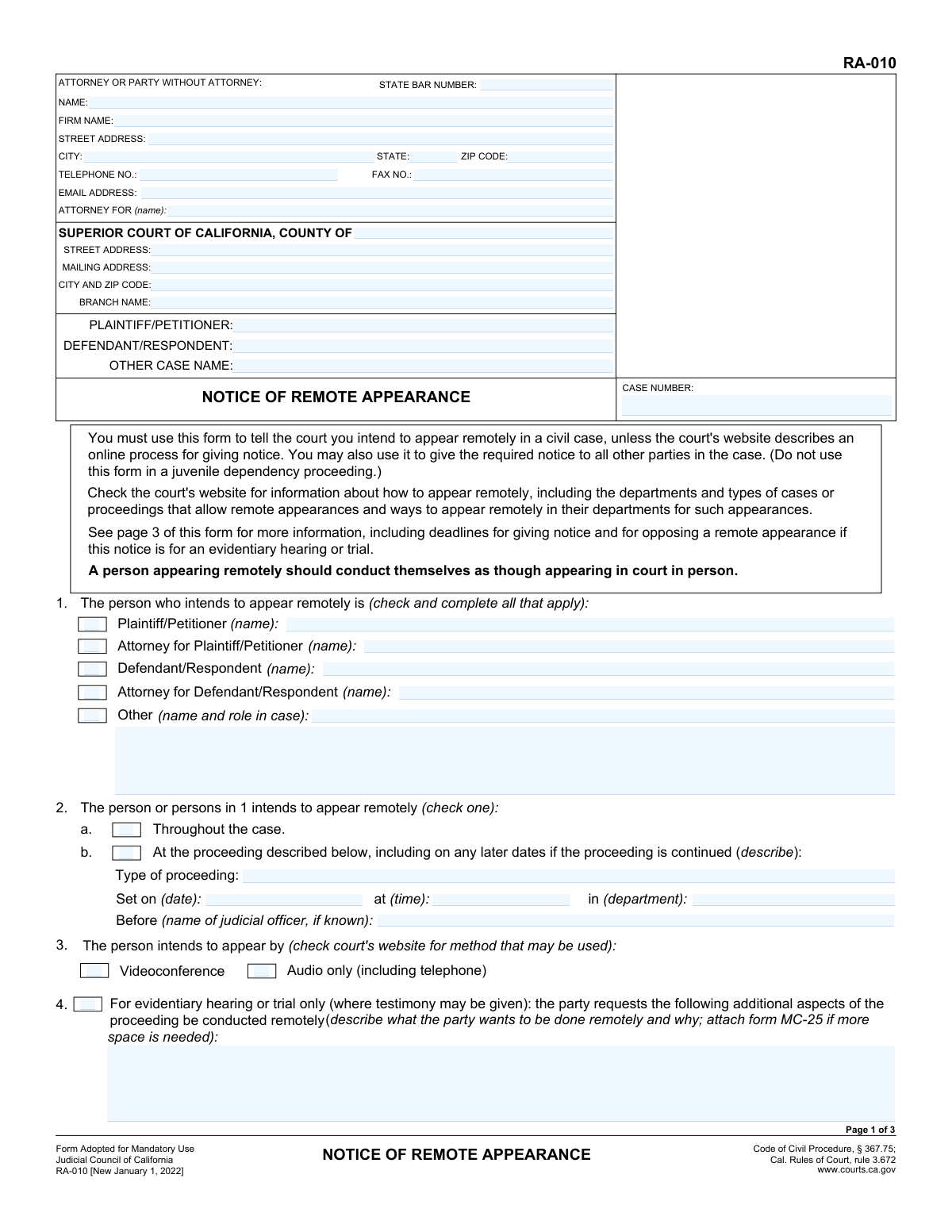
Yes! You can use AI to fill out Judicial Council of California Form RA-010, Notice of Remote Appearance
California Form RA-010, Notice of Remote Appearance, is a legal document filed in a civil case to formally notify the court and other parties that a person plans to participate in a proceeding via video or audio instead of in person. This notice is crucial for ensuring all participants are aware of the format of the appearance and for complying with court rules and deadlines for remote participation. Today, this form can be filled out quickly and accurately using AI-powered services like Instafill.ai, which can also convert non-fillable PDF versions into interactive fillable forms.
Our AI automatically handles information lookup, data retrieval, formatting, and form filling.
It takes less than a minute to fill out RA-010 using our AI form filling.
Securely upload your data. Information is encrypted in transit and deleted immediately after the form is filled out.
Form specifications
| Form name: | Judicial Council of California Form RA-010, Notice of Remote Appearance |
| Number of fields: | 103 |
| Number of pages: | 3 |
| Language: | English |
More forms in California judicial forms
Instafill Demo: How to fill out PDF forms in seconds with AI
How to Fill Out RA-010 Online for Free in 2026
Are you looking to fill out a RA-010 form online quickly and accurately? Instafill.ai offers the #1 AI-powered PDF filling software of 2026, allowing you to complete your RA-010 form in just 37 seconds or less.
Follow these steps to fill out your RA-010 form online using Instafill.ai:
- 1 Navigate to Instafill.ai and upload or select the RA-010 form.
- 2 Provide your personal or attorney information, including name, address, and State Bar number if applicable.
- 3 Enter the case details, including the court, county, case number, and the names of the plaintiff and defendant.
- 4 Specify who intends to appear remotely and whether it's for the entire case or a specific proceeding, providing the date, time, and department if necessary.
- 5 Select the method of remote appearance (videoconference or audio) and describe any special requests for evidentiary hearings.
- 6 Complete the 'Declaration of Notice' section, detailing how and when you notified all other parties of your remote appearance.
- 7 Review all entered information for accuracy, then use the AI tool to sign, date, and download the completed form for filing with the court and serving on other parties.
Our AI-powered system ensures each field is filled out correctly, reducing errors and saving you time.
Why Choose Instafill.ai for Your Fillable RA-010 Form?
Speed
Complete your RA-010 in as little as 37 seconds.
Up-to-Date
Always use the latest 2026 RA-010 form version.
Cost-effective
No need to hire expensive lawyers.
Accuracy
Our AI performs 10 compliance checks to ensure your form is error-free.
Security
Your personal information is protected with bank-level encryption.
Frequently Asked Questions About Form RA-010
This form is used to officially notify the court and all other parties in a California civil case that you intend to appear at a court proceeding remotely, either by video or by phone, instead of in person.
Any party, attorney, or other person involved in a civil case who wants to appear remotely must use this form, unless the specific court's website describes a different online process for giving notice.
Deadlines vary by the type of proceeding. For most motions, notice is due at least 2 court days before the hearing, while for trials or evidentiary hearings, it's at least 10 court days before. Always check page 3 of the form for the specific deadline that applies to your situation.
Select 'Throughout the case' if you plan to appear remotely for all future proceedings in the case, which means you only need to file this notice once. Choose 'At the proceeding described below' if you only intend to appear remotely for one specific hearing.
Yes, you are required to give notice to all other parties that you intend to appear remotely. You can do this by sending them a copy of the form and then completing the 'Declaration of Notice' on page 2 to inform the court that you have done so.
Yes. Even after you file this notice, the court has the final authority and can order any person to appear in person for a proceeding.
Yes, for trials or evidentiary hearings, another party can file an 'Opposition to Remote Proceeding' (Form RA-015). The judge will then decide whether the remote appearance will be allowed.
You will need your case number, court information, the names of all parties, and the date, time, and department of the hearing. You will also need the contact information for all other parties to provide them with notice.
No, you are not allowed to record any part of the court proceeding without first getting explicit approval from the judge, as stated in California Rules of Court, rule 1.150.
Yes, services like Instafill.ai use AI to help you fill out legal forms accurately and quickly. These tools can auto-fill repetitive information like your name, case number, and attorney details, saving time and reducing potential errors.
To fill out Form RA-010 online, you can upload the PDF to Instafill.ai. The platform's AI will make the document interactive, allowing you to type your information directly into the fields before downloading the completed form.
If you have a flat, non-fillable PDF, you can use a service like Instafill.ai. It can convert the document into an interactive, fillable form so you can easily complete it on your computer.
This section is your sworn statement to the court confirming that you have notified all other parties of your intent to appear remotely. You must specify who you notified, on what date, and by what method (e.g., email, mail, phone).
Compliance RA-010
Validation Checks by Instafill.ai
1
Exclusive Appearance Scope Selection
Validates that in section 2, exactly one of the two checkboxes ('Throughout the case' or 'At the proceeding described below') is selected. This is a critical choice that determines the scope of the notice. If neither or both are selected, the form is ambiguous and cannot be processed correctly, leading to a rejection or a need for clarification.
2
Conditional Proceeding Details Requirement
Ensures that if the 'At the proceeding described below' checkbox is selected in section 2, the 'Type of proceeding', 'Set on (date)', and 'at (time)' fields are all mandatory and must be filled. This information is essential for the court and other parties to know the specific hearing this notice applies to. Failure to provide these details makes the notice incomplete and invalid for a specific proceeding.
3
Future Proceeding Date
Checks that the 'Set on (date)' in section 2 is a valid date that is not in the past. A notice of appearance must be for a future court date. This prevents submission of forms for hearings that have already occurred, which would be a logical error and waste court resources.
4
Person Appearing Identification
Verifies that at least one checkbox is selected in section 1 to identify who intends to appear remotely. The form is meaningless without knowing who is filing the notice. If no person is identified, the form must be rejected as incomplete.
5
Conditional Person Name Entry
Confirms that for every checkbox selected in section 1 (e.g., 'Plaintiff/Petitioner', 'Attorney for Plaintiff/Petitioner', etc.), the corresponding name field is filled out. Simply checking the box is insufficient; the court must know the specific name of the individual or attorney. An empty name field would lead to ambiguity and require manual follow-up.
6
Exclusive Appearance Method Selection
Validates that in section 3, exactly one of the two methods ('Videoconference' or 'Audio only') is selected. The court needs to know the technical requirements for the remote appearance. Selecting both or neither creates uncertainty for court staff preparing for the hearing.
7
Case Number Consistency Across Pages
Ensures the 'CASE NUMBER' entered in the header on page 1 is identical to the 'CASE NUMBER' entered on page 2. This is crucial for document management, ensuring that all pages of the filing are correctly associated with the same case file. A mismatch could cause the second page to be misfiled or lost.
8
Declaration of Notice Completeness
For each party listed in the 'Declaration of Notice' on page 2, this check verifies that all associated fields (Name, Date of notice, Method of notice, and Address/phone number) are completed. An incomplete entry for a notified party invalidates the proof of service for that party. The court relies on this complete information to confirm that all parties were properly notified.
9
Notice Method and Contact Info Format
Validates the format of the contact information in the 'Declaration of Notice' section based on the selected 'Method of notice'. If the method is 'Electronic notice', the field must contain a valid email format. If 'Phone', it must be a valid phone number format. This ensures the stated method of service is plausible and the contact data is correctly formatted.
10
Valid State Bar Number
Checks if the 'STATE BAR NUMBER' field, if filled, contains only numeric digits. This field is required for attorneys to identify them correctly in the California State Bar system. An invalid format would prevent proper identification and could lead to rejection of the filing.
11
Conditional Attorney Representation
Verifies that if a 'STATE BAR NUMBER' is provided, the 'ATTORNEY FOR (name)' field is also filled. An attorney must be associated with a client or party in the case. This check ensures the relationship between the attorney and the represented party is explicitly stated on the form.
12
Valid Declaration Date
Ensures the 'Date' field in the final declaration on page 2 is a valid date and is not in the future. The declaration is signed under penalty of perjury as of a specific date. A future date is a logical impossibility and would invalidate the legal statement being made.
13
Header Core Information Requirement
Validates that the primary case identifiers in the header, specifically 'CASE NUMBER', 'Court county', 'PLAINTIFF/PETITIONER', and 'DEFENDANT/RESPONDENT', are not empty. This information is the minimum required to identify the case and the primary parties involved. Without it, the form cannot be routed or filed correctly.
14
Final Declarant Name Consistency
Checks that the printed name in the final declaration on page 2 matches the name of the 'ATTORNEY OR PARTY WITHOUT ATTORNEY' from the header on page 1. This confirms that the person signing the declaration is the same person who is submitting the notice. A mismatch could indicate an unauthorized filing.
Common Mistakes in Completing RA-010
Users often focus on page 1 and either skip the 'Declaration of Notice' on page 2 or fill it out incorrectly, not realizing it is the required proof of service to other parties. An incomplete or missing declaration can lead the court to deny the remote appearance request, as there is no valid proof that other parties were properly notified. To avoid this, meticulously list every party served, the exact date and method of notice, and sign the declaration under penalty of perjury.
The form's instructions detail complex deadlines that vary by the type of hearing (e.g., 10 court days for a trial, 2 court days for a motion). People often miscalculate court days or are unaware of the rules, filing their notice too late. This is a primary reason for requests to be denied, forcing an unplanned in-person appearance. Always read the instructions on page 3 carefully and file well before the deadline.
When selecting to appear for a specific proceeding (item 2b), filers often omit the hearing type, time, or department number. This ambiguity makes it difficult for court staff to process the notice and properly informs no one of the filer's intent. This can lead to the notice being rejected or simply not acted upon. Always reference the official hearing notice to ensure all details are transcribed accurately.
In Section 1, a self-represented party might check the box for 'Plaintiff' when it is their attorney who will actually be attending the hearing. This creates an inaccurate court record and confusion for the judge who may be expecting the party, not the lawyer, to appear on screen. Be precise and check the box only for the specific individual(s) who will actually connect to the remote proceeding.
This form has two potential signature blocks: one on page 1 and another for the Declaration of Notice on page 2. It is a frequent error to sign one but forget the other, or to leave off the date. An unsigned notice or declaration is invalid and will be rejected by the court, nullifying the entire request and proof of service.
The form repeatedly instructs users to check their specific court's website, as many courts have their own mandatory online portals for requesting remote appearances, making this form obsolete. Filing this form when a different local procedure is required will result in the request being ignored. Always start at the local superior court's website to confirm the correct process before filling out any form.
Mistakes in the case number, party names, or court address in the top section are common data entry errors. An incorrect case number is a fatal flaw that guarantees the clerk will reject the filing. Inconsistent party names create confusion and can delay processing. To prevent this, use a tool like Instafill.ai that can save and accurately auto-populate correct case information, ensuring consistency across all documents.
In Section 2, filers must choose between appearing remotely 'Throughout the case' or for one 'proceeding described below.' People often select 'Throughout the case' for a single hearing, creating a false expectation for future events, or they select a single proceeding when they mean for all of them, creating extra work. This choice has significant procedural implications and should be made deliberately based on your long-term intent and local court rules.
In cases with many parties, the space on page 2 is insufficient. Filers often forget to attach the required continuation sheet (Form MC-025) to list all additional parties they served. This makes the Declaration of Notice incomplete and could allow an unlisted party to claim they never received notice, jeopardizing the remote appearance.
The instructions on page 1 explicitly state, '(Do not use this form in a juvenile dependency proceeding.)'. However, filers in a hurry may overlook this warning and use the form improperly. Filing the wrong form for a specific case type wastes time and effort, as it will be rejected by the court. If the form is a non-fillable PDF, a tool like Instafill.ai can make it fillable, but it is still the user's responsibility to confirm it is the correct form for their legal matter.
Saved over 80 hours a year
“I was never sure if my IRS forms like W-9 were filled correctly. Now, I can complete the forms accurately without any external help.”
Kevin Martin Green
Your data stays secure with advanced protection from Instafill and our subprocessors

Robust compliance program
Transparent business model
You’re not the product. You always know where your data is and what it is processed for.
ISO 27001, HIPAA, and GDPR
Our subprocesses adhere to multiple compliance standards, including but not limited to ISO 27001, HIPAA, and GDPR.
Security & privacy by design
We consider security and privacy from the initial design phase of any new service or functionality. It’s not an afterthought, it’s built-in, including support for two-factor authentication (2FA) to further protect your account.
Fill out RA-010 with Instafill.ai
Worried about filling PDFs wrong? Instafill securely fills judicial-council-of-california-form-ra-010-notice-of-remote-appearance forms, ensuring each field is accurate.