Yes! You can use AI to fill out Mandatory Settlement Conference Report

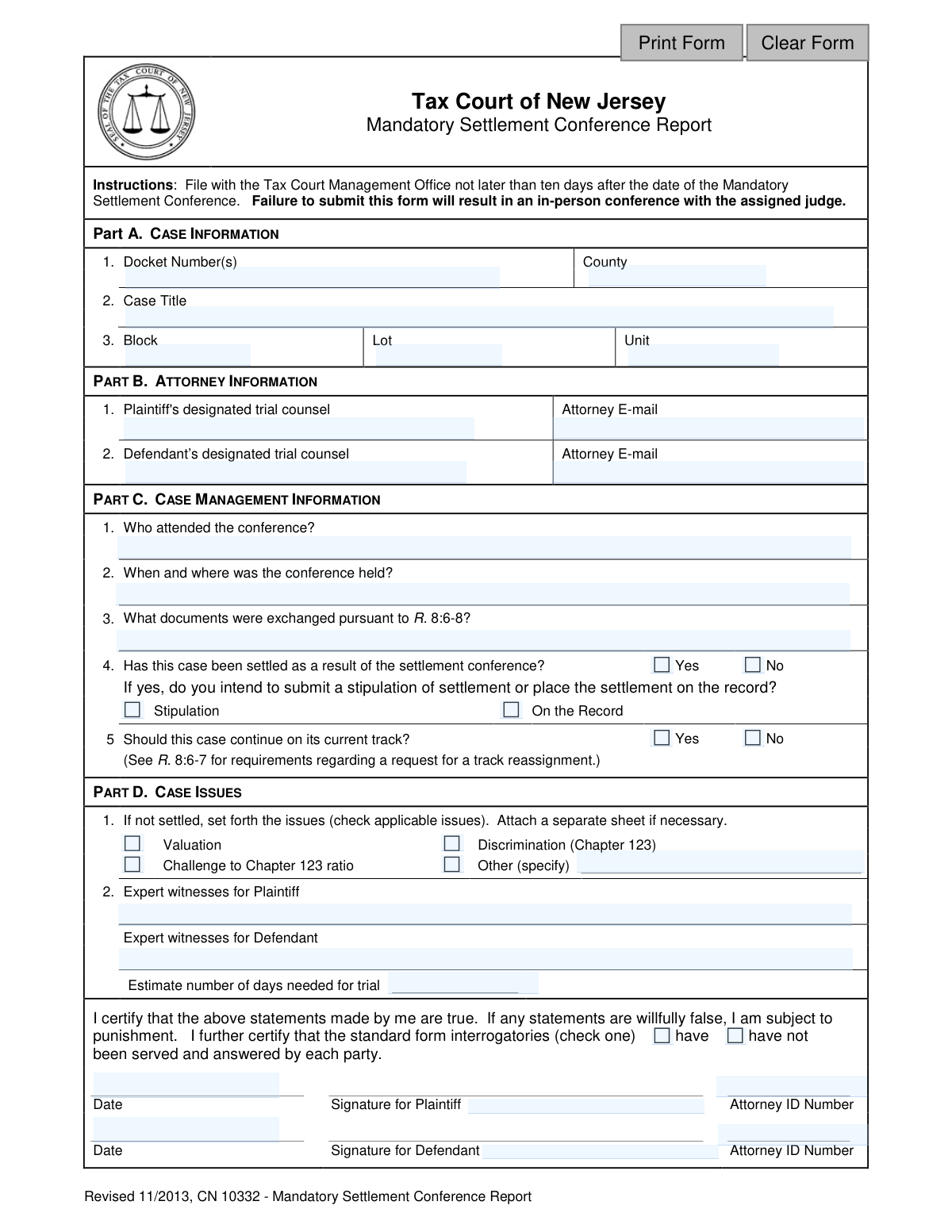
The Mandatory Settlement Conference Report, form CN 10332, is a document filed with the Tax Court of New Jersey to summarize the results of a required settlement meeting between parties in a tax case. It confirms attendance, details whether a settlement was reached, and outlines the remaining issues if the case is proceeding to trial. Today, this form can be filled out quickly and accurately using AI-powered services like Instafill.ai, which can also convert non-fillable PDF versions into interactive fillable forms.
CN 10332 is part of the New Jersey forms category on Instafill.
Our AI automatically handles information lookup, data retrieval, formatting, and form filling.
It takes less than a minute to fill out CN 10332 using our AI form filling.
Securely upload your data. Information is encrypted in transit and deleted immediately after the form is filled out.

Form specifications

Form name: Mandatory Settlement Conference Report
Number of fields: 37
Number of pages: 1
Language: English
main-image

Instafill Demo: How to fill out PDF forms in seconds with AI

How to Fill Out CN 10332 Online for Free in 2026

Are you looking to fill out a CN 10332 form online quickly and accurately? Instafill.ai offers the #1 AI-powered PDF filling software of 2026, allowing you to complete your CN 10332 form in just 37 seconds or less.
Follow these steps to fill out your CN 10332 form online using Instafill.ai:
  1. 1 Navigate to Instafill.ai and upload your Mandatory Settlement Conference Report (CN 10332) or select it from the template library.
  2. 2 Use the AI assistant to automatically populate Part A with the correct case information, such as the docket number, case title, and property block/lot.
  3. 3 Enter the designated trial counsel information for both the plaintiff and defendant in Part B, including names and email addresses.
  4. 4 Complete Part C by providing details about the conference, including who attended, when and where it was held, and whether the case was settled.
  5. 5 If the case is not settled, proceed to Part D to check the applicable issues (e.g., Valuation, Discrimination) and list the expert witnesses for each party.
  6. 6 Carefully review all the auto-filled and manually entered information for accuracy, then certify the statements and provide the required signatures and dates.
  7. 7 Download the completed, signed report, ready for filing with the Tax Court Management Office within the specified ten-day deadline.

Our AI-powered system ensures each field is filled out correctly, reducing errors and saving you time.

Why Choose Instafill.ai for Your Fillable CN 10332 Form?

Speed

Complete your CN 10332 in as little as 37 seconds.

Up-to-Date

Always use the latest 2026 CN 10332 form version.

Cost-effective

No need to hire expensive lawyers.

Accuracy

Our AI performs 10 compliance checks to ensure your form is error-free.

Security

Your personal information is protected with bank-level encryption.

Frequently Asked Questions About Form CN 10332

This form is used to report the results of a mandatory settlement conference to the Tax Court of New Jersey. It details whether the case was settled, who attended, and what issues remain if the case is proceeding to trial.

The designated trial counsels for both the plaintiff and the defendant are responsible for completing, signing, and filing this joint report.

The report must be filed with the Tax Court Management Office not later than ten days after the date of the Mandatory Settlement Conference.

Failure to submit this form within the ten-day deadline will result in an in-person conference with the assigned judge, as stated in the form's instructions.

You will need to provide the case Docket Number(s), County, Case Title, and the property's Block, Lot, and Unit numbers. This information should match your official case records.

In Part C, question 4, check 'Yes' to indicate the case has been settled. You must also specify whether you will be submitting a formal 'Stipulation' of settlement or placing the settlement 'On the Record'.

If the case is not settled, you must check the applicable unresolved issues, such as Valuation or Discrimination, list the expert witnesses for each party, and estimate the number of days needed for trial.

Yes, the form requires a signature, date, and Attorney ID number from the designated counsel for both the plaintiff and the defendant to certify its contents.

This certification confirms whether both parties have exchanged and completed the required initial sets of written questions as part of the discovery process. You must check either 'have' or 'have not' to reflect the status.

The form states that you can attach a separate sheet if necessary to provide a complete description of the unresolved issues in the case.

Yes, services like Instafill.ai use AI to auto-fill form fields accurately and save time, which is especially helpful for repetitive information like case and attorney details.

You can use a service like Instafill.ai to fill out this form online. Simply upload the PDF, and the platform will make it an interactive, fillable document you can complete from your computer.

Instafill.ai can convert flat, non-fillable PDFs into interactive fillable forms. This allows you to easily type your answers directly into the fields before printing for signatures and submission.

Compliance CN 10332
Validation Checks by Instafill.ai

1
Conditional Settlement Action Requirement
This validation checks if the 'SettleConf' field is marked 'Yes'. If it is, then the user must select one of the options in the 'StipRecord' field ('Stipulation' or 'On the Record'). This is important for ensuring that the court knows how the settlement will be formally documented. If the case is settled but this information is missing, the submission will be rejected and the user prompted to specify the documentation method.
2
Conditional Case Issues Visibility
This check ensures that the entire 'Case Issues' section (Part D) is only required and active if the 'SettleConf' field is marked 'No'. If the case has been settled, there are no outstanding issues to report, and this section is irrelevant. This prevents user confusion and incomplete submissions by guiding the user to fill out only the necessary sections based on the case status.
3
Attorney Email Format Validation
This validation verifies that the values entered into the 'plaAttyEmail' and 'defAttyEmail' fields are in a standard email format (e.g., '[email protected]'). This is crucial for ensuring the court has valid contact information for all counsel for official communication. If an invalid format is entered, the form will display an error message and require the user to correct the email address before submission.
4
Signature Date Logical Consistency
This check validates that the 'PlaSigDt' and 'DefSigDt' fields contain dates that are not in the future. It also ensures the signature date is on or after the conference date specified in the 'CaseMgmtLocation' field. This prevents typographical errors and ensures the certification is signed only after the conference has occurred. A failure would block submission and require the user to enter a valid date.
5
Mandatory Certification of Interrogatories
This validation ensures that one of the two options for the 'CertStatment' field ('have' or 'have not' been served) is selected. This certification is a required part of the report, confirming the status of standard form interrogatories between the parties. Failure to select an option will result in an error, preventing submission until the certification is explicitly made.
6
Required 'Other' Issue Specification
This validation is triggered if the 'Other' checkbox is selected in the 'CaseIssues' section. It ensures that the corresponding 'CaseIssuesDesc' text field is not left empty. This is important so the court understands the specific, non-standard issues that remain in the case. If 'Other' is checked and the description is blank, the form will prompt the user to provide details.
7
Trial Day Estimate Numeric Validation
This check ensures that the value entered into the 'TrialDayNo' field is a positive number. The court needs this estimate for scheduling and resource planning, so a non-numeric or zero/negative value is invalid. If the user enters text or an invalid number, an error will be shown, requiring a valid numerical estimate of trial days.
8
Attorney ID Format and Presence
This validation verifies that if a signature is provided for a party, the corresponding Attorney ID field ('plaAttyID' or 'defAttyID') is also filled out. It can also check that the ID conforms to a specific format expected by the New Jersey bar (e.g., a certain number of digits). This is critical for correctly identifying the certifying attorney in the court's records. An incomplete or improperly formatted ID will block submission.
9
Completeness of Core Case Information
This check ensures that all fields in Part A, 'CASE INFORMATION' (Docket Number, County, Case Title, Block, Lot), are filled out. This data is fundamental for identifying the case and property in question. A submission without this core information is unusable, so the system will prevent submission until all required fields in this section are complete.
10
County Name Validation
This validation checks the 'TypeCounty' field against a predefined list of the 21 official counties in New Jersey. This prevents spelling errors and ensures data consistency within the court's database, which is essential for accurate record-keeping and reporting. If the entered text does not match a valid county, the user will be shown an error and may be provided with a dropdown list of valid options.
11
Block and Lot Numeric Format
This validation ensures that the 'BlockNo' and 'LotNo' fields only contain numeric characters. These fields represent specific property parcel identifiers which are numerical by definition. Allowing text or special characters could lead to incorrect property identification and data corruption. The form should reject any non-numeric input for these fields.
12
Mandatory Conference Details
This check verifies that the fields 'CaseMgmtAttendee' (Who attended) and 'CaseMgmtLocation' (When and where) are not empty. This information is the primary purpose of the report, documenting the particulars of the mandatory conference. Without these details, the report fails its objective, so submission is blocked until this information is provided.

Common Mistakes in Completing CN 10332

Late Filing of the Conference Report

The form instructions explicitly state it must be filed no later than ten days after the conference. Missing this deadline has a direct consequence: an in-person conference with the assigned judge, creating unnecessary work for both attorneys and the court. This mistake often happens due to poor coordination between parties or simple oversight of the deadline.

Missing Interrogatories Certification

In the final certification block, filers must check whether standard form interrogatories 'have' or 'have not' been served and answered. Overlooking this small but mandatory checkbox renders the certification incomplete and can lead to the form's rejection or judicial inquiry. This simple oversight can result in penalties for non-compliance.

Incomplete Settlement Status Reporting

When a case has settled, filers often check 'Yes' but then forget to specify how the settlement will be finalized (by 'Stipulation' or 'On the Record'). This omission leaves the court uncertain about the next steps and may trigger unnecessary follow-up or status conferences. Always complete the conditional follow-up question to provide a clear path for case closure.

Omitting Property Identifiers (Block/Lot/Unit)

These fields are critical for identifying the specific property at the heart of a tax appeal, yet they are frequently left blank or filled with transposed numbers. This creates ambiguity and requires clarification from the court, delaying proceedings. Ensure you copy these numbers exactly from official tax records; AI-powered tools like Instafill.ai can auto-populate this data accurately to prevent such errors.

Missing or Incorrect Attorney ID Numbers

Both the plaintiff's and defendant's attorneys must provide their unique Attorney ID number next to their signature. This required identifier is often forgotten, especially when one attorney is filling out the form on behalf of both. The absence of this ID can cause processing delays as court staff must manually look up the information.

Vague Description of Exchanged Documents

The form asks what documents were exchanged, requiring specificity. Simply writing 'discovery' or 'appraisals' is insufficient and may not satisfy the court's need for information. Filers should provide a clear, itemized list of the key documents exchanged (e.g., 'Plaintiff's Appraisal Report dated 10/15/23, Defendant's Income & Expense Statements') to demonstrate compliance.

Unspecified 'Other' Case Issues

In Part D, if the case is not settled, filers can check 'Other' to describe unique case issues. A common error is to check this box but fail to provide a clear, concise explanation in the space provided. This leaves the court guessing about the nature of the dispute, hindering effective case management and trial preparation.

Using an Incorrect Case Title

The 'Case Title' must exactly match the official title on record with the court. Using abbreviations, informal names, or incorrect party names can lead to filing errors and difficulty in matching the report to the correct case file. Always reference the official complaint or court notices to ensure the title is accurate.

Submitting a Partially Signed Form

The report requires signatures and dates from representatives for both the plaintiff and the defendant. Submitting a form that is missing one party's signature or date will lead to its rejection. This often occurs due to a lack of coordination, delaying the official recording of the conference outcome. Since this form is a non-fillable PDF, tools like Instafill.ai can convert it to a fillable version that can be easily shared and electronically signed to streamline this process.
Saved over 80 hours a year

“I was never sure if my IRS forms like W-9 were filled correctly. Now, I can complete the forms accurately without any external help.”

Kevin Martin Green

Your data stays secure with advanced protection from Instafill and our subprocessors

Robust compliance program

Transparent business model

You’re not the product. You always know where your data is and what it is processed for.

ISO 27001, HIPAA, and GDPR

Our subprocesses adhere to multiple compliance standards, including but not limited to ISO 27001, HIPAA, and GDPR.

Security & privacy by design

We consider security and privacy from the initial design phase of any new service or functionality. It’s not an afterthought, it’s built-in, including support for two-factor authentication (2FA) to further protect your account.

Fill out CN 10332 with Instafill.ai

Worried about filling PDFs wrong? Instafill securely fills mandatory-settlement-conference-report forms, ensuring each field is accurate.