Yes! You can use AI to fill out Matrimonial Early Settlement Panel (MESP) Case Information Form

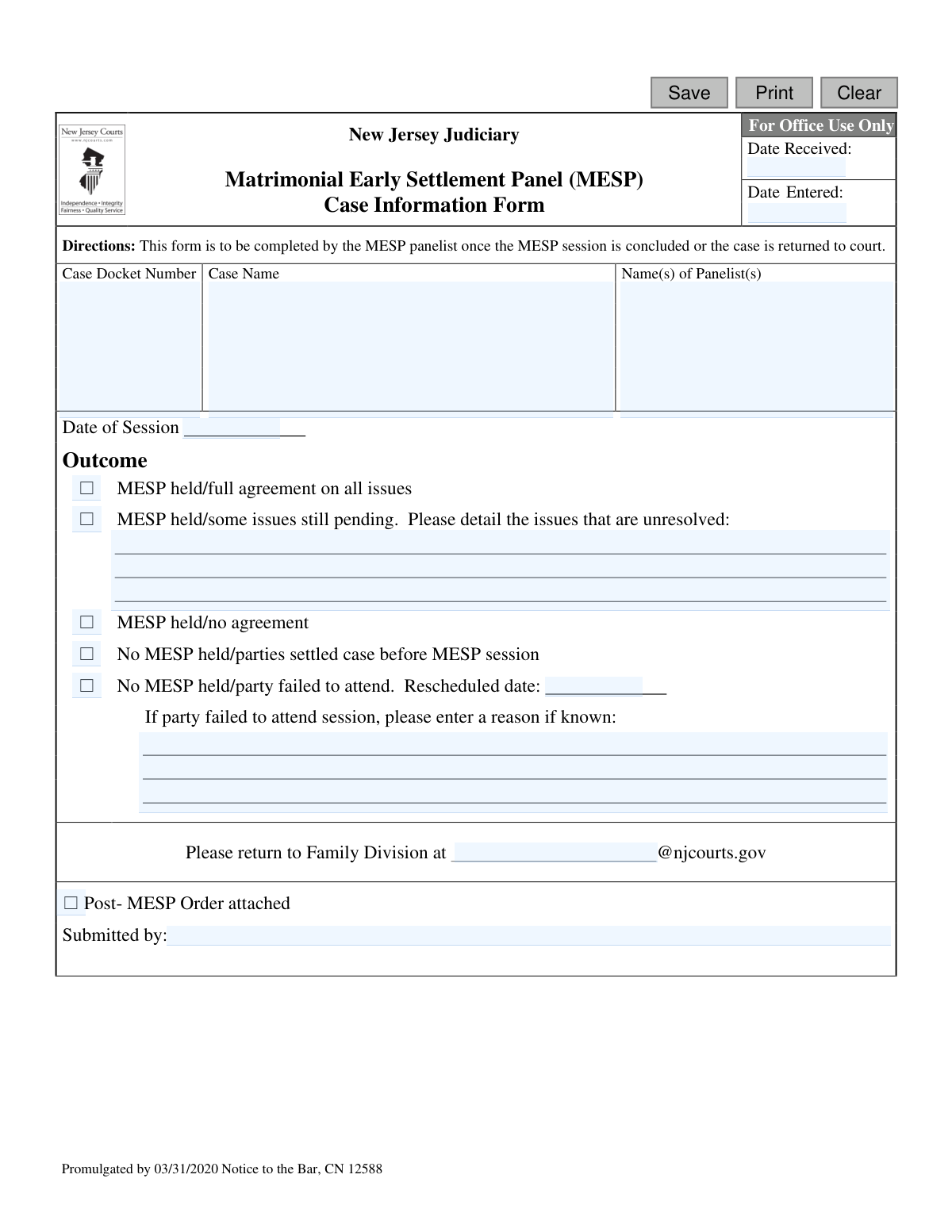
The Matrimonial Early Settlement Panel (MESP) Case Information Form is a New Jersey Judiciary document used by court-appointed panelists. It serves to officially report the outcome of a divorce or matrimonial settlement conference to the Family Division court. This form is crucial for documenting whether a case reached a full agreement, partial agreement, or no agreement, helping the court manage its docket and next steps. Today, this form can be filled out quickly and accurately using AI-powered services like Instafill.ai, which can also convert non-fillable PDF versions into interactive fillable forms.
MESP Case Information Form is part of the New Jersey forms category on Instafill.
Our AI automatically handles information lookup, data retrieval, formatting, and form filling.
It takes less than a minute to fill out MESP Case Information Form using our AI form filling.
Securely upload your data. Information is encrypted in transit and deleted immediately after the form is filled out.

Form specifications

Form name: Matrimonial Early Settlement Panel (MESP) Case Information Form
Number of fields: 20
Number of pages: 1
Language: English
main-image

Instafill Demo: How to fill out PDF forms in seconds with AI

How to Fill Out MESP Case Information Form Online for Free in 2026

Are you looking to fill out a MESP CASE INFORMATION FORM form online quickly and accurately? Instafill.ai offers the #1 AI-powered PDF filling software of 2026, allowing you to complete your MESP CASE INFORMATION FORM form in just 37 seconds or less.
Follow these steps to fill out your MESP CASE INFORMATION FORM form online using Instafill.ai:
  1. 1 Navigate to Instafill.ai and upload or select the Matrimonial Early Settlement Panel (MESP) Case Information Form.
  2. 2 Use the AI tool to automatically identify and label all fields, such as 'Case Docket Number', 'Case Name', and 'Date of Session'.
  3. 3 Enter the specific case information, including the docket number, names of the parties, and the panelists involved.
  4. 4 Indicate the outcome of the MESP session by checking the appropriate box, such as 'MESP held/full agreement' or 'MESP held/no agreement'.
  5. 5 If there are unresolved issues or a party failed to attend, provide detailed explanations in the designated text areas.
  6. 6 Review all the information for accuracy, enter the name of the person submitting the form, and check if the Post-MESP Order is attached.
  7. 7 Securely download the completed form to be emailed to the specified Family Division address or print for your records.

Our AI-powered system ensures each field is filled out correctly, reducing errors and saving you time.

Why Choose Instafill.ai for Your Fillable MESP Case Information Form Form?

Speed

Complete your MESP Case Information Form in as little as 37 seconds.

Up-to-Date

Always use the latest 2026 MESP Case Information Form form version.

Cost-effective

No need to hire expensive lawyers.

Accuracy

Our AI performs 10 compliance checks to ensure your form is error-free.

Security

Your personal information is protected with bank-level encryption.

Frequently Asked Questions About Form MESP Case Information Form

This form is used by MESP panelists to officially report the outcome of a settlement session to the New Jersey Judiciary's Family Division. It documents whether an agreement was reached, which issues remain unresolved, or why a session did not take place.

The MESP panelist is responsible for completing and submitting this form. It should be filled out after the MESP session is concluded or if the case is returned to the court for any reason.

You will need the case docket number, case name, the names of the panelists, and the date of the session. Most importantly, you must accurately report the outcome by selecting the appropriate option.

Check the box next to 'MESP held/some issues still pending.' You must then use the space provided to list all the specific issues that are still unresolved.

Select the option 'No MESP held/party failed to attend.' If a new session is scheduled, enter the new date and provide a reason for the non-attendance in the space provided, if known.

The completed form must be returned to the Family Division via email. The specific email address, formatted as [countyname][email protected], is indicated on the form.

If the case is settled before the session occurs, you should check the box for 'No MESP held/parties settled case before MESP session.' You still need to complete the case information and submit the form to the court.

If a Post-MESP Order was generated as a result of the session, you must check the 'Post- MESP Order attached' box and include the order with your submission.

This section should be left blank by the panelist. It is intended for internal court use and will be completed by Family Division staff when they receive and process the form.

Yes, you can use AI-powered services like Instafill.ai to help fill out this form. These tools can accurately auto-fill fields from your case files, saving time and reducing the risk of manual errors.

To fill this form out online, you can upload the PDF to a platform like Instafill.ai. The service will make the document interactive, allowing you to type directly into the fields, save your progress, and download the completed form.

If you have a non-fillable or 'flat' PDF, you can use a tool like Instafill.ai to convert it into an interactive, fillable form. This allows you to easily complete it on your computer without needing to print and write by hand.

The 'Submitted by' field is for the name of the MESP panelist who is completing and submitting the form. This confirms who is reporting the outcome to the court.

Compliance MESP Case Information Form
Validation Checks by Instafill.ai

1
Ensures Case Docket Number is Provided
This check verifies that the 'Case Docket Number' field is not empty. The docket number is a unique identifier for the case within the court system and is essential for accurate record-keeping and retrieval. Failure to provide a docket number will prevent the form from being associated with the correct case file.
2
Validates Case Docket Number Format
This validation ensures the 'Case Docket Number' adheres to the standard New Jersey Judiciary format (e.g., FM-XX-YYYYYY-ZZ). Using the correct format is crucial for system compatibility and prevents data entry errors that could lead to misfiling. An incorrectly formatted number will trigger an error, requiring the user to correct it before submission.
3
Ensures Case Name is Provided
This check confirms that the 'Case Name' field, which typically includes the names of the plaintiff and defendant, has been completed. The case name is a primary human-readable identifier for the legal matter. Submitting the form without a case name would make it difficult to identify the parties involved and could delay processing.
4
Ensures Panelist Name(s) are Listed
This validation verifies that the 'Name(s) of Panelist(s)' field is not blank. It is critical to record who conducted the MESP session for accountability and to maintain a complete record of the proceedings. If the panelist names are missing, the submission will be rejected as it lacks information about who is reporting the outcome.
5
Requires an Outcome Selection
This check ensures that one of the 'Outcome' options has been selected. The primary purpose of this form is to report the result of the MESP session. Without a selected outcome, the form provides no useful information and the submission will be blocked until an outcome is chosen.
6
Validates Session Date Format and Recency
This validation confirms that the 'Date of Session' is a valid date and is not a future date. The session date must be in the past or the current day, as it records an event that has already occurred. An invalid format or a future date will cause a validation error, preventing inaccurate or impossible data from being entered.
7
Requires Session Date for Held MESP
This is a conditional check that requires the 'Date of Session' to be filled out if the selected 'Outcome' indicates a session was held. The date is essential context for when the session took place. If a session was held, the form is incomplete without this date and submission will be blocked.
8
Requires Details for Unresolved Issues
This conditional validation ensures the 'unresolvedIssues' text area is filled if the 'Outcome' is 'MESP held/some issues still pending'. This detail is crucial for the court to understand what matters still require judicial attention. If this field is left empty when required, the user will be prompted to provide the necessary details before the form can be submitted.
9
Requires Reschedule Date for Non-Attendance
This check is triggered if the 'Outcome' is 'No MESP held/party failed to attend'. It verifies that a 'Rescheduled date' has been entered. This information is vital for court scheduling and ensuring the case progresses in a timely manner. The form will be considered incomplete and rejected if a reschedule date is not provided for this outcome.
10
Validates Reschedule Date is in the Future
This validation ensures that the 'Rescheduled date', if provided, is a valid date that occurs in the future. A rescheduled session must logically be set for a future time. Entering a past date is a logical error and will be flagged, requiring the user to input a correct future date.
11
Ensures Submitter's Name is Provided
This check verifies that the 'Submitted by' field is completed. Knowing who submitted the form is essential for accountability and for any follow-up questions that may arise. An empty submission field will result in a validation failure, as the source of the information is unknown.
12
Validates Family Division Email Format
This validation checks that the 'emailFamily' field contains a properly formatted email address ending specifically with '@njcourts.gov', as indicated on the form. This ensures the form can be correctly routed to the intended Family Division recipient via the system. An incorrect email format would lead to a delivery failure, so the system will prevent submission until it is corrected.
13
Ensures Logical Date Sequence for Office Use Fields
This check validates that the 'Date Entered' is on or after the 'Date Received' for the 'For Office Use Only' section. A form cannot be entered into the system before it has been received. This check prevents logical impossibilities and data entry errors, ensuring the integrity of the processing timeline.
14
Prevents Extraneous Unresolved Issues Details
This validation ensures the 'unresolvedIssues' text area is empty unless the selected 'Outcome' is 'MESP held/some issues still pending'. Providing details in this field for other outcomes is illogical and can create confusion. The system will flag this as an error to ensure data is only provided in the correct context.

Common Mistakes in Completing MESP Case Information Form

Entering an Incorrect Family Division Email Address

Panelists often enter the wrong email address in the 'Please return to Family Division at' field because the form requires them to know the specific address for their county's court. This leads to submission failures or sending the form to the wrong office, causing significant delays in processing the case outcome. To avoid this, panelists should confirm the correct vicinage-specific email address beforehand and save it for future use.

Incorrect or Incomplete Docket Number

A common mistake is entering the Case Docket Number with typos, transposed digits, or missing prefixes like 'FM'. This usually happens due to manual data entry from case files. An incorrect docket number can prevent the form from being matched to the correct case file, leading to administrative delays and requiring court staff to manually search for the case.

Selecting a Conflicting Outcome

Panelists sometimes select contradictory options, such as checking both 'MESP held/full agreement on all issues' and also detailing unresolved issues. This error occurs when rushing and creates confusion for court staff about the true status of the case. It necessitates follow-up communication to clarify the outcome, delaying the entry of any orders or scheduling of future events.

Providing Vague Descriptions of Unresolved Issues

When 'some issues still pending' is selected, panelists may provide unclear or overly brief descriptions in the corresponding text box. Using shorthand like 'financials' or 'parenting' is not specific enough for the court to act upon. This lack of detail forces the court to schedule status conferences just to identify the specific disputes, wasting time and resources. Panelists should clearly list each specific unresolved item, such as 'dispute over alimony amount' or 'holiday parenting time schedule'.

Forgetting to Attach the Post-MESP Order

A frequent oversight is checking the 'Post-MESP Order attached' box but failing to actually include the document with the submission. This is a simple human error that separates the action of filling the form from the action of attaching the file. This results in an incomplete filing, delaying the judge's review and signature and requiring court staff to contact the panelist to obtain the missing order.

Omitting Panelist Names

When multiple panelists preside over a session, the submitting panelist might forget to list all participants' full names. This oversight leads to an incomplete official record of who conducted the MESP session. To prevent this, all panelists should be confirmed and their names spelled correctly before the form is submitted to ensure proper credit and record-keeping.

Using Ambiguous Date Formats

Panelists may enter dates in ambiguous numerical formats like '04-05-24', which could be interpreted as either April 5th or May 4th. This ambiguity can create confusion in the case timeline and lead to scheduling errors for future deadlines or hearings. It is best to use a clear, unambiguous format such as MM/DD/YYYY or to write out the month (e.g., Apr 05, 2024) to ensure accuracy.

Leaving the 'Submitted by' Field Blank

It is easy to overlook the 'Submitted by' field, especially after filling in the panelist names at the top of the form. However, leaving it blank can create uncertainty about who is responsible for the information provided, especially if there were multiple panelists. Clearly printing or typing the name of the person submitting the form provides a clear point of contact for the court if questions arise.

Failing to Specify Reason for Non-Attendance

When a party fails to attend and the corresponding box is checked, panelists may neglect to fill in the reason, even if one was provided by counsel. This omission deprives the court of crucial context needed to determine the next steps, such as whether to issue sanctions or simply reschedule. If a reason is known, it should be recorded factually; if it is unknown, the field should state 'Reason not provided'.

Using an Inaccurate Case Name

Panelists may inadvertently misspell names, use informal abbreviations, or reverse the plaintiff and defendant when entering the 'Case Name'. This happens when not referencing the official case caption directly. An incorrect case name complicates the filing process and increases the risk of the document being associated with the wrong file, especially if the docket number is also incorrect. AI-powered tools like Instafill.ai can help prevent many of these data entry errors by auto-populating and validating information. If the form is a non-fillable PDF, Instafill.ai can also convert it into an interactive, fillable version to streamline completion.
Saved over 80 hours a year

“I was never sure if my IRS forms like W-9 were filled correctly. Now, I can complete the forms accurately without any external help.”

Kevin Martin Green

Your data stays secure with advanced protection from Instafill and our subprocessors

Robust compliance program

Transparent business model

You’re not the product. You always know where your data is and what it is processed for.

ISO 27001, HIPAA, and GDPR

Our subprocesses adhere to multiple compliance standards, including but not limited to ISO 27001, HIPAA, and GDPR.

Security & privacy by design

We consider security and privacy from the initial design phase of any new service or functionality. It’s not an afterthought, it’s built-in, including support for two-factor authentication (2FA) to further protect your account.

Fill out MESP Case Information Form with Instafill.ai

Worried about filling PDFs wrong? Instafill securely fills matrimonial-early-settlement-panel-mesp-case-information-form forms, ensuring each field is accurate.