
Instafill.ai
7 days free
AI form filling · 251 fields · 3 pages · done in seconds

Yes! You can use AI to fill out Memòria Tècnica d’Instal·lació de Producció/Generació d’Energia Elèctrica (per a la sol·licitud del permís d’accés i connexió i la tramitació davant la DGECC)

Don't type 251 fields by hand. Tell our AI about yourself, or upload a document you already have, and it fills every field in seconds. You check it, then download, print or sign.
7 days free, then $19.99/month · Cancel anytime
AI fills it, no typingEncrypted, never used to train AICancel in two clicks
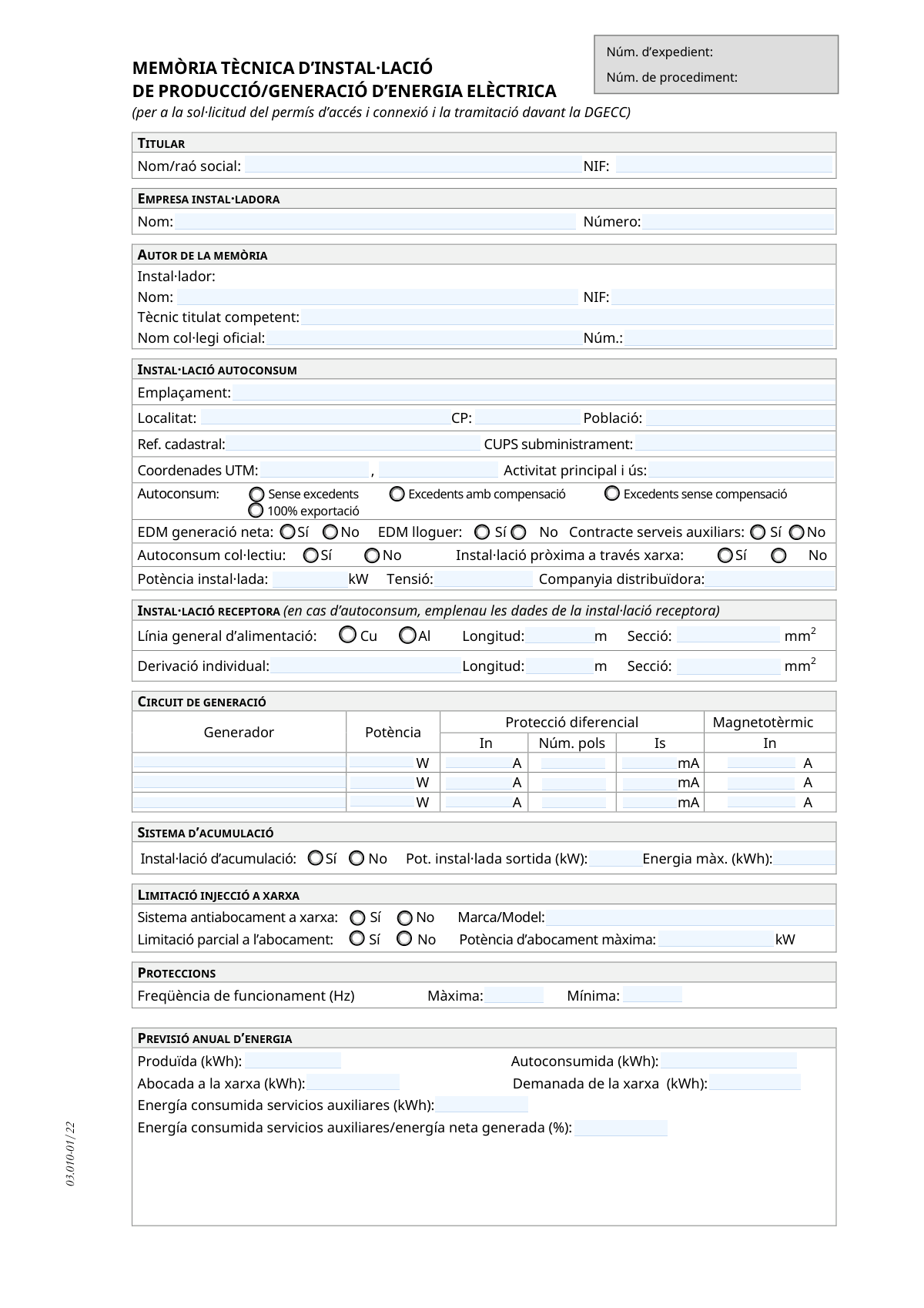
Memòria Tècnica d’Instal·lació de Producció/Generació d’Energia Elèctrica (per a la sol·licitud del permís d’accés i connexió i la tramitació davant la DGECC), page 1
Complex · 79/100Form Complexity Index

The AI does the filling. You just check it.

No typing into boxes, nothing to install.

Tell the AI about youAnswer a few questions in plain words, or upload a document you already have. That is all the typing there is.
AI fills every field in secondsIt puts each answer in the right box on every page, tables and checkboxes included.
Check it and downloadReview every field, change anything, then download, print or sign the PDF.

What this form asks for

The AI fills all of it, from your answers or your documents.

This form, the 'Memòria Tècnica d’Instal·lació de Producció/Generació d’Energia Elèctrica', is a detailed technical document required for projects involving the installation of electrical power generation systems, such as solar or wind. It is submitted to authorities like the DGECC (General Directorate of Energy and Climate Change) to obtain necessary permits for grid access and connection, capturing all technical specifications from owner details to equipment specifics. Today, this form can be filled out quickly and accurately using AI-powered services like Instafill.ai, which can also convert non-fillable PDF versions into interactive fillable forms.
Fillable fields251
Pages3
Sections27
Tables and lists2
Questions that depend on earlier answers23
Form Complexity IndexComplex, 79/100

The AI checks your answers before you download

14 checks built for this form, so a wrong date or a missing answer is caught before anyone else sees it.

Validates NIF/CIF Format

This check ensures that the tax identification numbers (NIF/CIF) for the titleholder, installer, and any associated consumers follow the official Spanish format. This is crucial for correctly identifying legal entities and individuals in administrative records. A failure in this validation would prevent the form from being correctly processed and linked to the right parties, causing significant delays.

Ensures CUPS Supply Point Code Format

This validation verifies that the 'CUPS subministrament' field follows the standard format for a Universal Supply Point Code (e.g., ES followed by 20 digits and letters). The CUPS is a unique identifier for the electricity connection point, and its accuracy is absolutely critical for the utility company to manage access, connection, and billing. An incorrect CUPS would lead to the rejection of the application as the installation cannot be located on the grid.

Validates Cadastral Reference Format

This check confirms that the 'Ref. cadastral' field contains a valid 20-character alphanumeric code. The cadastral reference uniquely identifies the property where the installation is located, which is essential for legal and planning purposes. An invalid format would cause issues with property verification and could halt the permit process.

Exclusive Autoconsum Mode Selection

This validation ensures that exactly one of the four 'Autoconsum' modes (no surplus, compensated surplus, uncompensated surplus, 100% export) is selected. The chosen mode defines the fundamental operating and commercial rules for the installation. Selecting none or more than one would create ambiguity and make it impossible to determine the applicable regulations, leading to immediate rejection.

Conditional Requirement for Storage System Details

This check verifies that if 'Instal·lació d'acumulació' is marked 'Sí', then the 'Pot. instal·lada sortida (kW)' and 'Energia màx. (kWh)' fields are filled with positive numerical values. This information is mandatory for assessing the capacity and impact of the energy storage system. Missing these details for an installation with storage would result in an incomplete technical specification.

Annual Energy Forecast Consistency Check

This validation ensures the logical consistency of the annual energy forecast values. Specifically, it checks that the 'Produïda' (Produced) energy is greater than or equal to the sum of 'Autoconsumida' (Self-consumed) and 'Abocada a la xarxa' (Grid-injected) energy. This serves as a basic sanity check on the energy balance calculation, and a discrepancy indicates a fundamental error in the installation's projected performance.

And 8 more checks
  • Logical Validation for No-Surplus Systems
  • Collective Self-Consumption Annex Requirement
  • Photovoltaic Power Calculation Consistency
  • Total Installed Power Consistency Across Sections
  • Frequency Protection Range Logic
  • Author Information Completeness
  • Partial Injection Power Limit Logic
  • Conditional Requirement for Receiving Installation Data

Let AI fill out your Memòria Tècnica 03.010-01/22

No typing. Every field filled in seconds, checked, ready to sign.

7 days free, then $19.99/month · Cancel anytime

How to Fill Out Memòria Tècnica 03.010-01/22 Online for Free in 2026

What the AI walks you through.

  1. Navigate to Instafill.ai and upload the 'Memòria Tècnica' form or select it from the template library.
  2. Provide identification details for the Titular (Owner), Empresa Instal·ladora (Installer Company), and the Autor de la Memòria (Author of the Report).
  3. Enter the specific details of the self-consumption installation, including its location, cadastral reference, type of self-consumption (e.g., with or without surplus), and installed power.
  4. Fill in the technical data for the generation circuit, including generator power, differential protection, and circuit breaker specifications, as well as any energy storage system details.
  5. Specify details for the type of technology used, such as photovoltaic (inverter and panel data), wind (turbine data), or cogeneration.
  6. Input the annual energy forecast, including energy produced, self-consumed, and fed into the grid, and add any relevant observations.
  7. Review all AI-populated fields for accuracy, then have the installer or competent technician sign and date the document before downloading it for submission.

Common Mistakes in Completing Memòria Tècnica 03.010-01/22

The ones the AI is built to catch.

Incorrect CUPS or Cadastral Reference
Users often make typos or copy the wrong number when entering the CUPS (Codi Unificat del Punt de Subministrament) or the 'Referència cadastral'. These are long, unique alphanumeric codes, and a single incorrect character will link the installation to the wrong supply point or property, causing significant administrative delays or outright rejection. To avoid this, carefully copy the CUPS from a recent electricity bill and the cadastral reference from official property documents, and double-check each character before submission.
Inconsistent Annual Energy Forecast
The form requires a forecast of energy produced, self-consumed, and fed into the grid. A common mistake is providing numbers that are not logically consistent; for example, the sum of self-consumed energy and energy fed to the grid exceeding the total energy produced. This indicates a calculation error and can lead to the technical report being questioned or rejected. Ensure the energy balance is correct: Produced Energy must be equal to or greater than the sum of Self-Consumed Energy and Grid-Injected Energy.
Incorrect UTM Coordinate Format
The form specifically asks for location data in UTM coordinates (X and Y), but applicants sometimes enter latitude/longitude, use an incorrect format, or mix up the X and Y values. This mistake can lead to the installation being incorrectly geolocated in official records, causing issues with planning and grid management. Always use a reliable tool to convert the address to the correct UTM coordinate system (ETRS89 in Spain) and carefully enter the X (easting) and Y (northing) values.
Confusion Between Power Units (W, Wp, kW)
This technical form uses different power units: kW for total installed power, Wp for panel peak power, and W for generator power. Applicants frequently confuse these units, for example, entering panel power in kW instead of Wp, leading to a 1000-fold error. This invalidates the technical specifications and will cause the project to be rejected. Pay close attention to the unit specified for each field and ensure all conversions are done correctly.
Misselecting the Self-Consumption Modality
Choosing the correct self-consumption mode (e.g., 'Sense excedents,' 'Excedents amb compensació') is critical as it defines the legal and financial framework of the installation. People may misunderstand the differences, leading to incorrect registration and future billing or compliance issues. Before filling out the form, the installer and owner must clearly define the project's objective and understand the implications of each modality according to current regulations.
Incomplete Data for Collective Installations
When filling out the annex for collective self-consumption, it is common to miss information for one or more associated consumers. Each row in the table must be fully completed with the correct NIF, CUPS, and cadastral reference for every participant. Incomplete or inconsistent data in this annex will halt the entire collective project, as the distributor cannot process the shared configuration. It is vital to gather all participant data accurately beforehand and verify each entry.
Forgetting to Attach Required Documents
The form explicitly lists several documents that must be annexed, such as site plans, single-line diagrams, and manufacturer certificates. A very common mistake is submitting the technical report without all the required attachments. This results in an incomplete submission, which is immediately put on hold, delaying the entire approval process. Create a checklist of all required documents and ensure they are all attached before submitting.
Mismatch Between Total and Component Power
In the photovoltaic section, the 'Potència instal·lada total' must be consistent with the product of the 'Quantitat de panells' and the 'Potència de pic unitària'. Installers sometimes make manual calculation errors or enter a total power value that doesn't align with the component details. This discrepancy raises red flags during the technical review and can lead to rejection. Always calculate the total power from the component data and ensure the values match. AI-powered form filling tools like Instafill.ai can perform these calculations automatically to prevent errors.
Incorrectly Filling Conditional Fields
The form contains several fields that should only be filled out if a specific condition is met, such as providing battery details only if 'Instal·lació d'acumulació' is marked 'Sí'. A frequent error is either leaving these fields blank when they are required or filling them in when they are not applicable. This creates confusion and can be interpreted as providing contradictory information. Carefully read the conditions for each field and only provide information where it is explicitly requested based on your previous selections.
Using Generic or Incomplete Equipment Descriptions
Fields like 'Marca/Model' for panels, inverters, or the anti-injection system require specific information. Users sometimes enter generic terms like 'Solar Panel' instead of the exact manufacturer and model number. This lack of specificity prevents the reviewing body from verifying that the equipment complies with regulations, leading to delays. Always refer to the equipment's technical datasheet and enter the full, precise brand and model designation. If the form is a non-fillable PDF, tools like Instafill.ai can convert it into an interactive version to make data entry easier and more accurate.

Frequently Asked Questions About Memòria Tècnica 03.010-01/22


Is it really free for 7 days?
Yes. You pay $0 today. Cancel before Nov 8 and you are never charged. Keep it, and it is $19.99 a month for 5 fills of your Memòria Tècnica 03.010-01/22.
Can I fill other forms too?
This plan is for your Memòria Tècnica 03.010-01/22: your own AI agent fills it as often as 5 times a month. To fill other forms and upload your own, choose a Professional plan from your account.
How do I cancel?
From your account, in two clicks, any time. No email, no call.
How does the AI fill out Memòria Tècnica 03.010-01/22?
You answer a few questions in plain words, or upload a document you already have. The AI reads what you give it and puts each answer into the right field of Memòria Tècnica 03.010-01/22, on every page, in seconds. It checks the answers against the form's own rules, and you review and change anything before you download, print or sign.
What happens to my information?
It is encrypted in transit and at rest, and it is never used to train AI.
How complex is Memòria Tècnica 03.010-01/22 to fill out?
Memòria Tècnica 03.010-01/22 has a Form Complexity Index of 79 out of 100, in the complex tier: 251 fillable fields across 3 pages. Instafill.ai's AI fills it in under a minute, with every field there for you to review before you download.
What is the purpose of the 'Memòria Tècnica d'Instal·lació' form?
This form is a technical report for an electrical energy generation installation, like solar panels. It's required to request grid access and connection permits and for processing with the Directorate General for Energy and Climate Change (DGECC).
Who needs to fill out and sign this form?
A qualified installer or a competent certified technician must complete and sign the form. The installing company is also required to provide their official stamp.
What documents must I attach to this technical report?
You must annex several documents, including a site plan, installation layout, a single-line electrical diagram, the inverter manufacturer's certificate, and grid access permits from your distribution company.
How do I know which 'Autoconsum' (self-consumption) option to choose?
Choose the option that matches your agreement: 'Sense excedents' if you won't export power, 'Excedents amb compensació' for compensated surplus, or 'Excedents sense compensació' for uncompensated surplus.
My installation is for a community (autoconsum col·lectiu). What do I need to do?
For collective self-consumption, you must check the 'Sí' box and complete the annex page. The annex requires the details of all associated consumers, including their NIF, CUPS, and address.
Where do I enter information about my battery storage system?
In the 'SISTEMA D’ACUMULACIÓ' section, check 'Sí' and then fill in the installed output power (kW) and maximum energy capacity (kWh) of your battery.
Where can I find the CUPS number and the cadastral reference?
Your CUPS (Codi Unificat del Punt de Subministrament) is on your electricity bill. The cadastral reference ('Ref. cadastral') is on your property tax (IBI) receipt or can be looked up on the Cadastre's official website.
Do I need to fill out the sections for both photovoltaic and wind installations?
No, you only need to complete the section that applies to your system. Fill out the 'INSTAL·LACIÓ FOTOVOLTAICA' details for solar panels or 'INSTAL·LACIÓ EÒLICA' for wind turbines.
What is a 'Sistema antiabocament a xarxa'?
This is an anti-injection system that prevents surplus energy from being fed into the grid. It is mandatory for installations registered as 'Sense excedents' (without surplus) to ensure no power is exported.
What information is needed for the 'PREVISIÓ ANUAL D’ENERGIA' (Annual Energy Forecast)?
You must estimate the annual energy in kWh for four categories: total energy produced, energy self-consumed, energy exported to the grid, and energy imported from the grid.
Can AI tools help me fill out this technical form?
Yes, services like Instafill.ai use AI to auto-fill form fields accurately and save time. This is particularly useful for complex technical forms, helping to prevent errors and speed up completion.
How can I use Instafill.ai to complete this form online?
Simply upload the PDF of the 'Memòria Tècnica' to the Instafill.ai platform. The AI will make the document interactive, allowing you to fill in all the fields online, save your progress, and download the completed form.
The PDF I have is not fillable. What can I do?
If you have a flat or non-fillable PDF, you can use a tool like Instafill.ai. It can convert the static document into an interactive, fillable form that you can complete easily on your computer.
Encrypted in transit and at restNever used to train AIDelete your forms any time

Get your Memòria Tècnica 03.010-01/22 filled out by AI

$0 today. Cancel before Nov 8 and you pay nothing.

Other forms like this one

ERM forms: REQUEST FOR OWNERSHIP INFORMATION—ERM-14 FORM, Form I-90, Application to Replace Permanent Resident Card, Form I-485, Application to Register Permanent Residence, Form SS-8, Determination of Worker Status, Form CMS-1763, Request for Termination of Medicare Coverage, Form I-212, Application for Permission to Reapply, Form I-192, Application for Advance Permission to Enter as a Nonimmigrant, Form W-8IMY (Rev. October 2021), Certificate of Foreign Intermediary, Foreign Flow-Through Entity, or Certain U.S. Branches for United States Tax Withholding and Reporting, County of Louisa Department of Community Development – New Non-Residential Building Permit Package, Application Schedule 1: Designer Information (City of Toronto Building Permit Application), HR-Pol-Rec&Res-04 Employment Application Form (Recruitment of Permanent Employees), Fauquier County Department of Community Development – Building Trades Permit or Amendment to Existing Permit Application (Residential or Commercial), Belastingdienst VPB 075 – Verzoek fiscale eenheid Vennootschapsbelasting (Deel A – Gegevens moedermaatschappij), ROTC Cadet Academic Plan / Degree and Credit Hour Worksheet (Student Identification, Term-by-Term Courses, GPA Summary, and Completion Certification), Health Assessment – Ontario Health atHome (Fixing Long-Term Care Act, 2021) (Form 4768-69E), Health Assessment - Ontario Health atHome (Fixing Long-Term Care Act, 2021) — Form 4768-69E, Washington Single-Family Property Term Lease & Security Deposit Receipt (WA Single-Family Lease) | Revised 10/08/2025, Application for Mechanical Permit, Pennsylvania Department of State — Certificate of Termination (Domestic Limited Liability Company) (15 Pa.C.S. § 8872(f)) (DSCB:15-8872(f)), Document Checklist for a Study Permit (IMM 5483)

7 days free, then $19.99/month · Cancel anytime