Yes! You can use AI to fill out New Jersey Form of Order - Order of Protection (CN 10485)

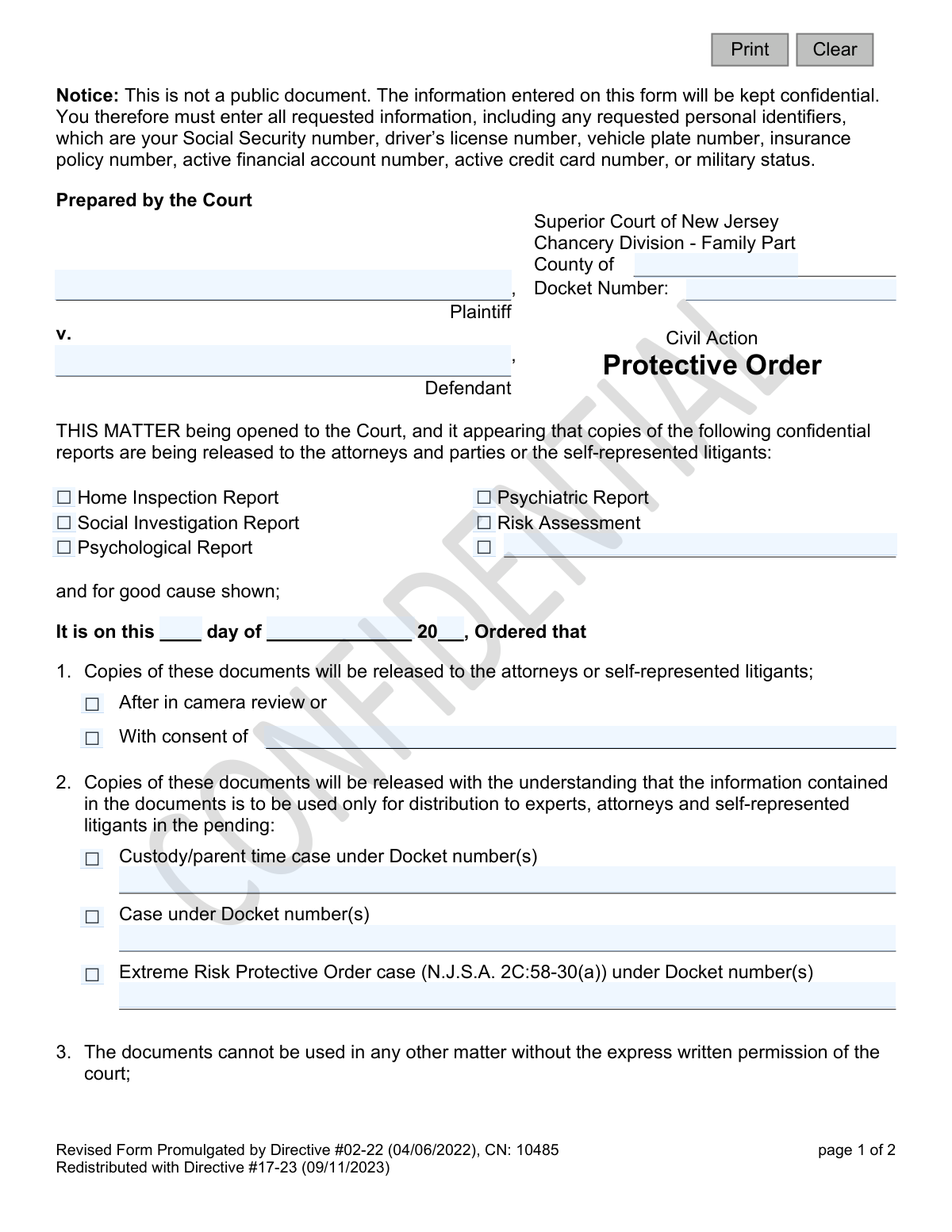
The New Jersey Form of Order - Order of Protection (CN 10485) is a court order issued by the Chancery Division - Family Part to manage the release of sensitive documents like psychiatric or social investigation reports. It establishes strict rules about who can access these confidential records, for what specific legal purpose, and how they must be handled or destroyed after the case. Today, this form can be filled out quickly and accurately using AI-powered services like Instafill.ai, which can also convert non-fillable PDF versions into interactive fillable forms.
CN 10485 is part of the New Jersey forms category on Instafill.
Our AI automatically handles information lookup, data retrieval, formatting, and form filling.
It takes less than a minute to fill out CN 10485 using our AI form filling.
Securely upload your data. Information is encrypted in transit and deleted immediately after the form is filled out.

Form specifications

Form name: New Jersey Form of Order - Order of Protection (CN 10485)
Number of fields: 32
Number of pages: 1
Language: English
main-image

Instafill Demo: How to fill out PDF forms in seconds with AI

How to Fill Out CN 10485 Online for Free in 2026

Are you looking to fill out a CN 10485 form online quickly and accurately? Instafill.ai offers the #1 AI-powered PDF filling software of 2026, allowing you to complete your CN 10485 form in just 37 seconds or less.
Follow these steps to fill out your CN 10485 form online using Instafill.ai:
  1. 1 Navigate to Instafill.ai and upload or select the 'Form of Order - Order of Protection (CN 10485)'.
  2. 2 Use the AI tool to input the court information, including the County, Docket Number, and the names of the Plaintiff and Defendant.
  3. 3 Check the boxes corresponding to the specific confidential reports being released, such as 'Home Inspection Report' or 'Psychological Report'.
  4. 4 Specify the conditions of release, such as 'After in camera review' or 'With consent of', and enter the relevant case docket numbers.
  5. 5 Indicate the final disposition of the documents as ordered by the court, choosing whether they will be destroyed or returned.
  6. 6 Add any further specific orders from the judge in the designated section.
  7. 7 Review all the information for accuracy with Instafill.ai's validation checks before the order is finalized and signed by the Judge of the Superior Court.

Our AI-powered system ensures each field is filled out correctly, reducing errors and saving you time.

Why Choose Instafill.ai for Your Fillable CN 10485 Form?

Speed

Complete your CN 10485 in as little as 37 seconds.

Up-to-Date

Always use the latest 2026 CN 10485 form version.

Cost-effective

No need to hire expensive lawyers.

Accuracy

Our AI performs 10 compliance checks to ensure your form is error-free.

Security

Your personal information is protected with bank-level encryption.

Frequently Asked Questions About Form CN 10485

This form is a legal order issued by a New Jersey Family Court judge. It sets strict rules for the release and use of confidential documents, such as psychological or social investigation reports, in a court case.

No, this form is prepared and completed by the court, not by the plaintiff or defendant. The judge signs the order, and you receive a copy to inform you of the rules you must follow.

The order specifies the case details, lists the exact confidential reports being released, and outlines who is permitted to view the documents and for what specific legal purpose.

Access is strictly limited to the people specified in the order, which typically includes the attorneys, self-represented parties, and any named experts involved in the case.

Sharing the reports with any unauthorized person is a direct violation of a court order. This can result in sanctions, which may include fines or other penalties at the court's discretion.

No, the documents can only be used for the specific case and docket number listed in the order. Using them for any other matter is strictly prohibited without express written permission from the court.

The order will instruct you on what to do when the case is resolved. You will be required to either destroy the documents or return them to a specific person or entity designated by the judge.

The notice section is provided in multiple languages, including Spanish, Haitian Creole, and Arabic, to ensure all parties understand the critical rules and consequences associated with the Protective Order.

The Docket Number is the unique identification number assigned to your case by the court. It appears on all official court documents related to your case, and the court will fill it in on this order.

While the court prepares this specific order, AI services like Instafill.ai are very useful for other legal forms you must complete. They can auto-fill your information accurately, saving time and preventing errors.

You can upload your form to the Instafill.ai platform. The AI technology identifies the fields and helps you fill them out quickly and accurately using your securely saved information.

Services like Instafill.ai can solve this problem. You can upload a 'flat' or non-fillable PDF, and their tool will convert it into an interactive, fillable form that you can complete online.

This means the confidential reports cannot be shown to or discussed with anyone else, such as family, friends, or the media. The information is strictly for use within the legal proceedings of your case.

Compliance CN 10485
Validation Checks by Instafill.ai

1
Ensures County is Specified
This check verifies that the 'County' field is not empty. The county is a critical piece of jurisdictional information that determines which court is issuing the order. If this field is left blank, the form cannot be processed as its origin and authority are unclear.
2
Validates Primary Docket Number Format
This validation ensures the 'Docket Number' field is filled and conforms to the official New Jersey court format (e.g., FM-XX-NNNNNN-YY). A correct docket number is essential for linking the protective order to the correct case file within the judiciary's system. An invalid or missing number would lead to filing errors and an unenforceable order.
3
Requires Plaintiff and Defendant Identification
This check confirms that both the 'Plaintiff' and 'Defendant' name fields are populated. These names are fundamental to the order, as they identify the parties involved in the legal action. The validation also ensures the names are not identical, as a party cannot be both plaintiff and defendant in the same action.
4
Confirms at Least One Report Type is Selected
This validation ensures that at least one checkbox for a report type (e.g., 'Home Inspection Report', 'Psychiatric Report') is selected. The entire purpose of this order is to govern the release of specific confidential reports. If no report is selected, the order has no subject matter and is meaningless.
5
Requires Description for 'Other' Report Type
This is a conditional check that activates if the 'Other' report type checkbox is selected. It ensures the corresponding text field ('rptOtherDesc') is filled out to specify what the 'other' report is. Without this description, the order would be ambiguous about which document is being protected.
6
Validates Order Date
This check verifies that the 'day', 'month', and 'year' fields for the order date combine to form a valid calendar date. It also ensures the date is not in the future, as an order cannot be signed on a future date. This is crucial for establishing the exact moment the order becomes effective.
7
Requires Selection of Associated Case Type
This validation ensures that at least one case type checkbox under paragraph 2 (e.g., 'Custody/parent time case', 'Extreme Risk Protective Order case') is selected. This is necessary to define the specific legal context in which the released documents are permitted to be used. Failure to specify this would make the scope of the order dangerously broad.
8
Ensures Associated Docket Number is Provided
This conditional validation ensures that if a case type is checked in paragraph 2, the corresponding docket number field ('custodyDocket', 'caseDocket', or 'erpoDocket') is filled in. The docket number provides a precise reference to the case where the documents can be used. An omission would create ambiguity and potential misuse of confidential information.
9
Validates Disposition Method Selection
This check requires that one of the two disposition options in paragraph 6, either 'destroyed' or 'returned to', must be selected. This instruction is a critical part of the protective order, as it dictates how the confidential documents must be handled after the case concludes. An incomplete selection leaves a critical term of the order unresolved.
10
Requires 'Returned To' Recipient if Selected
This conditional check ensures that if the 'returned to' disposition option is selected in paragraph 6, the corresponding text field ('dispDesc') is filled out. The field must specify the person or entity to whom the documents will be returned. Without this information, the instruction is incomplete and cannot be followed.
11
Ensures Judge's Name is Provided
This validation verifies that the printed name of the Judge of the Superior Court ('jdgName') is entered on the form. The judge's name, along with their signature, authenticates the order and gives it legal force. A missing name would call the document's validity into question.
12
Requires Consent Party Name if Applicable
This is a conditional check for paragraph 1. If the 'With consent of' checkbox is selected, this validation ensures the corresponding name field ('consentName') is populated. This is crucial for documenting which party has consented to the release of the reports, which may be a prerequisite for the order.

Common Mistakes in Completing CN 10485

Entering an Incorrect or Incomplete Docket Number

Users often mistype, transpose digits, or omit parts of the docket number required in the header and in paragraph 2. An incorrect docket number is a critical error that can cause the protective order to be misfiled or be unenforceable, leading to significant legal confusion and delays. Always double-check the docket number against official court documents to ensure its accuracy.

Omitting the County Name

The form requires the specific County of the Superior Court where the case is filed. A common error is leaving this field blank or writing a generic location like "New Jersey." This omission can prevent the order from being processed correctly, as the court's jurisdiction is unclear. Ensure the full and correct county name is entered at the top of the form.

Using Incomplete or Informal Party Names

The form requires the full legal names for both the Plaintiff and Defendant as they appear on other official court documents. Using nicknames, initials, or incomplete names can create legal ambiguity and future problems with enforcement. To avoid rejection or challenges, always use the full, official names to ensure the order correctly and legally identifies all parties.

Failing to Specify 'Other' Report Types

When the type of confidential report being released is not listed, users may check the 'Other' box but forget to write a description in the provided space. This leaves the order vague and potentially unenforceable for that specific report. If you select 'Other,' you must clearly and accurately describe the document to ensure the order covers it.

Mismatched Case Type and Docket Number

Paragraph 2 requires checking the relevant case type (e.g., Custody, ERPO) and providing its specific docket number. A frequent mistake is checking a box but leaving the docket number field blank or entering the main case's docket number instead of the specific one for the related matter. This can result in the protective order not applying to the intended subordinate case, defeating its purpose.

Providing Vague Document Disposition Instructions

Paragraph 6 specifies whether confidential documents should be 'destroyed' or 'returned.' If 'returned' is selected, the form requires specifying to whom they should be returned. Leaving this description blank makes the instruction ambiguous and unenforceable, which can lead to future disputes over the proper handling of sensitive records.

Party Signing in the Judge's Signature Line

Self-represented litigants, unfamiliar with court procedures, sometimes mistakenly sign the document in the space reserved for the 'Judge of the Superior Court.' This space is exclusively for the judge's signature to make the order official. A party's signature in this area will invalidate the form and require it to be resubmitted, causing unnecessary delays.

Making Conflicting Selections for Document Release

In paragraph 1, the form presents mutually exclusive options for how documents will be released ('After in camera review' or 'With consent of'). Individuals sometimes check both boxes or check 'With consent of' without naming the consenting party. This creates a contradiction that the court must resolve, delaying the issuance of the order.

Illegible Handwriting on a Non-Fillable Form

This form is often provided as a non-fillable PDF, requiring information to be handwritten. Poor or illegible handwriting, especially in the 'further Ordered' section, can lead to misinterpretation of names, docket numbers, and specific provisions, potentially rendering parts of the order void. To prevent this, use clear block letters or utilize a tool like Instafill.ai, which can convert flat PDFs into fillable forms for clean, typed entries.

Overlooking Critical Acknowledgment Checkboxes

The form contains important checkboxes, such as the one in paragraph 4 confirming that parties were advised about disclosure prohibitions. Forgetting to check these boxes can weaken the order's enforceability or create a record suggesting that required judicial warnings were not given. It is crucial to carefully review the entire form and check all boxes that accurately reflect the court's actions and instructions.
Saved over 80 hours a year

“I was never sure if my IRS forms like W-9 were filled correctly. Now, I can complete the forms accurately without any external help.”

Kevin Martin Green

Your data stays secure with advanced protection from Instafill and our subprocessors

Robust compliance program

Transparent business model

You’re not the product. You always know where your data is and what it is processed for.

ISO 27001, HIPAA, and GDPR

Our subprocesses adhere to multiple compliance standards, including but not limited to ISO 27001, HIPAA, and GDPR.

Security & privacy by design

We consider security and privacy from the initial design phase of any new service or functionality. It’s not an afterthought, it’s built-in, including support for two-factor authentication (2FA) to further protect your account.

Fill out CN 10485 with Instafill.ai

Worried about filling PDFs wrong? Instafill securely fills new-jersey-form-of-order-order-of-protection-cn-10485 forms, ensuring each field is accurate.