Yes! You can use AI to fill out New Jersey Judiciary Adult Guardianship Case Information Statement (CIS)

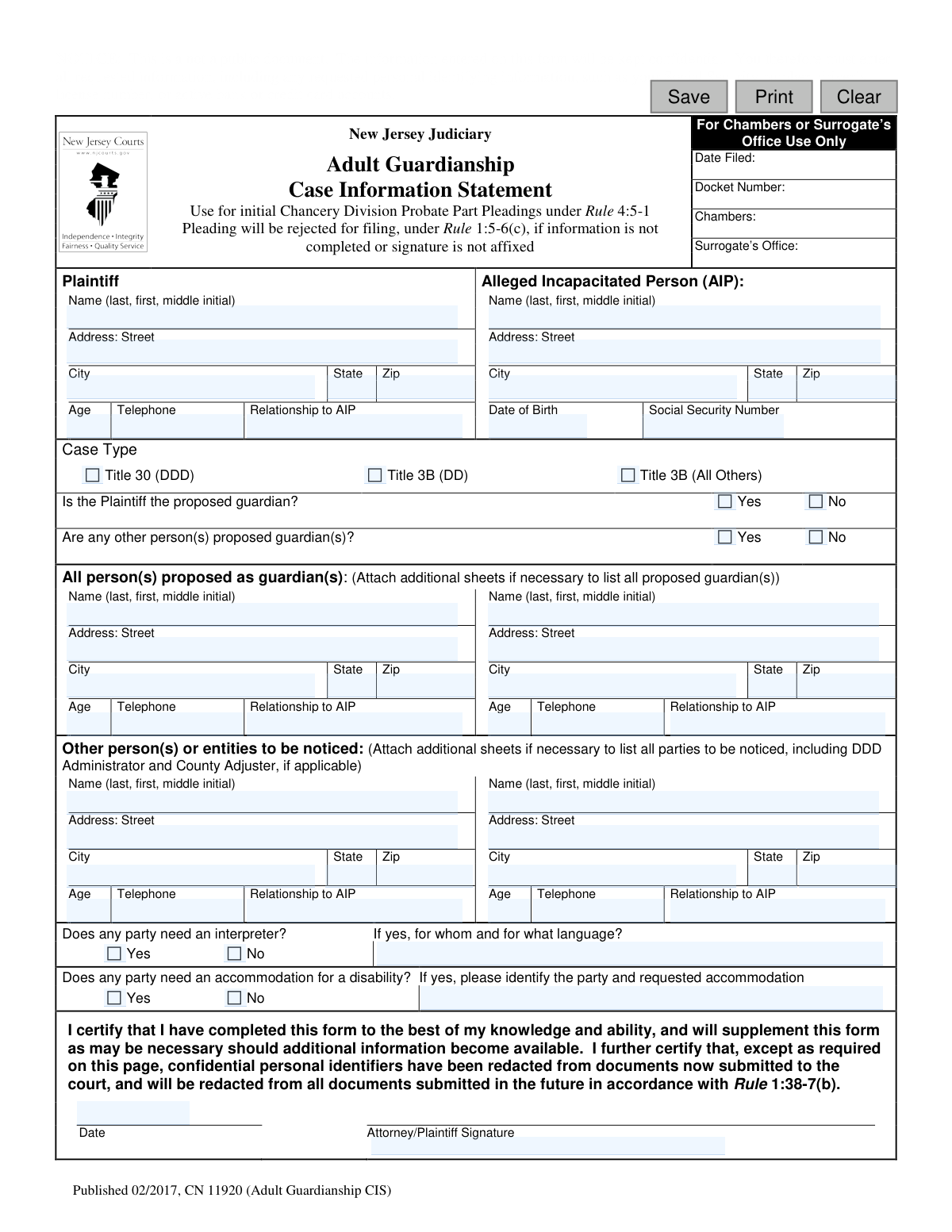
The Adult Guardianship Case Information Statement (CIS), form CN 11920, is a required document for initiating a guardianship proceeding in the New Jersey Judiciary Chancery Division, Probate Part. It confidentially collects essential details about the plaintiff, the alleged incapacitated person, and any proposed guardians to support the application. This form ensures the court has all necessary preliminary information to process the case. Today, this form can be filled out quickly and accurately using AI-powered services like Instafill.ai, which can also convert non-fillable PDF versions into interactive fillable forms.
Adult Guardianship CIS (CN 11920) is part of the New Jersey forms category on Instafill.
Our AI automatically handles information lookup, data retrieval, formatting, and form filling.
It takes less than a minute to fill out Adult Guardianship CIS (CN 11920) using our AI form filling.
Securely upload your data. Information is encrypted in transit and deleted immediately after the form is filled out.

Form specifications

Form name: New Jersey Judiciary Adult Guardianship Case Information Statement (CIS)
Number of fields: 65
Number of pages: 1
Language: English
main-image

Instafill Demo: How to fill out PDF forms in seconds with AI

How to Fill Out Adult Guardianship CIS (CN 11920) Online for Free in 2026

Are you looking to fill out a ADULT GUARDIANSHIP CIS (CN 11920) form online quickly and accurately? Instafill.ai offers the #1 AI-powered PDF filling software of 2026, allowing you to complete your ADULT GUARDIANSHIP CIS (CN 11920) form in just 37 seconds or less.
Follow these steps to fill out your ADULT GUARDIANSHIP CIS (CN 11920) form online using Instafill.ai:
  1. 1 Navigate to Instafill.ai and upload or select the Adult Guardianship CIS form.
  2. 2 Use the AI assistant to automatically fill in your information as the Plaintiff, including your name, address, and relationship to the alleged incapacitated person.
  3. 3 Enter the required details for the Alleged Incapacitated Person (AIP), such as their name, address, date of birth, and Social Security number.
  4. 4 Select the appropriate case type and indicate who is being proposed as the guardian(s), providing their contact information.
  5. 5 List all other persons or entities that need to be notified of the application, such as family members or the County Adjuster.
  6. 6 Answer the questions regarding the need for an interpreter or disability accommodations for any party involved.
  7. 7 Review all the information for accuracy, then digitally sign and date the certification to complete the form for filing.

Our AI-powered system ensures each field is filled out correctly, reducing errors and saving you time.

Why Choose Instafill.ai for Your Fillable Adult Guardianship CIS (CN 11920) Form?

Speed

Complete your Adult Guardianship CIS (CN 11920) in as little as 37 seconds.

Up-to-Date

Always use the latest 2026 Adult Guardianship CIS (CN 11920) form version.

Cost-effective

No need to hire expensive lawyers.

Accuracy

Our AI performs 10 compliance checks to ensure your form is error-free.

Security

Your personal information is protected with bank-level encryption.

Frequently Asked Questions About Form Adult Guardianship CIS (CN 11920)

This form provides the court with basic information about your application to have a guardian appointed for an adult alleged to be incapacitated. It is a required part of the initial paperwork for a guardianship case.

The 'plaintiff' is the person applying to have a guardian appointed. If you are initiating the guardianship case, you are the plaintiff and must complete and sign this form.

No, the Adult Guardianship CIS is not a public document, and all information you provide on it will be kept confidential. However, you must remove confidential personal identifiers from other public documents you file with the court.

Yes, because this form is confidential, you must provide all requested information, including the Social Security Number, if it is known to you. The form may be rejected if required information is missing.

Select 'Title 30 (DDD)' if the person receives services from the Division of Developmental Disabilities. Choose 'Title 3B (DD)' if they are developmentally disabled but not receiving DDD services, and 'Title 3B (All Others)' for all other cases.

You must list the County Adjuster, as well as the person's spouse, parents, adult children, and siblings. If it's a Title 30 (DDD) case, you must also include the Regional Administrator for the DDD.

The form has space for two proposed guardians. If you need to list more, you must attach additional sheets with the required information for each person.

Your entire case filing will be rejected if the information is not completed or if your signature is missing. You must fill it out accurately and sign and date it before submission.

No, you must leave this section blank. It is for internal court use only to record the filing date, docket number, and other official information.

Yes, the instructions state that you must list every person proposed as a guardian in that section, including yourself if you are seeking to be appointed.

The form includes checkboxes to indicate if any party needs an interpreter or an accommodation. If you check 'Yes,' you must specify who needs it and the language or specific accommodation requested.

Yes, services like Instafill.ai use AI to help you accurately auto-fill form fields, which can save you time and reduce errors. This is especially helpful for complex forms with repetitive information.

You can use a service like Instafill.ai to fill out the form online. Simply upload the PDF, and the platform will allow you to type your information directly into the fields before printing for submission.

If you have a non-fillable or 'flat' PDF, you can use a tool like Instafill.ai. It can convert the document into an interactive, fillable form so you can easily type in your information.

Compliance Adult Guardianship CIS (CN 11920)
Validation Checks by Instafill.ai

1
AIP Social Security Number Format
Checks if the Social Security Number for the Alleged Incapacitated Person (AIP) is entered in a valid format, such as XXX-XX-XXXX or XXXXXXXXX. This is crucial for correct identification and to meet the form's requirement for confidential personal identifiers, which are kept confidential but required on this specific form. If the format is invalid, the system should prompt the user to correct it before submission to avoid data processing errors.
2
AIP Date of Birth is a Valid Past Date
Validates that the Date of Birth provided for the Alleged Incapacitated Person is a complete and valid date that occurs before the current date. This ensures the data is logical and accurate for establishing the person's identity and age. An invalid or future date would indicate a data entry error and must be corrected to proceed.
3
Ensures a Single Case Type is Selected
This validation confirms that the user has selected exactly one of the three available case types: Title 30 (DDD), Title 3B (DD), or Title 3B (All Others). Selecting a case type is mandatory for court processing and determines the legal statute under which the application is filed. The form cannot be processed without this information and will be rejected if zero or more than one option is selected.
4
Logical Check for Proposed Guardian Status
Verifies that at least one person is proposed as a guardian by checking that the answers to 'Is the Plaintiff the proposed guardian?' and 'Are any other person(s) proposed guardian(s)?' are not both 'No'. Since the purpose of the application is to appoint a guardian, it is a logical impossibility for no one to be proposed. Such a submission would be fundamentally flawed and must be corrected.
5
Requires Details if Other Guardians are Proposed
This check is triggered if the user answers 'Yes' to 'Are any other person(s) proposed guardian(s)?'. It then validates that the name and address information for at least one 'other' guardian has been entered in the subsequent section. This ensures the form is complete and provides the court with the necessary information about all individuals being considered for the role.
6
Requires Interpreter Details When Needed
Validates that if the 'Does any party need an interpreter?' box is checked 'Yes', the corresponding text field specifying for whom and for what language is not left empty. This is critical for ensuring due process and accessibility, as the court needs this information to arrange for necessary services. Failure to provide details would delay proceedings.
7
Requires Accommodation Details When Needed
This check ensures that if the user selects 'Yes' for 'Does any party need an accommodation for a disability?', the details of the party and the specific accommodation requested are provided. This information is essential for the court to comply with disability laws and provide a fair hearing. An incomplete request prevents the court from making the necessary arrangements.
8
Certification Signature is Present
Confirms that the 'Attorney/Plaintiff Signature' field is not empty, indicating that the plaintiff or their attorney has signed the document. The signature certifies the accuracy of the information and is a legal requirement for court filings. A missing signature will cause the pleading to be rejected for filing under Rule 1:5-6(c).
9
Certification Signature Date is Present and Valid
This validation ensures that a date is provided alongside the plaintiff's or attorney's signature and that it is in a valid date format. This date establishes when the certification was made and is a standard requirement for legal documents. A missing or invalid date can lead to the document being rejected.
10
Plaintiff Information Completeness
Verifies that all fields in the Plaintiff section—including name, full address, age, telephone number, and relationship to the AIP—are filled out. The plaintiff is the primary party initiating the case, and their complete information is essential for court records and communication. Incomplete information would lead to rejection as per the form's instructions.
11
At Least One Proposed Guardian is Listed
This check ensures that the section 'All person(s) proposed as guardian(s)' contains information for at least one individual or entity. The entire purpose of the filing is to appoint a guardian, so this section can never be blank. This validation prevents the submission of a logically incomplete application that fails to name a candidate for the role.
12
Validates All Phone Number Fields
This check scans all telephone number fields on the form to ensure they conform to a standard format, such as (XXX) XXX-XXXX or XXX-XXX-XXXX, including the area code. Correctly formatted phone numbers are crucial for the court and other parties to be able to contact individuals involved in the case. Invalid formats can lead to communication failures and delays.
13
Validates All Zip Code Fields
This validation ensures that all zip code fields on the form are filled with a 5-digit numeric value (or a 9-digit ZIP+4 format). Accurate zip codes are essential for mail delivery of official notices and documents to all relevant parties. An incorrect format could result in misdirected mail and failure to provide legal notice.
14
Plaintiff's Age is a Valid Number
This check verifies that the 'Age' field for the plaintiff contains a valid, positive integer, typically over 18. As the party initiating a legal action, the plaintiff must be an adult or have legal standing, and this check ensures the data entered is a logical number. This maintains data integrity for court records and prevents non-numeric or nonsensical entries.

Common Mistakes in Completing Adult Guardianship CIS (CN 11920)

Misclassifying the Guardianship Case Type

Filers often misunderstand the distinction between 'Title 30 (DDD)', 'Title 3B (DD)', and 'Title 3B (All Others)'. This mistake occurs because it requires specific knowledge of the alleged incapacitated person's eligibility for services from the Division of Developmental Disabilities (DDD). Selecting the wrong case type means the application is filed under the incorrect statute, which can lead to immediate rejection or significant legal delays, requiring the entire process to be restarted. To avoid this, confirm the individual's DDD status before completing the form.

Omitting the AIP's Social Security Number

Due to general privacy concerns, people often hesitate to write a full Social Security Number on a form. However, the instructions for this confidential document explicitly state that all requested personal identifiers must be provided. Leaving the AIP's Social Security Number blank will cause the filing to be considered incomplete, leading to processing delays or rejection by the Surrogate's Office until the information is supplied.

Failing to List All Required Parties for Notification

The form requires listing not just family members, but also specific entities like the County Adjuster and, in some cases, the DDD Regional Administrator. Filers often overlook these non-obvious, legally mandated parties, resulting in an incomplete application. Failure to properly notify all required parties can invalidate the legal proceedings and force the plaintiff to re-file the application, causing significant delays. It is critical to identify all these parties before filling out the form.

Plaintiff Not Listed Again as a Proposed Guardian

When the plaintiff is also a proposed guardian, they must indicate this by checking 'Yes' and then re-entering their complete information in the 'All person(s) proposed as guardian(s)' section. Many filers mistakenly assume that providing their information once in the 'Plaintiff' section is sufficient. This omission creates ambiguity about who is being appointed, causing the court to halt the process and request clarification.

Missing Signature or Date of Certification

Forgetting to sign and date the certification at the bottom is a simple but critical error. The form explicitly warns that the pleading will be rejected for filing if the signature is missing. This oversight, often due to rushing, brings the entire guardianship process to an immediate halt until a properly executed form is resubmitted, wasting valuable time.

Misunderstanding the Redaction Certification

The form's dual instruction—to provide confidential data on this specific form while also certifying that such data will be redacted from *other* court documents—is a common point of confusion. This can lead filers to incorrectly redact information on the CIS itself (causing rejection) or fail to redact it on subsequent public filings (violating court rules). It is vital to understand that this CIS form is confidential and requires full disclosure, while other documents filed with the court may be public and require redaction.

Vague Interpreter or Disability Accommodation Requests

If a party requires an interpreter or an accommodation for a disability, simply checking 'Yes' is insufficient. Filers often forget to specify who needs the service and the precise details, such as the specific language required or the nature of the accommodation. This lack of detail prevents the court from making the necessary arrangements, which can delay hearings or impede a party's ability to participate fully in the proceedings.

Completing the 'For Office Use Only' Section

Despite explicit instructions to leave the top-right corner blank, some applicants fill in every box they see on a form. Entering information in the section marked 'For Chambers or Surrogate’s Office Use Only' can interfere with the court's internal docketing and case management procedures. This can cause confusion and slow down the processing of the application.

Not Attaching Supplemental Sheets When Necessary

The form provides limited space for listing proposed guardians or other parties to be noticed. When more individuals need to be listed than space allows, the filer must attach additional sheets. Forgetting to attach these sheets, or not realizing they are needed, results in an incomplete application that fails to identify all relevant parties, which is grounds for rejection or significant delays.

Inconsistent or Incomplete Personal Information

Simple data entry errors like transposing numbers in a zip code, using an incorrect date of birth, or providing an incomplete address are very common. These mistakes can lead to returned mail, failed background checks, and delays in notifying the correct parties. Using an AI-powered tool like Instafill.ai can help prevent these errors by auto-filling information from a secure profile and validating data formats, ensuring accuracy and completeness. If the form is a non-fillable PDF, Instafill.ai can also convert it into an interactive, fillable version to streamline the process.
Saved over 80 hours a year

ā€œI was never sure if my IRS forms like W-9 were filled correctly. Now, I can complete the forms accurately without any external help.ā€

Kevin Martin Green

Your data stays secure with advanced protection from Instafill and our subprocessors

Robust compliance program

Transparent business model

You’re not the product. You always know where your data is and what it is processed for.

ISO 27001, HIPAA, and GDPR

Our subprocesses adhere to multiple compliance standards, including but not limited to ISO 27001, HIPAA, and GDPR.

Security & privacy by design

We consider security and privacy from the initial design phase of any new service or functionality. It’s not an afterthought, it’s built-in, including support for two-factor authentication (2FA) to further protect your account.

Fill out Adult Guardianship CIS (CN 11920) with Instafill.ai

Worried about filling PDFs wrong? Instafill securely fills new-jersey-judiciary-adult-guardianship-case-information-statement-cis forms, ensuring each field is accurate.