Yes! You can use AI to fill out New Jersey Judiciary Affidavit - Lost Receipts
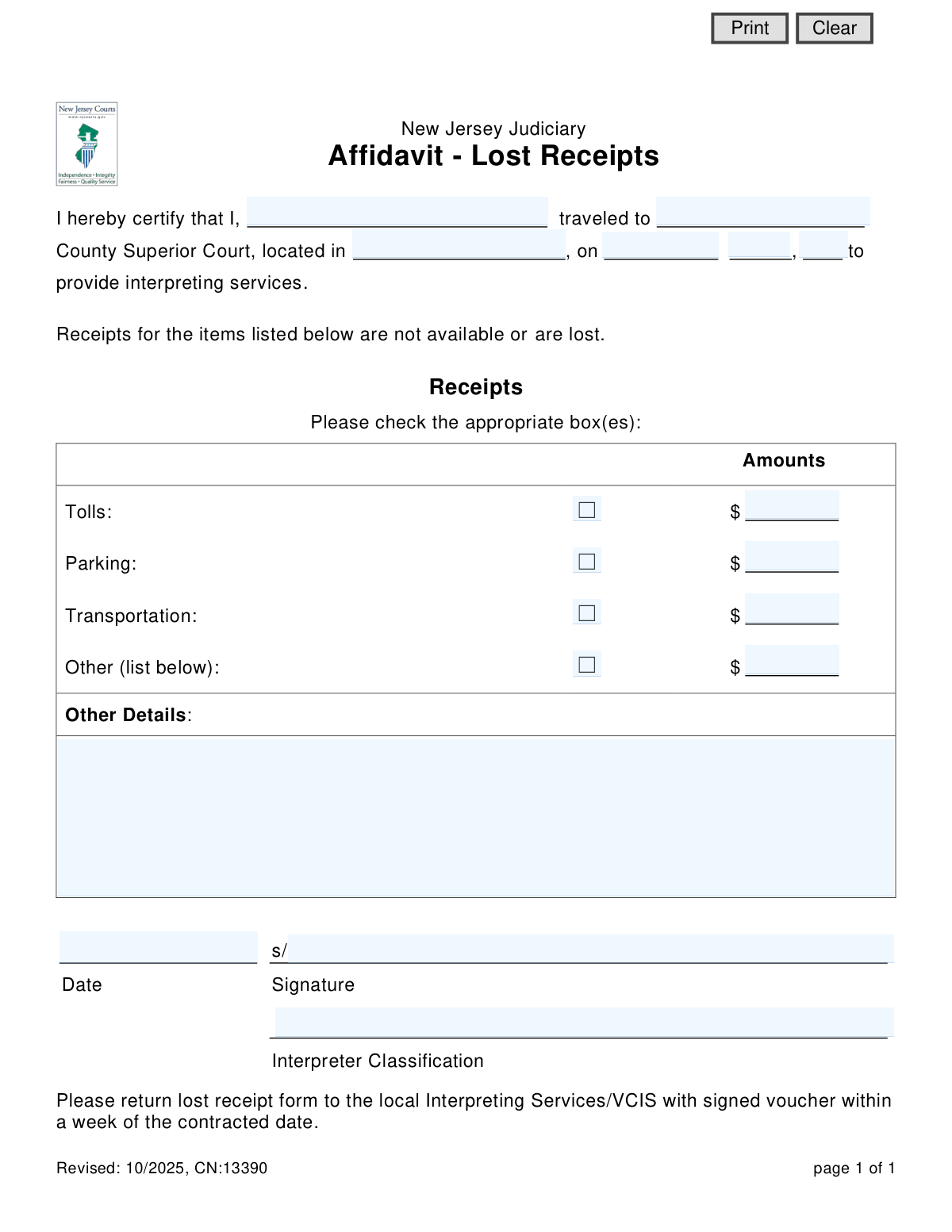
This form is an affidavit used by interpreters within the New Jersey Judiciary system to certify and claim reimbursement for work-related expenses, such as tolls or parking, when the original receipts have been lost. It serves as a sworn statement to justify the expenses incurred while providing interpreting services for the court. Today, this form can be filled out quickly and accurately using AI-powered services like Instafill.ai, which can also convert non-fillable PDF versions into interactive fillable forms.
Affidavit - Lost Receipts is part of the
New Jersey forms category on Instafill.
Our AI automatically handles information lookup, data retrieval, formatting, and form filling.
It takes less than a minute to fill out Affidavit - Lost Receipts using our AI form filling.
Securely upload your data. Information is encrypted in transit and deleted immediately after the form is filled out.
Form specifications
| Form name: | New Jersey Judiciary Affidavit - Lost Receipts |
| Number of fields: | 20 |
| Number of pages: | 1 |
| Language: | English |
Instafill Demo: How to fill out PDF forms in seconds with AI
How to Fill Out Affidavit - Lost Receipts Online for Free in 2026
Are you looking to fill out a AFFIDAVIT - LOST RECEIPTS form online quickly and accurately? Instafill.ai offers the #1 AI-powered PDF filling software of 2026, allowing you to complete your AFFIDAVIT - LOST RECEIPTS form in just 37 seconds or less.
Follow these steps to fill out your AFFIDAVIT - LOST RECEIPTS form online using Instafill.ai:
- 1 Navigate to Instafill.ai and upload or select the 'Affidavit - Lost Receipts' form.
- 2 Enter your personal information, including your full name and interpreter classification.
- 3 Provide the details of the assignment, including the county, city, and date you provided interpreting services.
- 4 Indicate the types of expenses for which receipts were lost by checking the appropriate boxes (Tolls, Parking, Transportation, Other).
- 5 Input the monetary amount for each claimed expense in the corresponding fields.
- 6 If you selected 'Other', provide specific details in the 'Other Details' section.
- 7 Review all entered information for accuracy, then digitally sign and date the affidavit before downloading it for submission.
Our AI-powered system ensures each field is filled out correctly, reducing errors and saving you time.
Why Choose Instafill.ai for Your Fillable Affidavit - Lost Receipts Form?
Speed
Complete your Affidavit - Lost Receipts in as little as 37 seconds.
Up-to-Date
Always use the latest 2026 Affidavit - Lost Receipts form version.
Cost-effective
No need to hire expensive lawyers.
Accuracy
Our AI performs 10 compliance checks to ensure your form is error-free.
Security
Your personal information is protected with bank-level encryption.
Frequently Asked Questions About Form Affidavit - Lost Receipts
This form is used by interpreters for the New Jersey Judiciary to claim reimbursement for travel-related expenses when the original receipts have been lost or are unavailable. It acts as a sworn statement to certify the expenses you incurred.
This form is for interpreters who have provided services at a New Jersey County Superior Court and need to be reimbursed for expenses for which they do not have receipts.
No, you should only use this form to claim expenses for which you have lost the receipts. For all other expenses, you should submit the actual receipts as normally required.
You must return the completed affidavit, along with your signed voucher, to the local Interpreting Services/VCIS. This should be done within one week of the date you provided the interpreting services.
The signed voucher is your primary claim for payment for your interpreting services. This affidavit is a supplementary document to that voucher, specifically to justify expenses without receipts.
In this field, you should specify your official classification within the Judiciary's system, such as 'Staff Interpreter,' 'Freelance Interpreter,' or your specific language professional designation (e.g., Certified, Master, etc.).
The 'Other' category is for any valid, reimbursable travel expense that doesn't fall under tolls, parking, or transportation. You must provide a description of the expense in the 'Other Details' section.
No, the form is designed to be filled out for a single date of service. You must complete a separate affidavit for each date you provided services and lost receipts.
Since this is a sworn affidavit, you are certifying that the amounts listed are true and accurate to the best of your knowledge. You should provide the most precise figures you can recall for the expenses incurred.
Yes, services like Instafill.ai can use AI to accurately auto-fill form fields from your saved profile, which helps save time and reduce errors.
You can use a service like Instafill.ai to upload the PDF and fill it out online. The platform allows you to type directly into the fields, add your signature, and then download the completed form.
If you have a non-fillable PDF, you can use Instafill.ai to convert it into an interactive, fillable form. This allows you to easily type your information into the correct fields before printing or saving.
Compliance Affidavit - Lost Receipts
Validation Checks by Instafill.ai
1
Interpreter Name Presence
This check ensures the 'I hereby certify that I, ...' field (nameInterpreter) is not empty. It is critical for identifying the individual submitting the affidavit for proper processing and payment. If this field is left blank, the form cannot be attributed to a specific interpreter and will be rejected.
2
Travel Date Completeness and Validity
Validates that the travel date fields (dtMnth, dtDay, dtYr) are all filled in and constitute a valid calendar date that is not in the future. An accurate travel date is essential for verifying that the expenses correspond to a specific service engagement. An incomplete or invalid date will prevent the system from processing the claim.
3
Court Location Completeness
Ensures that both the county ('cnty') and city ('cityName') of the Superior Court are provided. This information is necessary to confirm the location where the interpreting services were rendered and to validate the plausibility of the claimed expenses. Missing location details will result in the form being returned for completion.
4
At Least One Expense Claimed
This validation verifies that at least one expense checkbox is checked and its corresponding amount field has a value greater than zero. The purpose of the affidavit is to claim reimbursement for lost receipts, so a form with no claimed expenses is invalid. A submission with no expenses will be flagged as an error.
5
Expense Amount Format
Checks that all entered amounts (totalTolls, totalParking, totalTransp, totalOther) are valid, non-negative numeric values. This prevents data entry errors, such as text in a currency field, which would cause calculation and payment failures. Any non-numeric or negative values will trigger a validation error.
6
Tolls Expense Consistency
Ensures that if the 'Tolls' checkbox is checked, the corresponding amount field contains a value greater than zero. Conversely, it checks that if an amount is entered for tolls, the checkbox is checked. This prevents incomplete entries, such as claiming an expense type without specifying the amount, which would require manual follow-up.
7
Parking Expense Consistency
Validates that if the 'Parking' checkbox is checked, the associated amount field has a positive value. It also ensures the checkbox is selected if an amount is entered. This maintains logical consistency and ensures that every claimed expense is fully specified, preventing processing delays.
8
Transportation Expense Consistency
Checks that if the 'Transportation' checkbox is selected, the corresponding amount field is filled with a value greater than zero. This rule prevents ambiguous claims where an expense type is indicated but no cost is provided. Failure to comply will result in a validation error.
9
'Other' Expense Detail Requirement
This check ensures that if the 'Other' checkbox is checked and an amount is entered, the 'Other Details' text field is not empty. This is crucial for providing justification for miscellaneous expenses not covered by the standard categories. A missing explanation for an 'Other' expense will cause the form to be rejected pending clarification.
10
Signature Presence
Verifies that the signature field ('signatureInterpreter') has been signed. An electronic or physical signature is required to legally certify the statements made in the affidavit. An unsigned form is legally invalid and cannot be processed for payment.
11
Signature Date Presence and Validity
Ensures the signature date field ('Date2_af_date') is filled with a valid calendar date. The signature date legally establishes when the affidavit was certified by the interpreter. A missing or malformed date will invalidate the document.
12
Date Chronology Logic
Validates that the signature date is on or after the travel date. An affidavit cannot be signed before the event it describes has occurred. This logical check prevents errors and ensures the integrity of the sworn statement. A signature date preceding the travel date will be flagged as an error.
13
Interpreter Classification Presence
This check ensures the 'Interpreter Classification' field is filled out. This information is likely required for administrative purposes, such as determining the correct payment rate or for statistical tracking. A missing classification may delay processing until the information is provided.
Common Mistakes in Completing Affidavit - Lost Receipts
Interpreters often use a nickname or an abbreviated version of their name instead of their full legal name. This causes a mismatch with official Judiciary payroll and credentialing records, leading to significant delays in processing the reimbursement while staff verifies the individual's identity. To avoid this, always enter your full legal name exactly as it appears on your official interpreter documentation and payment records.
The form asks for both the County and the City where the Superior Court is located, but people frequently enter the city name in the county field or vice-versa. This ambiguity can slow down verification, especially if the interpreter worked in multiple courts within the same week. Always specify the correct County (e.g., 'Essex') and the City where the courthouse is physically located (e.g., 'Newark').
A common error is entering the date the form is being filled out, rather than the specific date the interpreting services were provided. This creates a discrepancy with the main service voucher, which will cause the lost receipt claim to be rejected and returned for correction. To prevent this, carefully reference your calendar or the service voucher to ensure you enter the exact date you traveled to the court.
Users frequently enter a dollar amount for an expense like 'Tolls' but forget to check the corresponding box, or they check a box without entering an amount. In either case, the claim for that item is considered incomplete and will not be processed, resulting in non-reimbursement. Always double-check that for every amount you claim, the adjacent box is checked, and vice-versa.
When claiming an expense under the 'Other' category, individuals often enter a dollar amount but neglect to explain the charge in the 'Other Details' section. Unspecified expenses are automatically considered invalid and will be denied, as the finance department has no way to verify their legitimacy. To ensure reimbursement, you must provide a clear and concise description for any amount claimed in the 'Other' category.
The signature line is crucial for making the affidavit a legally binding document, but it's often handled incorrectly by simply typing a name where a signature is required. An invalid signature nullifies the entire affidavit, causing the claim to be rejected outright. You must either print the form to provide a physical 'wet' signature or follow the precise instructions for an electronic signature (e.g., /s/ Jane Doe).
Alongside the signature, the date of signing is a required legal component of an affidavit, but it is frequently left blank. An undated signature can render the document invalid, forcing the processing office to return it for correction and delaying your reimbursement. Always enter the current date—the date you are actually signing the form—in the space provided next to your signature.
Because the 'Interpreter Classification' field is located at the bottom of the form and separate from the main affidavit text, it is very easy to miss. This information is necessary for the administrative staff to process the payment correctly according to your status. Forgetting it can cause delays while staff look up your information, so be sure to scan the entire page to ensure all fields are completed.
The instructions at the very bottom of the form state it must be returned with a signed voucher within one week, but this is often missed. Submitting the affidavit late, or separately from the main expense voucher, can lead to the entire claim being denied for non-compliance with procedural rules. To avoid this, read all instructions on the form, including the fine print, and ensure you submit all necessary documents together and on time.
When entering dollar amounts, users sometimes include currency symbols ($) or commas, which can cause data entry errors on the processing side. Always enter amounts using only numbers and a decimal point (e.g., 25.50). AI-powered form-filling tools like Instafill.ai can help prevent this by automatically formatting data correctly and can also convert non-fillable PDFs into interactive, fillable versions to streamline the process.
Saved over 80 hours a year
“I was never sure if my IRS forms like W-9 were filled correctly. Now, I can complete the forms accurately without any external help.”
Kevin Martin Green
Your data stays secure with advanced protection from Instafill and our subprocessors

Robust compliance program
Transparent business model
You’re not the product. You always know where your data is and what it is processed for.
ISO 27001, HIPAA, and GDPR
Our subprocesses adhere to multiple compliance standards, including but not limited to ISO 27001, HIPAA, and GDPR.
Security & privacy by design
We consider security and privacy from the initial design phase of any new service or functionality. It’s not an afterthought, it’s built-in, including support for two-factor authentication (2FA) to further protect your account.
Fill out Affidavit - Lost Receipts with Instafill.ai
Worried about filling PDFs wrong? Instafill securely fills new-jersey-judiciary-affidavit-lost-receipts forms, ensuring each field is accurate.