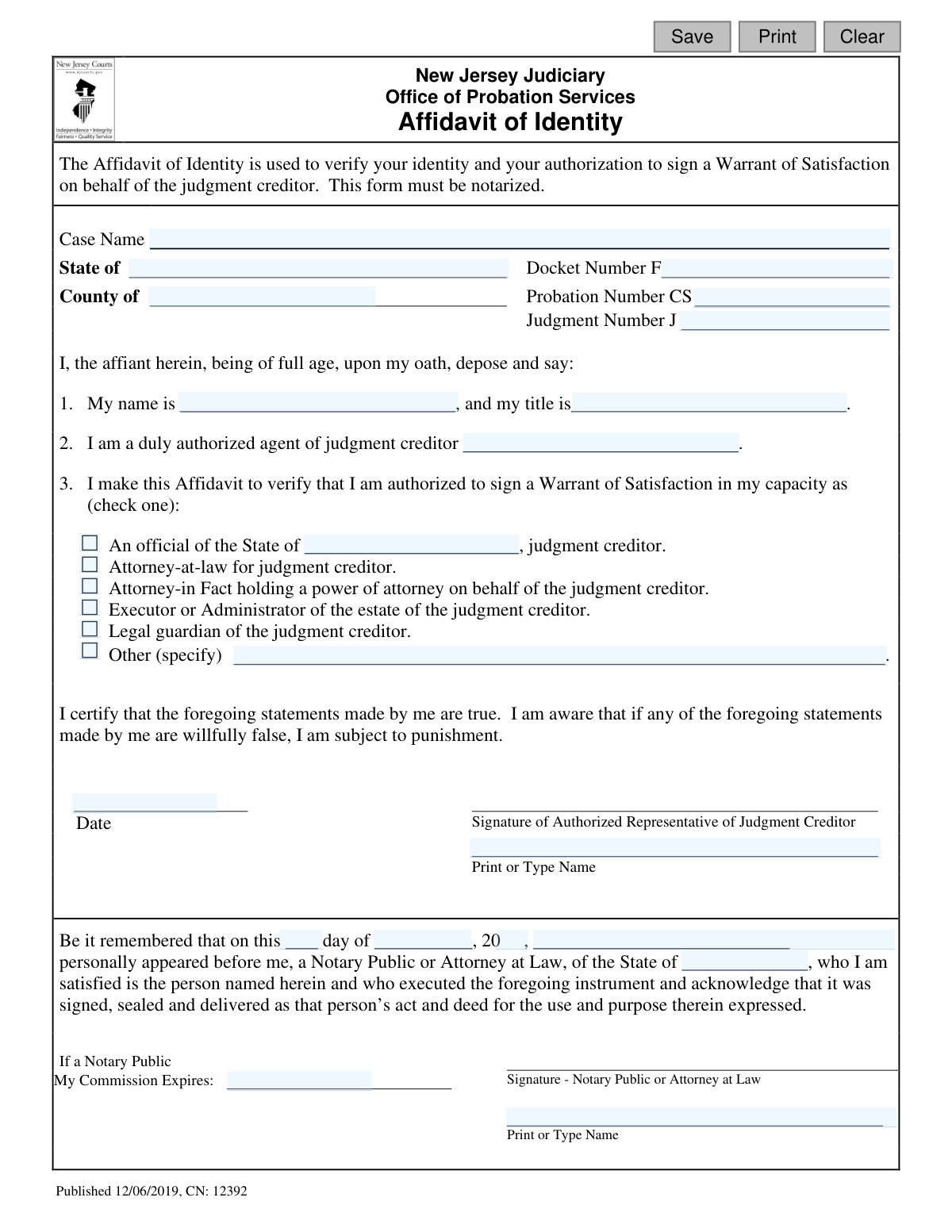
Yes! You can use AI to fill out New Jersey Judiciary Affidavit of Identity

The Affidavit of Identity is a sworn statement required by the New Jersey Judiciary's Office of Probation Services. It serves to confirm that the person signing a Warrant of Satisfaction is a duly authorized agent of the judgment creditor, preventing fraud and ensuring legal compliance. Today, this form can be filled out quickly and accurately using AI-powered services like Instafill.ai, which can also convert non-fillable PDF versions into interactive fillable forms.
Affidavit of Identity is part of the New Jersey forms category on Instafill.
Our AI automatically handles information lookup, data retrieval, formatting, and form filling.
It takes less than a minute to fill out Affidavit of Identity using our AI form filling.
Securely upload your data. Information is encrypted in transit and deleted immediately after the form is filled out.

Form specifications

Form name: New Jersey Judiciary Affidavit of Identity
Number of fields: 29
Number of pages: 1
Language: English
main-image

Instafill Demo: How to fill out PDF forms in seconds with AI

How to Fill Out Affidavit of Identity Online for Free in 2026

Are you looking to fill out a AFFIDAVIT OF IDENTITY form online quickly and accurately? Instafill.ai offers the #1 AI-powered PDF filling software of 2026, allowing you to complete your AFFIDAVIT OF IDENTITY form in just 37 seconds or less.
Follow these steps to fill out your AFFIDAVIT OF IDENTITY form online using Instafill.ai:
  1. 1 Navigate to Instafill.ai and upload or select the New Jersey Affidavit of Identity form.
  2. 2 Allow the AI to scan the document and identify all the required fields, such as case details, personal information, and authorization capacity.
  3. 3 Enter the case information, including the Case Name, Docket Number, and Judgment Number, into the designated fields.
  4. 4 Provide your personal details as the affiant and specify your relationship to the judgment creditor by checking the appropriate box.
  5. 5 Carefully review all the information auto-filled by the AI to ensure its accuracy and completeness.
  6. 6 Electronically sign and date the affidavit in the designated signature block.
  7. 7 Download the completed form to have it notarized by a Notary Public or an Attorney at Law, as required.

Our AI-powered system ensures each field is filled out correctly, reducing errors and saving you time.

Why Choose Instafill.ai for Your Fillable Affidavit of Identity Form?

Speed

Complete your Affidavit of Identity in as little as 37 seconds.

Up-to-Date

Always use the latest 2026 Affidavit of Identity form version.

Cost-effective

No need to hire expensive lawyers.

Accuracy

Our AI performs 10 compliance checks to ensure your form is error-free.

Security

Your personal information is protected with bank-level encryption.

Frequently Asked Questions About Form Affidavit of Identity

This form is used to legally verify your identity and confirm that you are authorized to sign a Warrant of Satisfaction on behalf of a judgment creditor in a New Jersey court case.

The person or agent signing the Warrant of Satisfaction for the judgment creditor must complete this form. This individual is referred to as the 'affiant' on the form.

A Warrant of Satisfaction is a legal document filed with the court to certify that a judgment, which is a debt ordered by the court, has been fully paid and the matter is resolved.

These numbers are located on official court documents related to your case, such as the original judgment order or correspondence from the NJ Judiciary. If you cannot find them, contact the court clerk's office for assistance.

Yes, this is a sworn affidavit and is not valid unless it is signed in the presence of a Notary Public or an Attorney at Law, who must then complete the notarization section.

Check the box that accurately describes your relationship to the judgment creditor, such as being their attorney or the executor of their estate. If your specific role isn't listed, check 'Other' and write in your title.

By signing, you certify that your statements are true. The form explicitly states that you are subject to punishment if you willfully provide false information.

This affidavit should be submitted together with the signed Warrant of Satisfaction to the New Jersey Judiciary, typically by filing it with the Clerk of the Superior Court.

The judgment creditor is the person, company, or government entity that won the lawsuit and is owed money by the other party, known as the judgment debtor.

Yes, services like Instafill.ai use AI to accurately auto-fill form fields from your saved information, which can save you time and help prevent common errors.

You can use a service like Instafill.ai to upload the form, fill it out electronically, and then print it for the required wet signature and notarization. This ensures all typed information is clear and legible.

Tools like Instafill.ai can convert non-fillable or 'flat' PDFs into interactive, fillable forms online. This allows you to easily type your information directly into the fields before printing.

You will need the full case name, the Docket Number, Probation Number (if applicable), and Judgment Number. You also need the full legal name of the judgment creditor and your own title or capacity to act on their behalf.

Compliance Affidavit of Identity
Validation Checks by Instafill.ai

1
Docket Number Format Validation
This check ensures the 'Docket Number' field adheres to the required format, which is a prefix 'F' followed by a series of numbers. It is crucial for correctly identifying the case within the New Jersey Judiciary system. A submission with an incorrect format will be rejected to prevent data entry errors and ensure the affidavit is linked to the correct legal case file.
2
Probation and Judgment Number Format
This validation verifies that the 'Probation Number' and 'Judgment Number' fields follow their specific formats, prefixed with 'CS' and 'J' respectively. These numbers are unique identifiers critical for the Office of Probation Services. Failure to match the format could lead to the affidavit being misfiled or rejected, delaying the processing of the Warrant of Satisfaction.
3
Mandatory Capacity Selection
This check confirms that exactly one option has been selected from the list of capacities in section 3. The affiant must declare their specific authority to act on behalf of the judgment creditor. If no option or multiple options are selected, the form is considered incomplete and ambiguous, and the submission will be blocked until a single, valid choice is made.
4
Conditional 'Other' Capacity Details
This validation is triggered if the 'Other' option is selected as the affiant's capacity. It ensures that the corresponding 'specify' text field (`otherDetails`) is not empty and provides a clear description of the affiant's role. An empty description for 'Other' makes the affidavit invalid, as the basis for the affiant's authority is not established.
5
Affiant Name Consistency Check
This check verifies that the affiant's name is consistent across the form: the name declared in paragraph 1 (`name`), the printed name under the signature (`sigName`), and the name of the person appearing before the notary (`appearName`). This consistency is vital for preventing identity fraud and confirming the same individual completed and signed the document. Discrepancies will flag the form for manual review or rejection.
6
Signature and Notarization Date Synchronization
This validation ensures the date the affiant signs the document (`sigDt`) is identical to the date of notarization (`notaryDt`). The notary section explicitly states 'on this day...', meaning the notarization must occur on the same day as the signature. A mismatch in dates invalidates the notarization and, by extension, the entire affidavit, requiring correction before acceptance.
7
Completeness of Affiant and Creditor Information
This check ensures that the affiant's name (`name`), title (`title`), and the judgment creditor's name (`jcName`) are all filled in. These fields are fundamental to the purpose of the affidavit, establishing who is making the statement, their position, and on whose behalf they are acting. Missing any of this information renders the document legally insufficient and will cause the submission to fail.
8
Valid Notary Commission Expiration Date
This validation confirms that if the document is signed by a Notary Public, the 'My Commission Expires' date is provided and is a date in the future. An expired or missing commission date invalidates the notary's authority to witness the signature. The system will reject the form to ensure compliance with legal notarization standards.
9
Conditional State Official Field
This rule validates that if the capacity 'An official of the State of...' is checked, the corresponding state field (`offSt`) is filled with a valid state name. This information is required to specify which state entity is the judgment creditor. Failure to provide the state name makes the declaration incomplete and the form will be rejected.
10
Case State and County Validation
This check verifies that the 'State' (`st`) and 'County' (`typeCounty`) fields are both provided and that the county is a valid county within the specified state. This ensures accurate jurisdiction information for the case. An invalid state-county combination will prevent the form from being filed correctly and will result in a validation error.
11
Required Case Identifiers
This validation ensures that all primary case identifiers—Docket Number, Probation Number, and Judgment Number—are filled out. These three numbers are critical for uniquely identifying the legal matter in the court and probation systems. Submitting the form without all three identifiers will result in rejection, as it cannot be accurately linked to the correct case.
12
Valid Signature Date
This check ensures the values entered for the signature date (`dtDay`, `dtMnth`, `dtYr2Digit`) form a valid calendar date. It prevents impossible dates like February 30th or non-numeric entries. A valid date is essential for establishing the legal timeline of events, and an invalid entry will block submission until corrected.

Common Mistakes in Completing Affidavit of Identity

Failing to Notarize the Affidavit

This is a sworn legal document, and the instructions explicitly state 'This form must be notarized.' Submitting an un-notarized form renders it legally invalid, leading to immediate rejection by the court and significant delays in processing the Warrant of Satisfaction. To avoid this, you must sign the document in the physical presence of a Notary Public or an authorized Attorney at Law who can then complete the required attestation section.

Incorrectly Formatting Case Numbers

The form requires several case-specific numbers, such as the Docket, Probation, and Judgment numbers, which often have letter prefixes (e.g., 'F', 'CS', 'J'). A common mistake is omitting these prefixes or transcribing the numbers incorrectly. This error can prevent court staff from matching the affidavit to the correct case file, causing processing delays or misfiling. Always double-check official court documents to copy the numbers exactly as they appear.

Signing or Dating the Form Prematurely

The affiant's signature must be witnessed by the notary to be valid. Many people sign and date the form beforehand for convenience, but this invalidates the notarization process, as the notary cannot legally attest to a signature they did not witness. Always bring the unsigned form to the notary and sign it only when you are in their presence, ensuring the date you enter matches the date of the notarization.

Entering an Incorrect or Abbreviated Judgment Creditor Name

The form requires the full, official legal name of the judgment creditor. People often use abbreviations, trade names, or slight variations, which can create a legal discrepancy and potentially invalidate the Warrant of Satisfaction. To prevent this, refer to the original judgment document and copy the creditor's name exactly as it is written to ensure legal precision.

Incomplete or Vague Authorization Capacity

In section 3, people often forget to check a box to specify their authority or they check 'Other' without providing the required explanation. This ambiguity casts doubt on the signer's legal standing to act for the judgment creditor, which is a primary reason for rejection. Carefully select the box that accurately describes your role, and if you choose 'Other,' provide a clear and specific title or relationship in the space provided.

Using an Inappropriate Personal Title

On the line 'my title is...', the form is asking for a professional title that establishes your authority to act (e.g., 'President,' 'Paralegal,' 'Executor'). A frequent error is entering a social title like 'Mr.' or 'Ms.', which provides no information about your legal capacity to sign the document. Always use the official job title or role that grants you authorization on behalf of the judgment creditor.

Using Illegible Handwriting

This legal form contains critical case information that must be legible for court clerks to process it correctly. Poor handwriting can lead to data entry errors, potentially linking the affidavit to the wrong case or person and causing major delays. If the form is a non-fillable PDF, AI-powered tools like Instafill.ai can convert it into a fillable version, allowing you to type directly into the fields to ensure perfect clarity.

Confusing Signature and Printed Name Lines

A simple but common error is printing one's name on the signature line or, conversely, signing on the 'Print or Type Name' line. This can cause confusion and may require the form to be re-executed. Pay close attention to the labels; the signature line requires your unique handwritten mark, while the printed name line is for legibility. AI form-filling tools like Instafill.ai can help prevent this by clearly designating signature fields.

Submitting with an Incomplete Notary Section

The person filing the form is ultimately responsible for its completeness, including the notary's portion. It's common for a notary to forget to add their commission expiration date, print their name legibly, or apply their seal correctly. Before leaving the notary, quickly review their section to ensure every field is complete, as a single missing detail can cause the entire document to be rejected by the court.

Inconsistent Naming Across the Document

The name of the person signing (the affiant) must be written identically in every place it appears: the initial statement ('My name is...'), the printed name below the signature, and the notary's acknowledgement ('personally appeared before me...'). Using a nickname, initial, or different version of a name can raise identity questions. To avoid this, use your full legal name consistently across the form.
Saved over 80 hours a year

“I was never sure if my IRS forms like W-9 were filled correctly. Now, I can complete the forms accurately without any external help.”

Kevin Martin Green

Your data stays secure with advanced protection from Instafill and our subprocessors

Robust compliance program

Transparent business model

You’re not the product. You always know where your data is and what it is processed for.

ISO 27001, HIPAA, and GDPR

Our subprocesses adhere to multiple compliance standards, including but not limited to ISO 27001, HIPAA, and GDPR.

Security & privacy by design

We consider security and privacy from the initial design phase of any new service or functionality. It’s not an afterthought, it’s built-in, including support for two-factor authentication (2FA) to further protect your account.

Fill out Affidavit of Identity with Instafill.ai

Worried about filling PDFs wrong? Instafill securely fills new-jersey-judiciary-affidavit-of-identity forms, ensuring each field is accurate.