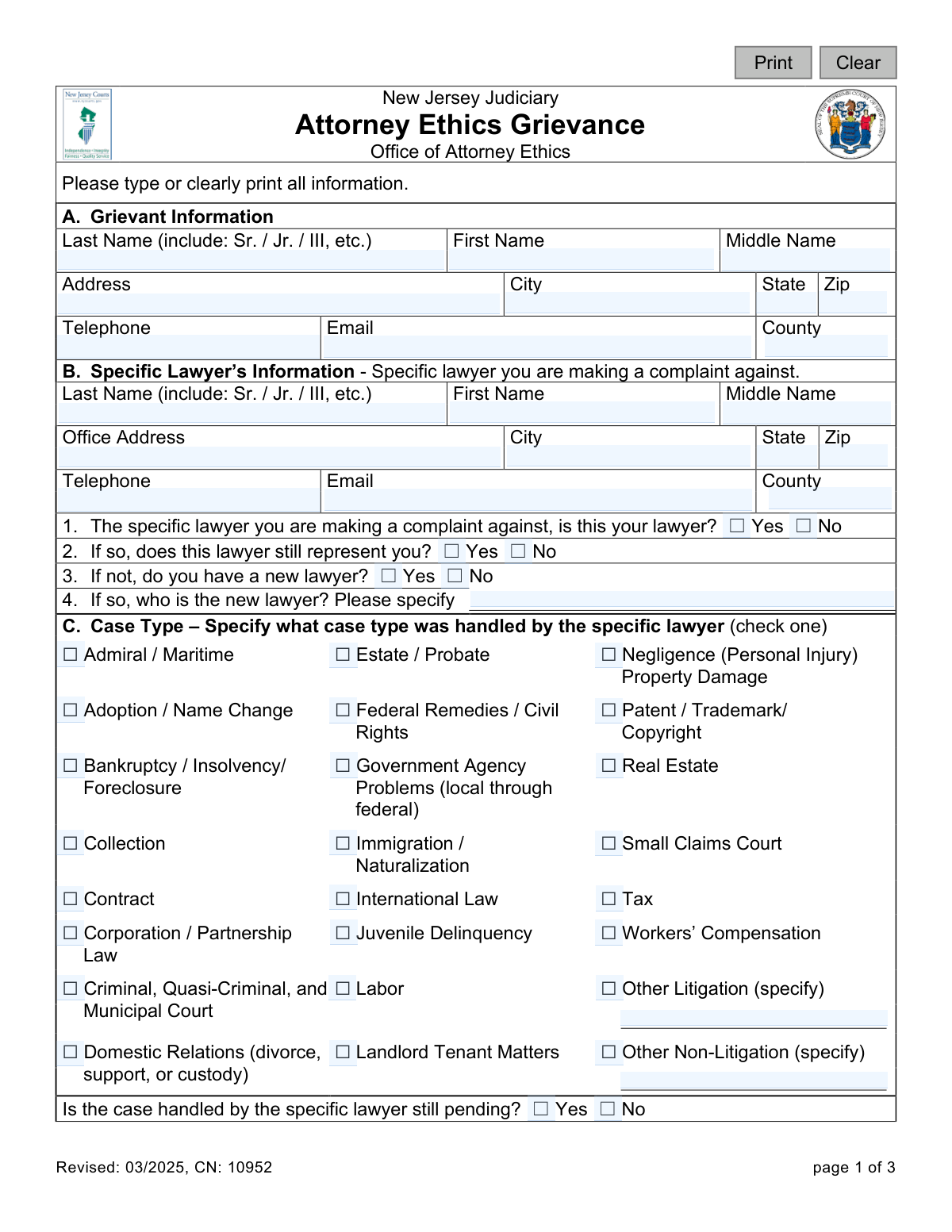
Yes! You can use AI to fill out New Jersey Judiciary Attorney Ethics Grievance
This is the official form provided by the New Jersey Judiciary for individuals to file a grievance against an attorney they believe has acted unethically. It is a critical tool for maintaining professional standards and accountability within the legal profession in New Jersey. Today, this form can be filled out quickly and accurately using AI-powered services like Instafill.ai, which can also convert non-fillable PDF versions into interactive fillable forms.
CN 10952 is part of the
New Jersey forms category on Instafill.
Our AI automatically handles information lookup, data retrieval, formatting, and form filling.
It takes less than a minute to fill out CN 10952 using our AI form filling.
Securely upload your data. Information is encrypted in transit and deleted immediately after the form is filled out.
Form specifications
| Form name: | New Jersey Judiciary Attorney Ethics Grievance |
| Number of fields: | 71 |
| Number of pages: | 1 |
| Language: | English |
Instafill Demo: How to fill out PDF forms in seconds with AI
How to Fill Out CN 10952 Online for Free in 2026
Are you looking to fill out a CN 10952 form online quickly and accurately? Instafill.ai offers the #1 AI-powered PDF filling software of 2026, allowing you to complete your CN 10952 form in just 37 seconds or less.
Follow these steps to fill out your CN 10952 form online using Instafill.ai:
- 1 Navigate to Instafill.ai and upload or select the New Jersey Attorney Ethics Grievance form.
- 2 Use the AI assistant to accurately fill in your personal details in the 'Grievant Information' section.
- 3 Provide the complete information for the lawyer you are filing the complaint against in Section B.
- 4 Check the appropriate box to indicate the 'Case Type' and answer the related questions about your legal representation.
- 5 In Section E, write a detailed statement explaining the nature of your grievance, including all relevant facts, dates, and names.
- 6 Disclose any other related complaints or pending litigation in Section D.
- 7 Carefully review all entered information for accuracy, then digitally sign and date the form before submitting it to the Office of Attorney Ethics.
Our AI-powered system ensures each field is filled out correctly, reducing errors and saving you time.
Why Choose Instafill.ai for Your Fillable CN 10952 Form?
Speed
Complete your CN 10952 in as little as 37 seconds.
Up-to-Date
Always use the latest 2026 CN 10952 form version.
Cost-effective
No need to hire expensive lawyers.
Accuracy
Our AI performs 10 compliance checks to ensure your form is error-free.
Security
Your personal information is protected with bank-level encryption.
Frequently Asked Questions About Form CN 10952
This form is used to file a formal complaint with the New Jersey Judiciary's Office of Attorney Ethics against a lawyer you believe has engaged in unethical conduct.
The grievant is you—the person filing the complaint against the attorney. You must provide your full name and contact information in this section.
You should provide the lawyer's full name, office address, and contact information in Section B. Fill in as much detail as you can to ensure the correct attorney is identified.
In Section E, clearly describe what the lawyer did or failed to do that you believe was unethical. Include relevant facts, dates, places, and the names of any witnesses to support your claim.
Yes, you should attach copies (not originals) of any important letters, contracts, emails, or other documents that support your grievance.
If your specific case type is not listed in Section C, check the 'Other Litigation' or 'Other Non-Litigation' box and write a brief description of the matter.
According to the form, you should allow up to 45 days for the initial review of your grievance after it is received by the district secretary.
Yes, you can file a grievance against an attorney who is currently representing you. Section B of the form asks you to specify if the lawyer still represents you.
You may say that you filed a grievance, but you must keep any documents you receive during the investigation confidential. To protect the investigation's integrity, it is recommended not to discuss the case with anyone besides disciplinary officials.
The form should be sent to the appropriate district ethics committee secretary for the Office of Attorney Ethics. You should check the New Jersey Judiciary website for the correct and most current mailing address.
Yes, services like Instafill.ai use AI to help you accurately auto-fill form fields from your saved profile, which saves time and helps prevent errors.
Simply upload the PDF form to the Instafill.ai platform. You can then type your information directly into the fields, add a digital signature, and download the completed document.
If you have a non-fillable or 'flat' PDF, you can upload it to Instafill.ai. The service will automatically convert it into an interactive, fillable form that you can complete on your computer.
Compliance CN 10952
Validation Checks by Instafill.ai
1
Ensures Grievant and Lawyer Names are Provided
This validation confirms that the first and last name fields for both the grievant (Section A) and the specific lawyer (Section B) are not empty. These names are fundamental for identifying the parties involved in the grievance and are essential for initiating any investigation. A failure to provide these names would render the form incomplete and prevent the Office of Attorney Ethics from processing the complaint.
2
Requires at least one Grievant Contact Method
This check verifies that the grievant has provided either a telephone number or an email address in Section A. It is critical for the Office of Attorney Ethics to be able to communicate with the grievant for follow-up questions, status updates, or requests for more information. If neither contact method is provided, the form submission will be rejected as it would be impossible to proceed with the investigation.
3
Validates Phone Number Format
This check ensures that any entered phone numbers in the grievant or lawyer information sections adhere to a standard North American format, such as (XXX) XXX-XXXX or XXX-XXX-XXXX. This prevents data entry errors and ensures the phone numbers are functional for communication purposes. An invalid format would trigger an error message prompting the user to correct the entry before submission.
4
Validates Email Address Format
This validation confirms that any email address entered in the grievant or lawyer information sections follows the standard '[email protected]' format. Correctly formatted email addresses are crucial for reliable electronic communication regarding the grievance. An invalid email format would prevent the system from sending or receiving important case-related correspondence, so the user must correct it to proceed.
5
Ensures Valid ZIP Code Format
This check verifies that the ZIP code fields for both the grievant and lawyer addresses contain either a 5-digit or 9-digit (ZIP+4) number. Accurate ZIP codes are essential for mailing physical documents and correctly identifying the geographic location of the parties. An invalid format would cause mail delivery failures and could delay the processing of the grievance.
6
Conditional Logic for Representation Status
This validation ensures that Question B2 ('does this lawyer still represent you?') is only presented and required if the user answers 'Yes' to Question B1 ('is this your lawyer?'). This creates a logical flow and prevents users from answering irrelevant questions. If the lawyer is not the user's lawyer, their current representation status by that lawyer is a moot point.
7
Conditional Requirement for New Lawyer's Name
This check enforces a two-part conditional logic. First, Question B3 ('do you have a new lawyer?') is only enabled if the user answers 'No' to Question B2. Second, if the user then answers 'Yes' to Question B3, the text field for the new lawyer's name becomes a required field. This ensures the form only collects relevant information when applicable.
8
Requires at least one Case Type Selection
This validation ensures that the user has selected at least one checkbox from the 'Case Type' list in Section C. Understanding the area of law involved is critical for routing the grievance to the appropriate investigative staff with the relevant expertise. A submission without a case type would be considered incomplete and would require the user to make a selection.
9
Requires Specification for 'Other' Case Types
This check is triggered if the user selects the 'Other Litigation' or 'Other Non-Litigation' checkbox in the Case Type section. It validates that the corresponding 'specify' text field is not left empty. This is important because 'Other' is not a useful category on its own; the specific details are needed for proper classification and review of the grievance.
10
Conditional Requirement for Other Complaint Details
This validation ensures that if a user answers 'Yes' to Question D1 ('Have you filed a complaint... with any other... agency?'), they must provide the agency name and date filed. This information is crucial for coordinating investigations and avoiding duplicative efforts. Failure to provide these details after indicating a prior complaint would result in an error, prompting the user to complete the section.
11
Conditional Requirement for Pending Lawsuit Details
This check validates that if a user answers 'Yes' to Question D2 ('Is the matter... the subject of a pending civil lawsuit...?'), they must provide the Court Name and Docket Number. This information allows the ethics committee to understand the full legal context of the grievance and determine if there are jurisdictional issues to consider. The form cannot be submitted without these details if the user indicates a pending lawsuit exists.
12
Ensures Substantive Grievance Narrative
This validation checks that the 'Nature of Grievance' text area in Section E is not empty and meets a minimum character count, such as 50 characters. This is the most critical part of the form, and this check prevents submissions with blank or trivial descriptions. It ensures that the grievant provides enough detail for an initial assessment of the ethical complaint.
13
Validates Signature Date
This check ensures the 'Date' field next to the signature is filled with a valid date and that the date is not in the future. The signature date legally attests to when the grievance was finalized by the grievant. A future date is logically impossible and would invalidate the attestation, so the system must reject it.
14
Requires Grievant Signature
This validation confirms that the 'Signature of Grievant' field has been completed before submission. In a digital context, this might be a typed name or a clicked checkbox that signifies legal agreement and attestation to the facts presented. The signature is a legal requirement for the grievance to be considered valid and for the investigation to begin.
Common Mistakes in Completing CN 10952
Filers often write a long, emotional account of their dissatisfaction rather than a factual statement of unethical conduct. This makes it difficult for investigators to identify specific violations of the Rules of Professional Conduct. To avoid this, clearly and chronologically state what the lawyer did or failed to do, including specific dates, facts, and references to any supporting documents.
The form instructs filers to attach copies of important letters and documents, but many forget this step. A grievance without supporting evidence is significantly weaker and may be dismissed for lack of proof. Before submitting, gather all relevant emails, letters, contracts, and court filings mentioned in your narrative and ensure copies are included with the form.
The form explicitly requests that information be typed or clearly printed, but submissions are often difficult to read. Illegible handwriting can lead to data entry errors, delays, or even rejection of the grievance if key information like names and addresses cannot be deciphered. If the form is a non-fillable PDF, tools like Instafill.ai can convert it into an electronically fillable version to ensure perfect clarity.
People sometimes misspell the attorney's name, provide an outdated office address, or omit the attorney's middle name or suffix. This can significantly delay the investigation as the Office of Attorney Ethics must first locate and positively identify the correct lawyer. Always verify the attorney's full name and current contact information using the state bar association's directory before filling out the form.
Grievants occasionally omit their own phone number, email, or complete mailing address. This is a critical error, as the ethics office will be unable to contact you for additional information, provide updates, or notify you of the outcome. Double-check that all fields in Section A are complete and accurate to ensure the lines of communication remain open.
Forgetting to sign and date the form in Section F is a simple but fatal mistake that renders the entire grievance invalid. An unsigned submission cannot be processed and will be returned or discarded, forcing you to start the process over. Always perform a final check to ensure you have provided a valid signature and the current date before mailing.
The form contains several fields, such as 'Other Litigation' or 'new lawyer', that require specific details if a preceding box is checked. Filers often check 'Yes' or 'Other' but then fail to provide the required explanation in the corresponding text box. This leaves critical information gaps, so be sure to provide the requested details anytime you see a 'specify' instruction.
In Section D, when a filer indicates there is a related lawsuit or complaint, they often fail to provide the complete docket number, court name, or agency details. This information is essential for the investigators to understand the full context of the dispute and check for jurisdictional conflicts. Before submitting, locate the precise details for any related legal matters.
The simple Yes/No questions in Section B regarding current and past representation are frequently skipped or answered incorrectly. The status of the attorney-client relationship is a key factor in assessing many potential ethics violations. Read each question carefully and provide a clear 'Yes' or 'No' answer to avoid creating confusion about the context of your grievance.
In Section C, filers may be unsure of the precise legal category and select one that is only partially correct or default to 'Other' without providing specifics. This can lead to the grievance being initially misclassified or misunderstood. Review the list carefully and choose the most accurate and specific case type that describes the matter the attorney handled for you.
Saved over 80 hours a year
“I was never sure if my IRS forms like W-9 were filled correctly. Now, I can complete the forms accurately without any external help.”
Kevin Martin Green
Your data stays secure with advanced protection from Instafill and our subprocessors

Robust compliance program
Transparent business model
You’re not the product. You always know where your data is and what it is processed for.
ISO 27001, HIPAA, and GDPR
Our subprocesses adhere to multiple compliance standards, including but not limited to ISO 27001, HIPAA, and GDPR.
Security & privacy by design
We consider security and privacy from the initial design phase of any new service or functionality. It’s not an afterthought, it’s built-in, including support for two-factor authentication (2FA) to further protect your account.
Fill out CN 10952 with Instafill.ai
Worried about filling PDFs wrong? Instafill securely fills new-jersey-judiciary-attorney-ethics-grievance forms, ensuring each field is accurate.