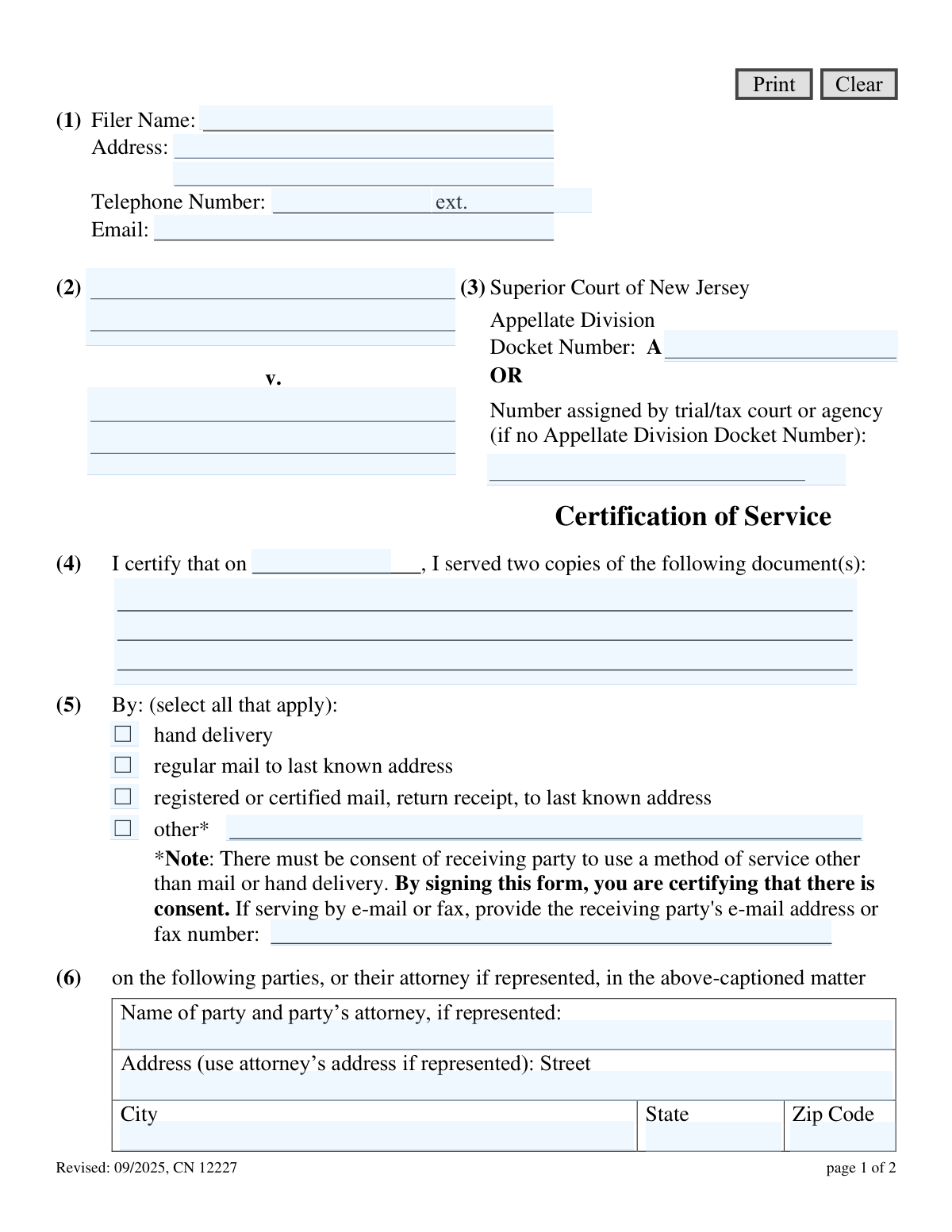
Yes! You can use AI to fill out New Jersey Judiciary Certification of Service - Appellate

This form is a legal document filed with the Superior Court of New Jersey, Appellate Division, to certify that copies of case documents have been served to all other involved parties. It is a crucial step in the legal process, providing proof of service and ensuring all parties are properly notified of filings. Today, this form can be filled out quickly and accurately using AI-powered services like Instafill.ai, which can also convert non-fillable PDF versions into interactive fillable forms.
CN 12227 is part of the New Jersey forms category on Instafill.
Our AI automatically handles information lookup, data retrieval, formatting, and form filling.
It takes less than a minute to fill out CN 12227 using our AI form filling.
Securely upload your data. Information is encrypted in transit and deleted immediately after the form is filled out.

Form specifications

Form name: New Jersey Judiciary Certification of Service - Appellate
Number of fields: 32
Number of pages: 1
Language: English
main-image

Instafill Demo: How to fill out PDF forms in seconds with AI

How to Fill Out CN 12227 Online for Free in 2026

Are you looking to fill out a CN 12227 form online quickly and accurately? Instafill.ai offers the #1 AI-powered PDF filling software of 2026, allowing you to complete your CN 12227 form in just 37 seconds or less.
Follow these steps to fill out your CN 12227 form online using Instafill.ai:
  1. 1 Navigate to Instafill.ai and upload or select the Certification of Service - Appellate (CN 12227) form.
  2. 2 Enter your personal information as the filer, including your name, address, and contact details.
  3. 3 Input the case details, such as the case caption and the Appellate Division docket number.
  4. 4 Specify the date of service and list all the documents that were served on the other parties.
  5. 5 Indicate the method of service used (e.g., hand delivery, mail) and provide any required additional information for methods like email or fax.
  6. 6 List the names and addresses of each party (or their attorney) that received the documents.
  7. 7 Review the entire form for accuracy, then digitally sign and date to certify the truthfulness of your statements.

Our AI-powered system ensures each field is filled out correctly, reducing errors and saving you time.

Why Choose Instafill.ai for Your Fillable CN 12227 Form?

Speed

Complete your CN 12227 in as little as 37 seconds.

Up-to-Date

Always use the latest 2026 CN 12227 form version.

Cost-effective

No need to hire expensive lawyers.

Accuracy

Our AI performs 10 compliance checks to ensure your form is error-free.

Security

Your personal information is protected with bank-level encryption.

Frequently Asked Questions About Form CN 12227

This form is a sworn statement used to prove that you have sent copies of your legal documents to all other parties involved in your New Jersey Appellate Division case. It must be filed with the court along with the documents you are serving.

Anyone filing documents, such as a motion or brief, with the New Jersey Appellate Division must complete and file this form. It certifies that you have provided copies of those documents to the opposing parties in the case.

If you are filing this form with your initial Notice of Appeal, you likely won't have an Appellate Division number. In that case, leave that line blank and enter the docket number from the trial court or agency in the space below it.

You must list the full title of every document you are serving on the other parties. For example, you would write "Notice of Motion for Summary Judgment" and "Brief in Support of Motion."

Yes, but only if the receiving party has consented to being served by email. By selecting "other" and providing their email address, you are certifying to the court that you have obtained their permission.

If a party is represented by an attorney, you must serve the documents on their attorney, not the party directly. Use the attorney's name and office address in section (6) of the form.

If you need to serve more than two parties, you can attach an additional page listing the extra parties and their service information. Be sure to reference the attachment on the main form.

"Et al." is an abbreviation for "and others." The court requires you to write out the full names of all parties in the case caption exactly as they appear on the original court papers, without using abbreviations.

Your signature certifies that all statements on the form are true and that you have served the documents as described. Knowingly providing false information can subject you to punishment under court rules.

This form should be filed with the Appellate Division along with the legal documents you are serving. It is not sent by itself but accompanies your main filing, such as a motion or brief.

As stated in section (4) of the form, you are certifying that you served two copies of the listed documents on each party or their attorney.

Yes, services like Instafill.ai use AI to accurately auto-fill form fields, which can save time and help reduce errors. The AI can pull information from your case files to populate the form.

To use Instafill.ai, you upload the Certification of Service PDF to the platform. The AI will make the fields interactive, allowing you to quickly type your information, e-sign, and download the completed document.

If you have a non-fillable or "flat" PDF, you can use a service like Instafill.ai. Upload the file, and the tool will convert it into an interactive, fillable form that you can complete and sign on your computer.

Compliance CN 12227
Validation Checks by Instafill.ai

1
Filer Information Completeness
This check verifies that the filer's name (svcName) and full address (svcAddrStr) are provided. This information is fundamental for identifying the person making the certification and is required for official court records. If these fields are empty, the form submission should be blocked and the user prompted to provide the necessary information.
2
Valid Filer Email Format
This validation ensures the text entered into the 'Email' field (svcEmail) conforms to a standard email address format (e.g., [email protected]). A valid email is crucial for electronic communication from the court and other parties. If the format is invalid, the system should display an error message and prevent submission until the address is corrected.
3
Docket Number Presence
This check ensures that either the 'Appellate Division Docket Number' (svcCaseDocket) or the 'trial/tax court or agency number' (svcCaseDocket2) is filled out. A case identifier is essential for the clerk's office to associate the certification with the correct legal matter. The form should be rejected if both fields are left blank.
4
Prohibits 'et al.' in Case Caption
This validation scans the case caption fields (svcPlaName, svcDefName) to ensure they do not contain the abbreviation 'et al.'. The form's instructions explicitly require all party names to be written in full. This check enforces compliance with court rules, and if 'et al.' is detected, it should trigger a warning or error asking the user to list all parties.
5
Service Date and Document List Required
This check verifies that both the date of service (serviceDt) and the list of documents served (serviceDocs) are filled in. These two fields form the core of the certification, specifying what was served and when. A submission lacking either piece of information is incomplete and legally insufficient, so validation failure should block submission.
6
Logical Date Consistency
This validation compares the 'Date of Service' (serviceDt) with the 'Signature Date' (sig12227Dt) to ensure the service date is on or before the signature date. A person cannot legally certify an action that has not yet occurred. If the service date is in the future relative to the signature date, an error should be displayed, requiring the user to correct the dates.
7
Method of Service Selection
This check ensures that at least one method of service checkbox (serviceHand, serviceRegular, serviceRegistered, or serviceOther) is selected. The manner of service is a critical legal detail that must be recorded. If no method is selected, the form is incomplete and the user must be prompted to choose one before the form can be submitted.
8
Conditional Requirement for 'Other' Service Method
If the 'other' method of service checkbox (serviceOther) is selected, this validation confirms that the corresponding description field (serviceOtherDesc) is not empty. The rules require an explanation for non-standard service methods like email or fax. Failure to provide this explanation should result in an error message prompting the user to describe the 'other' method used.
9
At Least One Party Served
This check validates that the name and address information for at least the first party served (service1Name, service1AddrStr, etc.) is completed. A certification of service is meaningless if it does not state who received the documents. The system should prevent submission if no receiving party details are provided.
10
Served Party Complete Address
If a party's name (e.g., service1Name) is entered, this validation ensures all corresponding address fields (Street, City, State, Zip Code) are also filled. A partial address is insufficient for proper legal service and can be challenged. This check ensures data integrity and completeness for each party listed.
11
Valid ZIP Code Format
This check validates that the ZIP code fields (service1AddrZip, service2AddrZip) contain a string that matches a valid 5-digit or 9-digit (XXXXX-XXXX) format. Correct ZIP codes are essential for ensuring the validity of service by mail and for maintaining accurate records. An invalid format should prompt the user for correction.
12
Signature Date and Printed Name Required
This validation ensures the 'Date' (sig12227Dt) and 'Print Name' (sig12227Name) fields in the signature block are both filled. The signature date establishes when the certification was made, and the printed name legibly identifies the signatory. The form is not properly executed without this information, and submission should be blocked if they are missing.

Common Mistakes in Completing CN 12227

Using 'et al.' in the Case Caption

Filers often abbreviate the case caption by using 'et al.' instead of listing all party names, despite instructions explicitly forbidding this. This happens out of habit or an attempt to save space. An incorrect caption can lead to the document being misfiled or rejected, as it creates ambiguity about the parties involved. Always copy the full case caption exactly as it appears on prior court documents.

Incorrect Docket Number Entry

People frequently get confused between the 'Appellate Division Docket Number' and the 'trial/tax court number', entering the wrong one or leaving both blank. This confusion causes significant processing delays as court clerks must manually search for the correct case file. To avoid this, use the Appellate Division number if one has been assigned; otherwise, use the number from the lower court or agency as instructed.

Omitting the Date of Service

Forgetting to fill in the date of service in section (4) is a critical error that invalidates the entire certification. This date is the most crucial piece of information on the form, as it establishes the timeline for legal deadlines. An omission or mistake here can lead to the filing being deemed untimely and rejected by the court.

Improper Use of 'Other' Service Methods

A serious mistake is selecting 'other' for service by email or fax without first obtaining consent from the receiving party. The form clearly states that by signing, the filer certifies that consent was given, creating a legal attestation. If consent was not actually obtained, the service can be challenged and deemed invalid, forcing the filer to re-serve documents and potentially miss deadlines.

Serving a Represented Party Directly

Filers, especially those without legal experience, often mistakenly serve the opposing party at their personal address instead of serving their attorney. The instructions and rules of court require service to be made upon a party's attorney if they are represented. This error can invalidate the service and may require the filer to start the process over again.

Vague Description of Served Documents

In section (4), filers may list documents with generic descriptions like 'motion' or 'briefs'. This is insufficient and can create disputes about what was actually served. Each document must be listed with its full, specific title, such as 'Notice of Motion for Leave to Appeal' or 'Appellant's Reply Brief', to create a clear and indisputable record.

Forgetting to Sign the Certification

An unsigned Certification of Service is legally void and will be rejected by the court clerk. This simple oversight, often made in haste, completely nullifies the document's purpose. Forgetting to sign in section (9) will result in filing delays and can cause a party to miss a critical deadline, with potentially severe consequences for their case.

Incomplete or Illegible Filer Information

Filers often provide incomplete contact details or write illegibly in section (1), making it difficult for the court or other parties to send notices or communicate. Since many court forms are non-fillable PDFs, this problem is common. Using a tool like Instafill.ai can convert the form into a fillable version and auto-populate the information clearly and accurately, preventing communication breakdowns.

Failing to List All Parties Served

In cases with multiple opposing parties, filers sometimes only list one or two in section (6) and forget the others. The form requires certification of service on every party to the action. Failing to list a party means there is no proof of service for them, which can lead to legal challenges, sanctions, and delays in the case.

Confusing the Service Date with the Signature Date

The form requires two separate dates: the date of service in section (4) and the date of signature in section (8). Filers often incorrectly use the same date for both, even if the events occurred on different days. The date of service is the legally significant date for calculating deadlines, and it must be recorded with absolute accuracy to ensure the certification is valid.
Saved over 80 hours a year

“I was never sure if my IRS forms like W-9 were filled correctly. Now, I can complete the forms accurately without any external help.”

Kevin Martin Green

Your data stays secure with advanced protection from Instafill and our subprocessors

Robust compliance program

Transparent business model

You’re not the product. You always know where your data is and what it is processed for.

ISO 27001, HIPAA, and GDPR

Our subprocesses adhere to multiple compliance standards, including but not limited to ISO 27001, HIPAA, and GDPR.

Security & privacy by design

We consider security and privacy from the initial design phase of any new service or functionality. It’s not an afterthought, it’s built-in, including support for two-factor authentication (2FA) to further protect your account.

Fill out CN 12227 with Instafill.ai

Worried about filling PDFs wrong? Instafill securely fills new-jersey-judiciary-certification-of-service-appellate forms, ensuring each field is accurate.