Yes! You can use AI to fill out New Jersey Judiciary DCP&P Request for Adult Probation or Pretrial Services Records

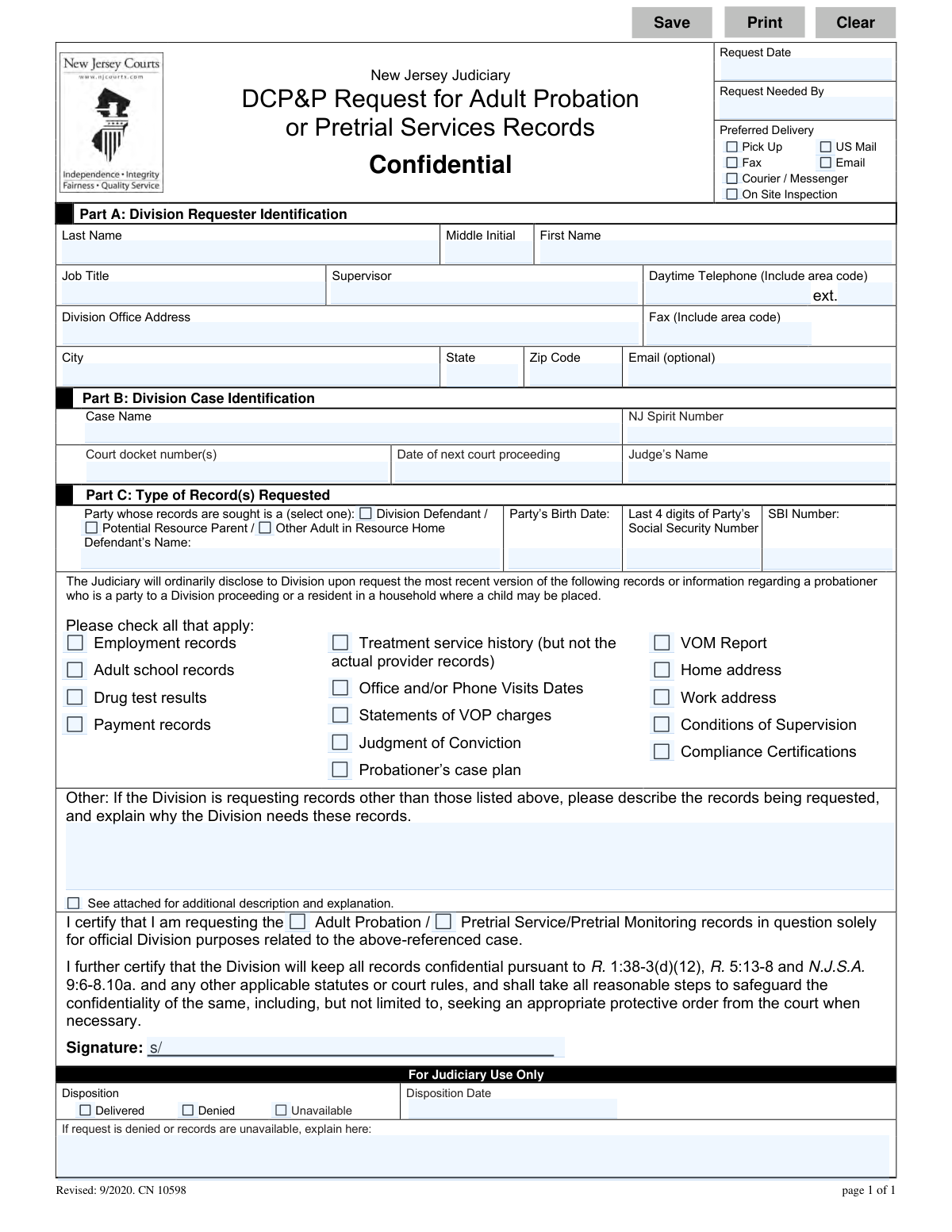
This form, officially titled the 'DCP&P Request for Adult Probation or Pretrial Services Records,' is a confidential document used within the New Jersey Judiciary system. It allows the Division of Child Protection and Permanency (DCP&P) to formally request sensitive records about an adult involved in a child welfare case, which is crucial for making informed decisions about child safety and placement. Today, this form can be filled out quickly and accurately using AI-powered services like Instafill.ai, which can also convert non-fillable PDF versions into interactive fillable forms.
CN 10598 is part of the New Jersey forms category on Instafill.
Our AI automatically handles information lookup, data retrieval, formatting, and form filling.
It takes less than a minute to fill out CN 10598 using our AI form filling.
Securely upload your data. Information is encrypted in transit and deleted immediately after the form is filled out.

Form specifications

Form name: New Jersey Judiciary DCP&P Request for Adult Probation or Pretrial Services Records
Number of fields: 60
Number of pages: 1
Language: English
main-image

Instafill Demo: How to fill out PDF forms in seconds with AI

How to Fill Out CN 10598 Online for Free in 2026

Are you looking to fill out a CN 10598 form online quickly and accurately? Instafill.ai offers the #1 AI-powered PDF filling software of 2026, allowing you to complete your CN 10598 form in just 37 seconds or less.
Follow these steps to fill out your CN 10598 form online using Instafill.ai:
  1. 1 Navigate to Instafill.ai and upload or select the 'DCP&P Request for Adult Probation or Pretrial Services Records' form.
  2. 2 Complete Part A by providing your identification details as the DCP&P requester, including your name, title, office, and contact information.
  3. 3 Fill in Part B with the specific case identification, such as the case name, NJ Spirit number, and court docket number.
  4. 4 In Part C, identify the party whose records are being sought, providing their name, birth date, and the last four digits of their Social Security number.
  5. 5 Check the boxes corresponding to the specific records you are requesting, such as employment records, drug test results, or conditions of supervision.
  6. 6 Certify the request by signing the form, affirming the information will be used for official purposes and kept confidential.
  7. 7 Review all the information entered by the AI for accuracy, and then download, print, or submit the completed form as required.

Our AI-powered system ensures each field is filled out correctly, reducing errors and saving you time.

Why Choose Instafill.ai for Your Fillable CN 10598 Form?

Speed

Complete your CN 10598 in as little as 37 seconds.

Up-to-Date

Always use the latest 2026 CN 10598 form version.

Cost-effective

No need to hire expensive lawyers.

Accuracy

Our AI performs 10 compliance checks to ensure your form is error-free.

Security

Your personal information is protected with bank-level encryption.

Frequently Asked Questions About Form CN 10598

This form is used by the New Jersey Division of Child Protection and Permanency (DCP&P) to officially request confidential records from the NJ Judiciary's Adult Probation or Pretrial Services divisions for a case-related investigation.

Only an employee of the Division of Child Protection and Permanency (DCP&P) can complete this form for official purposes related to a specific DCP&P case.

You will need the DCP&P Case Name, the NJ Spirit Number, and any relevant court information such as the docket number, date of the next proceeding, and the judge's name.

You must provide the person's full name, date of birth, the last four digits of their Social Security Number, and their SBI number if available. You also need to specify their role in the case, such as a Division Defendant or Potential Resource Parent.

Check the 'Other' box and provide a detailed description of the records you need and a clear explanation for why the Division requires them. You can attach a separate page if more space is needed.

By signing the form, you certify that the records will be kept confidential and used only for official Division purposes, in accordance with state laws and court rules.

You should submit this form to the specific Adult Probation or Pretrial Services office of the New Jersey Judiciary that holds the records you are requesting.

The form does not specify a standard processing time, but you can indicate a 'Request Needed By' date to communicate the urgency of your request.

If the Judiciary denies your request or the records are unavailable, the 'For Judiciary Use Only' section on the form will be completed with an explanation for the denial.

Yes, services like Instafill.ai can use AI to accurately auto-fill form fields with your saved information, which can save you significant time and reduce errors.

You can use a service like Instafill.ai to upload the PDF, which makes it an interactive, fillable form that you can complete and sign electronically directly in your browser.

Tools like Instafill.ai can convert flat, non-fillable PDFs into interactive forms, allowing you to easily type your information into the correct fields online.

Yes, you must sign the form to certify that the request is for official Division purposes and that you will maintain the confidentiality of any records received.

Compliance CN 10598
Validation Checks by Instafill.ai

1
Request Date vs. Needed By Date Logical Check
This validation ensures the 'Request Needed By' date ('ReqNeedByDt') is on or after the 'Request Date' ('ReqDt'). This is a critical logical check to prevent impossible requests, such as needing records before they were even requested. If this validation fails, the user should be prompted to correct one or both dates as it indicates a data entry error.
2
Requester Identification Completeness
This check verifies that all fields in Part A, the 'Division Requester Identification' section, are filled out completely. This includes name, title, supervisor, phone, and address. This information is essential for verifying the requester's identity, ensuring the request is legitimate, and knowing where to send the records or who to contact with questions. A failed validation would prevent submission until all required fields are completed.
3
Case Identification Completeness
This validation ensures that the 'Case Name' and 'NJ Spirit Number' fields in Part B are mandatory and filled. These identifiers are crucial for the Judiciary to locate the correct case file to which the record request pertains. Without this information, the request is ambiguous and cannot be processed, so a failure would halt the submission.
4
Party Identification Completeness
This check confirms that the 'Defendant’s Name' ('DefNames'), 'Party’s Birth Date' ('DefBirthDt'), and 'Last 4 digits of Party’s Social Security Number' ('SsnDigits') are all provided. These three data points are critical for accurately and uniquely identifying the individual whose records are being sought, preventing the release of information for the wrong person. A missing field would result in an error, requiring the user to provide the information.
5
SSN Last 4 Digits Format
This validation ensures the 'Last 4 digits of Party’s Social Security Number' field ('SsnDigits') contains exactly four numeric digits. This maintains data integrity and ensures the identifier is in the correct format for database lookups. An entry with letters, symbols, or an incorrect number of digits would be rejected, prompting the user to enter a valid 4-digit number.
6
Requester Phone Number Format
This check validates that the 'Daytime Telephone' field ('ReqPhoneDay') is a valid 10-digit US phone number. A properly formatted number is essential for Judiciary staff to be able to contact the requester if there are any issues or questions regarding the request. The validation should reject entries that do not conform to standard phone number formats (e.g., (XXX) XXX-XXXX or XXXXXXXXXX).
7
Conditional 'Other' Records Explanation
This validation rule ensures that if the 'Other' checkbox is selected for the type of records requested, the corresponding text area ('ReqDetails') must not be empty. This is important because 'Other' requests require specific justification and description for the Judiciary to evaluate and fulfill them. If 'Other' is checked and the explanation is missing, the form submission should be blocked until the user provides the necessary details.
8
Exclusive Party Type Selection
This check ensures that exactly one option is selected for the 'Party whose records are sought' field ('PartyType'). The party must be clearly identified as either a 'Division Defendant', 'Potential Resource Parent', or 'Other Adult in Resource Home'. Selecting none or more than one creates ambiguity, so the system should enforce a single choice.
9
Signature Certification Requirement
This validation verifies that the signature field ('sig') has been completed, indicating the requester's certification of the request's purpose and their agreement to maintain confidentiality. The signature is a legal attestation that is fundamental to the request's validity and compliance with regulations. A form submitted without a signature would be considered incomplete and invalid.
10
Conditional Disposition Explanation
This check is for the 'For Judiciary Use Only' section and ensures that if the 'Disposition' ('Dispo') is marked as 'Denied' or 'Unavailable', the explanation field ('DipsoDeniedExplain') must be filled out. This provides a necessary audit trail and communicates the reason for the denial back to the requester. This business rule ensures proper process completion by the Judiciary user.
11
Record Type Selection Requirement
This validation ensures that at least one checkbox from the list of available records (e.g., 'Employment records', 'Drug test results') is selected. A request must specify what information is being sought. If no records are selected, the request is pointless and cannot be processed, so the form should not be submittable.
12
Requester Email Format
This validation checks that if the optional 'Email' field ('ReqEmail') is filled in, its content conforms to a standard email address format (e.g., [email protected]). While optional, if a user provides an email, it should be a valid one to ensure successful electronic communication or delivery. An invalid format would trigger an error message asking the user to correct the entry or leave it blank.
13
Party Birth Date Validity
This check validates that the 'Party's Birth Date' ('DefBirthDt') is a plausible, valid date in the past. It also confirms the date corresponds to an individual who is at least 18 years old, as the form is for 'Adult Probation' records. This prevents nonsensical dates and helps ensure the request aligns with the form's stated purpose. A failure would require the user to correct the date.
14
Exclusive Record Scope Selection
This validation ensures that in the certification section, exactly one of 'Adult Probation' or 'Pretrial Service/Pretrial Monitoring' is selected for the 'recordType' field. This selection clarifies the specific Judiciary division from which records are being requested, which is critical for routing the request correctly. The form should prevent the user from selecting both or neither option.

Common Mistakes in Completing CN 10598

Incomplete or Incorrect Case Identification Numbers

Users often leave fields like the 'NJ Spirit Number' or 'Court docket number(s)' blank or enter them with transposed digits. This happens due to carelessness or not having the information readily available when filling out the form. An incorrect identifier will make it impossible for the Judiciary to locate the correct case file, leading to an automatic denial or significant delays while they request clarification. To avoid this, always double-check all numbers against the official case file before submission.

Submitting an Unsigned Form

In a rush to complete the form, requesters frequently forget to sign the certification at the bottom. An unsigned request is legally invalid and cannot be processed, as the signature certifies the confidentiality and official purpose of the request. This results in an immediate rejection of the form, forcing the user to resubmit and delaying the entire process. Always perform a final review of the entire document, paying special attention to the signature line before sending.

Omitting Critical Party Identification Details

Requesters may fail to provide the party's birth date, the last four digits of their Social Security Number, or the SBI number in Part C. This information is crucial for distinguishing the subject from other individuals with similar names. Without these unique identifiers, the Judiciary may pull the wrong person's records or deny the request due to ambiguity, compromising the case and causing delays. Ensure all available identifiers are accurately entered to guarantee the correct records are located.

Providing a Vague 'Other' Records Description

When needed records are not listed as checkboxes, users might write a generic request like 'all available records' or 'entire case file' in the 'Other' section without the required explanation. The form explicitly requires a detailed description and justification for non-standard requests. A vague entry will likely be denied, as the Judiciary needs to understand the specific need in order to release confidential information. Clearly articulate what records are needed and why they are essential for the Division's official purpose.

Entering Incomplete Requester Contact Information

Errors in Part A, such as a wrong phone number, missing extension, or an incomplete office address, are common during manual data entry. These mistakes can severely hinder communication if the Judiciary has a question or needs to clarify part of the request. Incorrect contact information means they cannot reach the requester, leading to the request being denied or marked as 'Unavailable.' Using an AI-powered form filling tool like Instafill.ai can prevent this by auto-filling saved contact profiles, ensuring accuracy every time.

Failing to Specify the Party's Role

In Part C, the form requires the user to select whether the person whose records are sought is a 'Defendant / Division,' 'Potential Resource Parent,' or 'Other Adult in Resource Home.' Overlooking this simple checkbox is a frequent error. This selection provides critical context for the request and may affect which records can be released, so failing to specify the role can cause processing delays or a request for clarification. Always review all checkboxes on the form before submission.

Setting an Unrealistic 'Request Needed By' Date

In an effort to expedite the process, requesters sometimes enter the same day or the next day in the 'Request Needed By' field. This does not account for the Judiciary's internal processing time, mail delivery, or existing workload. Setting an unrealistic deadline does not guarantee faster service and may be ignored; it is better to provide a reasonable date that aligns with actual case deadlines, such as an upcoming court proceeding.

Omitting the Record Type in the Certification Statement

The final certification sentence requires the requester to select whether they are requesting 'Adult Probation' or 'Pretrial Service/Pretrial Monitoring' records. This is a small but crucial detail that is easily missed when focusing on the larger fields. Forgetting to check one of these boxes makes the certification incomplete and could cause the form to be returned for correction, delaying the fulfillment of the request.

Submitting a Form with Illegible Handwriting

When the form is printed and filled out by hand, poor handwriting can make critical information like names, docket numbers, and addresses unreadable. This forces the Judiciary staff to guess at the information, which can lead to searching for the wrong case, or to simply deny the request as unprocessable. To prevent this, it is always best to fill out the form electronically before printing. If the form is a non-fillable PDF, tools like Instafill.ai can convert it into a fillable version to ensure all entries are clear and legible.

Mismatching Case Name and Party Name

A user might correctly enter the 'Case Name' in Part B (e.g., 'State vs. John Smith') but then list a different individual in Part C's 'Defendant’s Name' field (e.g., 'Jane Doe,' another party in the household). This creates confusion about whose records are actually being requested. This ambiguity forces the Judiciary to seek clarification, delaying the request, or potentially leads to a denial. Ensure the name of the person whose records are sought in Part C is clearly linked to the case specified in Part B.
Saved over 80 hours a year

“I was never sure if my IRS forms like W-9 were filled correctly. Now, I can complete the forms accurately without any external help.”

Kevin Martin Green

Your data stays secure with advanced protection from Instafill and our subprocessors

Robust compliance program

Transparent business model

You’re not the product. You always know where your data is and what it is processed for.

ISO 27001, HIPAA, and GDPR

Our subprocesses adhere to multiple compliance standards, including but not limited to ISO 27001, HIPAA, and GDPR.

Security & privacy by design

We consider security and privacy from the initial design phase of any new service or functionality. It’s not an afterthought, it’s built-in, including support for two-factor authentication (2FA) to further protect your account.

Fill out CN 10598 with Instafill.ai

Worried about filling PDFs wrong? Instafill securely fills new-jersey-judiciary-dcpp-request-for-adult-probation-or-pretrial-services-records forms, ensuring each field is accurate.