Yes! You can use AI to fill out New Jersey Judiciary EEO Complaint Form: Report of Discrimination, Sexual Harassment, Retaliation

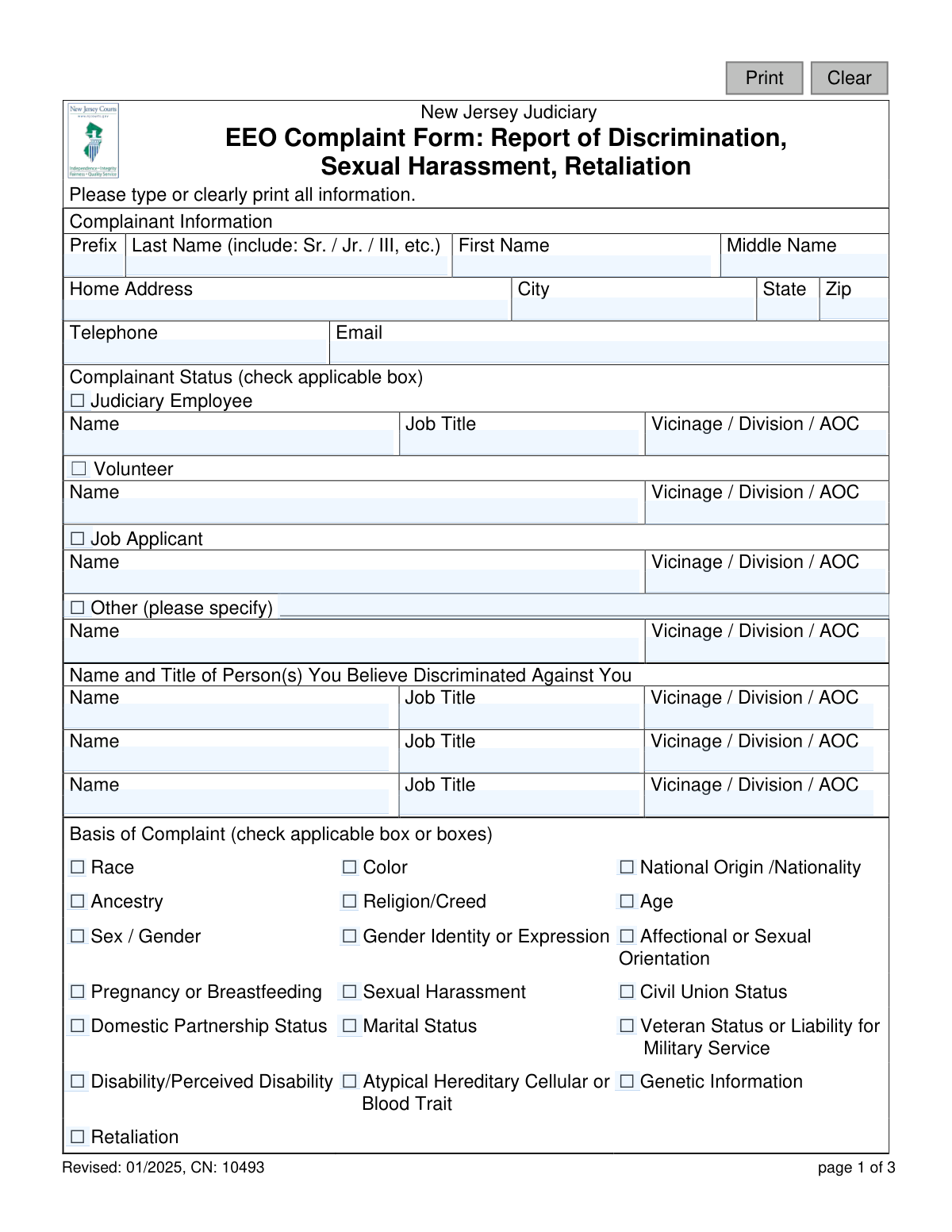
This is the official New Jersey Judiciary EEO Complaint Form, used by employees, volunteers, job applicants, and others to file a formal complaint of discrimination, sexual harassment, or retaliation. It allows individuals to detail the basis of their complaint, describe the incidents, and state the remedy they are seeking. Today, this form can be filled out quickly and accurately using AI-powered services like Instafill.ai, which can also convert non-fillable PDF versions into interactive fillable forms.
EEO Complaint Form (CN 10493) is part of the New Jersey forms category on Instafill.
Our AI automatically handles information lookup, data retrieval, formatting, and form filling.
It takes less than a minute to fill out EEO Complaint Form (CN 10493) using our AI form filling.
Securely upload your data. Information is encrypted in transit and deleted immediately after the form is filled out.

Form specifications

Form name: New Jersey Judiciary EEO Complaint Form: Report of Discrimination, Sexual Harassment, Retaliation
Number of fields: 79
Number of pages: 1
Language: English
main-image

Instafill Demo: How to fill out PDF forms in seconds with AI

How to Fill Out EEO Complaint Form (CN 10493) Online for Free in 2026

Are you looking to fill out a EEO COMPLAINT FORM (CN 10493) form online quickly and accurately? Instafill.ai offers the #1 AI-powered PDF filling software of 2026, allowing you to complete your EEO COMPLAINT FORM (CN 10493) form in just 37 seconds or less.
Follow these steps to fill out your EEO COMPLAINT FORM (CN 10493) form online using Instafill.ai:
  1. 1 Navigate to Instafill.ai and upload or select the New Jersey Judiciary EEO Complaint Form.
  2. 2 Enter your personal details in the 'Complainant Information' section, including your name, contact information, and status (e.g., employee, volunteer).
  3. 3 Provide the name, title, and location of the person(s) you believe discriminated against you.
  4. 4 In the 'Basis of Complaint' section, check all boxes that apply to your situation, such as race, gender, age, or retaliation.
  5. 5 Carefully describe each incident in the provided spaces, including the date of occurrence and whether it was previously reported.
  6. 6 Explain the desired outcome or 'Remedy Sought' to resolve the complaint.
  7. 7 Review all the information for accuracy, then digitally sign and date the form before submitting it to the appropriate EEO/AA Officer.

Our AI-powered system ensures each field is filled out correctly, reducing errors and saving you time.

Why Choose Instafill.ai for Your Fillable EEO Complaint Form (CN 10493) Form?

Speed

Complete your EEO Complaint Form (CN 10493) in as little as 37 seconds.

Up-to-Date

Always use the latest 2026 EEO Complaint Form (CN 10493) form version.

Cost-effective

No need to hire expensive lawyers.

Accuracy

Our AI performs 10 compliance checks to ensure your form is error-free.

Security

Your personal information is protected with bank-level encryption.

Frequently Asked Questions About Form EEO Complaint Form (CN 10493)

This form is used to officially report incidents of discrimination, sexual harassment, or retaliation that you believe you have experienced within the New Jersey Judiciary system.

You can file this form if you are a Judiciary employee, volunteer, job applicant, or another individual who has interacted with the NJ Judiciary and believes they have been subjected to discrimination or harassment.

You will need to provide your personal contact details, your status (e.g., employee, applicant), the name and title of the person(s) you are complaining against, and a detailed description of the incident(s).

Describe each incident separately and in as much detail as possible, including the date and location. However, do not identify any witnesses or mention background evidence on this form, as you will provide that separately to an investigator.

You should not name witnesses on the form because a copy is provided to the person you are filing the complaint against. You will have a separate, confidential opportunity to provide witness information to the investigator assigned to your case.

You can submit the signed form to your local EEO/AA Officer or directly to the Chief Judiciary EEO/AA Officer in the Administrative Office of the Courts (AOC).

After submission, your complaint will be reviewed, and an investigator will be assigned to your case. The investigator will contact you to gather more information, including evidence and witness statements.

In this section, you should explain what you would like to happen as a result of your complaint. This could be a request for the behavior to stop, disciplinary action, or another form of resolution.

Yes, the form notes that you have the right to file a complaint with external agencies like the New Jersey Division on Civil Rights (NJ DCR) or the federal Equal Employment Opportunity Commission (EEOC).

The form allows for up to five incidents, but you can attach additional pages if you need more space. Be sure to clearly label the attached pages and reference them on the main form.

Yes, services like Instafill.ai use AI to help you accurately auto-fill form fields, which can save time and help prevent errors.

Simply upload the EEO Complaint Form PDF to the Instafill.ai platform. The AI will make the fields interactive, allowing you to type your information, save your progress, and download the completed document.

If you have a non-fillable or 'flat' PDF, you can use a service like Instafill.ai. It can convert the document into an interactive, fillable form that you can easily complete on your computer.

Compliance EEO Complaint Form (CN 10493)
Validation Checks by Instafill.ai

1
Ensures Complainant Name is Complete
This check verifies that both the 'nameFirst' and 'nameLast' fields for the complainant are filled out. These fields are essential for identifying the individual filing the complaint and for all subsequent correspondence. If either field is missing, the form submission will be rejected with a message prompting the user to provide their full name.
2
Requires at Least One Complainant Contact Method
Validates that the user has provided at least one form of contact information, either a telephone number ('phoneHome') or an email address ('email'). This is critical for the EEO/AA Officer to communicate with the complainant regarding their case. If both fields are empty, the submission fails, and the user is instructed to provide at least one contact method.
3
Validates Email Address Format
This check ensures that if an email address is entered in the 'email' field, it conforms to a standard format (e.g., '[email protected]'). This prevents typos and ensures that communications sent to the provided address will be deliverable. An invalid format will trigger an error message asking the user to correct the email address before proceeding.
4
Verifies Complainant Status Selection
This validation ensures that the complainant has selected at least one checkbox indicating their status (e.g., Judiciary Employee, Volunteer, Job Applicant, Other). This information is fundamental to understanding the context of the complaint and determining jurisdiction. Failure to select a status will prevent form submission and prompt the user to make a selection.
5
Conditional Requirement for 'Other' Complainant Status
If the complainant selects the 'Other' checkbox under 'Complainant Status', this check ensures the corresponding text field ('cmplnantOtherSpecify') is not empty. This provides necessary context that is not captured by the predefined categories. If 'Other' is checked and the specification is blank, an error will require the user to describe their status.
6
Requires at Least One Basis for Complaint
This check verifies that at least one checkbox under the 'Basis of Complaint' section has been selected. The basis is the legal foundation of the EEO complaint (e.g., Race, Sex, Disability), and the form is invalid without it. If no basis is selected, the submission is blocked, and the user is required to choose the applicable basis for their complaint.
7
Requires Identification of at Least One Alleged Discriminating Person
This validation ensures that the name of at least one person believed to have discriminated is entered in the 'allegation1Name' field. A complaint must be filed against a specific individual or individuals for an investigation to proceed. If this section is left entirely blank, the form cannot be processed, and the user will be prompted to identify at least one person.
8
Ensures at Least One Incident is Described
This check confirms that the details ('incident1Details') and date ('incident1Dt') for the first incident are filled out. The description of events is the core evidence of the complaint, and without it, there is nothing to investigate. If these fields are empty, the form is considered incomplete and cannot be submitted.
9
Validates Incident Date is Not in the Future
This validation checks any provided incident dates (e.g., 'incident1Dt', 'incident2Dt') to ensure they are not set to a future date. A complaint can only be filed for events that have already occurred. If a future date is entered, the system will display an error and require the user to enter a valid date that is on or before the current date.
10
Ensures Logical Chronology of Incident and Report Dates
This check compares the 'Date of Incident' ('incident1Dt') with the 'Date Reported' ('incident1RptDt'). The reported date cannot be before the incident date. This logical check prevents data entry errors and ensures the timeline of events is coherent. If 'incident1RptDt' is earlier than 'incident1Dt', an error is triggered.
11
Conditional Requirement for Incident Report Date
If the user enters a name in the 'Was Incident Reported to Anyone? If Yes, Who?' field (e.g., 'incident1RptName'), this validation makes the corresponding 'Date Reported' field ('incident1RptDt') mandatory. This ensures that when a prior report is mentioned, the date of that report is also captured for a complete record. An error will be shown if the name is present but the date is missing.
12
Verifies 'Remedy Sought' Field is Completed
This check ensures that the 'Remedy Sought' text area is not left empty. Understanding the complainant's desired outcome is crucial for the investigation and potential resolution process. An empty field will halt submission and prompt the user to explain what they hope to achieve by filing the complaint.
13
Validates Complainant Signature Date
This check ensures the 'sigDtCmplnant' field is filled with a valid date when the complainant signs the form. This date legally attests to when the complaint was formally filed. The validation will also ensure the date is not in the future, typically defaulting to or requiring the current date for submission.

Common Mistakes in Completing EEO Complaint Form (CN 10493)

Incomplete Complainant Status Information

A person selects their status, such as 'Judiciary Employee' or 'Job Applicant,' but fails to fill in the associated name, job title, or Vicinage/Division/AOC fields. This omission forces the EEO office to spend extra time verifying the complainant's identity and relationship to the Judiciary, delaying the start of the review process. To avoid this, carefully complete all fields corresponding to your selected status.

Missing or Inaccurate Information About the Accused

Complainants often struggle to provide the full name, exact job title, and correct Vicinage/Division for the person(s) they are filing against. Leaving these fields blank or providing guesses can make it difficult to properly identify and notify the correct parties, causing significant delays. It is crucial to provide as much accurate identifying information as possible to ensure the complaint is routed correctly from the start.

Improperly Selecting the Basis of Complaint

Complainants may either check too many boxes without clear relevance or fail to check the most appropriate one due to misunderstanding the legal definitions (e.g., the difference between 'Sex/Gender' and 'Gender Identity'). This can misdirect the investigation's focus and affect how the complaint is categorized and analyzed. It is important to carefully consider which basis most accurately reflects the nature of the alleged discrimination.

Including Witness or Background Evidence in the Description

This is a critical procedural error. The form explicitly warns that the accused will receive a copy and that witnesses should not be identified on the form itself. Complainants who ignore this instruction can inadvertently compromise the investigation and potentially expose witnesses to retaliation. All witness information and background evidence should be saved and provided separately only when requested by the investigator.

Providing Vague or Emotional Incident Descriptions

Instead of a clear, factual account of events (who, what, when, where), complainants may write a narrative focused on their emotional response. While the impact is important, the investigation hinges on objective facts. A lack of specific details makes it difficult for an investigator to assess the situation, so it's vital to describe each incident with as much factual detail as possible.

Using Inaccurate or Missing Incident Dates

Recalling dates under stress is difficult, leading many to enter incorrect dates, approximate timelines ('sometime in May'), or leave the field blank. Precise dates are essential for establishing a timeline, identifying patterns of behavior, and ensuring the complaint falls within statutory time limits. An incorrect date can weaken the credibility of the complaint.

Leaving the 'Remedy Sought' Section Blank or Unspecific

Many people feel intimidated by this section and either leave it blank or write a vague, emotional plea like 'I want justice.' This is a missed opportunity to state a desired, concrete outcome, such as 'cessation of the harassing behavior,' 'a formal apology,' or 'transfer to a different department.' A specific remedy provides a tangible goal for the resolution process.

Forgetting to Sign and Date the Complaint

An unsigned or undated form is legally invalid and cannot be processed. This is one of the most common and completely preventable errors that brings the entire process to a halt. The EEO office cannot act on an unsigned complaint, meaning the filing is not official until a signed copy is received, which can cause critical delays.

Illegible Handwriting on a Printed Form

The form instructs users to 'type or clearly print,' but it is often filled out by hand with poor penmanship. Illegible names, dates, and contact information can lead to critical data entry errors, misidentification of parties, and returned mail. This simple mistake can cause confusion and significant delays in a time-sensitive process. If the form is a non-fillable PDF, a tool like Instafill.ai can convert it into a fillable version to ensure all entries are typed and legible.

Incorrect Contact Information Entry

Simple typos in an email address, a wrong digit in a phone number, or an incorrect zip code can prevent the EEO office from contacting the complainant for crucial follow-up information. This can stall the investigation for weeks. Using an AI-powered form filler like Instafill.ai can help prevent these errors by auto-filling contact information from a saved profile, ensuring accuracy and consistency across all documents.
Saved over 80 hours a year

“I was never sure if my IRS forms like W-9 were filled correctly. Now, I can complete the forms accurately without any external help.”

Kevin Martin Green

Your data stays secure with advanced protection from Instafill and our subprocessors

Robust compliance program

Transparent business model

You’re not the product. You always know where your data is and what it is processed for.

ISO 27001, HIPAA, and GDPR

Our subprocesses adhere to multiple compliance standards, including but not limited to ISO 27001, HIPAA, and GDPR.

Security & privacy by design

We consider security and privacy from the initial design phase of any new service or functionality. It’s not an afterthought, it’s built-in, including support for two-factor authentication (2FA) to further protect your account.

Fill out EEO Complaint Form (CN 10493) with Instafill.ai

Worried about filling PDFs wrong? Instafill securely fills new-jersey-judiciary-eeo-complaint-form-report-of-discrimination-sexual-harassment-retaliation forms, ensuring each field is accurate.